1:29

Reducto Extract Just Got More Accurate and 2× Faster
Reducto · Sep 2026
OpenEvidence · Mar 2026 · 2:54 · Full motion · AI-annotated
OpenEvidence’s 2:54 launch film runs 42 scenes, about 4.2 s each. The product is on screen from the first frame and 8 features are revealed, with social proof. There is no explicit call to action. A clean white slide-deck build where each feature follows the same typed-prompt-then-scrolling-document pattern, anchored by a fixed orange crescent and arrow. Pacing is steady and declarative, with charts and stat cards cascading in for the proof block and a single coral accent carrying every emphasis.
Is this your launch? to your site or press kit.
Reducto · Sep 2026
Duolingo · Consumer · Sep 2024
FurtherAI · B2B · Apr 2026
Centered on white, the OpenEvidence wordmark resolves from a soft blur as an orange arc draws around the last letter, then the mark fades out. A tagline card follows: “Clinical Answers” in black over “for Clinical Moments” in orange.
On-screen text: “Clinical Answers”, “for Clinical Moments”
Techniques: Kinetic type
Camera: Static
A white card holds a black and orange headline as four body lines fade in one by one, then journal logos slide in below. An orange panel and a front-facing phone mockup slide in from the right, showing the app typing a question and streaming an answer.
On-screen text: “Clinical Answers”, “for Clinical Moments”, “OpenEvidence is the world's leading medical information platform powered by AI.”, “Clinical answers for clinical moments.”, “Synthesizes 35 million+ peer-reviewed papers, 300+ medical journals, plus FDA and CDC sources.”, “Delivers relevant, current guidelines and evidence backed answers from the most trusted sources.”, “and more”, “OpenEvidence #1 for Doctors #6 in Medical”, “The #1 App for HCPs in the U.S.”
Techniques: Kinetic type, Split screen
Camera: Pan
A plain off-white title card. A centered headline near the top fades in from low opacity to full strength, with 'Record Growth' and 'Engagement' set in coral orange and the remaining words in dark gray.
On-screen text: “OpenEvidence's Record Growth and Engagement”
Camera: Static
A white slide with a black-and-orange title; orange bars rise in a monthly query chart as a trend line draws across, and right-side cards pop in with 690,000+ and 900,000+ figures. An 8X callout appears, then the frame pans right to a third card.
On-screen text: “OpenEvidence’s Record Growth and Engagement”, “Logged-in NPI-Verified U.S. Clinician Query Growth on OpenEvidence”, “Monthly Active Users”, “Daily Active Users”, “690,000+”, “Averaging at least one question everyday”, “900,000+”, “Queries per day”, “8X growth over last 15mo.”, “40”
Camera: Pan
A white slide holds the headline while three light-gray stat cards slide in from the right, one after another, each pairing a bold orange figure with a black caption line.
On-screen text: “OpenEvidence's Record Growth and Engagement”, “40%+ of US physicians use OpenEvidence”, “690,000+ verified physicians use OpenEvidence monthly”, “20 Million+ consultations per month”
Techniques: Kinetic type
Camera: Pan
A slide transition on a white background: the previous growth-stats panel with orange figures slides out to the left while the heading OE is a Tool Across Specialties slides in from the right and settles at the top left.
On-screen text: “OpenEvidence’s Record Growth and Engagement”, “690,000+”, “verified physicians use OpenEvidence monthly”, “20 Million+”, “consultations per month”, “OE is a Tool Across Specialties”
Techniques: Kinetic type
Camera: Pan
A horizontal bar chart titled OE is a Tool Across Specialties lists medical specialties against sign-up percentages. Orange bars grow out from the zero axis in a quick cascade, sorted longest to shortest, then the whole chart shrinks toward the center.
On-screen text: “OE is a Tool Across Specialties”
Camera: Pan
A white title card: the headline “Breakdown of queries by specialty” slides from the center into the top-left corner while an orange horizontal bar chart exits off the left edge, leaving the text alone on a plain background.
On-screen text: “Breakdown of queries by specialty”
Techniques: Kinetic type
Camera: Pan
Under the headline, a single orange bar rises from the baseline, its count 20,861,315 sliding to the top. A gray wedge opens beside it as a ranked list of specialties with percentages fades in on the right, then the whole frame slides left.
On-screen text: “Breakdown of queries by specialty”
Camera: Push in
A data table of medical specialties with percentages fills the left side, then the frame clears to a plain light background where a centered two-line headline fades in, the second line in light peach.
On-screen text: “Exclusive Content Partnerships from the Sources Physicians Trust”
Camera: Static
A centered two-line headline sits on a plain off-white background, the first line in black and the second in orange. The whole text block slides upward toward the top edge of the frame.
On-screen text: “Exclusive Content Partnerships from the”, “Sources Physicians Trust”
Techniques: Kinetic type
Camera: Static
A white slide holds a black and orange headline and a bottom mission statement while medical society logos scroll right to left across the middle. Gray text below reads 'and more medical societies coming soon.' The frame crossfades to a card with an orange C mark and a rounded field.
On-screen text: “Exclusive Content Partnerships from the Sources Physicians Trust”, “OpenEvidence's mission is to organize and expand the world's collective medical knowledge in order to help clinicians make more informed & more successful decs”, “and more medical societies coming soon”
Camera: Static
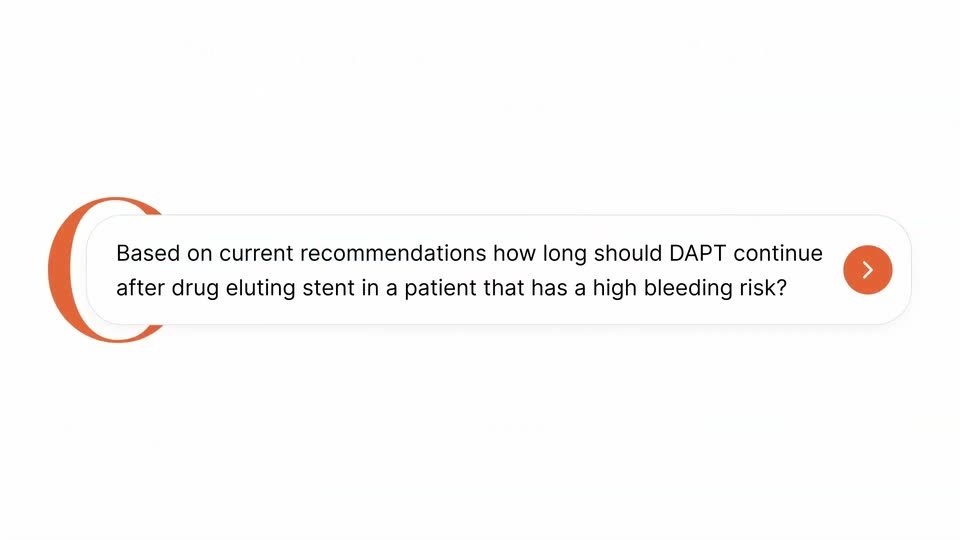
A white rounded search bar with an orange crescent and orange arrow button holds a medical query that types itself in word by word. When the sentence completes, the bar slides up and a Practice Guideline card with a cardiology society logo rises from the bottom edge.
Techniques: Kinetic type
Camera: Static
A white query bar with an orange logo and arrow stays fixed at the top while a practice-guideline document card scrolls upward beneath it. Large gray text reading the tagline slides in on the right, then the whole frame fades to white.
On-screen text: “Evidence based clinical decision support”
Camera: Pull out
A white rounded input bar with an orange crescent on its left edge and an orange chevron button on the right rests on a white background. A long prompt is typed into the field word by word across four lines, then the frame holds.
Techniques: Kinetic type
Camera: Static
A prompt card and a generated document slide into place, then the document scrolls down beneath the pinned card while a large gray headline slides in at the right; finally the view scrolls up and the card exits.
On-screen text: “Write patient handouts & after visit summaries”
Camera: Pull out
A white FAQ card with body text slides up and out of frame, revealing a second card where a pale pink crescent shape scales in on the left, opposite a pink circular arrow button on the right.
Camera: Static
A white prompt bar with an orange crescent on the left and an orange send button on the right sits on a plain background. A prior authorization request is typed into the field word by word, then a second bar and a document preview slide in below.
Techniques: Kinetic type
Camera: Static
A white prompt bar with an orange crescent logo and arrow button sits at the top. Below, a prior authorization letter generates line by line inside a rounded card, the page scrolling upward as new paragraphs and numbered points fill in.
Techniques: Kinetic type
Camera: Pull out
A document generation screen shows a white prompt bar at top with an orange arrow button, above a long letter body that scrolls upward while two overlapping text layers crossfade. A large heading sits at the right edge, partly cut off.
On-screen text: “Prior authorization letters”
Camera: Pan
A white prompt box with an orange logo and arrow button holds at the top as a generated prior authorization letter scrolls up beneath it. A large gray headline reads on the right side of the frame.
On-screen text: “Prior authorization letters”
Camera: Pull out
A flat interface mockup shows a chat prompt card above a generated letter document; both scroll slowly upward while a bold headline sits to the right.
On-screen text: “Prior authorization letters”
Camera: Pan
A white form card with bracketed placeholder fields slides up and out of frame. A rounded search bar with a pink chevron button wipes left across a large pink letter C, which then scales up on the left against the white background.
On-screen text: “C”
Camera: Static
A white search bar on a plain background, an orange crescent tucked behind its left edge and an orange chevron button at the right, fills as a query types in letter by letter, then holds.
Techniques: Kinetic type
Camera: Static
A white card of guideline text scrolls up beneath a fixed search bar, then a large black tagline slides in from the right edge of the frame.
On-screen text: “Guideline recommendations at your fingertips”
Techniques: Kinetic type
Camera: Pull out
A white document card on the left scrolls its medical guideline text upward, pushing the header bar off the top, while a large black headline stays fixed on the right.
On-screen text: “Guideline recommendations at your fingertips”
Camera: Pan
A white rounded card holding a paragraph of medical text scrolls up and out of the top of the frame, leaving a plain white field where the label OpenEvidence Visits fades in on the right.
On-screen text: “OpenEvidence Visits”
Camera: Static
A plain light background holds the title OpenEvidence Visits top right. A patient-visit form panel with a toolbar and fields slides in from the left, a Running Notes card overlaps its lower edge, and the headline Transcribe your patient visits plus a HIPAA Compliant badge sit on the right.
On-screen text: “OpenEvidence Visits”, “Transcribe your patient visits”
Camera: Pull out
A flat notes editor on the left shows a Running Notes card with a pulsing orange mic as gray lines fill in. The right headline swaps to Generate evidence based notes while the document scrolls to the Assessment section and two orange evidence callouts appear.
On-screen text: “OpenEvidence Visits”, “Transcribe your patient visits”, “HIPAA COMPLIANT”, “Generate evidence based notes”
Techniques: Kinetic type
Camera: Pan
A plain off-white field holds a white medical note card and a blue HIPAA badge along the top, which then clear, leaving the product name in gray and orange at the top right.
On-screen text: “HIPAA COMPLIANT”
Camera: Static
Two phone mockups slide into frame, one showing a dialer keypad, the other a profiles list. The headline 'Call patients with your organization's caller ID' fades in under the OpenEvidence Dialer logo, with a HIPAA Compliant badge at the bottom right.
On-screen text: “Call patients with your organization's caller ID”
Camera: Pull out
Two flat phone screens sit side by side on white. The left dialer types out a number while the right profiles list cycles its selection. A headline and subtext read on the right beside a HIPAA badge.
On-screen text: “OpenEvidence Dialer”, “Call patients with your organization's caller ID”
Camera: Static
Two front-facing phone mockups sit side by side on white, each scrolling its OpenEvidence screens: dialer and keypad on the left, profiles and fax list on the right. A headline and subhead hold still on the right, with a HIPAA badge below.
On-screen text: “OpenEvidence Dialer”, “Send and receive secure text messages and faxes”, “HIPAA COMPLIANT”
Camera: Pan
Two flat phone mockups sit side by side on white; the left chat pops in an orange reminder bubble then a grey reply, the right shows a static fax list. Right side holds a black and orange OpenEvidence Dialer headline over a subhead, with a blue HIPAA badge below.
On-screen text: “OpenEvidence Dialer”, “Send and receive secure text messages and faxes”, “HIPAA COMPLIANT”
Camera: Pan
Two flat phone mockups and a blue HIPAA badge sit at the top of a white frame and scroll upward out of view, revealing a row of CME cards and a gray headline at the bottom.
On-screen text: “HIPAA COMPLIANT”, “Earn Continuing Medical Education Credits”
Camera: Pan
Two-column layout: the left app view swaps its Key Point card from 1 to 2, then scrolls up to reveal more answer text. The right column holds a static black headline and subtext about earning CME credits.
On-screen text: “Earn Continuing Medical Education Credits”, “Redeem CME by reviewing board topics related to your past questions.”
Techniques: Split screen
Camera: Pan
A medical reference document scrolls upward on the left, revealing a reflection form with radio buttons and a credit table, while a static headline and caption hold on the right.
On-screen text: “Earn Continuing Medical Education Credits”, “Redeem CME by reviewing board topics related to your past questions.”
Techniques: Split screen
Camera: Pan
A CME reflection form with radio buttons sits beside a headline block. The credits counter ticks from 0 to 0.5 as the 'Informed my approach to future cases' option selects, then the view scrolls down, cropping the headline.
On-screen text: “Earn Continuing Medical Education Credits”, “Redeem CME by reviewing board topics related to your past questions.”
Camera: Pan
A blank white screen fades into a clinical trial matching interface. A column of trial cards with green Recruiting badges sits left, a city map with blue and red pins sits center, and a headline with subline occupies the right edge.
On-screen text: “Clinical Trial Matching”, “Find active and recruiting clinical trials for your patients.”
Camera: Pan
A flat white panel pairs a scrolling list of clinical trial cards with a static New York map, while a large black headline and subhead hold still on the right. The list scrolls up smoothly and settles.
On-screen text: “Clinical Trial Matching”, “Find active and recruiting clinical trials for your patients.”
Camera: Pan
A product screen showing a list of clinical trial cards on the left and a New York map with location pins in the center, beside a three-line headline on the right, fades out to a plain white background, leaving a faint blurred gray shape.
On-screen text: “Find active and recruiting clinical trials for your patients.”
Camera: Pan
On a white background, the black serif wordmark OpenEvidence reveals letter by letter from left to right with a soft blur. An orange circle then draws itself around the final e, and a small registered mark fades in at upper right.
On-screen text: “OpenEvidence”
Techniques: Kinetic type
Camera: Static