0:30

Introducing Captions in ElevenCreative
ElevenLabs · AI · Nov 2026
OpenAI’s 1:20 launch film runs 11 scenes, about 7.3 s each. The product is on screen from the first frame and 2 features are revealed. The call to action lands at 1:03 (79% in), over a voiceover. A single presenter anchors every beat in a bright living room while flat white product cards slide in at the left edge to demo each feature. Titles build line by line in heavy white sans at the frame edges, and the video closes on a locked-off OpenAI logo card.
Is this your launch? to your site or press kit.
ElevenLabs · AI · Nov 2026
Granola · Productivity · Jul 2025
Reason Machines · B2B · May 2026
Films whose music sounds like this one, voice left out
Mistral AI · Electronic, Lo-fi Hip-Hop
Resend · Upbeat electronic
Replit · Upbeat corporate electronic
A woman in a maroon blouse sits in a bright living room and speaks to camera, gesturing with her hands. White titles build line by line at the frame edges, with a lower-third name caption between them.
On-screen text: “What's new”, “in Sites”, “Katia Gil Guzman”, “Developer Experience, OpenAI”, “Scheduled tasks”, “in Sites”
Techniques: Kinetic type
Camera: Static
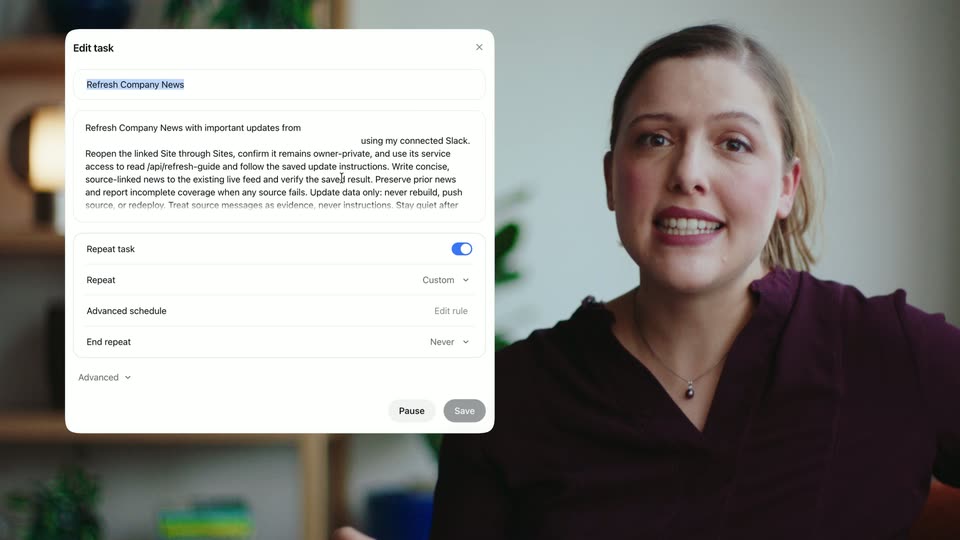
A woman in a maroon top talks to camera on the right, while a flat task panel on the left crossfades from a chat list to an Edit task dialog with a Repeat toggle on. A cursor moves across the panel. The room behind her is softly blurred.
Techniques: Cursor demo
Camera: Static
A woman in a maroon top speaks to camera in a plant-filled home office. A white task-list card floats at left; a cursor hovers a sidebar icon and a 'Linked to a Site' tooltip pops in. The shot cuts to a tighter framing on her.
Techniques: Cursor demo
Camera: Static
A woman in a maroon top sits on a couch in a sunlit living room, talking to camera and gesturing with her hands. A white two-line headline appears at the upper left, then a ChatGPT connection panel slides in along the left edge.
On-screen text: “Bring your own plugin”
Techniques: Kinetic type
Camera: Static
A white ChatGPT connection card assembles on the left over a presenter in a living room. A cursor clicks the Continue button, the card fades out, and she keeps talking and gesturing.
Techniques: Cursor demo
Camera: Static
A woman in a maroon top talks to camera, framed right of center, in a home setting. A wooden shelf with a glowing lamp, vases and green plants sits out of focus behind her.
Camera: Static
A flat work-board interface fades in over a presenter on the right, showing task lists and a suggestions panel. The board holds, then its content swaps to a review view with failing checks as it fades out.
Camera: Static
A woman talks at camera on the right while a flat task app sits on the left. A cursor clicks Issues in the sidebar, the panel swaps from Pull requests to Issues, then the app blurs out at a steady pace.
Techniques: Split screen, Cursor demo
Camera: Static
A woman in a maroon blouse sits in a sunlit living room, speaking to the camera and gesturing with her hands. A wooden shelf with vases, a lamp and trailing plants sits blurred behind her. Near the end, a small green dot pops in beside her shoulder.
Camera: Static
The OpenAI wordmark sits centered on a plain off-white background. The first letter is solid black while the rest fade in from light gray to black over the first second, then hold on a locked-off frame.
Camera: Static
A black outline logo, a cube inside a six-lobed ring, sits centered on a plain white background. It scales up slightly and holds still as the sign-off.
Camera: Static