
0:44
Explore
00:00:00 / 02:11:08
- Length
- 2:11
- Scenes
- 13 · 10.1 s avg
- Product on screen
- 0:00
- Features shown
- 2
- Call to action
- 1:52 · 86%
- Voiceover
- Yes
- Views
- 174K on YouTube
as of November 22, 2026
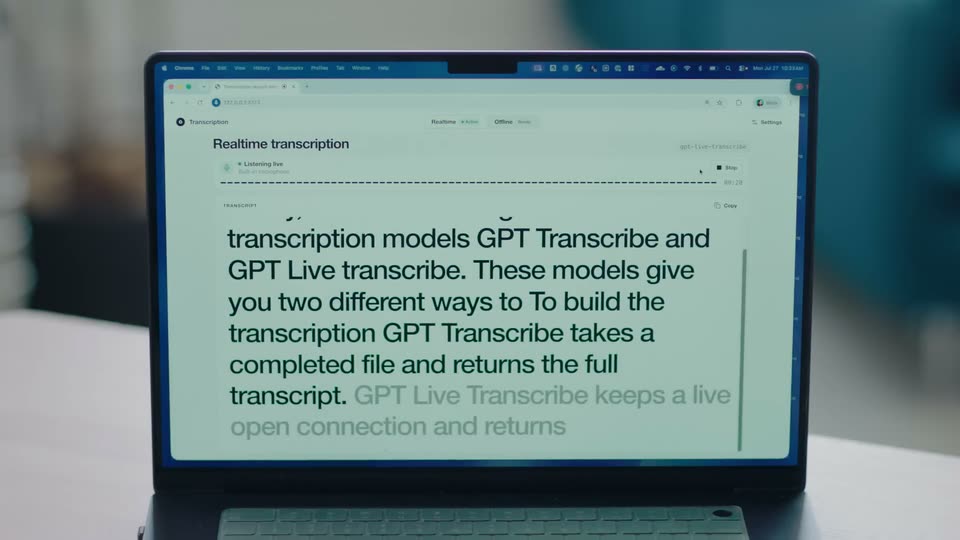
OpenAI’s 2:11 launch film runs 13 scenes, about 10 s each. The product is on screen from the first frame and 2 features are revealed. The call to action lands at 1:52 (86% in), over a voiceover. The video alternates a static medium shot of the presenter with locked-off close-ups of the laptop, so the transcript types in sync with the voiceover and the screen reads as a live prop. Pacing is steady and conversational, with minimal motion design: fade-in text lists, a monospace timer, and one prop (a ukulele) to punctuate the noise-handling point.
Footage neededEstimated needs: 2 capture groups — your screens or recordings · 7 filmed passages — shoot, supply or replace
Is this your launch? to your site or press kit.
More like this





Similar soundtrack
Films whose music sounds like this one, voice left out
0:31

Introducing Voice Search for your computer
Google · Upbeat, modern corporate tech advertisement music
Introducing gpt-transcribe and gpt-live-transcribe, scene by scene
· 13 scenes as text
01 · Product intro · 0:00–0:14
A long-haired man in a denim shirt sits at a table and speaks to camera, gesturing with his hands. A laptop beside him types his words in real time. Large white text 'gpt-transcribe' then 'gpt-live-transcribe' pops in over the frame.
On-screen text: “gpt-transcribe”, “gpt-live-transcribe”
Camera: Static
02 · Feature reveal · 0:14–0:20
A laptop on a desk displays a realtime transcription page; the transcript types out word by word and scrolls up as new lines appear, the camera locked off against a blurred office background.
Techniques: Kinetic type
Camera: Static
03 · Feature reveal · 0:20–0:38
A long-haired man in a denim shirt sits at a table in a bright room, talking and gesturing, with a laptop in front of him showing a document that scrolls as it types. A white list of five terms fades in line by line at left, then fades out.
On-screen text: “Accents”, “Multilingual speech”, “Short answers”, “Names”, “Numbers”
Techniques: Kinetic type
Camera: Static
04 · Feature reveal · 0:38–0:52
A close-up of a laptop screen shows a realtime transcription panel. Dark serif text types in word by word and scrolls up as new lines fill the page. A hand gestures at the right edge near the middle.
Techniques: Kinetic type
Camera: Static
05 · Feature reveal · 0:52–1:01
A man with long hair sits at a table beside a laptop showing a live transcription that updates as he speaks. He looks to the camera, then picks up a small wooden ukulele and holds it in playing position while talking.
Camera: Static
06 · Feature reveal · 1:01–1:11
A locked-off close-up of a laptop screen showing a transcription app. The transcript block fills line by line, new words flashing gray before settling to black, and the text scrolls upward as the page fills.
Techniques: Kinetic type
Camera: Static
07 · Feature reveal · 1:11–1:22
A man in a denim shirt sits at a table and talks to camera, gesturing with his hands. A laptop on the table in the foreground shows a transcription that types out his words line by line as he speaks. Static medium shot, soft daylight office behind him.
Camera: Static
08 · Feature reveal · 1:22–1:33
A laptop on a desk displays a transcription page where text types out live, switching from English to Spanish and back. The shot then widens to reveal a long-haired man gesturing at the desk beside the open laptop.
Techniques: Kinetic type
Camera: Static
09 · Feature reveal · 1:33–1:38
A long-haired man sits at a wooden table, gesturing as he speaks, while a laptop to his left shows a transcript scrolling in English and Spanish. Static medium shot in a bright room with tall windows and a teal couch behind him.
Camera: Static
10 · Feature reveal · 1:38–1:42
A macOS browser window shows a transcription page. A cursor moves to the Transcribe file button and clicks it, switching the button to a Transcribing state with a spinner. In the transcript panel below, a loading spinner turns while a large monospace timer counts up from 00:00.2 to 00:03.7.
Techniques: Cursor demo
Camera: Static
11 · Feature reveal · 1:42–1:47
A long-haired man in a denim shirt sits at a wooden table, talking and gesturing with both hands. A laptop in front of him shows a transcript document whose text scrolls upward, mixing Spanish and English lines. Bright room, static medium shot.
Camera: Static
12 · Feature reveal · 1:47–1:52
A browser window shows the offline transcription page. A timer counts up past 00:41, then the panel flips to a green check with “Transcription complete” and 25:00 to 00:41.7 stats. Cut to a long-haired man at a desk speaking, a laptop in front of him displaying the transcript.
Camera: Static
13 · CTA · 1:52–2:11
A long-haired man in a denim shirt sits at a wooden table in a sunlit loft, gesturing as he speaks. A laptop on the table shows a transcription page whose text fills in line with his words. The camera holds a static medium shot.
Camera: Static