0:59

iPhone 17 Pro: The most powerful iPhone ever
Apple · Hardware · Aug 2026
Opal · Jun 2026 · 0:30 · Full motion · AI-annotated
Opal’s 0:30 launch film runs 17 scenes, about 1.8 s each. The product is on screen from the first frame and 4 features are revealed. There is no explicit call to action; a voiceover carries the film. A what's-new changelog built as a run of locked-off phone mockups on near-black, where each feature is announced by a small green label and a two-line white caption, with quick whip-pan slides handing one screen to the next. The signature moves are the soft green glow, 3D cards lifting off the screen, and the slow count-up score, all held against drifting specks and a faceted opal gem.
Is this your launch? to your site or press kit.
Apple · Hardware · Aug 2026
Nothing · Hardware · Jul 2023
A black starfield holds still as gray text fades up in the center: a small 'New in' line above a much larger 'Opal', both rising from near-invisible to readable.
On-screen text: “New in”, “Opal”
Techniques: Kinetic type
Camera: Static
Centered white text 'New in Opal' holds still on a locked-off frame as the backdrop shifts from a black starfield to a teal cave with drifting particles.
On-screen text: “New in”, “Opal”
Techniques: Particles
Camera: Pull out
A glowing iridescent opal stone rises from the bottom of a dark teal cave, its surface shimmering with blue and green light. White specks drift through the air. The white headline “New in Opal” holds centered over the stone.
On-screen text: “New in”, “Opal”
Techniques: Particles
Camera: Pull out
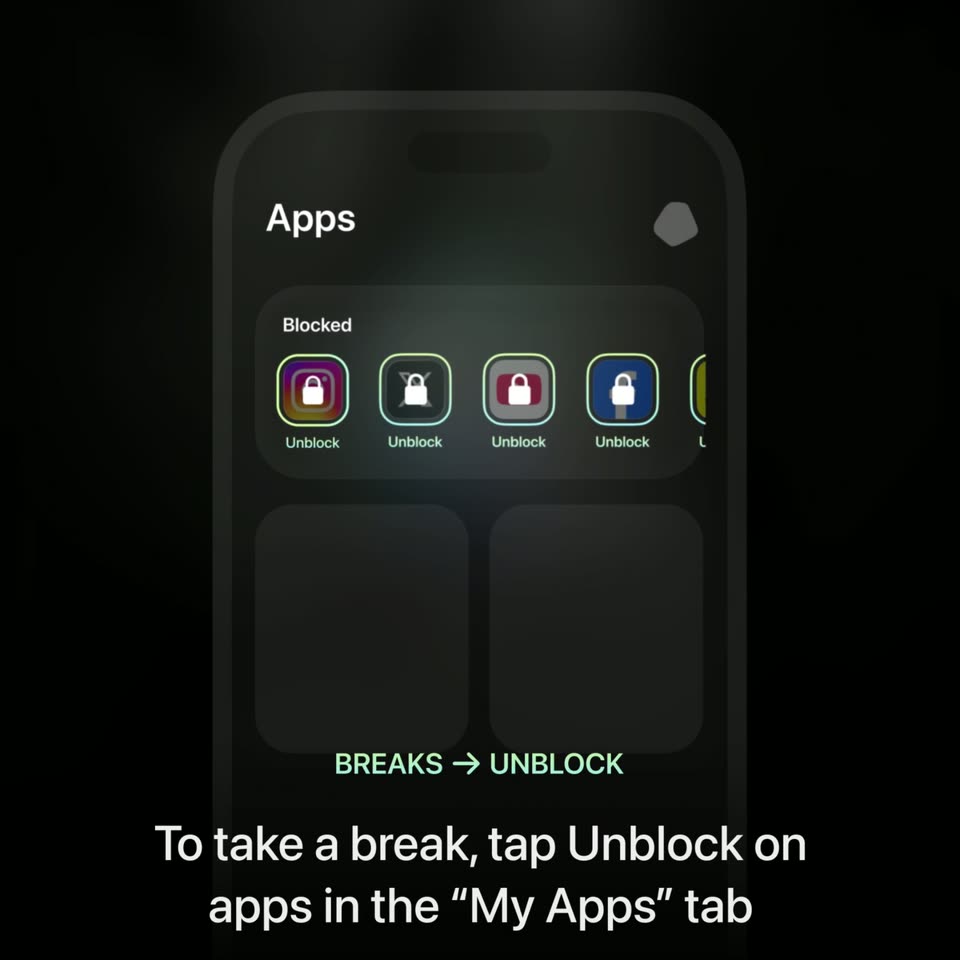
A dark phone screen fades in to show the Apps tab, a row of blocked app icons each tagged Unblock. A green ring highlights the first padlock. A green tagline and a white caption read the break instruction at the bottom.
On-screen text: “BREAKS → UNBLOCK”, “To take a break, tap Unblock on apps in the “My Apps” tab”
Camera: Static
A dark phone mockup displays the Apps screen; the Blocked card lifts off the screen with a soft glow, its row of locked app icons each ringed by a colored progress arc. Below, a green tagline and a two-line white caption stay static.
On-screen text: “BREAKS → UNBLOCK”, “To take a break, tap Unblock on apps in the “My Apps” tab”
Techniques: 3D mockup, UI zoom
Camera: Static
A dark phone screen shows the Blocked apps row with padlock icons and green Unblock labels, then reframes right onto the Work Hours card with its remaining timer and Blocking pill. White caption lines swap at the bottom while the green label changes from the Unblock flow to Blocks Renamed.
On-screen text: “→ UNBLOCK BREAKS → UNBLOCK”, “To take a break, tap Unblock on the “My Apps” tab”, “BLOCKS RENAMED”, “Your Blocks are now called Blocks, but still work the same.”
Techniques: UI zoom
Camera: Pan
A dark phone mockup on black holds a Work Hours card with a green Blocking pill. A second card with a calendar, shield and 9 AM - 5 PM rises above it, lit by a green glow, while a caption reads BLOCKS RENAMED.
On-screen text: “BLOCKS RENAMED”, “Your Blocks are now called Rules, but still work the same way.”
Techniques: 3D mockup, Light sweep
Camera: Static
A phone mockup stands in 3D perspective on a black background, its screen glowing green with a schedule card and a Work Hours panel. Below the device, a green label and a two-line white caption sit static on the black field.
On-screen text: “BLOCKS RENAMED”, “Your Blocks are now called Rules, but still work the same way.”
Techniques: 3D mockup
Camera: Pan
A dark scene holds two phone mockups showing the app's schedule and stats screens. The camera pans right, sliding the first phone off and centering the second, while the bottom caption swaps from a renaming note to an Opal Score note.
On-screen text: “BLOCKS RENAMED”, “blocks are now called Rules, still work the same way.”, “SEE HOW YOU'RE DOING”, “The Opal Score will show how well you're doing today.”
Camera: Static
A front-facing phone mockup on a black background shows an app screen. A green waveform pulses, then fades as the Opal Score 86 glows in above the Sleep, Focus and Rest icons. A white caption sits below the phone.
On-screen text: “The Opal Score will show how well you're doing today.”
Camera: Static
A dark phone mockup in 3D perspective shows an app screen where the Opal Score counts up from 99 to 100 inside a soft green glow, above three glowing category icons. A white caption sits at the bottom of the frame.
On-screen text: “The Opal Score will show how well you're doing today.”
Techniques: 3D mockup
Camera: Pan
A dark phone mockup in 3D perspective shows the Opal Score screen with category icons, then slides left as a second phone and a new caption slide in from the right.
On-screen text: “The Opal Score will show well you're doing today.”, “Opal can now intelligently you when scrolling too y”, “AUTOFOCUS”
Techniques: 3D mockup
Camera: Static
A dark, blurred phone screen sits centered on black. A notification banner with a beach emoji and a weather nudge drops in at the top, while a white caption remains fixed below.
On-screen text: “Opal can now intelligently nudge you when scrolling too much.”
Camera: Static
A dark phone mockup stands centered on black. A top notification crossfades from a weather nudge to a 'Still here?' alert, then the screen fades to a glowing yellow speed bump icon with a one-minute wait line. Green AUTOFOCUS label and white caption sit below.
On-screen text: “AUTOFOCUS”, “Opal can now intelligently nudge you when scrolling too much.”
Techniques: 3D mockup
Camera: Static
A dark phone screen holds a glowing yellow speed-bump icon with the text Speed Bump and a wait line. The screen slides up and out, fades to black, then the Opal wordmark fades in faintly at center while a white caption stays at the bottom.
On-screen text: “AUTOFOCUS”, “Opal can now intelligently nudge you when scrolling too much.”
Camera: Static
The Opal wordmark, a circular O mark with a polygon inside followed by lowercase letters, fades in from near-black to light gray on a black background, centered and locked-off.
On-screen text: “Opal”
Camera: Static
A white Opal wordmark, its O drawn around a faceted gem shape, holds centered on a flat black background. The frame is locked off with no motion throughout the shot.
Camera: Static