1:25
Y Combinator - Local coding agents can't do end-to-end work at your company. @prolif
Proliferate · B2B · Feb 2026
NVIDIA’s 1:17 launch film runs 27 scenes, about 2.9 s each. The product is on screen from the first frame, with social proof. The call to action lands at 1:13 (95% in). The video is built as a lab-bench showcase: a clean white table, white robot arms with blue grippers, and a persistent HUD (step counter, speed badge, scrolling command log) frame every task demo, then it pulls back into a 4x4 grid montage and dark data charts before a single closing title card. Pacing is fast and rhythmic, cutting between sped-up robot motion and animated graph builds, with a consistent green accent color and monospace code typography tying the live footage to the graphics.
Is this your launch? to your site or press kit.
Proliferate · B2B · Feb 2026
Axonnic · Industrials · Oct 2026
Applied Compute · Sep 2026
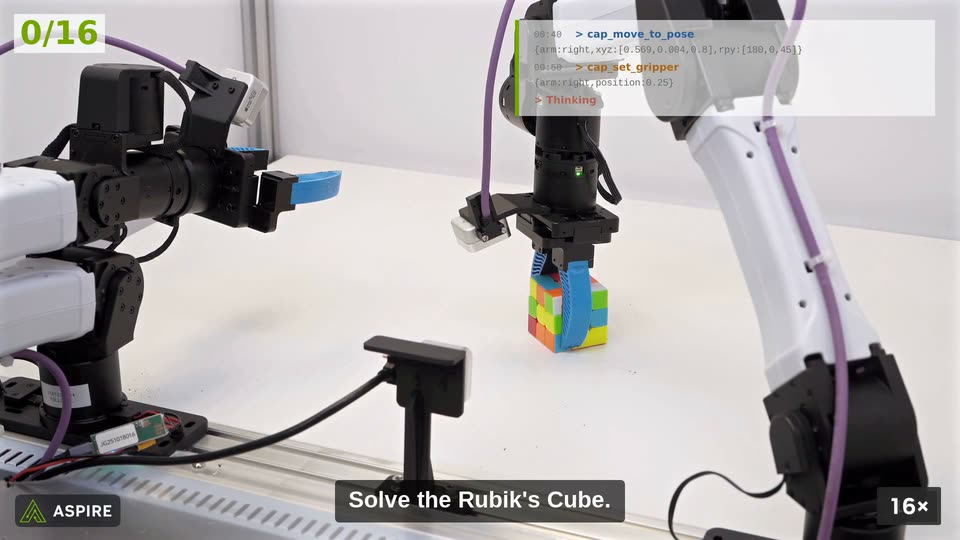
Two white and black robot arms face each other across a white table with a Rubik's cube between them. The right arm lowers, grips the cube, lifts it and passes it to the left arm. A command log scrolls in the top-right corner and a caption names the task below.
On-screen text: “0/16”, “ASPIRE”, “Solve the Rubik's Cube.”, “16×”, “64×”
Techniques: Speed ramp
Camera: Static
Two white robot arms with blue grippers meet over a white table; the right arm holds a Rubik's cube and the left arm grabs it. A code log updates top right. Green step and speed badges sit in the corners; a caption reads Solve the Rubik's Cube. below.
On-screen text: “0/16”, “Solve the Rubik's Cube.”, “64x”, “ASPIRE”, “160x”, “1/16”
Camera: Static
Two white robot arms stand over a white table. The left gripper holds a Rubik's cube as the right gripper reaches in and closes on it, the action sped up. A code panel sits top right, a green step counter top left, and a caption box sits bottom center.
On-screen text: “1/16”, “Solve the Rubik's Cube.”, “160x”, “2/16”
Camera: Static
A white robotic arm with a black gripper hovers above a Rubik's cube on a blue holder. Three inset cameras show wrist and top views left, a command log updates top right, and a step counter and speed multiplier tick up. A bottom caption reads Solve the Rubik's Cube.
On-screen text: “Solve the Rubik's Cube.”
Techniques: Split screen
Camera: Static
Two white robot arms rotate a Rubik's cube on a blue holder in fast motion. A left column shows three wrist and top camera feeds, a command log updates top right, and a green step counter climbs from 4 to 12. A caption reads Solve the Rubik's Cube.
On-screen text: “Solve the Rubik's Cube.”, “320x”
Techniques: Split screen
Camera: Static
Two white robotic arms with blue grippers rotate a Rubik's cube on a white table. A green 15/16 counter sits top left, a 320x badge bottom right, and a code snippet overlays the top right. The caption Solve the Rubik's Cube. stays at the bottom.
On-screen text: “15/16”, “Solve the Rubik's Cube.”, “320x”
Camera: Static
A sped up split screen shows a white robotic arm with black grippers turning a Rubik's cube on a white table, while three inset camera feeds (left wrist, top, right wrist) and a code console update in sync. The right arm rotates the cube between its two grippers as the console logs new move commands.
On-screen text: “15/16”, “Left Wrist”, “Top”, “Right Wrist”, “Solve the Rubik's Cube.”, “160x”
Techniques: Split screen
Camera: Static
A white and black robotic arm with purple cables hovers over a Rubik's cube on a blue holder, captured live. Three inset camera feeds (left wrist, top, right wrist) sit on the left, a command log panel sits top right, a green step counter and speed badge frame the corners, and a caption reads at the bottom.
On-screen text: “15/16”, “Solve the Rubik's Cube.”, “160x”, “64x”
Techniques: Split screen
Camera: Static
A white robot arm with purple cables works over a white bench. Three inset cameras on the left track a Rubik's cube from wrist and top angles. A command log scrolls top right. A bottom caption reads Solve the Rubik's Cube, with a 64x speed badge at the corner.
On-screen text: “15/16”, “Solve the Rubik's Cube.”, “64x”
Techniques: Split screen
Camera: Static
A white and black robot arm with an open gripper hovers above a Rubik's cube on a blue stand. Three labeled camera feeds sit on the left and a code panel on the right. The step counter ticks from 15 to 16 as the arm moves.
On-screen text: “Solve the Rubik's Cube.”, “64x”
Camera: Static
Two white robotic arms with purple cables hold a Rubik's cube on a white table, twisting its faces while a terminal log scrolls in the top right corner. Green step and speed badges sit in the corners, and a caption reads at the bottom.
On-screen text: “16/16”, “Solve the Rubik's Cube.”, “64x”
Camera: Static
Two white robotic arms stand over a white table; the right arm's blue gripper lowers a Rubik's cube onto the surface, releases it, and retracts upward while the left arm holds still. A small black webcam on a stand sits in the foreground, and the clip runs sped up.
On-screen text: “16/16”, “Solve the Rubik's Cube.”, “64×”, “16×”
Techniques: Speed ramp
Camera: Static
In a 64x time-lapse, a black robot arm with a blue gripper picks up the pink pill, drops it into the clear bottle, then caps it with the yellow lid. A code panel in the top right updates in sync, and a caption at the bottom states the task.
On-screen text: “Pick up the pill, put it into the bottle, then tighten its cover.”, “64×”
Techniques: Speed ramp
Camera: Static
A white robot arm with purple cables sits left of a black gripper with blue fingers, which lifts a yellow cap clear of a clear bottle on a blue base. A code panel updates top right and a caption sits at the bottom while the footage runs at high speed.
On-screen text: “Unscrew the bottle cap.”, “ASPIRE”, “48x”
Camera: Static
Two white robotic arms with purple cables sit on a white table. The right arm's blue gripper lifts an orange cap away from a glass bottle, while a code panel updates in the top right corner and a caption states the task.
On-screen text: “Unscrew the bottle cap.”, “48x”
Camera: Static
A white robotic arm holds a blue cup upside down over a white table set with three green-branded paper cups. The arm carries the cup toward the stack and back while a code panel updates in the top right and a task caption sits below.
On-screen text: “Stack all the cups upside down into a pile.”, “128x”
Camera: Static
A white-and-black robot arm with a blue gripper lifts an upside-down paper cup and stacks it on a second cup. A command log updates top right. A dark bottom caption states the task, with a green 128x badge and ASPIRE mark in the corners.
On-screen text: “Stack all the cups upside down into a pile.”, “128x”, “ASPIRE”
Camera: Static
A white robotic arm with a blue gripper lifts an upside-down paper cup and lowers it toward a matching cup on a white table. A scrolling code log sits in the top right, and a caption states the task at the bottom.
On-screen text: “Stack all the cups upside down into a pile.”, “128x”
Camera: Static
A fixed side view of a white and black robotic arm with purple cables on a white table. The arm lowers its gripper onto a white cup printed with green text and closes around it, lifting it slightly as the clip ends.
On-screen text: “Stack all the cups upside down into a pile.”, “128x”
Camera: Static
A 2x2 grid fades in from black, each panel showing a white robotic arm with a blue gripper on a white table performing a task. Corner captions name the task and a 16x speed tag; the ASPIRE logo sits bottom-right.
On-screen text: “Rubik's Cube”, “16x”, “Unscruw bottle”, “16x”, “Pill in bottle”, “16x”, “Stack cups”, “16x”
Techniques: Split screen
Camera: Static
A 2x2 grid of filmed robot-arm demos sits at center on a dark background, each tile labeled with a task name and a 16x speed tag. A ring of additional benchmark tiles slides into view around the edges while the ASPIRE logo holds in the corner.
On-screen text: “Rubik's Cube”, “16x”, “Unscrew bottle”, “16x”, “Pill in bottle”, “16x”, “Stack cups”, “16x”, “ASPIRE”, “RoboCasa-1K”
Techniques: Split screen
Camera: Pull out
A four-by-four grid of robot manipulation clips plays at once, mixing 3D simulation renders and live footage, while a green border highlights the central real-robot tiles. A caption listing simulation environments appears along the bottom edge.
On-screen text: “+ Simulation · LIBERO-Pro · Robosuite · BEHAVIOR-1K”
Techniques: Split screen
Camera: Pull out
A 4x4 grid of simulated robot environments plays, with a green border highlighting the central four feeds. A bottom caption lists the simulation platforms used.
On-screen text: “+ Simulation · LIBERO-Pro · RoboSuite · BEHAVIOR-1K”, “ASPIRE”
Techniques: Split screen
Camera: Static
A dark scatter plot titled ASPIRE success vs. API cost builds up: orange, blue and purple dots pop in at their success-rate and cost positions, each with a name and stat label. A green step line then traces the cost/success frontier and a green region fills beneath it.
On-screen text: “ASPIRE success vs. API cost”, “10 LIBERO-Pro tasks”
Camera: Static
On a black grid, a bar chart titled Claude Opus 4.6 builds up: three pale-green bars rise in turn to 59%, 62% and 18%, each value popping in above its bar, while the ASPIRE mark sits in the corner.
On-screen text: “Claude Opus 4.6”
Camera: Static
A bar chart on black plots three benchmarks. Pale green bars for Claude Opus 4.6 rise with counting values, then green and purple bars for Opus 5.5 and GPT-6 Astra grow in sequence as legends fade in at top. The chart holds, then fades to a dim grid of frames.
On-screen text: “Claude Opus 4.6”, “LIBERO-Pro”, “Robosuite”, “BEHAVIOR-1K”, “ASPIRE”, “Claude Opus 5.5”, “GPT-6 Astra”
Camera: Static
A darkened, blurred grid of top-down robot images fills the frame as a static backdrop. The left side carries a locked-off title: white bold Auto Discover, green monospace /skills, white bold for Robots, with a green triangle logo, the word ASPIRE and a GitHub URL at the lower left.
On-screen text: “Auto Discover”, “/skills”, “for Robots”, “ASPIRE”, “github.com/NVlabs/ASPIRE”
Camera: Static