0:56
Explore
Motionfly - Today we are launching Motionfly MCP, The OPUS 5.5 of launch videos
Motionfly · Nov 2026 · 0:30 · AI-annotated
- Length
- 0:30
- Scenes
- 18 · 1.7 s avg
- Product on screen
- 0:05
- Features shown
- 1
- Call to action
- 0:24 · 81%
- Voiceover
- Yes
00:00:00 / 00:30:06
Motionfly’s 0:30 launch film runs 18 scenes, about 1.7 s each. The product shows up at 0:05 and 1 feature is revealed. The call to action lands at 0:24 (81% in), over a voiceover. The video alternates typographic cards, live-action footage, and 3D mockups, cutting near ten times a minute to a 123 bpm pulse. Its signature moves are word-by-word typing, circular-mask reveals, and the black diamond icon morphing between states.
Footage neededEstimated needs: 2 capture groups — your screens or recordings · 1 official logo — reused across the film · 2 filmed passages — shoot, supply or replace · 2 graphic passages — draw or supply · 2 3D passages — build or supply
Is this your launch? to your site or press kit.
More like this


Motionfly - Today we are launching Motionfly MCP, The OPUS 5.5 of launch videos, scene by scene
· 18 scenes as text
01 · Hook · 0:00–0:02
On a white background, the sentence types in word by word at center, the newest word tinted pink, while four small gray squares spread outward to frame the growing line.
On-screen text: “One prompt. Full launch video.”
Techniques: Kinetic type
Camera: Static
02 · Problem · 0:02–0:03
A locked-off wide shot of a beach with the Golden Gate Bridge holds while a blurred dark panel in the center clears, revealing a row of rounded app icons, including Pr and Ae, that scale in place.
On-screen text: “One prompt. Full launch video.”
Camera: Static
03 · Problem · 0:03–0:05
Flat app icons, including Pr, Ae, a black film-strip tile and a black tile with colored arrows, scroll steadily right to left over a blurred dusk beach with birds overhead. A white underline marks the icon at center.
Camera: Pan
04 · Problem · 0:05–0:05
Three app icons hover over a defocused beach with birds and a distant bridge. The central brand icon holds a white underline, then the frame blurs and the side icons fade, leaving an empty white-outlined square in the middle.
Camera: Static
05 · Product intro · 0:05–0:06
On a near-black field, a rounded-square app icon with four white diamond shapes holds center while the wordmark MOTIONFLY scales in below it, resolving from a soft blur into a crisp white line.
On-screen text: “MOTIONFLY”
Techniques: Kinetic type
Camera: Static
06 · Product intro · 0:06–0:09
The word Introducing in a gray-to-purple gradient scales in on a light background, then gives way to the Motionfly lockup, a black rounded icon with four white diamonds beside the wordmark. The icon then lifts to center as the wordmark exits.
On-screen text: “Introducing”
Techniques: Kinetic type
Camera: Static
07 · Feature reveal · 0:09–0:09
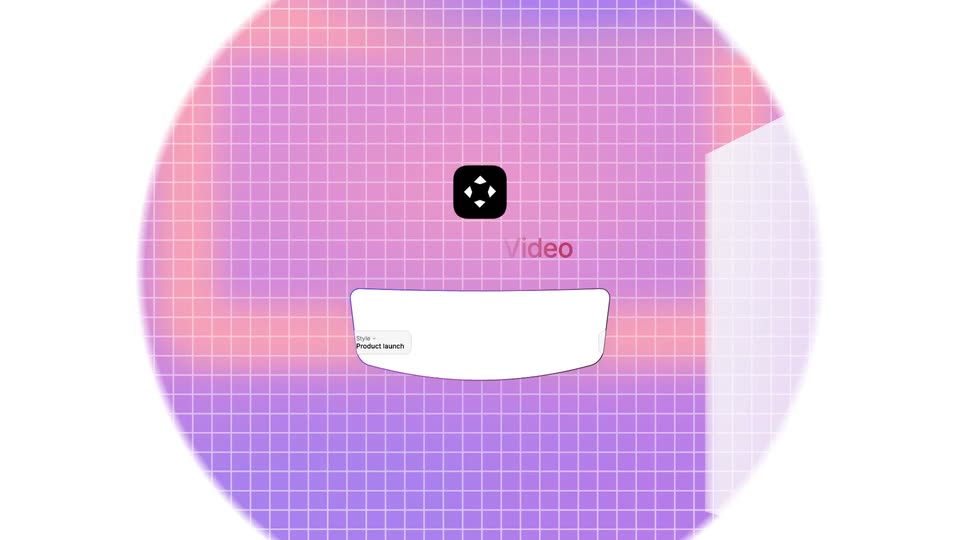
A pink-to-purple grid background blooms outward through a circular mask around a centered black app icon with a white diamond mark. A white card carrying a Style label settles into the lower frame under a faint Video heading.
Techniques: Masking
Camera: Static
08 · Feature reveal · 0:09–0:10
The indigo headline “Prompt a Video” scales in below a black logo with a white diamond, on a pink grid. A white prompt box with a purple border types “A 3 second launch” beside a Style chip, with soft pink 3D blocks at the right.
On-screen text: “Prompt a Video”
Techniques: Kinetic type
Camera: Static
09 · Feature reveal · 0:10–0:11
A white interface holds a black app icon and a bold Prompt a Video heading that scales, above a purple-outlined box where a caret types a habit-tracker prompt. A Product Launch style chip sits in the field's lower left.
Techniques: Kinetic type
Camera: Push in
10 · Feature reveal · 0:11–0:12
Close-up of the 'Prompt a Video' input box, its border a pink-to-purple gradient. The prompt finishes typing 'upbeat and modern' as a blue cursor arrow moves to the up-arrow button and clicks it; the button flashes pink and the border settles to solid purple.
Techniques: Cursor demo
Camera: Static
11 · Feature reveal · 0:12–0:13
Close-up of a prompt input box reading “bit tracker app, upbeat and modern” beside a mic icon and a teal send button. A purple cursor clicks the button, which fades lighter as the field border shifts from gray to violet.
Techniques: Cursor demo
Camera: Static
12 · Demo · 0:13–0:15
On a white background, a gray prompt bubble sits above a vertical checklist that builds line by line, each row fading in with a check or spinner icon while the second line types itself out.
Camera: Static
13 · Demo · 0:15–0:17
A light interface panel shows a typed prompt and a checklist of generation steps filling in with checkmarks, then a 3D phone mockup tilts into the center displaying the Habit Tracker app with a morning greeting and a habit list.
Techniques: 3D mockup
Camera: Pull out
14 · Demo · 0:17–0:18
A white phone mockup sits at a 3D angle on a plain white background, its screen showing a habit tracker app with a greeting line and three habit rows. A black shape on the screen morphs between a rounded square and an octagon while the device tilts slightly.
Techniques: 3D mockup, Morph
Camera: Pull out
15 · Demo · 0:18–0:18
A tilted smartphone mockup on a white background rotates toward the camera as a grid of small photo thumbnails pops in on either side, while the app screen adds a third headline line.
Techniques: 3D mockup
Camera: Static
16 · Demo · 0:18–0:21
A ring of rounded photo thumbnails (landscapes, a laptop, a boat, greenery) rotates clockwise around a white center holding the headline, then the circle expands outward so more cards appear at the frame edges.
On-screen text: “Every launch video type.”
Techniques: Kinetic type
Camera: Push in
17 · Other · 0:21–0:24
A black headline “Polished video in seconds.” sits on an off-white background as a gray line types out beneath it, letter by letter, behind a cursor. Four small colored pill labels with icons drift around the text, and the whole composition tilts a few degrees at the end.
On-screen text: “Polished video in seconds.”, “In minutes, not days.”, “Script”, “3D mockups”, “ACD20”, “Music & SFX”
Techniques: Kinetic type
Camera: Pan
18 · CTA · 0:24–0:30
On a white background, a black rounded-square icon rotates from a diamond to an upright position, then the Motionfly wordmark scales in beside it with a gradient sweep that settles to black. A dark pill button reading Get Started for Free and the URL motionfly.co fade in below.
On-screen text: “Motionfly”, “Get Started for Free”, “motionfly.co”
Techniques: Kinetic type
Camera: Static