1:31
Explore
MiniMax Design (H3) - Opus 5.5 on #MiniMaxDesign | Code Your Next Video Turn text into vide
MiniMax Design · Oct 2026 · 1:07 · AI-annotated
- Length
- 1:07
- Scenes
- 44 · 1.5 s avg
- Product on screen
- 0:05
- Features shown
- 2
- Voiceover
- No
00:00:00 / 01:07:47
MiniMax Design’s 1:07 launch film runs 44 scenes, about 1.5 s each. The product shows up at 0:05 and 2 features are revealed. There is no explicit call to action. The video opens with a fast reel of illustrated mascot vignettes under a serif model title, then settles into a clean UI walkthrough on a violet construction-line grid before handing off to three full motion graphics showcases in dark HUD, paper cut and star map styles. Pacing is quick with short cuts, and its signature moves are typed in text with a blinking caret, node graphs that resolve into tidy layouts, and a recurring glowing orange core that anchors the data visualizations.
No filming indicatedEstimated needs: 4 capture groups — your screens or recordings · 1 official logo — reused across the film · 26 graphic passages — draw or supply · 1 3D passage — build or supply
Is this your launch? to your site or press kit.
More like this

1:37
Mathias Heide - Introducing Summer Engine (YC F26). Summer makes it easy for everyone
Summer Engine · Nov 2026
1:31


Introducing Personal Finance in Claude
Anthropic · AI · Nov 2026
MiniMax Design (H3) - Opus 5.5 on #MiniMaxDesign | Code Your Next Video Turn text into vide, scene by scene
· 44 scenes as text
01 · Hook · 0:00–0:00
A purple cartoon creature with headphones crouches on the curved edge of a large orange record, gripping a tonearm. White sound arcs pulse beside the needle while the title holds still above on a dark grainy background.
On-screen text: “Claude Opus 5.5”
Camera: Static
02 · Hook · 0:00–0:01
A black serif title sits above a yellow illustrated landscape of rolling black-and-white fields, a small orange arch, and a purple round creature peering through a white telescope. The frame is locked off and the illustration remains still.
On-screen text: “Claude Opus 5.5”
Camera: Static
03 · Hook · 0:01–0:02
On a grainy black field, a small purple creature crouches on a curved white lace doily, pushing a needle through the pattern with an orange thread. The cream title holds still above. The frame stays locked off while the creature's hands and thread shift gently.
On-screen text: “Claude Opus 5.5”
Camera: Static
04 · Hook · 0:02–0:02
A paper-cut purple octopus sits on a curved blue hill of flat colored shapes, lifting an orange piece with one arm in a small motion. The cream textured background holds the centered title, and the camera stays locked.
On-screen text: “Claude Opus 5.5”
Camera: Static
05 · Hook · 0:02–0:03
A hand-drawn purple mascot shifts between two vignettes: rowing a paper boat on a blue sea with a paintbrush, then on a leafy hill with headphones and a microphone as a bird sings. The serif title stays locked at the top, recoloring to match each background.
On-screen text: “Claude Opus 5.5”
Camera: Static
06 · Hook · 0:03–0:03
A purple cartoon creature with a magnifying glass peeks over the rim of a curved vintage butterfly-and-flower dome as the backdrop lightens from near-black to cream paper. The serif title Claude Opus 5.5 stays fixed at the top.
On-screen text: “Claude Opus 5.5”
Camera: Static
07 · Hook · 0:03–0:05
A purple cartoon character wearing headphones plugs a cable into a white socket on a cratered planet, beneath a starry sky with code symbols. Orange sound waves pulse from the plug. The title sits centered above in a cream serif.
On-screen text: “Claude Opus 5.5”
Camera: Static
08 · Product intro · 0:05–0:07
A periwinkle field with faint white construction lines and circles. A black rounded-square icon with a white-eyed creature face, framed by a selection box, slides left as the title types in letter by letter with an underscore cursor, then the lockup holds.
On-screen text: “MiniMax Design × Claude Opus 5.5”
Techniques: Kinetic type
Camera: Static
09 · Demo · 0:07–0:09
A white Model Settings panel with Agent, Video, Images, Audio tabs slides in from the left over a purple background with faint geometric lines. The model list fades in as a checkmark appears on the Claude Opus 5.5 row.
Camera: Static
10 · Demo · 0:09–0:10
A white prompt card floats on a violet field with faint wireframe lines and a circle. The prompt text types out across two lines with a blinking caret, while Model, Skill and Auto chips and a round send button sit still along the bottom.
Techniques: Kinetic type
Camera: Static
11 · Demo · 0:10–0:11
A dark prompt interface sits on a purple field. A vertical purple bar wipes across the screen, revealing the typed line in the prompt box, while a small panda image thumbnail pops into the top right corner.
Techniques: Masking
Camera: Static
12 · Demo · 0:11–0:12
A white card on a purple field builds the phrase word by word: bold sans “What” scrolls up as italic serif “do you” takes the center, then bold sans “want to” follows. Small corner labels and a bottom caption stay fixed while the large words cycle vertically.
On-screen text: “What”, “do you”, “want to”, “WHAT DO YOU WANT TO CREATE?”, “MINIMAX DESIGN”, “01 - PROMPT”
Techniques: Kinetic type
Camera: Pull out
13 · Demo · 0:12–0:13
A white rounded card slides up from the bottom over a violet background, revealing the headline What do you want to create? in bold black sans with create? in purple italic serif. Small corner labels frame the card. The frame holds still once the card is in place.
On-screen text: “What do you want to create?”
Techniques: Masking
Camera: Static
14 · Demo · 0:13–0:13
A white UI card on a purple background displays a minimal interface. The large central text changes from 'Understand,' to 'breakdown,'.
On-screen text: “Understand,”, “breakdown,”
Techniques: Kinetic type
Camera: Static
15 · Demo · 0:13–0:14
A dark panel on a violet background holds a node graph: a PROMPT dot branches via thin lines into four cards, Image, Video, Audio and Text, each with a small visualization. A huge white headline “and execute.” overlays it, then clears to reveal the diagram.
On-screen text: “and execute.”
Camera: Static
16 · Feature reveal · 0:14–0:15
A white card on a purple field holds a large black Image. headline with a purple dot and a small grey caption line. On the right, a poster mockup with a purple square and black circle fills in from the bottom, revealing a white italic Image word.
On-screen text: “Image.”, “Video”, “Audio”, “Text”
Techniques: Masking
Camera: Static
17 · Feature reveal · 0:15–0:15
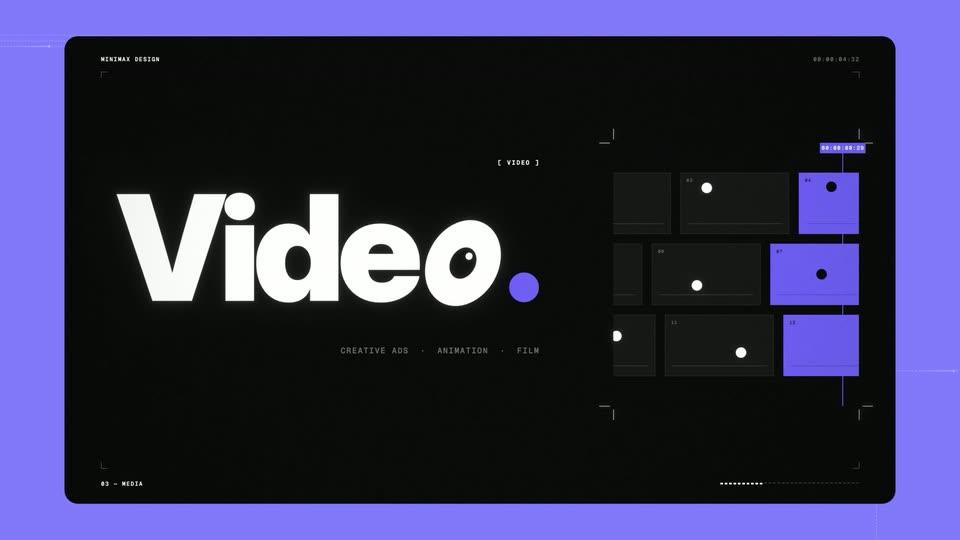
A black HUD card on a purple field holds the large static white word Video. with a purple period, a small label above and a tagline below. On the right, a grid of dark and purple rectangles with dots rearranges from a scattered, line-connected layout into a tidy three-by-three grid.
On-screen text: “Video.”
Camera: Static
18 · Feature reveal · 0:15–0:16
A flat purple card with corner brackets and a timecode shows the big white word Audio. over a small category line, while a white vertical-line waveform pulses on the right. The headline swaps from Video. to Audio.
On-screen text: “Video.”, “Audio.”, “SOUND EFFECTS · VOICEOVER · MUSIC”
Techniques: Kinetic type
Camera: Static
19 · Feature reveal · 0:16–0:16
A white rounded card on a purple background opens on a large black Text. title beside a gray serif italic caption, then cuts to a 2x2 grid of Image, Video, Audio and Text panels as the card fades to white.
On-screen text: “Text.”, “Scripts, ad copy, branding”, “Image.”, “Video.”, “Audio.”, “VOICEOVER”
Techniques: Split screen
Camera: Static
20 · Feature reveal · 0:16–0:17
A rounded card on a purple field cuts from a black 3D grid stage to a white video timeline. A huge headline swaps between words, scaling in with a slight horizontal offset, while corner labels and a dotted progress line stay fixed.
On-screen text: “ad copy,”, “3D Director Stage”, “branding”, “Video Editing”
Techniques: Kinetic type
Camera: Static
21 · Feature reveal · 0:17–0:17
A rounded card flips from a purple node-graph canvas with large cream 'ComfyUI Storyboard' type to a white canvas where the nodes become gray placeholders and the headline switches to black 'Subject Library'.
On-screen text: “ComfyUI Storyboard”, “Subject Library”
Techniques: Kinetic type
Camera: Static
22 · Feature reveal · 0:17–0:17
A black rounded panel on a violet field shows a headline resolving from overlapping gray letters into clean white type, marked by a purple slash and caret. A numbered featured-skills list then slides in beneath it.
On-screen text: “Type to explore all Skills”
Techniques: Kinetic type
Camera: Static
23 · Demo · 0:17–0:19
A black title card on a lavender background types the serif question “Can machines think?” letter by letter behind a glowing amber caret. Small mono labels, the year 1950 and the caption “It began with a question.” sit at the bottom above a year timeline.
On-screen text: “ON THE EVOLUTION OF INTELLIGENCE”, “SEVEN MOMENTS - ONE QUESTION”, “Can machines think?”, “A. M. TURING - COMPUTING MACHINERY AND INTELLIGENCE, 1950”, “1950”, “01 - THE QUESTION”, “It began with a question.”, “1950 1958 1966 2012 2017 2022 2025 AI”
Techniques: Kinetic type
Camera: Static
24 · Demo · 0:19–0:22
A black panel on a purple field shows a neural-network diagram: white input lines converge into a glowing orange sum node, white specks scattering along the connections. The lower-left year and caption switch from 1950 to 1958 as the diagram resolves into a labeled seven-input network with a step-function output.
On-screen text: “Can machines think?”, “1950”, “It began with a question.”, “1958”, “It learns from its mistakes.”
Techniques: Particles, Morph
Camera: Static
25 · Demo · 0:22–0:23
A black panel on a violet field holds a flat neural-network diagram. The network restructures from three layers to four as orange light traces the middle connections. The large year at lower left changes from 1958 to 1986 and the caption updates beneath it, while a timeline at the bottom marks the new year.
On-screen text: “ON THE EVOLUTION OF INTELLIGENCE”, “1958”, “It learns from its mistakes.”, “1986”, “Layer upon layer, it begins to see.”
Techniques: Morph
Camera: Static
26 · Demo · 0:23–0:25
A dark HUD panel on a purple background: a thin orange circle holds a horizontal band of white wireframe lines around a glowing orange core, with a large thin year numeral. The circle and numeral vanish, and the lines burst outward as radial white streaks from the core.
On-screen text: “Layer upon layer, it begins to see.”, “2017”
Techniques: Particles
Camera: Push in
27 · Demo · 0:25–0:27
On a violet field, a black rounded panel holds a glowing particle waveform that pulses across the center while a large thin 2017 fades out. The lines then curl into a ring with two bright nodes and an orange core, while corner labels and a year timeline stay fixed.
On-screen text: “2017”, “Every word, aware of every other.”, “Layer upon layer, it begins to see.”
Techniques: Particles, Morph
Camera: Static
28 · Demo · 0:27–0:29
A wireframe sphere of dotted orbits rotates around a glowing orange core on a black field. A large year 2020 sits at the center, then fades out while the sphere keeps spinning. A small caption in the lower left reads Trained on everything we ever wrote.
On-screen text: “2017”, “Every word, aware of every other.”, “2020”, “Trained on everything we ever wrote.”
Techniques: Kinetic type
Camera: Static
29 · Demo · 0:29–0:30
A dark 3D sphere of dotted orbital rings rotates around a glowing amber core inside a rounded panel on a lavender field. The large year 2025 scales at the lower left beside the line From answering to acting, with a timeline of years along the bottom edge.
On-screen text: “Trained on everything we ever wrote.”, “2025”, “From answering to acting.”
Techniques: Kinetic type
Camera: Static
30 · Demo · 0:30–0:31
A dark orbital visualization: a glowing orange sun at the center with white and amber dotted rings rotating around it, the camera slowly pushing in. Bottom left, the year counts from 2025 to 2026 above the caption “From answering to acting.”
On-screen text: “2025”, “RS - AGENTS”, “From answering to acting.”, “2026”
Techniques: Parallax
Camera: Static
31 · Demo · 0:31–0:34
A dark panel on a purple field holds the word AGI in white serif inside a glowing orange ring with radiating light rays. A bright burst at the center fades as the ring settles, a small caption and a year timeline appear.
On-screen text: “AGI”, “ARTIFICIAL GENERAL INTELLIGENCE”, “Can machines think?”, “20”
Camera: Pull out
32 · Demo · 0:34–0:35
A white rounded prompt box rests on a purple field with faint wireframe lines. A prompt for a vector-style MV types itself out across three lines with a blinking caret, while Model, Skill and Auto controls line the bottom row.
Camera: Pull out
33 · Demo · 0:35–0:40
Paper-cutout castle illustration in a rounded frame. The camera pushes in on the central tower with a colorful rose window and a princess on the balcony. The sky turns red, the view pulls back, and a purple dragon head with a speech bubble enters from the right.
On-screen text: “999”
Camera: Push in
34 · Demo · 0:40–0:41
A cartoon purple dragon roars at a gray castle as a white spiky speech bubble with red ROAAARI text pops above its head. Its body then sweeps across the foreground, partly hiding the castle and balcony princess, all in a rounded card on a flat purple field.
On-screen text: “ROAAARI”
Camera: Push in
35 · Demo · 0:41–0:42
A flat 2D illustration of a walled castle and village plays inside a rounded frame on a purple canvas. Houses ignite one by one as a glowing fireball arcs down toward the left houses while tiny guards and villagers shift and wave.
Camera: Static
36 · Demo · 0:42–0:44
A flat 2D fairytale castle, framed in a rounded rectangle on a lavender field, fades from translucent to full color. A blonde girl in pink stands on a balcony beneath a multicolored wheel as a purple snake with red spikes slithers across the towers.
Camera: Pull out
37 · Demo · 0:44–0:45
A paper-cut illustrated castle with red and blue towers fades in from a dim state to full color. Flames flicker at the base houses and a 'DING!' caption pops in next to a star-shaped portal in the mountain.
On-screen text: “DING!”
Camera: Pull out
38 · Demo · 0:45–0:46
A paper-cut style castle with red and blue conical towers and a colored rose window. The frame pans left across the facade while a small crowned figure stands on a balcony and a torch flame ignites on a pole.
Camera: Push in
39 · Demo · 0:46–0:49
A parchment card on lavender shows a twelve-segment zodiac wheel beside a serif headline that swaps from 'We split the sun's path into twelve' to 'Then we gave each a story.' The view then zooms into the wheel, highlighting the ram and bull segments in green.
On-screen text: “WE SPLIT THE SUN'S PATH INTO TWELVE.”, “BABYLON · c. 450 BC · XII × 30°”, “THEN WE GAVE EACH A STORY.”, “ZODIAKOS KYKLOS · THE CIRCLE OF ANIMALS · ARATUS, c. 275 BC”
Techniques: UI zoom
Camera: Push in
40 · Demo · 0:49–0:55
A dark star map fills a framed screen as the camera pans right across the night sky. Scorpius line art and the headline 'NEVER MEET.' fade out, then Sagittarius draws in with a glowing arrow line aimed at the red star Antares while new headlines type in.
On-screen text: “ORION AND THE SCORPION”, “NEVER MEET.”, “ΣΚΟΡΠΙΟΣ · SCORPIUS · ANTARES, ITS RED HEART”, “When the Scorpion rises, Orion sets.”, “HIS ARROW STILL AIMS AT”, “THE SCORPION'S HEART.”, “ΤΟΞΟΤΗΣ · SAGITTARIUS · THE CENTAVR ARCHER”, “Behind it lies the center of our galaxy.”
Techniques: Kinetic type, Parallax
Camera: Pan
41 · Demo · 0:55–0:56
A beige card with corner brackets sits on a purple field, holding an oval zodiac chart with radial lines and small glyphs. The serif headline stays centered while the bottom-left year counter steps from AD 2025 to AD 2026.
On-screen text: “EPILOGUS”, “ZODIACVS XII”, “3,000 YEARS. TWELVE STORIES. ONE SKY.”, “AD 2025”, “12 / 12”
Camera: Static
42 · Demo · 0:56–1:01
A dark star field surrounds a bright central star as twelve zodiac medallions drift into a ring, each filling with a glowing constellation. A Greek line and its English translation fade in above, then the frame zooms to full screen.
On-screen text: “EPILOGVS · CAELVM”, “ZODIACVS XII”, “PTOLEMAEVS · c. 150 AD”, “ANNO ∞”, “SIGNA 12 / 12”, “Οὐδ' ὅτι θνητὸς ἐγὼ καὶ ἐφάμερος”, “Mortal as I am, when I trace the circling stars, my feet no longer touch the earth.”, “PTOLEMY · c. 150 AD”
Techniques: Particles
Camera: Push in
43 · Other · 1:01–1:04
A white headline 'Create more. Spend less.' scales up at the center of a purple field. Tilted panels float around it, holding 3D renders, ink-splatter art, a UI card, a black 'CREATIVE DEVELOPER' card, and a Mona Lisa collage. Thin white lines link the panels as the camera pushes in.
On-screen text: “Create more. Spend less.”
Techniques: Kinetic type, 3D mockup, Parallax
Camera: Push in
44 · Outro · 1:04–1:07
On a plain white background, a small square icon with corner selection handles and a black shape on lavender scales up at center-left while the wordmark MiniMax Design completes letter by letter, then both hold as a static black lockup.
On-screen text: “MiniMax Design”, “Hilarité”
Techniques: Kinetic type
Camera: Static