1:20

Mem0 - The Memory Layer for your AI apps
Mem0 · B2B · Sep 2024
Microsoft’s 4:26 clip runs 18 scenes, about 15 s each. The product is on screen from the first frame and 7 features are revealed. A single presenter narrates a product update over locked-off slides, alternating full-screen feature cards with split-screen talking head shots. The style is a calm corporate presentation: paper-gray and mint backgrounds, green accent type, static infographic layouts, and a steady, low-cut pace.
Is this your launch? to your site or press kit.
Mem0 · B2B · Sep 2024
Opencall · B2B · Mar 2024
Top-down locked-off shot of a white textured surface with a green overlapping-square logo and a white P tile, the word Welcome above. Two hands rest at the bottom, the right hand holding a dark green card poised to place it.
On-screen text: “Project, Planner and Tasks AMA”, “Welcome!”
Camera: Static
A man in a dark zip-up jacket talks to camera in a blurred office atrium, shot at medium close-up. A dark rounded lower-third with his name and title slides in from the left at 2.5s, holds, then slides out at 11s.
On-screen text: “Howard Crow”, “Group Program Manager”, “Microsoft Planner and Project”
Camera: Static
A bald man in a dark zip jacket speaks in a left video panel against a blurred kitchen, beside a white infographic card on a gray background. The card lists four green percentages with captions and a green 25M ring on the right. The layout stays static.
On-screen text: “Project management trends and opportunities”, “86% Project teams that work in multiple locations in many countries”, “85% Projects managed using a mix of methodologies such as agile, hybrid, informal, or multi-style methodologies”, “92% Lack of visibility and inefficient processes are the top two cited project and product management challenges”, “81% Project professionals who report their organizations are being impacted by AI technologies”, “25M”, “New project professionals needed by 2030 to fill 102 million total project jobs”
Techniques: Split screen
Camera: Static
A bald man in a dark zip jacket speaks to camera on the left against a blurred office. On the right, a white slide titled Connected Work Management holds app icons in concentric dotted rings. The layout stays static on a paper-gray backdrop.
On-screen text: “Connected Work Management”
Techniques: Split screen
Camera: Static
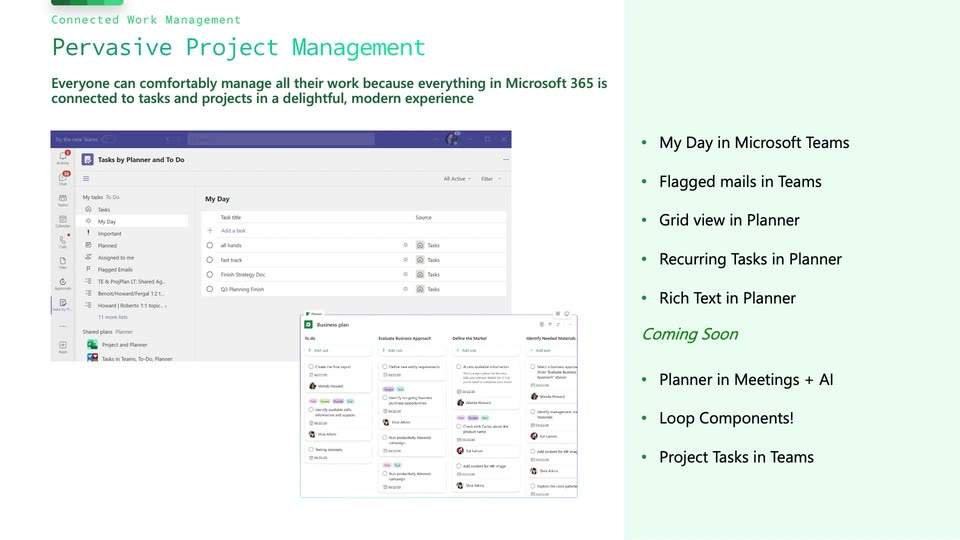
A static slide on a pale mint background. A green eyebrow and large green title sit top-left above a dark paragraph. Two product screenshots, a To Do list and a Planner board, fill the center-left. A bulleted feature list with a green italic 'Coming Soon' divider runs down the right.
On-screen text: “Connected Work Management”, “Pervasive Project Management”, “Everyone can comfortably manage all their work because everything in Microsoft 365 is connected to tasks and projects in a delightful, modern experience”, “My Day in Microsoft Teams”, “Flagged mails in Teams”, “Grid view in Planner”, “Recurring Tasks in Planner”, “Rich Text in Planner”, “Coming Soon”, “Planner in Meetings + AIeetings + AI”
Camera: Static
A bald man in a dark zip jacket speaks on the left against a blurred office background, while a static slide on the right shows the Pervasive Project Management title, Planner interface screenshots, and a bulleted feature list.
On-screen text: “Connected Work Management”, “Pervasive Project Management”, “Everyone can comfortably manage all their work because everything in Microsoft 365 is connected to tasks and projects in a delightful, modern experience”, “My Day in Microsoft Teams”, “Flagged mails in Teams”, “Grid view in Planner”, “Recurring Tasks in Planner”, “Rich Text in Planner”, “Coming Soon”, “Planner in Meetings + AI, Loop Components!, Project Tasks in Teams”
Techniques: Split screen
Camera: Static
A static slide on a light background. The left holds a Microsoft Teams task-board screenshot with an open dialog and chat panel; the right lists feature names in black serif under a green 'Coming Soon' heading. A teal 'Collaboration' title and a stat line frame it.
On-screen text: “Connected Work Management”, “Collaboration”, “Working together and growing as a project team in an increasingly global and distributed workforce.”, “Conditionally Colored Fields”, “Task Conversations”, “Activity Feed”, “Start a Project Trial”, “Coming Soon”, “Task History”, “Invite your friends w/ a trial, Notifications enhancements”
Camera: Static
A bald man in a dark zip-up jacket speaks to camera in a left panel; on the right, a static slide titled Collaboration shows a project interface screenshot, a bulleted feature list, and an 86% stat, all on a light gray paper background.
On-screen text: “Connected Work Management”, “Collaboration”, “Working together and growing as a project team in an increasingly global and distributed workforce.”, “86% Project teams work in multiple locations in many countries”, “Conditionally Colored Fields”, “Task Conversations”, “Activity Feed”, “Start a Project Trial”, “Coming Soon”, “Task History”
Techniques: Split screen
Camera: Static
A static two-column slide on pale green. Left: a teal monospace title and a bullet list of agile features, two marked Coming Soon. Right: a flat screenshot of a sprint-planning template in a browser frame, above a large green 85% stat. The frame holds still.
On-screen text: “Connected Work Management”, “Mixed Methodologies”, “Today's world requires a combination of agile execution and waterfall accountability and dependency management.”, “Sprints & Backlogs”, “Agile Boards”, “Advanced Dependencies”, “People workload in a Project”, “Coming Soon”, “Agile Template”, “People workload cross-projects”
Camera: Static
A bald man in a dark zip fleece talks to camera in a split-screen layout, his filmed shot on the left. The right side holds a static slide titled Best-in-class trial experience with two product screenshots and a bulleted list. The frame stays fixed throughout.
On-screen text: “Connected Work Management”, “Best-in-class trial experience”, “Providing a secure and manageable trial environment for users growing from Planner to Project”, “Try Project features w/o a credit card”, “Request a License”, “Administrator control & fulfillment”, “Coming Soon”, “Use My Planner Plan as a Template for a new Project”, “Invite my co-workers”, “Upgrade my Planner Plan to a Project”
Techniques: Split screen
Camera: Static
A bald man in a dark zip-up jacket stands centered in a modern office, speaking directly to camera. The background of windows and railings stays softly out of focus while he talks, head and shoulders framed in a static medium shot.
Camera: Static
A bald man in a dark zip jacket speaks in the left panel; the right panel holds a static slide with a green-titled project table screenshot, a bulleted feature list, and a 25M statistic.
On-screen text: “Connected Work Management”, “Professional Project Managers”, “Improving the Project for the web experience for professional users”, “Better Zoom Levels”, “Task Limits ↑”, “Custom Calendars”, “Contour Editing”, “Advanced Dependencies”, “Shepherd users to P4W”, “Coming Soon Lead Lag Baselines Higher Task and Other Limits”
Techniques: Split screen
Camera: Static
A white slide holds a teal title, a green bulleted feature list, and a static screenshot of a project dashboard with a connect dialog. A green 92% stat and caption sit at the bottom. Near the end the slide shrinks right as a presenter fades in on the left.
On-screen text: “Connected Work Management”, “Global Coordination and Alignment”, “Viva Goals – Connect Plans”, “Coming Soon”, “Project Goals”, “Viva Goals – Connect Projects”, “Roadmaps in Named Orgs”, “92%”, “Lack of visibility and inefficient processes are the top two cited project and product management challenges²”
Camera: Static
A bald man in a dark zip jacket talks to camera in the left panel, while the right panel holds a static slide titled Global Coordination and Alignment with a feature list, a project dashboard screenshot, and a bold green 92% stat line at the bottom.
On-screen text: “Connected Work Management”, “Global Coordination and Alignment”, “Viva Goals – Connect Plans”, “Coming Soon”, “Project Goals”, “Viva Goals – Connect Projects”, “Roadmaps in Named Orgs”, “92%”, “Lack of visibility and inefficient processes are the top two cited project and product management challenges⁵”
Techniques: Split screen
Camera: Static
A bald man in a dark zip-up jacket stands centered in a bright modern office, speaking directly to the camera. The background of glass walls and white architecture stays softly out of focus while he talks.
Camera: Static
A bald man in a dark zip jacket speaks to camera on the left; on the right, a static slide titled “Upgrading Enterprise Deployments” lists upcoming features next to a small project app screenshot. The frame is locked off, so only the speaker’s head and mouth move.
On-screen text: “Modernizing”, “Upgrading Enterprise Deployments”, “Working with our customers to build to the world’s most trusted platform”, “Coming Soon”, “DoD, GCC-High environments”, “Security Auditing”, “European Data Boundary Compliance”, “Named org projects in Teams and Conversations”, “Updated Workflow Connectors and Activities”, “Risks, Issues, Programs Native in PowerApps”, “Enterprise Custom Columns”,”, “API scaling for Custom Migrations”,”, “Purview Integration””
Techniques: Split screen
Camera: Static
A bald man in a black zip-up jacket stands centered, speaking to camera in a modern office. The background of windows, columns and railings is softly blurred. The locked-off medium shot holds steady while he talks.
On-screen text: “Upgrading Enterprise Deployments”, “• DoD, GCC-High environments”, “Secy Aing”
Camera: Static
On a plain white background, a small four-square Microsoft logo appears at center, then scales up to full size as the gray wordmark fades in beside it. The lockup holds still for the rest of the clip.
Camera: Static