
1:10
Explore
Introducing Copilot Workspaces | Microsoft Ignite 2026
Microsoft · Nov 2026 · 1:20 · Full motion · AI-annotated
- Length
- 1:20
- Scenes
- 25 · 3.2 s avg
- Product on screen
- 0:00
- Features shown
- 5
- Voiceover
- No
- Views
- 39K on YouTube
as of November 18, 2026
00:00:00 / 01:20:07
- Length
- 1:20
- Scenes
- 25 · 3.2 s avg
- Product on screen
- 0:00
- Features shown
- 5
- Voiceover
- No
- Views
- 39K on YouTube
as of November 18, 2026
Microsoft’s 1:20 launch film runs 25 scenes, about 3.2 s each. The product is on screen from the first frame and 5 features are revealed. There is no explicit call to action. The video alternates centered title cards with tight UI close-ups, each feature announced by a single line that scales into place before the screen demo begins. Pacing is brisk with quick reframes and zooms, and the named cursors plus the purple agent mascot carry the collaboration story from one beat to the next.
No filming indicatedEstimated needs: 5 capture groups — your screens or recordings · 1 official logo — reused across the film · 1 graphic passage — draw or supply
Is this your launch? to your site or press kit.
More like this
0:19
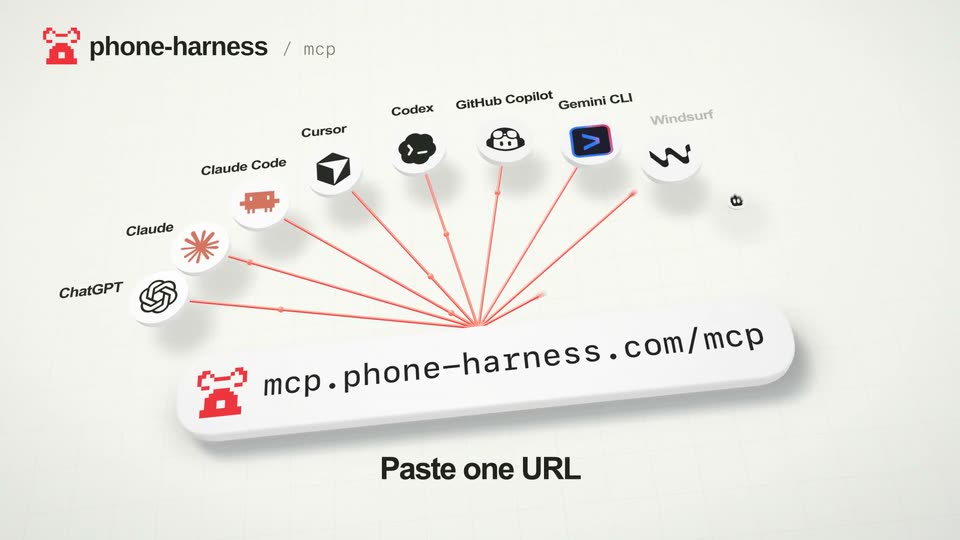

shawn - Introducing: Phone Harness MCP 🔌 Any agent that supports MCP can now
Phone Harness · B2B · Nov 2026
0:43
Similar soundtrack
Films whose music sounds like this one, voice left out
0:58

Introducing: Auto Drafts 2.0 ✨
Superhuman · Funk, disco, and dance music
1:48
Christoph Nakazawa - We open sourced Void v1.1.11 and we made a music video for it.
Void · Indie pop, alternative rock, and electronic dance
1:28

October 2026 Launch: MCP
Airtable · Funk, Disco, Nu-Disco
Introducing Copilot Workspaces | Microsoft Ignite 2026, scene by scene
· 25 scenes as text
01 · Product intro · 0:00–0:05
A gradient Copilot mark morphs in the center of a pale blue field, then centered dark titles appear in sequence: Copilot, Copilot goes multiplayer, and Introducing Workspaces with a small line icon.
On-screen text: “Copilot”, “Copilot goes multiplayer”, “Introducing Workspaces”
Techniques: Morph
Camera: Static
02 · Product intro · 0:05–0:09
On a cream background, a centered black sans-serif line reads “Work with people”; the word “people” is swapped for three circular photo avatars, the line reflows left as “and agents” enters, and “agents” becomes three 3D cartoon shapes: a purple square, a red triangle and a yellow star with eyes.
On-screen text: “Introducing Workspaces”, “Work with people”, “and agents”
Techniques: Kinetic type
Camera: Static
03 · Feature reveal · 0:09–0:11
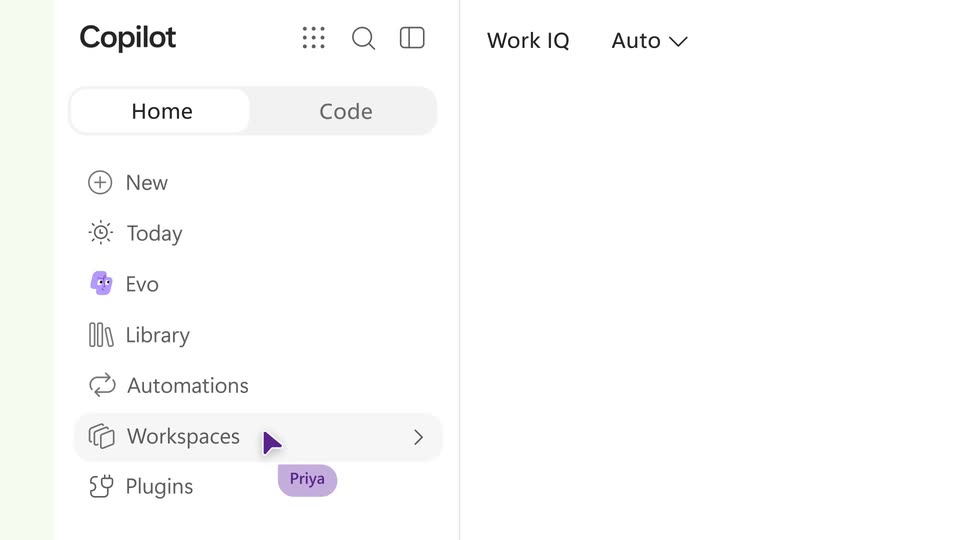
A purple cursor tagged Priya travels down the Copilot sidebar, passing New, Today, Evo, Library and Automations, then rests on Workspaces, which highlights with a chevron.
Techniques: Cursor demo
Camera: Static
04 · Feature reveal · 0:11–0:13
A light product screen titled Time to rally the team shows a row of three workspace cards. The dashed New workspace card slides right into the center slot as the Q4 Enterprise Renewals card slides left, while a grid of project cards stays fixed below.
Camera: Static
05 · Feature reveal · 0:13–0:14
A gray cursor hovers over a dashed New workspace card on a plain background, then the view reframes outward to a full Create a shared workspace form. The gray heading scales in above input fields, color dots and a black Create button.
Techniques: Cursor demo, UI zoom
Camera: Static
06 · Feature reveal · 0:14–0:20
A shared-workspace form fills in as the view zooms into the name field, where Monthly Business Review is typed, then scrolls down as a description appears. The view settles on the invite section, where a search dropdown lists people and an agent and the cursor hovers over one.
Techniques: UI zoom, Cursor demo
Camera: Push in
07 · Feature reveal · 0:20–0:23
A light project panel scrolls up past a row of avatar circles and a dashed add button holding two file chips, then cuts to a search view with category tabs and one spreadsheet, a cursor hovering over each.
Techniques: Cursor demo
Camera: Pan
08 · Feature reveal · 0:23–0:26
In a search interface, the cursor moves down the results list to the Q3_Finance_Report.pptx row, which highlights and gains a checkmark. A chip with the filename and an X button appears at the top of the screen.
Techniques: Cursor demo
Camera: Static
09 · Feature reveal · 0:26–0:28
A cream canvas holds the centered headline while four named cursors, Priya, Marcus, Mona and Lena, drift around it. The frame then cuts to the document workspace, with the same cursors resting over the page content.
On-screen text: “Create and edit together”
Camera: Static
10 · Feature reveal · 0:28–0:32
A shared workspace document view shows named cursors, Marcus, Priya and Lena, moving over the page as text fills a highlighted box. The view then zooms into the What's next section with file chips and a Start drafting button, where Priya's cursor hovers.
On-screen text: “Create and edit together”
Techniques: Cursor demo, UI zoom
Camera: Static
11 · Feature reveal · 0:32–0:33
On a plain cream background, a single line of black text scales up from a small size to its full width, settling at center. The phrase reads “With the full power of Office.” The frame stays locked off for the whole shot.
On-screen text: “With the full power of Office”
Techniques: Kinetic type
Camera: Static
12 · Feature reveal · 0:33–0:41
A shared PowerPoint slide in a window, where named collaborator cursors drag text and image blocks while a comments panel updates. The view scrolls down to a Q4 Tracker table, then a headline scales in.
On-screen text: “With the full power of Office”
Techniques: Cursor demo
Camera: Static
13 · Feature reveal · 0:41–0:47
A presentation editor shows a Q4 Tracker table slide beside a comments panel; a purple cursor and floating collaborator tags move over the table. The deck switches to a Product Roadmap Progress line chart slide, and a new comment appears in the panel.
Techniques: Cursor demo
Camera: Static
14 · Feature reveal · 0:47–0:48
A pale off-white field holds the line “Delegate tasks to agents” in dark sans-serif, centered. The text begins soft and out of focus, then snaps into crisp legibility while the frame stays locked.
On-screen text: “Delegate tasks to agents”
Camera: Static
15 · Feature reveal · 0:48–0:51
A white prompt bar on a cream field opens zoomed in on a purple pill reading @Evo (Priya's Autopilot), then pulls back to the full bar as a small purple face avatar appears and the command track and action any comments to me types in beside it.
Techniques: UI zoom
Camera: Static
16 · Feature reveal · 0:51–0:54
On a plain off-white background, a small purple rounded-square mascot with a cartoon face sits left of center. A dark gray status line to its right swaps between three messages, and the mascot's expression shifts with each one.
On-screen text: “Scanning presentation...”, “Locating documents.”, “Reviewing comments...”
Camera: Static
17 · Feature reveal · 0:54–0:56
A Teams chat panel and a fading document view dissolve out, leaving a plain background where the gray headline “Stay connected in Teams” fades in word by word, centered in frame.
On-screen text: “Stay connected in Teams”
Techniques: Kinetic type
Camera: Static
18 · Feature reveal · 0:56–0:57
A single centered headline reads Stay connected in Teams on a plain cream background. The frame is locked-off; the last word eases a few pixels into place at the start, then the line holds static.
On-screen text: “Stay connected in Teams”
Camera: Static
19 · Feature reveal · 0:57–0:59
A light chat interface with a left icon rail and an Evo header. The assistant message types to completion, then a document preview card titled Business Review slides up beneath it. The chat badge drops from 11 to 1.
Techniques: Kinetic type
Camera: Static
20 · Feature reveal · 0:59–0:59
A light chat interface shows an Evo message and a Business Review document card, then reframes into a close-up of the input field where an @Evo (Priya's Autopilot) mention sits in purple beside a send arrow.
Techniques: UI zoom
Camera: Static
21 · Feature reveal · 0:59–1:01
A rounded chat input bar is centered on a pale background. The message '@Evo (Priya's Autopilot) share it in our Leadership chat' types out character by character behind a thin caret, the untyped remainder shown in light gray, with a paper-plane send icon at the right.
Camera: Static
22 · Feature reveal · 1:01–1:03
A purple cursor moves down the chat list and clicks Leadership Team, then the view reframes to the open channel showing two Priya message bubbles and the message input box.
Techniques: Cursor demo, UI zoom
Camera: Static
23 · Feature reveal · 1:03–1:11
A 3D-angled chat window flattens and zooms into the thread. An autopilot shares a Business Review deck, a user tags a second autopilot to book a meeting, a spinner syncs calendars, and a confirmation message appears.
Techniques: 3D mockup, UI zoom
Camera: Pan
24 · Outro · 1:11–1:14
On a pale cream field, “Work is better” fades in gray, darkens to black, then cross-dissolves into the serif italic word “multiplayer,” while a rounded-square mark in pink, blue and green pops in above it.
On-screen text: “Work is better”, “multiplayer”
Techniques: Kinetic type
Camera: Static
25 · Outro · 1:14–1:20
A small gradient Copilot mark centered on a cream field scales up as the background shifts to a soft blue gradient, then the dark gray Microsoft Copilot wordmark appears beside it. The lockup holds still in a locked-off frame.
On-screen text: “Microsoft Copilot”
Camera: Static