1:19
Slack - Canvas
Salesforce
Mercura’s 1:18 launch film runs 8 scenes, about 9.8 s each. The product shows up at 0:37. There is no explicit call to action; a voiceover carries the film. The video opens with a live-action hook in a bathroom, then switches to a screen recording with a corner webcam inset that walks one spec document from PDF to quote. The pacing is steady with few cuts so each UI step can breathe, and the signature moves are the dark rounded caption pills, the cartoon hand cursor, and the green success toasts.
Is this your launch? to your site or press kit.
Salesforce
Conversion · May 2026
Granola · Productivity · Oct 2025
A man in brown overalls and red gloves kneels beside a white toilet in a tiled bathroom, then stands to speak to the camera. He gestures at the fixtures, holds up a stack of printed pages, and points at the lens. Subtitles sit in a dark box at the bottom.
On-screen text: “Hi, I'm Lukas.”, “My family has been in plumbing and electrical trade for over 100 years.”, “Ever wondered where contractors get toilets, electrical outlets or lighting?”, “From distributors and manufacturers.”, “When contractors need products, they send this -”, “hundreds of pages of specifications.”, “Distributors employ millions of inside sales reps.”, “It's manual, slow, and it costs them billions.”, “Inside sales teams should sell and not be buried in manual paperwork.”, “That's why we build Meracura. Watch this!”
Camera: Pull out
A man in glasses and brown overalls stands in a bright bathroom, smiling at the camera. A dark caption pill holds a line of text at the bottom of the frame.
On-screen text: “That's why we build Mercura. Watch this!”
Camera: Pan
A Mac desktop screen recording shows a PDF specification document open in Preview, scrolling slowly downward while the cursor hovers over the text. A small video-call inset of a man with glasses sits bottom right, and white caption lines appear along the bottom.
On-screen text: “That's why we build Mercura. Watch this!”, “Let's put ourselves in the shoes of a sales rep at a distributor.”, “They receive specifications like these every day”, “Normally reps have to go through all of this manually and match”, “specific positions with products in the inventory.”
Techniques: Cursor demo
Camera: Pan
A screen recording of a Customer Requests dashboard displays a project table beside a document panel that slides closed, widening the list. A cursor rests on a row, a presenter's webcam occupies the corner, and a caption bar sits at the bottom.
On-screen text: “specific positions”, “with products in the inventory.”
Techniques: Cursor demo, UI zoom
Camera: Pan
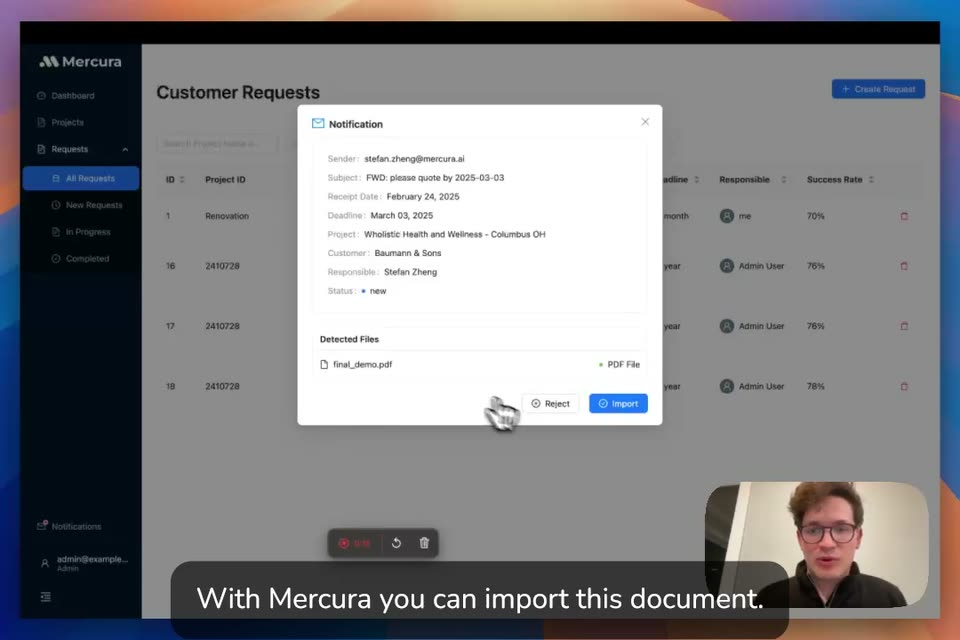
The Mercura dashboard shows a Customer Requests table with a presenter webcam inset at bottom right. A cursor clicks Notifications, a Notification modal listing a detected PDF appears centered, then the cursor clicks Import and the modal closes. A lower-third caption pill carries the voiceover line.
On-screen text: “With Mercura you can import this document.”
Techniques: Cursor demo
Camera: Static
The Mercura app window fills in with a request page, data table and two green success toasts. A cartoon hand cursor hovers over the panel while a small webcam inset of a bespectacled man sits bottom right, above a caption bar on a colorful gradient backdrop.
On-screen text: “The AI scans this document and instantly finds the right”
Techniques: Cursor demo
Camera: Static
A Mercura request page shows a table of stainless steel positions; toast notifications fade out as the suggestion column fills with product matches and confidence badges. A hand cursor hovers over rows and moves to the sidebar while a presenter appears in a bottom-right video inset.
On-screen text: “The AI scans this document and instantly finds the right”, “products with high accuracy.”, “want to see the details you can click here.”
Techniques: Cursor demo
Camera: Static
A screen recording of the Mercura interface. A cursor clicks an article number, and a Product Details panel slides in from the right, scrolling through property tables and pipe images as alternates load. A presenter's webcam sits in the bottom right.
On-screen text: “want to see the details you can click here.”, “Need alternates?”, “One click and boom options from other manufacturers appear.”, “This is Mercura! Quotes in minutes, not days.”
Techniques: Cursor demo
Camera: Static