1:52

Quivly - AI agents that run everything after the sale, from onboarding to renewal
Quivly AI · B2B · Oct 2026
Maxfusion AI · Aug 2026 · 0:29 · AI-annotated
Maxfusion AI’s 0:29 launch film runs 17 scenes, about 1.7 s each. The product is on screen from the first frame and 4 features are revealed, with social proof. The call to action lands at 0:25 (86% in). The video is a rapid feature montage: a title card hands off to a composer prompt, then each mutation (actors, outfit, location, language) is announced with a bold black-and-green headline and demoed by swapping a side panel next to a phone video, before a scrolling grid of variations pays off into a CTA card. Its signature moves are the green scale-pattern wipes, the sliding side panels, and the heavy condensed sans headlines set on a flat cream field.
Is this your launch? to your site or press kit.
Quivly AI · B2B · Oct 2026
Notion · Productivity · May 2025
A cream title card holds a row of partner logos, maxfusion x Claude for Meta Ads, above the bold black headline AD MUTATOR and a small gray tagline. It cuts to the condensed word MUTATOR alone, offset right of center.
On-screen text: “maxfusion × Claude FOR Meta Ads”, “AD MUTATOR”, “One ad in. Endless variations out.”, “MUTATOR”
Camera: Static
A cream field holds a large black title at the right edge, then a white rounded card with a pale bar drops into the top center while a black cursor arrow sits in the lower right corner.
On-screen text: “AD MUTATOR”
Techniques: Cursor demo
Camera: Static
On a cream background, a white composer card: a hand cursor drags a tilted photo of a woman in a pink shirt into the top-left corner, then a prompt types in as the cursor moves along the bottom toolbar, and the whole card fades out.
Techniques: Cursor demo
Camera: Push in
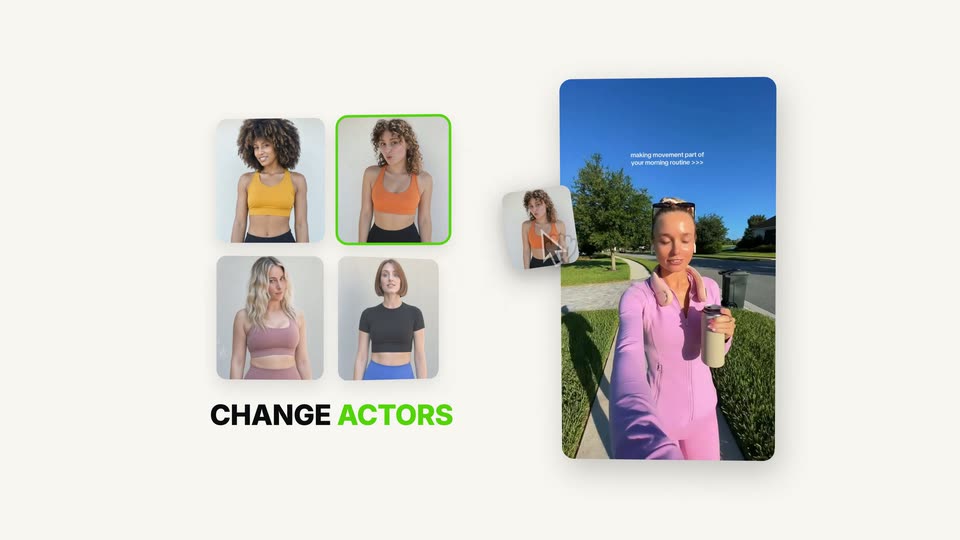
On a cream field a 2x2 grid of athlete portraits and a vertical phone video of a walking woman appear beside a static headline. A black cursor rests on the top-right portrait, outlined in green.
On-screen text: “CHANGE ACTORS”
Techniques: Cursor demo
Camera: Static
Locked-off product UI on cream: a CAST grid of four actresses, the curly-haired one ringed in green, sits above the bold headline CHANGE ACTORS. Right, a vertical video preview of a woman walking swaps her look through a green scale-pattern wipe as a hand cursor taps her torso.
On-screen text: “CHANGE ACTORS”
Techniques: Cursor demo, Morph
Camera: Static
A rounded video of a woman walking on a sidewalk sits beside a panel headed CHANGE OUTFIT with a two-by-two grid of clothing cards. The cursor picks the light-blue hoodie and the woman's outfit in the video changes to match, as the whole layout slides left and right.
On-screen text: “CHANGE ACTORS”, “CHANGE OUTFIT”, “WARDROBE”
Techniques: Cursor demo
Camera: Static
A flat interface on a cream background shows a vertical phone video of a woman walking on the right. On the left, a heading and three location thumbnails slide in as a cursor moves and selects a card, swapping the outfit panel for the location panel.
On-screen text: “CHANGE OUTFIT”, “CHANGE LOCATION”
Techniques: Cursor demo
Camera: Static
A light layout pairs a black-and-green CHANGE LOCATION headline with a 2x2 thumbnail grid, the beach tile outlined in green. Right, a phone video's background swaps from park to beach via a green scale-pattern wipe, two cursors flashing over the subject.
On-screen text: “CHANGE LOCATION”, “LOCATION”
Techniques: Cursor demo, Masking
Camera: Static
A product interface displays a 2x2 grid of location thumbnails on the left and a vertical video preview on the right. A cursor moves from the video preview to the right edge.
On-screen text: “CHANGE LOCATION”, “LOCATION”
Techniques: Cursor demo
Camera: Static
A vertical video card of a woman on a beach sits left on a light background. Three flag buttons appear on the right as the cursor hovers the Spanish flag, outlined in green, above the headline CHANGE LANGUAGE. The scene crossfades in from a CHANGE LOCATION layout.
On-screen text: “CHANGE LOCATION”, “CHANGE LANGUAGE”
Techniques: Cursor demo
Camera: Static
A vertical video card of a woman on the beach sits left; right, a grid of flag buttons shows Spain outlined in green as the bottom row fades in. A hand cursor carrying a Spain flag slides from the grid toward the card. CHANGE LANGUAGE sits below.
On-screen text: “CHANGE LANGUAGE”
Techniques: Cursor demo
Camera: Static
A flat phone mockup plays a woman's morning-routine video as a green scale pattern wipes off it. Right, six flag tiles sit under a LOCALIZATION label, Spain outlined in green, above a CHANGE LANGUAGE caption. The frame then zooms out to reveal a grid of fitness video tiles.
On-screen text: “LOCALIZATION”, “CHANGE LANGUAGE”
Techniques: Masking
Camera: Pull out
A grid of vertical video clips scrolls horizontally, showing various people speaking to the camera. The text 'The hype is real' slides in at the bottom right.
On-screen text: “The hype is real”
Techniques: Kinetic type
Camera: Pull out
A grid of vertical video clips scrolls horizontally across a white background, the outer rows fading to white at the top and bottom. The clips show assorted people holding small bottles. A large centered headline stays fixed over the moving grid.
On-screen text: “One ad. Endless variations.”
Camera: Static
A white panel holding six portrait video thumbnails, each tagged with a green check, scales up and settles at center on a cream background. A green 12 ready pill marks its top corner, and the headline Every variation, ready to run. appears below, ready to run. in green.
On-screen text: “One ad. Endless variations.”, “Every variation, ready to run.”
Techniques: Kinetic type
Camera: Static
A white Meta Ads Manager panel shows four video creative cards with ROAS figures. A green outline and a WINNER badge snap onto the top card as it lifts, a cursor clicks it, then a bold headline appears below the panel.
On-screen text: “WINNER”, “Find winners. Mutate them. Scale.”
Techniques: Cursor demo
Camera: Push in
On a cream background, the maxfusion wordmark sits above a small green pixel grid; the grid gives way to a bold black AD MUTATOR headline, a black pill with the URL, and a maxfusion x Claude for Meta Ads lockup, which hold still.
On-screen text: “AD MUTATOR”, “maxfusion.ai/mcp”, “maxfusion × Claude FOR Meta Ads”
Camera: Static