3:58

Raycast Just Got You A New Key
Raycast · Productivity · Feb 2025
Marey · Jul 2025 · 0:45 · AI-annotated
Marey’s 0:45 launch film runs 26 scenes, about 1.8 s each. The product is on screen from the first frame and 1 feature is revealed. The call to action lands at 0:43 (94% in). The video is built as a single feature walkthrough: a titled lunar render, a feature card selection, a six step tutorial over a dark editor UI, a showcase montage of rendered characters, and a brand end card. Signature moves are hard cuts at a fast tempo, monochrome footage with glowing neon HUD overlays, and orange step labels that anchor each instruction.
Is this your launch? to your site or press kit.
Raycast · Productivity · Feb 2025
BitBoard · B2B
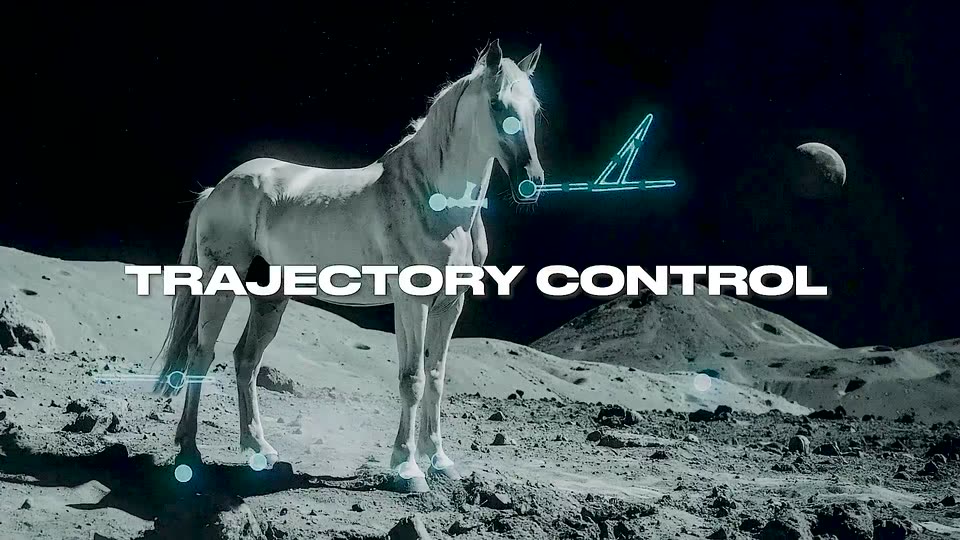
A white horse stands on a cratered moon surface under a starry sky with a small planet at right. Glowing cyan HUD markers dot its head, neck and hooves, and a triangular trajectory arrow hovers by its muzzle. The title sits centered across the frame.
On-screen text: “TRAJECTORY CONTROL”
Camera: Static
A white horse stands on a grey moon landscape under a starry sky, its body traced by cyan holographic lines and nodes that follow its head as it turns. A small triangle and a distant planet float to the right. The white title TRAJECTORY CONTROL sits centered across the frame.
On-screen text: “TRAJECTORY CONTROL”
Camera: Static
A white horse stands on a cratered lunar surface under a starry sky, a planet hanging at upper right. Cyan holographic nodes and a wireframe triangle track its head and hooves. White text TRAJECTORY CONTROL holds centered across the body.
On-screen text: “TRAJECTORY CONTROL”
Camera: Static
A dark grid of feature cards zooms in on a central card showing a horse on a rocky surface, overlaid with cyan trajectory lines and control points. A cursor hovers over the card while the label Trajectory control and its caption sit below.
Techniques: UI zoom, Cursor demo
Camera: Push in
A horizontal carousel of three feature cards sits on a black background. The center card, framed by a thin border, shows a grayscale horse on rocky terrain with cyan trajectory lines and a cursor, while a gray veil over the image lifts to reveal the footage. Side cards are cropped at the edges.
On-screen text: “camera-led”, “Trajectory control”, “Control the precise movements of objects & characters”, “Shot e”, “Extend a clip”
Camera: Static
A black panel with a white border holds a static layout. Left, an orange STEP 1 headline sits over a smaller UPLOAD IMAGE on a black block. Center, an orange tile shows a white pixel image icon and pixel cursor hand, with a gray pixel UPLOAD IMAGE caption below.
On-screen text: “STEP 1”, “UPLOAD IMAGE”, “UPLOAD”, “IMAGE”
Camera: Static
A dark upload screen shows two dashed drop zones above a horse thumbnail. A cursor clicks the thumbnail, and a larger image view with a numbered frame timeline opens over it. A small static step caption reads STEP1, UPLOAD IMAGE.
On-screen text: “STEP1”, “UPLOAD IMAGE”
Techniques: Cursor demo
Camera: Static
A black and white photo of a white horse on a cratered moon surface sits in a thin white frame on black. The image zooms in to fill the frame as a crosshair marker rests on the horse's neck.
Techniques: UI zoom
Camera: Push in
A white arrow cursor moves to an ADD LAYER button that fills orange, then the button slides down and a hand cursor taps it as it glows orange. A grainy grayscale photo in the top right fades out. An orange STEP 2 ADD LAYER label holds at the right.
On-screen text: “STEP 2 ADD LAYER”
Techniques: Cursor demo
Camera: Static
A dark product interface displays a black-and-white photo of a horse on a lunar surface. An orange STEP 2 ADD LAYER label sits on the right, a timeline bar runs along the bottom, and the frame holds still.
On-screen text: “STEP 2”, “ADD LAYER”
Camera: Static
A black-and-white profile photo of a horse fills the left side against a black void. A glowing red trajectory line draws out from the horse's mouth to the right, ending in two circular control icons, while an orange 'STEP 3 / SET TRAJECTORY' label sits on the right.
On-screen text: “STEP 3”, “SET TRAJECTORY”
Camera: Static
A black-and-white clip of a horse's hooves on rocky ground fills the top preview window. A cursor taps the orange play button, then drags red keyframe diamonds along the dark timeline, spawning Ease in/out dropdowns. An orange STEP 4 / SET KEYFRAMES label holds center.
On-screen text: “STEP 4”, “SET KEYFRAMES”
Techniques: Cursor demo
Camera: Static
A monochrome photo of a horse's head in profile fills the left side on a black background. Red vector lines with arrowheads and small circular icons animate, the diagonal line swinging from a hand symbol into a V shape over the muzzle.
Camera: Static
A dark modal shows a black-and-white photo of a horse on a lunar surface with a small moon. A red axis gizmo at the horse's nose rotates in place while a cursor clicks the play button on the timeline below, then the modal scales down and fades out.
Techniques: Cursor demo
Camera: Push in
A dark timeline interface holds a locked-off frame. Orange step text sits left as a hand cursor taps an orange ADD LAYER button, then moves right while timeline numbers and red markers shift.
On-screen text: “STEP 5”, “ADD LAYERS”
Techniques: Cursor demo
Camera: Push in
A trajectory control panel shows a black-and-white photo of a horse on a moon-like surface, with a red crosshair marker at its head. Large orange text reads STEP 5 ADD LAYERS at left. The timeline playhead advances and a small red dot appears at the horse's hoof.
On-screen text: “STEP 5”, “ADD LAYERS”
Camera: Static
Black-and-white footage of a horse's hooves on rocky ground. An orange circular anchor marker sits on the ground, crosshair guides float mid-frame, then a second orange anchor with a grid icon pops in beside the other hoof. A black caption box bottom-right reads STEP 6 / SET ANCHOR POINTS.
On-screen text: “STEP 6”, “SET ANCHOR POINTS”
Camera: Static
A dark Trajectory control window frames a black and white horse on a lunar surface, marked with orange, green and red anchor dots and a red 3D axis at its nose. A cursor hovers the ADD LAYER button, turning it orange, beside a large orange STEP 6 label.
On-screen text: “STEP 6”, “SET ANCHOR POINTS”
Techniques: Cursor demo
Camera: Static
A black-and-white image of a white horse standing on a lunar surface with a crescent moon behind it. Red anchor-point lines and dots animate around the horse's head and legs, while an orange STEP 6 label sits in the lower right.
On-screen text: “STEP 6”, “SET ANCHOR POINTS”
Camera: Static
A dark modal dialog with a thin gray border is centered over a near-black 3D render. A circular spinner rotates above the white caption Rendering video..., the frame held static.
On-screen text: “STEP6”, “SET ANCHOR POINTS”
Camera: Static
A white horse stands on a grey lunar surface beneath a black starry sky, a small crescent planet floating right. Cyan holographic markers and lines glow on its eye, neck, hoof, and a triangle by its head. The frame is locked off, the glow pulsing gently.
Camera: Static
A white horse stands on a cratered lunar surface beneath a black starry sky, a small planet at right. Glowing cyan wireframe lines and node circles trace its head, chest and hooves, then fade as the horse turns its head. The camera holds still.
Camera: Static
A 3D gorilla crouches on dark ground. Neon tracking lines and dots overlay its face and hands, then dissolve as the ape opens its jaws to roar, its eyes flaring red.
Camera: Static
A white humanoid robot with orange eyes stands before a suburban house and raises a black-gloved hand to wave. A glowing blue wireframe hologram with small circular nodes floats at its left, then fades out as the wave finishes. The frame stays locked off at medium distance.
Camera: Static
A black frame holds a centered two-line title: a small white bold caps line reading MADE WITH sits above a larger cream bold word HUMANS. Both lines stay perfectly still for the full shot.
On-screen text: “MADE WITH”, “HUMANS”
Camera: Static
Centered cream text on a black background changes in three static cuts: 'POWERED BY MAREY', then 'AVAILABLE NOW AT MOONVALLEY.COM', then the thin letter-spaced MOONVALLEY wordmark, before the frame fades to black.
On-screen text: “POWERED BY”, “MAREY”, “AVAILABLE NOW AT”, “MOONVALLEY.COM”
Camera: Static