2:14
Explore
Manus - Today, we are introducing Manus slides! Manus creates stunning, stru
Manus · May 2025 · 0:39 · AI-annotated
- Length
- 0:39
- Scenes
- 28 · 1.4 s avg
- Product on screen
- 0:00
- Call to action
- 0:36 · 91%
- Voiceover
- Yes
00:00:00 / 00:39:20
Manus’s 0:39 launch film runs 28 scenes, about 1.4 s each. The product is on screen from the first frame. The call to action lands at 0:36 (91% in), over a voiceover. The video is one continuous prompt-to-deck demo built on a dotted-grid backdrop, opening on a serif title card and closing on a fanned 3D logo card. Each beat is marked by motion-blur page flips and 3D tilts, with the fanned panels and the hand logo as the signature recurring moves.
Footage neededEstimated needs: 5 capture groups — your screens or recordings · 1 filmed passage — shoot, supply or replace · 8 3D passages — build or supply
Is this your launch? to your site or press kit.
More like this


Manus - Today, we are introducing Manus slides! Manus creates stunning, stru, scene by scene
· 28 scenes as text
01 · Product intro · 0:00–0:03
A cream dotted background holds a large black serif headline on the left, the hand logo sliding down beside it. On the right, tilted slide decks fan in one by one, each rotated at a different angle to show varied slide designs.
On-screen text: “Today, we are introducing Manus slides”
Camera: Static
02 · Product intro · 0:03–0:03
A large gray serif headline sits on the left over a dotted off-white background, while a tilted stack of presentation slide previews stands on the right. The whole composition softens and fades toward white.
On-screen text: “Today, we are introducing Manus slides”
Techniques: 3D mockup
Camera: Static
03 · Demo · 0:03–0:05
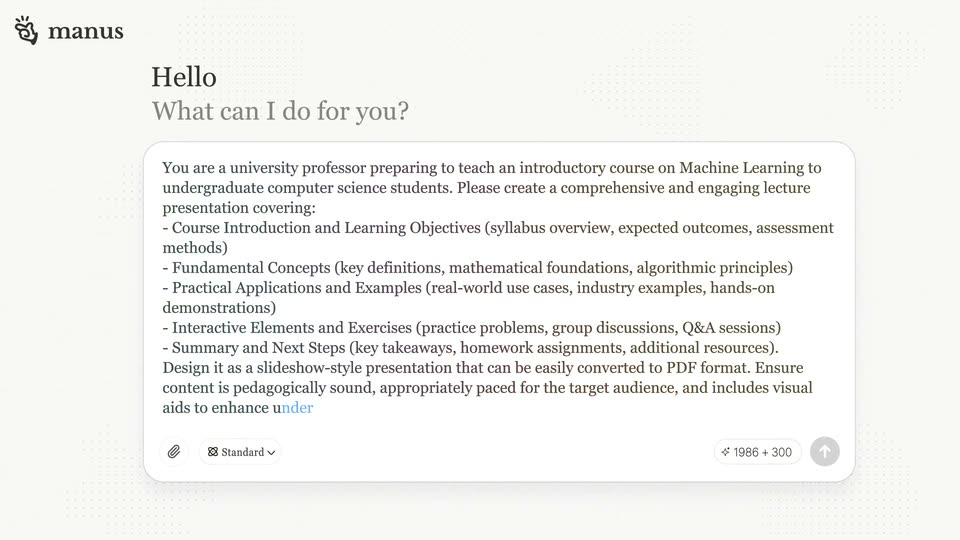
A light product screen shows the Manus composer with a dotted grid background. The serif header reads Hello and What can I do for you?. A long prompt about a machine learning lecture types itself into the text box, ending on an orange caret, while the send button fills gray.
Techniques: Kinetic type
Camera: Static
04 · Demo · 0:05–0:06
A light chat screen shows a long typed prompt for a machine learning lecture, then the view switches to a browser tab displaying the generated course document, with a replay status bar and two buttons at the bottom.
Camera: Static
05 · Demo · 0:06–0:08
A framed browser window on white shows Manus's chat log on the left and its terminal plus a slide preview on the right. The view reframes from a tight crop to the full window, settling as the chat reports the deck complete.
Camera: Pull out
06 · Demo · 0:08–0:09
A browser window frames the product interface, a task chat beside a two-page slide preview. The view then zooms and blurs onto the first slide, its blue title scaling up to fill the frame.
Techniques: UI zoom
Camera: Static
07 · Demo · 0:09–0:09
A pale slide deck scrolls top to bottom. The blue machine learning title gives way to a two column course overview, then a learning objectives list, each section sliding up with soft motion blur along the top edge.
Camera: Pan
08 · Demo · 0:09–0:10
A deck page moves with heavy motion blur, the Learning Objectives slide sliding up to reveal a Syllabus Overview slide laid out in three columns with blue highlighted boxes.
Camera: Pan
09 · Demo · 0:10–0:11
A light-gray slide titled Syllabus Overview shows six white cards in a two-by-three grid, each with a blue header naming a machine learning module and a bulleted list of topics. The view pans slowly downward.
Camera: Static
10 · Demo · 0:11–0:12
A page mid-flip turns the Syllabus page away, revealing an Algorithmic Principles slide. Two white cards sit side by side: Bias-Variance Tradeoff with a red and yellow table, and Occam's Razor with a quote and a line graph.
Techniques: Masking
Camera: Static
11 · Demo · 0:12–0:13
Two content cards sit side by side on a pale background. The left card, Bias-Variance Tradeoff, holds two tinted columns and a line chart; the right, Occam's Razor, holds a quote, a checklist and a three-line chart. A heading line fades in above while the cards drift slightly upward.
Camera: Static
12 · Demo · 0:13–0:14
A dark page cover flips down in 3D with heavy motion blur, turning the report over. The frame pulls back from two concept cards to a grid of industry sections.
Techniques: 3D mockup, UI zoom
Camera: Static
13 · Demo · 0:14–0:16
A blurred grid of six industry cards comes into focus, revealing their titles and bullet points.
Camera: Static
14 · Demo · 0:16–0:17
A generated document shows a grid of six industry cards. The view scrolls up with a brief crossfade on the top text; a blue rule draws in and the Practice Problems section reveals, its heading sliding in from the left above two exercise cards with code snippets.
Camera: Pan
15 · Demo · 0:17–0:17
A flat document page opens on a blue 'Practice Problems' heading that snaps from a blurred, chromatic state into sharp focus. Below, two white cards sit side by side, each holding a task line, a dark code block, and a bulleted list, on a pale background.
Camera: Static
16 · Demo · 0:17–0:18
A white document view opens on a Practice Problems page holding two problem cards with dark code blocks, then pans left to a Course Overview page that lists sections beside small blue icons.
Camera: Pan
17 · Demo · 0:18–0:24
A close-up of a course document shows a cursor editing the office-hours line, the text switching from Mon/Fri to Mon/Wed inside a selection box. The frame then pulls back and the page tilts into a 3D perspective on a dotted grid.
Techniques: Cursor demo, UI zoom, 3D mockup
Camera: Pull out
18 · Demo · 0:24–0:25
A black keynote slide floats tilted in 3D over a white dotted grid, then rotates to a flatter angle. The slide pairs a white-and-blue headline with a gray subtitle and a paragraph, beside a silhouette of a figure pushing against a glowing blue circuit-board wall.
Techniques: 3D mockup
Camera: Pull out
19 · Demo · 0:25–0:26
Three black presentation slides stand in a 3D perspective row on a white dotted grid. The row scrolls left, sliding new slides into the center while the edges tilt away. The focused slide pairs a heading with a line-art figure pushing a glowing blue circuit pattern.
Techniques: 3D mockup
Camera: Pan
20 · Demo · 0:26–0:27
A curved wall of dark presentation slides stands on a dotted gray backdrop, each panel holding a headline and a line-art illustration. The camera glides along the wall and pushes into one slide, which expands to full screen over a live-action bungee-jump clip.
Techniques: 3D mockup, Parallax, UI zoom
Camera: Pan
21 · Demo · 0:27–0:28
A full-bleed travel slide shows a rider on a motorcycle crossing a desert mountain pass, with a bold white headline, a paragraph of body copy, and two info chips for location and season. The scene starts and ends with a blurred crossfade as the background swaps to a close-up portrait of the goggled rider.
Camera: Static
22 · Demo · 0:28–0:29
A filmed volcano surfer in an orange jumpsuit sits on a wooden board amid smoke, with a white text layout on the left. The panel slides left with motion blur as a dark UI screen with a green top bar slides in from the right.
On-screen text: “VOLCANO SURFING MADNESS”, “CERRO NEGRO VOLCANO”, “Strap on a jumpsuit, grab a wooden board, and hurtle down the steep black slopes of an active volcano at speeds up to 60mph. This one-of-a-kind adrenaline rush,”, “LOCATION”, “Leòn, Nicaragua”, “BEST SEASON”, “December to Early May”
Camera: Pull out
23 · Demo · 0:29–0:30
A 2x2 grid of four destination cards, each pairing a bold white heading and body copy over a full-bleed photo (volcano surfer, jungle, shark cage, desert runner). The text slides up and sharpens from a blurred offset into place.
Techniques: Split screen, Kinetic type
Camera: Pull out
24 · Demo · 0:30–0:31
A 2x2 grid of four adventure slide cards fills the frame: volcano surfing, jungle survival, shark diving, desert marathon. Each card pairs a photo with a bold white headline, body copy, and location and season chips. The grid holds static.
Techniques: Split screen
Camera: Pan
25 · Demo · 0:31–0:36
A slide viewer displays a presentation titled Introduction to Machine Learning. A hand cursor clicks the download icon, opens a menu, and picks Download as PDF. The view then zooms out to reveal the full multi-section document on a dotted grid background.
Techniques: Cursor demo, UI zoom
Camera: Pull out
26 · CTA · 0:36–0:37
Three document mockups rotate into a fanned 3D arrangement on a light dotted background, each casting a soft reflection below. The center white slide shows a course overview while the left and right dark slides list topic cards.
Techniques: 3D mockup
Camera: Pull out
27 · Outro · 0:37–0:39
Three blurred phone screens tilt in 3D on a dotted grid while the sharp manus hand icon and serif wordmark hold centered in front.
On-screen text: “manus”
Techniques: 3D mockup
Camera: Static
28 · Outro · 0:39–0:39
Three blurred phone screens stand in 3D perspective on a dotted gray backdrop, the center one facing forward and the flanking ones angled outward. The dark manus hand logo sits centered over them as the frame dims.
On-screen text: “manus”
Techniques: 3D mockup
Camera: Static