4:31
Explore
00:00:00 / 01:13:20
- Length
- 1:13
- Scenes
- 21 · 3.5 s avg
- Product on screen
- 0:00
- Features shown
- 1
- Call to action
- 0:59 · 81%
- Voiceover
- Yes
- Views
- 61K on YouTube
as of November 25, 2026
magicX’s 1:13 launch film runs 21 scenes, about 3.5 s each. The product is on screen from the first frame and 1 feature is revealed, with social proof. The call to action lands at 0:59 (81% in), over a voiceover. A dark, cinematic product launch built around a single recurring object, the glowing autocomplete bar, that types itself across blurred live-action shots and clean gradient graphics. The edit alternates fast cutaways (logo bursts, stat counters, icon rings) with locked-off presenter shots, using a rising line chart and a final light-swept URL pill as its signature closing moves.
Footage neededEstimated needs: 2 capture groups — your screens or recordings · 8 filmed passages — shoot, supply or replace · 5 graphic passages — draw or supply
Is this your launch? to your site or press kit.
More like this


Similar soundtrack
Films whose music sounds like this one, voice left out
1:42
Stanley Wei - AI is already smart enough. Real-world tasks are still slow, expensi
Pine · Modern electronic corporate tech
1:14
Bjorn Birkelund - Today we're launching Financial Modeling Autopilot. It's the first AI
Filot · Corporate tech advertisement
2:04
Josh Gruenstein - We raised a $75M Series B to deploy intelligent robots now, led by @a
Tutor Intelligence · Modern electronic
Introducing the AI Autocomplete SDK, scene by scene
· 21 scenes as text
01 · Product intro · 0:00–0:00
A man in an olive button-up shirt stands in a concrete-walled loft, speaking directly to camera. A dark rounded caption box at the bottom center holds the word Introducing. The frame stays locked off.
On-screen text: “Introducing”
Camera: Static
02 · Product intro · 0:00–0:02
A dark blue gradient holds the small word Introducing, then a bright white burst in the center resolves into the letters AI. AI Autocomplete scales up, with Autocomplete enclosed in a thin rounded pill outline.
On-screen text: “Introducing”, “AI”, “AI Autocomplete”
Techniques: Kinetic type
Camera: Static
03 · Demo · 0:02–0:07
A man in a beige shirt stands blurred in an office as a black search bar types a query across his face. A white dropdown panel drops in, switching from color to material tabs. A large white and blue 50% scales in over the dimmed frame.
On-screen text: “AI Autocomplete”, “for every product”, “with a textbox”, “your conversions”, “50%”
Techniques: Kinetic type
Camera: Static
04 · Demo · 0:07–0:08
A blurred figure at a desk holds behind a large white 50%, its percent sign in blue. A thin white line chart draws itself across the frame, climbing to the upper right corner, while a small caption sits in the lower right.
On-screen text: “50%”, “Increases conversions by”
Camera: Static
05 · Demo · 0:08–0:11
On a dark blue gradient, white rounded text boxes with blinking cursors pop into a circular ring, each capped by a small app icon, as subtitle captions swap at the bottom.
On-screen text: “Increases conversions by”, “50%”, “Every product”, “a text box.”, “It's powerful.”
Camera: Pull out
06 · Problem · 0:11–0:19
A white input field labeled 'Your product' sits on a dark blue gradient. The label is replaced by a glowing question mark, then nine pill tags (time, what, date, from where, reason, payment method, duration, how much, with who) pop in below. Subtitle captions roll at the bottom.
On-screen text: “It's powerful.”, “a big”, “problem.”, “Your users”, “don't know”, “everything”, “they can say.”, “or what details”, “upfront.”
Techniques: Kinetic type
Camera: Push in
07 · Problem · 0:19–0:22
A man in a beige shirt stands in a modern office, gesturing as he speaks to camera. A white rounded text box overlay types out the phrase with a blinking caret, while dark caption chips appear word by word below him.
On-screen text: “This is the”, “blank text box problem...|”, “classic”, “blank text box”, “problem.”
Techniques: Kinetic type
Camera: Static
08 · Problem · 0:22–0:24
A man in a gray button-up shirt speaks to camera in a brick-walled office, framed medium close-up with a soft-focus desk and lamp behind him. White subtitles in a dark rounded box appear at the bottom center as he talks.
On-screen text: “blank textbox problem”, “And it's killing”, “your product.”
Camera: Static
09 · Feature reveal · 0:24–0:26
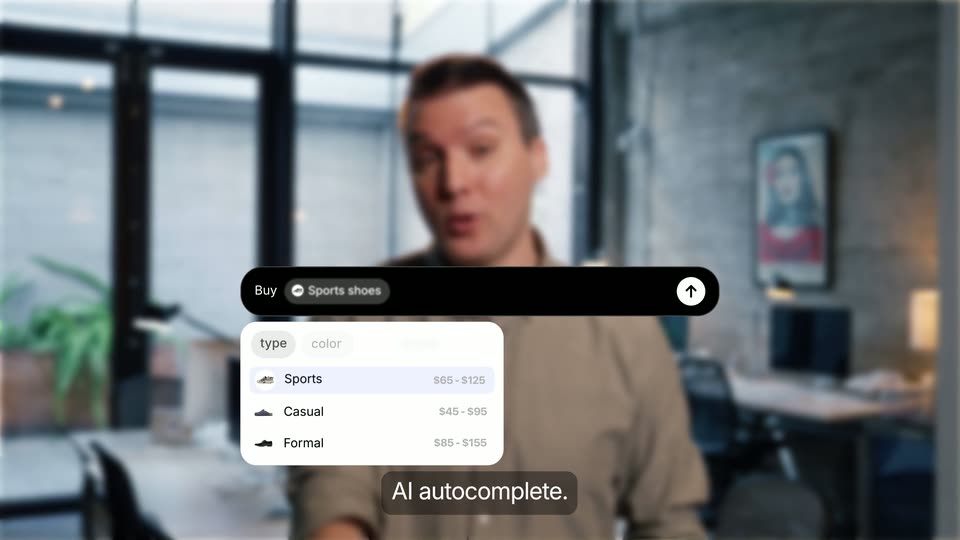
A presenter talks and gestures in a blurred office behind a floating dark search bar and white suggestion panel. The input text changes from 'Bug' to 'Buy', a 'Sports shoes' chip appears, and the dropdown rows switch to colors. Captions 'Now' and 'AI autocomplete.' sit at the bottom.
On-screen text: “your product.”, “Now”, “AI autocomplete.”
Techniques: Cursor demo
Camera: Static
10 · Feature reveal · 0:26–0:29
A blurred man types on a laptop at an office desk. Overlaid, a black search bar fills with Sports shoes, Black, then Nike chips as a caret types, while a white dropdown below switches from color to brand options with prices. Subtitles read As I type, and me options.
On-screen text: “As I type,”, “me options.”
Camera: Static
11 · Feature reveal · 0:29–0:35
Over a blurred man at a desk, a black command bar and white dropdown float. Chips for Sports shoes, Black, Nike, Pegasus and Affirm pop into the bar while the dropdown crossfades through lists of brands, models and payment plans, highlighting one row at a time.
On-screen text: “So, if your”, “has search,”, “you'll see”, “richer searches”, “and higher”, “immediately.”
Techniques: Morph
Camera: Static
12 · Feature reveal · 0:35–0:40
A blurred man sits in a loft behind a floating black prompt bar and white dropdown card. Chips like 'app', 'track my running', 'habits' fill the bar one by one, and the list below updates, checking features before landing on 'Minimalist'.
On-screen text: “immediately.”, “assistant”, “agent”, “the details”, “up front.”
Techniques: Kinetic type
Camera: Static
13 · Feature reveal · 0:40–0:44
A man types on a MacBook in a concrete office as a dark bar of product chips and a green Buy Now button floats before him. It resolves into an Order Placed card, then the frame shrinks to a small video tile beside an empty dark panel.
On-screen text: “Done.”, “I just bought”, “shoes”, “one shot.”
Techniques: Morph, Split screen
Camera: Static
14 · Feature reveal · 0:44–0:47
A dark schematic on a blue gradient: a filmed speaker in a rounded tile on the left, a black command bar in the center, and a placeholder box on the right, joined by thin lines. The bar lights up with a white glow and is labeled, while a caption types out below.
On-screen text: “This”, “Intent Layer”, “intent layer”, “you've been”, “missing.”
Techniques: Kinetic type
Camera: Static
15 · Other · 0:47–0:57
A man in an olive shirt talks to camera in a blurred office. Three green check icons pop in along a thin line with labels Install in mins, Your data, 100% customizable SDK, or API, while white captions in dark pills cycle at the bottom.
On-screen text: “You can add”, “Install in mins”, “the proprietary”, “engine”, “in minutes.”, “your data”, “Your data”, “privately.”, “It's 100%”, “100% customizable SDK, or API”
Camera: Static
16 · Social proof · 0:57–0:59
A grid of brand logos fades in row by row on a dark gradient background while a bottom caption cycles through the words. The scene then cuts to the product landing page, showing a headline and a button, as the caption changes.
On-screen text: “So join”, “the biggest”, “brands”, “Go to”
Camera: Static
17 · CTA · 0:59–1:02
A dark product page holds a static headline above a search field. The field types “Find a dress” letter by letter, then a suggestion panel with chips and rows appears beneath it. A bottom caption builds the URL.
On-screen text: “Go to”, “AI autocomplete.com.”
Camera: Static
18 · CTA · 1:02–1:04
A flat browser mockup on white shows a product UI: a typed query above an autocomplete card of location options. A cursor hovers a suggestion while gray caption pills below cycle 'add it', 'to your', 'text box', and a green hand-drawn line points at the field.
On-screen text: “add it”, “to your”, “text box”
Techniques: Cursor demo
Camera: Static
19 · CTA · 1:04–1:05
A faint browser mockup with a form sits behind a large black word and a green line chart that draws itself left to right. Two gray caption pills read at the bottom while the line zigzags upward.
On-screen text: “conversions”, “text box”, “and immediately”
Camera: Static
20 · CTA · 1:05–1:07
A blurred browser window fades out over a faint grid, leaving the word conversions centered above a rising green line graph. A small gray pill caption at the bottom swaps from your conversions to go up.
On-screen text: “conversions”, “and immediately”, “your conversions”, “go up.”, “Al-Autocomplete.com”
Camera: Static
21 · CTA · 1:07–1:13
A dark blue-to-black gradient background holds a centered rounded pill with the white URL text. At the start a bright horizontal light sweep glows across the pill, the text resolves out of the glow, then the frame stays locked off with the pill resting in the center.
On-screen text: “AI-Autocomplete.com”
Techniques: Light sweep
Camera: Static