1:45
herdr - *ehm ehm* BIG ANNOUNCEMENTS DAY 📣 two new things cooking in herdr la
herdr · B2B · Oct 2026
loopfour · Sep 2024 · 1:23 · Full motion · AI-annotated
loopfour’s 1:23 launch film runs 19 scenes, about 4.4 s each. The product shows up at 0:14 and 1 feature is revealed. The call to action lands at 1:07 (80% in), over a voiceover. The video opens with blur-in word cards on a soft gradient and a white problem statement, hands off to one long, unbroken screen-recording tour of the JustPaid app (contracts, then reports), and closes on an animated logo and a radial feature map. Its signature moves are the blur-in type, the locked-off purple-sidebar interface, and the radial line-draw feature map that resolves into the closing mark.
Is this your launch? to your site or press kit.
herdr · B2B · Oct 2026
Cekura · B2B · Aug 2026
Films whose music sounds like this one, voice left out
Sable · Upbeat electronic
Google · Upbeat electronic
Vexo · Upbeat electronic
A soft purple, pink and orange gradient holds the frame while white words appear one after another in the center, each fading in with a brief blur before the next takes its place.
On-screen text: “Empower”, “Your”, “Finance”
Techniques: Kinetic type
Camera: Static
On a plain white field, a bold black headline holds still while the line below it swaps through four benefit phrases, each blurring in and out in turn. The last phrase settles, then the word Finance appears to close.
On-screen text: “Leverage AI in financial automation for”, “precision and speed.”, “seamless operations.”, “unparalleled accuracy.”, “optimal decision-making.”, “Finance”
Techniques: Kinetic type
Camera: Static
A plain off-white background holds the centered black tagline “Let's do it together”, locked off and static for the full shot.
On-screen text: “Let's do it together”
Camera: Static
A static screen capture of the JustPaid Customer Contracts dashboard fills the frame, showing a left navigation sidebar and a table of contract rows with status pills. A caption overlay reads “Let's do it together” while the interface stays locked off.
On-screen text: “Let's do it together”
Camera: Static
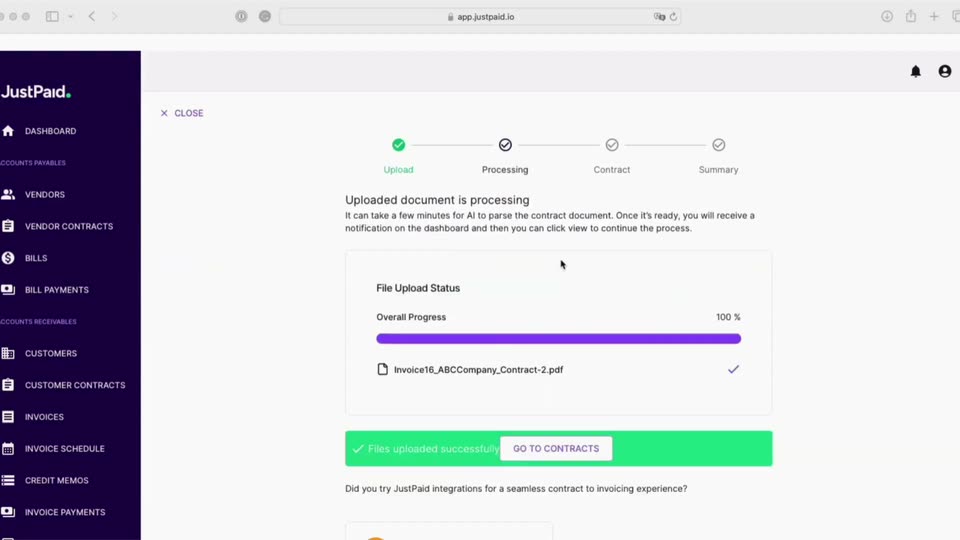
A browser window shows the JustPaid contract upload page. A cursor drags a PDF file into the dashed drop zone, the progress bar fills to 100%, and a green success banner with a button appears at the bottom.
Techniques: Cursor demo
Camera: Static
A browser view of a contracts table stays still while a cursor moves to the three-dot menu on the first row and clicks it. A small dropdown opens with Edit Contract, Renew Contract, and Delete Contract.
Techniques: Cursor demo
Camera: Static
A browser window shows the JustPaid contract page, split into a customer form on the left and a contract PDF on the right. The view scrolls down the form while a cursor clicks a billing radio button, revealing payment terms and a file upload box.
Techniques: Cursor demo
Camera: Pan
A JustPaid app window in a browser shows a plan details form beside a contract document with fee tables. Fixed fee line items populate with prices, the total updates to $35,000.00, and both panes scroll to reveal the entries.
Camera: Pan
A dashboard interface with a left navigation menu stays static while a contract document in the right panel scrolls down through tables and clauses.
Camera: Static
A browser window shows the JustPaid app summary page with a purple sidebar. The view scrolls down past a recurring invoice card to reveal an invoice timeline of dated amounts, ending on Update Contract and Done buttons. A cursor drifts over the text.
Techniques: Cursor demo
Camera: Pan
A browser window displays the JustPaid dashboard, a dark purple sidebar beside a white congratulations panel with three action buttons. A cursor moves left to right, hovering over each button in turn.
Techniques: Cursor demo
Camera: Static
A browser window shows the JustPaid Customer Contracts table. The rows slide and the status pills refresh, then a cursor clicks the three-dot icon on the top row and a small menu with View Contract, Renew Contract, and Cancel Contract drops down.
Techniques: Cursor demo
Camera: Static
A JustPaid contract details page scrolls down through customer info, plan items and an invoice timeline, while a scanned order form sits in the right column. A cursor drifts to the left menu and hovers over items.
Techniques: Cursor demo
Camera: Static
A static screen recording of the Reports page: a dark purple sidebar lists navigation items, two white cards hold report links above a Quick View row of metric tiles. A mouse cursor hovers over a link in the left card, then drifts right.
Techniques: Cursor demo
Camera: Static
A full-screen view of the JustPaid web app shows the Revenue Schedule page with the GAAP tab active and an empty data table. A purple loading spinner rotates in the center of the table while the mouse cursor rests below it.
On-screen text: “app.justpaid.io”
Camera: Static
A browser shows the JustPaid revenue schedule; the wide table pans horizontally across the monthly columns as the cursor tracks a purple-highlighted row. The screen fades to white and the purple J logo scales up at center.
Techniques: Cursor demo
Camera: Pan
A purple “J” logo sits centered on white as thin lines draw out from it, each ending in a colored dot and a fading label: Sales Contracts, Billing Plans and Subscriptions, Reporting, Revenue Collections, Sales Tax, Bill Payments, Payment Processing. The top branches then clear away.
On-screen text: “SALES CONTRACTS”, “BILLING PLANS AND SUBSCRIPTIONS”, “REPORTING”, “REVENUE COLLECTIONS”, “SALES TAX”, “BILL PAYMENTS”, “PAYMENT PROCESSING”
Techniques: Kinetic type
Camera: Static
On a plain white background, the JustPaid wordmark fades in from light gray to dark and scales up slightly, with a small green dot after the word. The frame stays locked off as the logo settles to center.
Techniques: Kinetic type
Camera: Static
The JustPaid logo holds centered on a black background, a white wordmark finished with a green period. The mark scales gently in place on a locked-off frame, settling into a steady sign-off.
On-screen text: “JustPaid.”
Techniques: Kinetic type
Camera: Static