2:39
Explore
00:00:00 / 01:25:12
- Length
- 1:25
- Scenes
- 42 · 2.0 s avg
- Product on screen
- 0:18
- Features shown
- 1
- Voiceover
- Yes
- Views
- 2.9K on YouTube
as of November 28, 2026
Liquid AI’s 1:25 launch film runs 42 scenes, about 2.0 s each. The product shows up at 0:18 and 1 feature is revealed. There is no explicit call to action; a voiceover carries the film. A cold-open montage that morphs abstract ink and macro eyes into a logo reveal, then alternates gradient text cards with live-action and 3D application shots. Signature moves are the deforming liquid blob, split-screen comparisons, and real-to-wireframe digital-twin transitions, all cut to a steady 120 bpm pulse.
Footage neededEstimated needs: 1 capture group — your screens or recordings · 1 official logo — reused across the film · 15 filmed passages — shoot, supply or replace · 10 graphic passages — draw or supply · 8 3D passages — build or supply
Is this your launch? to your site or press kit.
More like this


Similar soundtrack
Films whose music sounds like this one, voice left out
4:52
Extropic - Hello Thermo World.
Extropic · Modern electronic
2:35

Xiaomi x Leica | #LeicaLiveMoment
Xiaomi · Cinematic electronic and orchestral
1:04
Ishaan Sehgal - Introducing Omnara: the open-source alternative to Claude Managed Age
Omnara · Modern electronic
Liquid AI: Why Liquid?, scene by scene
· 42 scenes as text
01 · Hook · 0:00–0:05
A soft purple-to-orange gradient fills the frame as thin dark ink tendrils drift in from the top, curling and stretching like liquid before fading, while a warm orange patch blooms at the lower left.
Camera: Static
02 · Hook · 0:05–0:06
An extreme close-up of a blue eye resolves from a soft blur, the iris and eyebrow coming into focus on the left. Dark hair frames the face while a violet gradient fills the right, a blurred pink shape resting at the edge.
Camera: Static
03 · Hook · 0:06–0:06
An extreme macro shot of a brown human eye begins soft and out of focus, then racks into sharp focus, revealing the iris, pupil, eyelashes, and surrounding skin in fine detail.
Camera: Static
04 · Problem · 0:06–0:07
An aerial cityscape, with a tall glass tower at the left edge, occupies the left half of the frame; the right half is a flat white field. The skyline drifts slowly within its half-frame.
Camera: Static
05 · Problem · 0:07–0:08
A vertical split screen holds two live-action shots: an aerial city skyline on the left and a close-up of a hand holding a smartphone on the right. The phone screen shows a chart interface, and the hand tilts the device slightly as the clip plays.
Techniques: Split screen
Camera: Static
06 · Problem · 0:08–0:10
Split screen: left, an aerial shot of a gray city skyline with a river in the foreground; right, a close-up of a hand holding a phone showing a dark candlestick chart. The city drifts slowly while the hand stays still against a blurred bokeh background.
Techniques: Split screen
Camera: Static
07 · Problem · 0:10–0:13
A dim data center aisle holds black server cabinets with glass doors and open racks of cables. The camera trucks slowly forward, a white wall edge on the left slides out of frame, revealing overhead cable trays and a checkered floor.
Camera: Static
08 · Hook · 0:13–0:16
A centered line of text reads 'something revolutionary' in white and gradient, scaling up on a black field framed by soft pink and purple blobs; the word 'revolutionary' then slides up and out as 'dynamic' takes its place.
On-screen text: “something revolutionary”, “something dynamic”
Techniques: Kinetic type
Camera: Static
09 · Hook · 0:16–0:18
A purple-to-orange gradient blob fills the frame behind the word Fluid, which is flanked by faint ghost copies above and below. The blob contracts and the type collapses into a white line mark, leaving the logo with a small Fluid caption on black.
On-screen text: “something dynamic”, “Fluid”
Techniques: Kinetic type, Morph, Masking
Camera: Static
10 · Product intro · 0:18–0:19
A soft purple gradient sphere grows across a black background while the white Liquid wordmark and droplet icon slide in from the left, the blurred final letter settling into a crisp lockup at center.
On-screen text: “Liquid”
Techniques: Kinetic type
Camera: Static
11 · Product intro · 0:19–0:19
A soft purple-to-orange gradient fills the frame, its colors drifting slowly across the screen. The white Liquid wordmark and geometric mark sit centered and static.
Camera: Static
12 · Product intro · 0:19–0:25
A glossy orange-to-purple liquid blob deforms continuously on black, the white title held on its surface, as the camera pulls back to reveal six thin circular feature labels orbiting the form.
On-screen text: “Liquid Engine”, “Post Training”, “Evaluations”, “Deployment”, “Architecture”, “Data Pipeline”, “Training Algorithms”
Techniques: Morph
Camera: Pull out
13 · Demo · 0:25–0:27
A close-up over-the-shoulder shot follows a pair of hands typing on a backlit laptop keyboard. The screen behind them shows a code editor with a file tree on the left and an autocomplete dropdown, all in a dark theme. The framing stays tight and steady.
Camera: Static
14 · Demo · 0:27–0:28
A split screen holds two live shots side by side. On the left, a pair of hands types on a laptop whose screen shows code. On the right, a server rack glows blue and drifts slowly upward.
Techniques: Split screen
Camera: Static
15 · Demo · 0:28–0:30
A three-panel split screen shows hands typing on a laptop full of code on the left, a server rack with blinking green lights top right, and a cell tower on a hill at sunset bottom right.
Techniques: Split screen
Camera: Pull out
16 · Demo · 0:30–0:32
A person in a blue jacket stands at the water's edge in side profile, their right hand adjusting a black smartwatch on the left wrist. The background holds as a soft blur of water and distant buildings.
Camera: Static
17 · Demo · 0:32–0:33
A 3D-rendered warehouse aisle of stacked cardboard boxes on blue and orange racks; two autonomous floor robots carry boxes toward camera. Cut to a close-up of a silver robotic arm with an orange gripper holding a small orange object.
Techniques: 3D mockup
Camera: Static
18 · Demo · 0:33–0:35
A gray 3D jet with glowing orange engines banks and rotates through a blue sky streaked with white clouds, the camera tracking its spin. A single letter scales in at the edge of the locked-off frame.
On-screen text: “E”
Techniques: 3D mockup
Camera: Static
19 · Feature reveal · 0:35–0:37
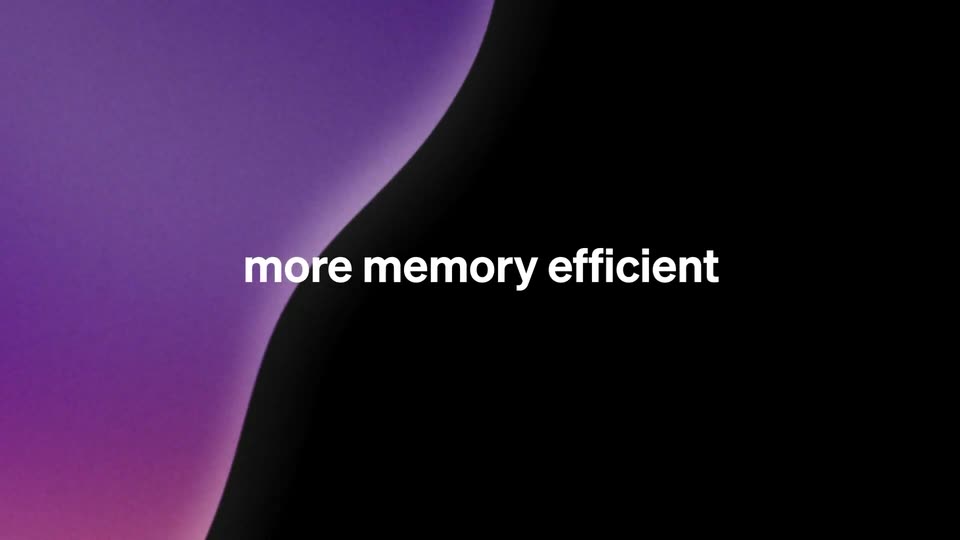
The phrase holds centered in white over a black field while a soft purple gradient shape drifts in from the left edge and widens across the frame.
On-screen text: “more memory efficient”
Camera: Static
20 · Feature reveal · 0:37–0:38
Black background with two large soft gradient blobs, orange-pink top-left and purple on the right, drifting slowly. Centered white text reads “more memory efficient”, then swaps to “more explainable” as the frame pulls into focus.
On-screen text: “more memory efficient”, “more explainable”
Camera: Static
21 · Feature reveal · 0:38–0:39
Centered on black, the caption higher quality starts soft and out of focus, then sharpens and scales up. Large pink and purple gradient blobs drift slowly behind it on a locked-off frame.
On-screen text: “higher quality”
Techniques: Kinetic type
Camera: Static
22 · Feature reveal · 0:39–0:42
A benchmark scatter plot with a pink highlight band zooms out to reveal more labeled model points. A purple LFM 1B pill badge pops in at the center, then drifts left and fades as a headline scales in.
On-screen text: “LFM 1B”, “higher quality”
Camera: Pan
23 · Feature reveal · 0:42–0:46
A benchmark scatter plot with pink vertical bands pans left to right across the x-axis. Pill badges with a flame logo, LFM 1B, LFM 3B and LFM 40B MoE (A12B), pop in at their data points while a purple line draws between them.
Camera: Pull out
24 · Feature reveal · 0:46–0:47
A white benchmark scatter plot labels LFM 1B, 3B and 40B MoE against other models on pink bands, then dissolves to white into a 3D perspective of a white server unit with a floating spec card listing model sizes.
On-screen text: “LFM 40B MoE (A12B)”, “LFM 3B”, “LFM 1B”
Techniques: 3D mockup, Masking
Camera: Static
25 · Demo · 0:47–0:49
Two angled monitors fill the frame in a shallow-focus lab shot. The left screen holds a white wireframe drone model that slowly rotates beside control panels, while the right screen displays blue data graphs and waveforms. Blurred workers move in the background.
Camera: Push in
26 · Demo · 0:49–0:50
A monitor in a blurred office shows a dark mission-control interface; a wireframe satellite with two solar panels orbits a night Earth as the camera pushes in, tightening from a two-screen view to the satellite.
Techniques: UI zoom, 3D mockup
Camera: Push in
27 · Demo · 0:50–0:50
A white hexagonal satellite with two solar-panel wings and a round dish antenna hovers over a cloud-streaked Earth, city lights glowing on the left horizon. The camera drifts slowly as the satellite tilts and the planet scrolls beneath it.
On-screen text: “Force Refresh”
Techniques: 3D mockup
Camera: Push in
28 · Demo · 0:50–0:53
A first-person drone view flies forward through a sunlit eucalyptus forest with white smoke rising from the burnt ground. The push-in accelerates, smearing the trees and ground into heavy radial motion blur as the sun blooms on the right.
Techniques: Speed ramp, Parallax
Camera: Push in
29 · Demo · 0:53–0:55
A low FPV drone shot skims across dry scrubland, banking past a thin eucalyptus trunk as smoke haze drifts through the sunlit air. The camera rushes forward over sparse grass and burnt ground, the sun flaring top right.
Camera: Push in
30 · Demo · 0:55–0:58
A doctor in a white coat and blue scrubs walks toward the camera down a bright hospital corridor, holding a phone. A translucent holographic panel titled Preferences floats at his left, joined to the phone by thin glowing lines, its rows sliding as he moves.
Techniques: 3D mockup, Parallax
Camera: Pull out
31 · Demo · 0:58–1:00
A lab monitor angled in 3D perspective shows a genomic dashboard: a stained cell image, a DNA sequence panel, and a row of rotating double helix models. The camera pulls back to reveal beakers and bottles on the desk.
On-screen text: “Analysis progress:”
Camera: Pull out
32 · Demo · 1:00–1:02
A yellow industrial robot arm in a factory holds a dark solar panel, then swings it out of frame to the right, leaving the arm centered. The footage fills the top half of a plain white background.
Camera: Static
33 · Demo · 1:02–1:05
Split screen: top shows two yellow industrial robot arms on a factory line, bottom mirrors the layout as a glowing blue wireframe 3D model with pink robot outlines and drifting particles. The camera drifts slowly forward through both.
Techniques: Split screen, Particles, Parallax
Camera: Static
34 · Demo · 1:05–1:06
Split screen: the top half shows a factory floor with yellow robotic arms moving over workbenches, while the bottom half mirrors them as a glowing cyan and pink wireframe 3D model on a black field of drifting particles.
Techniques: Split screen, Particles
Camera: Static
35 · Demo · 1:06–1:06
Split screen compares a real factory floor with its digital twin. Top: a yellow KUKA robot arm lifts and moves a metal part along a production line. Bottom: a glowing blue wireframe hologram of the same layout, with pink robot outlines and drifting light particles.
Techniques: Split screen, Particles
Camera: Static
36 · Other · 1:06–1:09
Close-up of two hands in a mustard sweater holding a dark phone; the index finger taps and swipes the screen. The shot cuts to a 3D globe of Earth turning in a dark starry void.
Camera: Static
37 · Other · 1:09–1:12
A 3D Earth globe floats centered in a starry black void, lit from the right. The view pushes straight into the planet, accelerating through the swirling white cloud layer until the frame dissolves into blurred blue atmosphere.
Techniques: Speed ramp
Camera: Push in
38 · Other · 1:12–1:19
A blurred purple and orange gradient drifts slowly behind centered white text. The line builds word by word, then cross-fades to a second line and fades out.
On-screen text: “The future of AI should not be limited”, “it should be Liquid.”
Techniques: Kinetic type
Camera: Static
39 · Other · 1:19–1:20
A soft purple and pink gradient fills the frame. A centered line of faint white text reads “it should be Liquid,” then fades out as the gradient blobs drift.
On-screen text: “it should be Liquid.”
Camera: Static
40 · Outro · 1:20–1:20
Three soft, blurred oval blobs in coral pink and violet purple drift on a black background. The left blob shifts from a vertical oval to a rounder shape while the top-right and bottom-right blobs settle into calmer forms.
Techniques: Morph
Camera: Static
41 · Outro · 1:20–1:21
Three soft, out-of-focus ovals in pink and purple drift on black, then snap into focus and morph into the three-petal logo, a ring of curved segments with a small white dot at its center. The mark settles dead center.
Techniques: Morph
Camera: Static
42 · Outro · 1:21–1:25
A purple geometric icon is centered on a black background. The wordmark 'Liquid' animates in to the right, forming a centered lockup that holds for the rest of the clip.
On-screen text: “Liquid”
Techniques: Kinetic type
Camera: Static