1:27


Glen - Glen is now open to the public!
Glen · B2B · Oct 2026
LinkRouter · Nov 2026 · 0:30 · AI-annotated
LinkRouter’s 0:30 launch film runs 20 scenes, about 1.5 s each. The product shows up at 0:04 and 7 features are revealed. The call to action lands at 0:27 (91% in). The video is built as a chain of short beats, each pairing a 3D-tilted or flat app mockup with a single bold headline that swaps in place, moving from the pain of misrouted links through one feature per beat to pricing and a final buy card. Pacing runs near 20 cuts per minute over a steady mid-tempo pulse, with blur-to-sharp headline transitions, slide-in window layers, and small number-badge key hints as the signature moves.
Is this your launch? to your site or press kit.
Glen · B2B · Oct 2026
Item · Oct 2026
Spine · B2B · Sep 2026
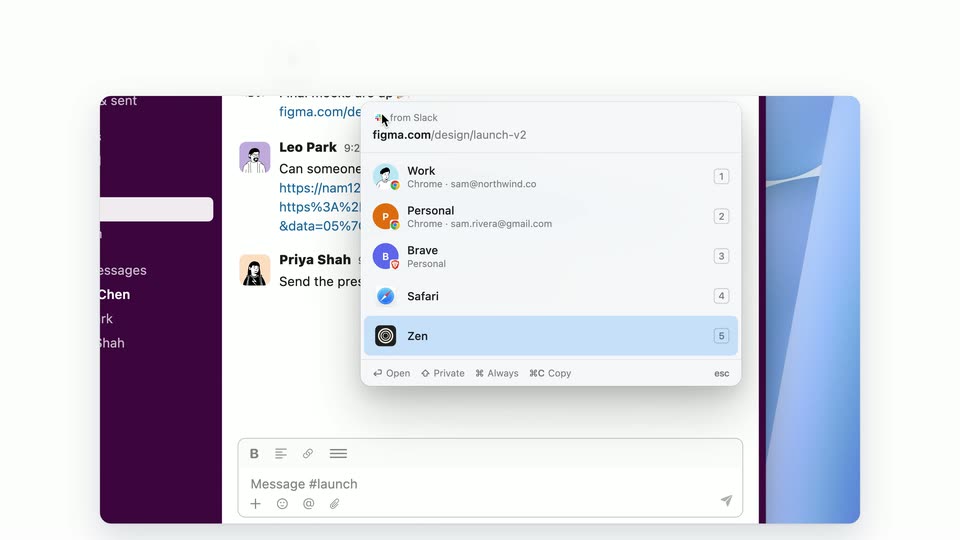
A tilted Slack window rests on a light gray backdrop beneath a bold headline that fades in. The window then slides left while a Figma login window slides in from the right edge, both kept in 3D perspective with soft shadows.
On-screen text: “You click a link in Slack.”
Techniques: 3D mockup
Camera: Pull out
Stacked app windows in 3D perspective on a light background. A Figma login window slides right to reveal a purple chat app; a cursor clicks a link, and a New Message mail window slides in front. The top headline swaps to “Email links? Apple Mail. Again.”
On-screen text: “Wrong browser. Signed out.”, “Email links? Apple Mail. Again.”
Techniques: 3D mockup, Cursor demo
Camera: Pull out
On a white background, a gray placeholder icon and faded headline snap to full color. The black LinkRouter icon slides left to uncover the static wordmark, while the bold headline Meet LinkRouter. scales in at the top.
On-screen text: “Meet LinkRouter.”
Techniques: Kinetic type
Camera: Static
A flat chat-app screen on white: a cursor hovers a link in the message list and a profile menu drops down, while the headline swaps between steps and a number-key icon appears. The link then opens in a design-tool canvas showing a pricing page as the frame blurs into a transition.
On-screen text: “Click a link. Choose where it opens.”, “Every browser. Every profile.”, “Press a number. Done.”
Techniques: Kinetic type, Cursor demo
Camera: Pan
A desktop screen shows a Figma browser window layered over a messaging app, with a numbered badge and bold headline above. The frame pushes in toward the open design canvas displaying a pricing page.
On-screen text: “1”, “Press a number. Done.”
Techniques: UI zoom
Camera: Push in
A purple chat-app interface floats in 3D on a white field as the headline above it sharpens from a blur. The view zooms in and an account-picker dropdown slides out on the right under a hovering cursor.
On-screen text: “Email opens as the right account.”
Techniques: 3D mockup, UI zoom, Cursor demo
Camera: Push in
A flat, centered Slack thread cuts to a Gmail inbox, each showing the same account-picker dropdown open on the right. The headline above changes from one line to another, now paired with a small numbered badge.
On-screen text: “Email opens as the right account.”, “1”, “Gmail, from the right address.”
Techniques: Cursor demo
Camera: Pull out
A tilted 3D desktop mockup displays Gmail's compose list and a New Message window with an open contact dropdown. The camera zooms toward the recipient field as a cursor lands on it, while the headline sits above.
On-screen text: “1”, “Gmail, from the right address.”
Techniques: 3D mockup, UI zoom, Cursor demo
Camera: Push in
A flat chat interface with a purple sidebar and message thread sits below a bold headline that fades in. A numbered dropdown of browser profiles opens over the messages as a cursor hovers the top row.
On-screen text: “Hold ⌘ 1 to always open it there.”
Techniques: Cursor demo
Camera: Push in
Ghosted Slack and Figma windows overlap under a bold headline, then snap into a solid browser window on a desktop, tilted in 3D perspective. The Slack chat and page dropdown remain layered over the Figma canvas.
On-screen text: “⌘ 1 Hold ⌘ to always open it there.”
Techniques: 3D mockup
Camera: Pull out
A dark gray headline holds above a tilted 3D macOS desktop. A purple Slack-like app and a Figma window with an open page menu settle from a ghosted overlap into a clean view, while a diagonal light band glints across the right edge.
On-screen text: “Next time, it just opens.”
Techniques: 3D mockup, Light sweep
Camera: Pull out
A LinkRouter rules window floats over a blurred mail app beneath a large headline. Rule rows for figma.com, Slack and acme.com slide into the list one by one, pushing the placeholder rows downward.
On-screen text: “Rules for sites, apps and senders.”
Camera: Push in
A chat window floats on a light background, its message thread showing a long URL crossed out in red beside a clean link. The view scrolls up as a profile-picker dropdown opens on the right under a cursor, while a bold headline sits at the top.
On-screen text: “Tracking junk, stripped.”
Techniques: Cursor demo
Camera: Pan
A browser window in 3D perspective shows a Figma login form, then the form is replaced by a Figma design canvas as a profile-switcher popup opens at the lower right and a cursor hovers. A Slack sidebar sits behind the window on the left.
On-screen text: “Opened in the wrong one? Bounce it.”
Techniques: 3D mockup, Cursor demo
Camera: Pull out
The headline 'Same page. Right profile.' sits above two overlapping app windows. A Slack-style chat window slides off left as the Figma design window, with Home, Pricing and Checkout frames, centers on a light background.
On-screen text: “Same page. Right profile.”
Camera: Push in
A bold dark gray headline sits above a macOS settings window over blurred blue wallpaper. The window crossfades from the Link Router toggle list to the Memory and About your data sections, zooming in to fill the frame.
On-screen text: “Private. Links never leave your Mac.”
Techniques: UI zoom
Camera: Push in
A white screen shows the headline “Works with what you already use.” above a row of app icons (Safari, Chrome, Brave, Zen, Gmail, Mail) that pan left. The headline blurs out and is replaced by “Pay once. Yours to keep.” as three price cards slide in.
On-screen text: “Works with what you already use.”, “Safari”, “Chrome”, “Brave”, “Zen”, “Gmail”, “Mail”, “Pay once. Yours to keep.”, “$5”, “1 Macs”
Camera: Static
A white screen holds the black headline above three rounded price cards, the middle black card settling from a lifted state to flat as a gray caption fades in below.
On-screen text: “Pay once. Yours to keep.”, “$5”, “1 Mac”, “$10”, “3 Macs”, “$15”, “5 Macs”, “No subscription. Free updates.”
Camera: Static
A bold headline sits above three rounded pricing cards, $5, $10 and $15, with a gray footnote beneath, all on a plain white field. The layout holds briefly, then dissolves to blank white.
On-screen text: “Pay once. Yours to keep.”, “$5”, “1 Mac”, “$10”, “3 Macs”, “$15”, “5 Macs”, “No subscription. Free updates.”
Camera: Static
On a pale background, a dark rounded app icon with a fork-and-pin mark sits beside the LinkRouter wordmark. A bold two-line headline holds below it, while a gray URL and a black Buy pill fade in at the bottom before the frame locks off.
On-screen text: “LinkRouter”, “Every link opens”, “as the right you.”, “snugbits.com/linkrouter”, “Buy from $5”
Camera: Static