3:06

mrs. robot - today we are announcing openrouter for commerce: a single endpoint t
Agentcard · Fintech · Oct 2026
Lightreel AI · Oct 2026 · 0:35 · AI-annotated
Lightreel AI’s 0:35 launch film runs 11 scenes, about 3.3 s each. The product is on screen from the first frame. The call to action lands at 0:31 (89% in). The video holds one locked-off split screen of ChatGPT and Lightreeel answering the same prompt, then zooms into the winning report as the handwritten marker notes circle stats and draw arrows. Pacing is a steady cut on the beat, and the signature move is the red-orange annotation layer that turns a plain interface tour into a data-versus-guesses comparison.
Is this your launch? to your site or press kit.
Agentcard · Fintech · Oct 2026
Liquid · May 2026
A locked-off split-screen shows a dark chatgpt interface left and a white lightreel interface right, each labeled in orange script. The same prompt types into both input boxes, then both switch to thinking and response states.
On-screen text: “chatgpt”, “lightreel”
Techniques: Split screen
Camera: Static
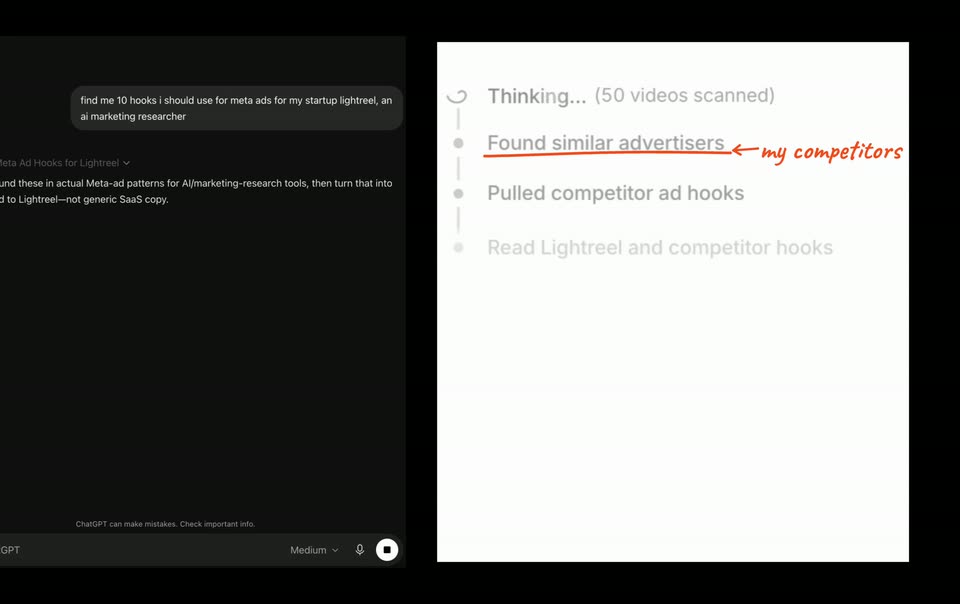
Split screen shows a dark ChatGPT chat on the left and a light Lightreel timeline on the right. The right panel cycles through step labels and ad thumbnails, while red handwritten marks underline a line and circle a stat.
On-screen text: “chatgpt”, “lightreel”, “my competitors”
Techniques: Split screen
Camera: Push in
Split screen with a dark ChatGPT prompt window on the left and a white step list on the right. Red marker handwriting is drawn onto the right panel, circling the scanned-video count, drawing an arrow, and writing two lines of explanation.
On-screen text: “my competitors”, “watching actual videos”, “analyzing tens of thousands of Meta ads”
Techniques: Split screen, Kinetic type
Camera: Static
A split screen pairs a dark chat prompt on the left with a white research interface on the right, overlaid with red handwritten notes circling “160 videos scanned” and listing what the tool does. The split then zooms into the white interface until it fills the frame.
On-screen text: “(160 videos scanned)”, “watching actual videos”, “analyzing tens of thousands of Meta ads”, “pulling live data”
Techniques: Split screen, UI zoom
Camera: Push in
A white report document scrolls down; an orange marker underline draws beneath a sentence and a circle encloses the 'Still running + relaunched' tag. Orange handwritten cursive text 'recognized my own ad account' writes itself in on the right.
On-screen text: “recognized my own ad account”
Techniques: Kinetic type
Camera: Push in
A report with a red handwritten note and a circled label fills the frame, then a dark chat pane slides in from the left to form a split screen. A second red note, 'no data, just guesses,' is drawn with an arrow pointing at the hook list.
On-screen text: “recognized my own ad account”, “no data, just guesses”
Techniques: Split screen
Camera: Pull out
A split screen shows a dark chat window listing ten ad hooks on the left and a lighter research dashboard with video thumbnails on the right. A red handwritten note with an arrow points to the numbered list on the left panel.
On-screen text: “no data, just guesses”
Techniques: Split screen
Camera: Pan
A white report view with three video thumbnails sits beside a dark chat sidebar. A cursor clicks a thumbnail, an orange circle is drawn around it, then an orange handwritten caption appears on the right with an arrow pointing to the circle.
On-screen text: “everything backed by real data”
Techniques: Cursor demo, Kinetic type
Camera: Static
A close-up of a research-tool article with three video thumbnails and an orange handwritten note pointing to a circled stat. The view then zooms out to reveal the full dark app window, with a chat panel on the left and the article panel on the right.
On-screen text: “everything backed by real data”
Techniques: UI zoom
Camera: Pull out
The scene settles from a crossfaded document overlay into a chat interface showing a “10 hooks to run” grid of nine cards. A blue highlight jumps across card text, then a handwritten orange note “real, non-slop formats” draws in on the right with an arrow pointing to a card.
On-screen text: “real, non-slop formats”
Camera: Static
A white grid of beige hook cards sits behind large orange serif text reading “try for free lightreeel.ai” that fades in at center. A cursor drags a blue selection across one card while orange handwritten script “real, non-slop formats” with an arrow points at it.
On-screen text: “try for free”, “lightreeel.ai”, “real, non-slop formats”
Techniques: Cursor demo
Camera: Push in