0:22
Explore
Lightreel AI - 🚨 BREAKING: Introducing Fable 5.5 for finding creators Just describe
Lightreel AI · Nov 2026 · 0:21 · AI-annotated
- Length
- 0:21
- Scenes
- 15 · 1.4 s avg
- Product on screen
- 0:00
- Call to action
- 0:18 · 87%
- Voiceover
- Yes
00:00:00 / 00:21:06
Lightreel AI’s 0:21 launch film runs 15 scenes, about 1.4 s each. The product is on screen from the first frame. The call to action lands at 0:18 (87% in), over a voiceover. The video is built on flat color fields of cream, white, and electric blue, with rapid typographic reveals and locked-off UI cards cut fast to match the typed prompt and the searching montage. Signature moves are word-by-word text builds, a vertical live-action clip carousel framed by a serif caption, and a rapid-fire find ANY headline swap that lands on a static blue CTA card.
Footage neededEstimated needs: 2 capture groups — your screens or recordings · 3 filmed passages — shoot, supply or replace · 1 graphic passage — draw or supply
Is this your launch? to your site or press kit.
More like this

0:43
govi - Introducing terminal-mac. Entire MacOS that runs inside your existin
terminal-mac · Nov 2026
0:22
Lightreel AI - Introducing the Claude Marketing MCP Connect Lightreel to Claude and
Lightreel AI · Sep 2026
Lightreel AI - 🚨 BREAKING: Introducing Fable 5.5 for finding creators Just describe, scene by scene
· 15 scenes as text
01 · Product intro · 0:00–0:03
On a flat beige field, a two-line headline builds up word by word. The first line reads “Introducing Fable 5.5” with the name in orange; the second line “for finding creators” is black serif. A small white heart sits at the line's end before the text locks in place.
On-screen text: “Introducing Fable 5.5”, “for finding creators”
Techniques: Kinetic type
Camera: Static
02 · Demo · 0:03–0:05
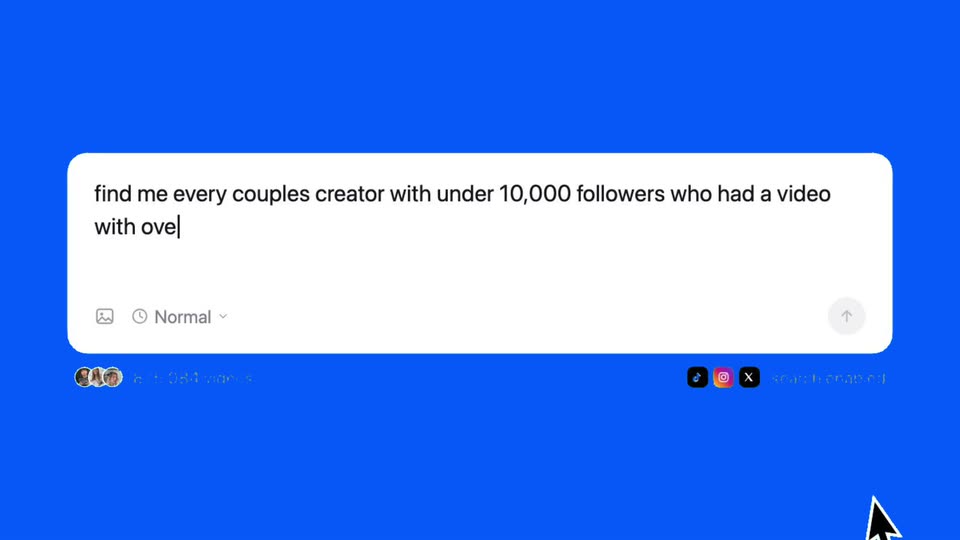
A white rounded input card sits centered on a solid blue field. A prompt types out character by character across two lines, the blue send arrow lights up when it finishes, and a small row of creator avatars plus TikTok, Instagram and X icons sits beneath the box.
On-screen text: “Introducing Fable 5.5”, “for finding creators”
Camera: Static
03 · Demo · 0:05–0:06
A white rounded chat input box sits centered on a blue field, filled with a typed prompt and a blinking caret. A black arrow cursor slides up from below and presses the blue circular send button at the box's right edge.
On-screen text: “arc.net”
Techniques: Cursor demo
Camera: Static
04 · Demo · 0:06–0:07
On a cream background, the serif word “searching.” sits at left while a vertical phone video of couples plays in the center and Instagram and TikTok icons stack at right. The center clip cuts from a night skyline walk to a sunset silhouette.
On-screen text: “searching.”, “find me every couples creator with under 10,000 followers who had a video”, “with over 100,000 views in the last 3 days”
Camera: Static
05 · Demo · 0:07–0:08
A vertical night video of a singing crowd sits in the center of a beige frame, flanked by the serif word searching on the left and stacked Instagram and TikTok icons on the right. The frame stays locked while the clip plays.
On-screen text: “searching.”
Camera: Static
06 · Demo · 0:08–0:08
On a beige background, a vertical video in the center cuts from a woman doing a hip thrust in a bedroom to two people wearing black face masks. To the left, the word searching in black serif changes from an ellipsis to a period; to the right, the Instagram and TikTok icons sit stacked.
On-screen text: “searching...”, “searching.”
Camera: Static
07 · Demo · 0:08–0:09
A cream background holds a static layout: the word searching.. sits at left, a vertical phone video of two people in a car sits center, and Instagram and TikTok icons sit at right. The frame is locked-off with no motion.
On-screen text: “searching..”
Camera: Static
08 · Demo · 0:09–0:09
A vertical clip of a smiling couple in a lit room sits centered on a beige field, flanked by the static word searching... on the left and Instagram and TikTok icons stacked on the right. The frame is locked off while the clip plays.
On-screen text: “searching...”
Camera: Static
09 · Demo · 0:09–0:12
A dark serif headline types in word by word above a white table card on a beige background. The table populates row by row with creator handles, follower counts, green engagement percentages, descriptions, and emails.
On-screen text: “found 200 couples from the last 3 days:”
Techniques: Kinetic type
Camera: Static
10 · Demo · 0:12–0:13
A plain white frame holds two lines of text, locked off. The word 'find' sits in black sans-serif above 'SPIDERMAN EDITORS' in a bold dark red comic-style face. Nothing moves.
On-screen text: “find”, “SPIDERMAN EDITORS”
Camera: Static
11 · Demo · 0:13–0:14
A plain white frame holds three lines of left-aligned text. A small black lowercase 'find' sits above two lines of dark blue, bold italic condensed type reading 'TRAVEL INFLUENCERS' and 'UNDER 9,000 FOLLOWERS'. The composition is static with no motion.
On-screen text: “find”, “TRAVEL INFLUENCERS”, “UNDER 9,000 FOLLOWERS”
Camera: Static
12 · Demo · 0:14–0:15
A white view holds the black word find above a bold orange headline that swaps through phrases, ending on UNDER 9,000 FOLLOWERS. A segmented control with three category tabs sits below, a cursor arrow resting at the bottom edge.
On-screen text: “find EVERY BASED BODYWORKS UGC CREATOR”, “ANY INFLUENCER”, “UNDER 9,000 FOLLOWERS”
Techniques: Kinetic type
Camera: Static
13 · Demo · 0:15–0:15
A light off-white frame holds the headline 'find ANY UGC CREATOR' on the left. A gray word, first 'INFLUENCER' then 'MICRO-INFLUENCER', crossfades behind the bold line. A three-segment tab bar sits below while a mouse cursor drifts right along the bottom edge.
On-screen text: “find”, “ANY UGC CREATOR”, “INFLUENCER”, “MICRO-INFLUENCER”
Techniques: Kinetic type
Camera: Static
14 · Demo · 0:15–0:18
A plain off-white frame holds the word find above a large bold line that cycles through ANY SHOT-WEIGHTER, ANY CREATOR, ANY CLIPPER, ANYONE with overlapping crossfades, while a cursor slides a white pill from the Influencers tab to Micro-influencers on a three-segment control below.
On-screen text: “find”, “ANY SHOT-WEIGHTER”, “ANY CREATOR”, “ANY CLIPPER”, “ANYONE”
Techniques: Kinetic type, Cursor demo
Camera: Static
15 · CTA · 0:18–0:21
A solid blue end card holds two centered lines of white text, the call to action and the product URL, locked off and static for the full duration.
On-screen text: “try for free at”, “lightreel.ai”
Camera: Static