0:24


Motion Graphics Explainer Video for Podcasting Platform | Chord
Chord · Oct 2026
Levo · Nov 2026 · 0:49 · AI-annotated
Levo’s 0:49 launch film runs 7 scenes, about 7.0 s each. The product shows up at 0:10 and 2 features are revealed. The call to action lands at 0:47 (95% in), over a voiceover. The video opens with a rapid cascade of disk full alerts, then settles into angled 3D shots of a menu bar panel that swaps bold headlines while the cursor performs cleanup actions. Pacing is tight at about 92 bpm with quick reframes and blur transitions, using a dark blue stage and red striped wallpaper to keep the interface in focus.
Is this your launch? to your site or press kit.
Chord · Oct 2026
Commas · Sep 2026
primitive · B2B · Oct 2026
A dark macOS Storage window on a MacBook in 3D perspective as notification banners about disk space errors pop up one after another, overlapping the screen. The camera pulls back from a close-up of the window to the full laptop, then blurs into a fast exit.
Techniques: 3D mockup, Speed ramp
Camera: Pull out
A MacBook screen tilts in 3D against a dark blue backdrop. A macOS notification banner slides in beneath the menu bar stating the Mac is almost full, while a cursor hovers over the status icons.
Techniques: 3D mockup, Cursor demo
Camera: Static
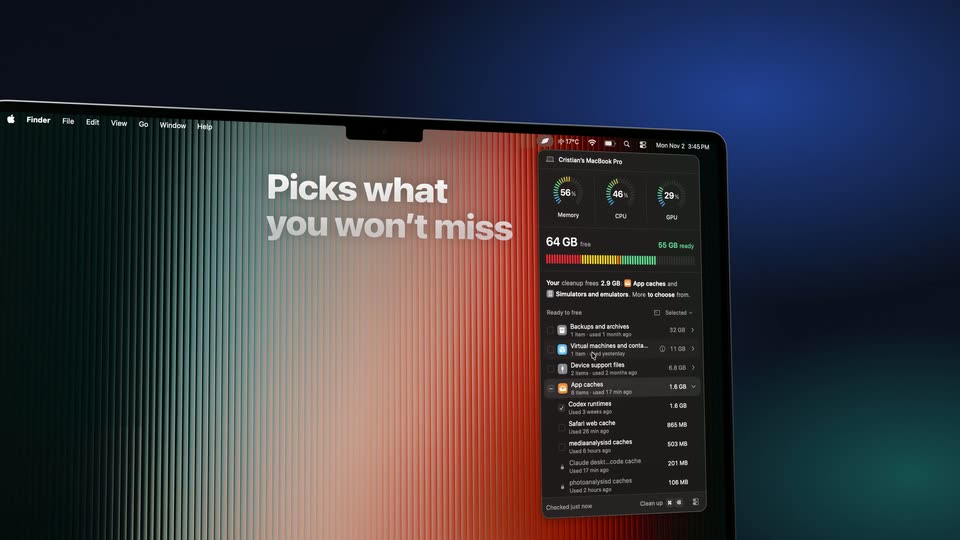
A MacBook Pro sits in 3D perspective on a dark blue backdrop, its screen showing a storage cleanup widget. A cursor opens a dropdown, checks file categories and expands a row, while large white headlines swap on the left and the view zooms into the list.
On-screen text: “Your AI knows what's junk”, “You decide how far it goes”, “Picks what you won't miss”, “Clears caches and temp files”
Techniques: 3D mockup, Kinetic type, Cursor demo, UI zoom
Camera: Pull out
An angled 3D MacBook shows a dark macOS dropdown of cache items; a cursor unchecks rows, the total falls, then clicks Delete, and the panel opens a quit-app menu. A white headline on the striped wallpaper reads 'Tick, confirm and it's gone'.
On-screen text: “Clears caches and temp files”, “Tick, confirm and it's gone”
Techniques: 3D mockup, Cursor demo
Camera: Pan
A tilted MacBook Pro in 3D perspective shows a dark menu-bar panel cycling through quit, uninstall and storage views. White italic headlines on the left swap from 'Quit what slows your Mac' to 'Uninstall in seconds' to 'Find what's eating your Mac' as the camera reframes to a side angle.
On-screen text: “Quit what slows your Mac”, “Uninstall in seconds”, “Find what's eating your Mac”
Techniques: 3D mockup, Cursor demo
Camera: Static
A MacBook Pro sits in 3D perspective against a dark blue backdrop, its screen showing a red striped wallpaper and an open menu bar stats panel. The camera orbits from the screen corner to the silver lid, blurring the panel into a floating card as white tagline text appears at the right.
On-screen text: “Or let Auto mode do the rest”
Techniques: 3D mockup
Camera: Static
A dark blue gradient holds the Levo app icon, a black rounded square with a white blob edged in orange, centered above the wordmark Levo. Below it sit the tagline and a URL, all static on a locked-off frame as the clip dims slightly.
On-screen text: “Your AI finds what's safe to delete”, “omggg.wtf/levo”
Camera: Static