
2:16
Explore
00:00:00 / 01:27:10
- Length
- 1:27
- Scenes
- 25 · 3.5 s avg
- Product on screen
- 0:00
- Features shown
- 3
- Call to action
- 1:15 · 86%
- Voiceover
- Yes
- Views
- 7.7K on X
as of November 23, 2026
Kiwi’s 1:27 launch film runs 25 scenes, about 3.5 s each. The product is on screen from the first frame and 3 features are revealed. The call to action lands at 1:15 (86% in), over a voiceover. Presenter-led explainer that alternates live-action shots of Melanie with flat vector animation and screen recordings, moving from a GTM-agent problem through three feature demos to a back-on-track payoff. Signature moves include the circular presenter inset, yellow highlight underlines, tick-up counters, and a pixel-dissolve gag.
Footage neededEstimated needs: 3 capture groups — your screens or recordings · 1 official logo — reused across the film · 8 filmed passages — shoot, supply or replace · 8 graphic passages — draw or supply
Is this your launch? to your site or press kit.
More like this

1:37

Sam Karu - Your AI notetaker is blind. My meetings are full of screen shares: c
Logical · B2B · Nov 2026
2:33

melanie - Today we're announcing @with_kiwi_ai: your GTM agent's data engineer., scene by scene
· 25 scenes as text
01 · Product intro · 0:00–0:00
A leafy green bamboo plant grows against a brown brick wall, while a white plaster wall fills the right third of the frame. The shot pans slowly to the right, sliding the white wall leftward and revealing more brick.
Camera: Static
02 · Product intro · 0:00–0:04
A woman with glasses steps out from behind a bamboo plant against a brown brick wall, smiling at the camera. On the white wall to the right, the Kiwi logo builds in: a yellow kiwi-slice app icon, the black wordmark, and a yellow underline.
Camera: Pull out
03 · Problem · 0:04–0:04
A smiling woman in a beige sweater stands before a brick wall and bamboo, filling the left two-thirds of the frame. A white side panel on the right shows the Kiwi logo, then switches to a row of avatar icons and a circular portrait of the woman.
Techniques: Split screen
Camera: Static
04 · Problem · 0:04–0:08
Four flat avatars sit at a desk with laptops under the fading-in headline, as role labels pop in above them while a presenter talks in a circular inset at bottom right. The view zooms into the yellow-shirted agent as a white agents panel slides in.
On-screen text: “Your sales team”, “SDR”, “AE · Jordan”, “CSM”, “Sales lead”
Techniques: Kinetic type, UI zoom
Camera: Push in
05 · Problem · 0:08–0:22
A browser window fills with agent cards as a yellow counter ticks from 1 to 20, beside a circular video of a woman. Red error badges pop onto cards and chat messages stack in from the right, then a frowning cartoon figure and a 6% roadmap card cover the grid.
Camera: Static
06 · Problem · 0:22–0:34
A flat illustration of a frowning man at a desk accumulates chat bubbles and counting stat cards while a roadmap bar climbs from 18% to 26%. A live-action circle of the speaker sits bottom right, then dissolves to full frame under a caption.
On-screen text: “GTM roadmap · this quarter”, “↓ pace slowing”, “kiwi is the data engineer for your GTM agents”
Techniques: Kinetic type
Camera: Static
07 · Feature reveal · 0:34–0:38
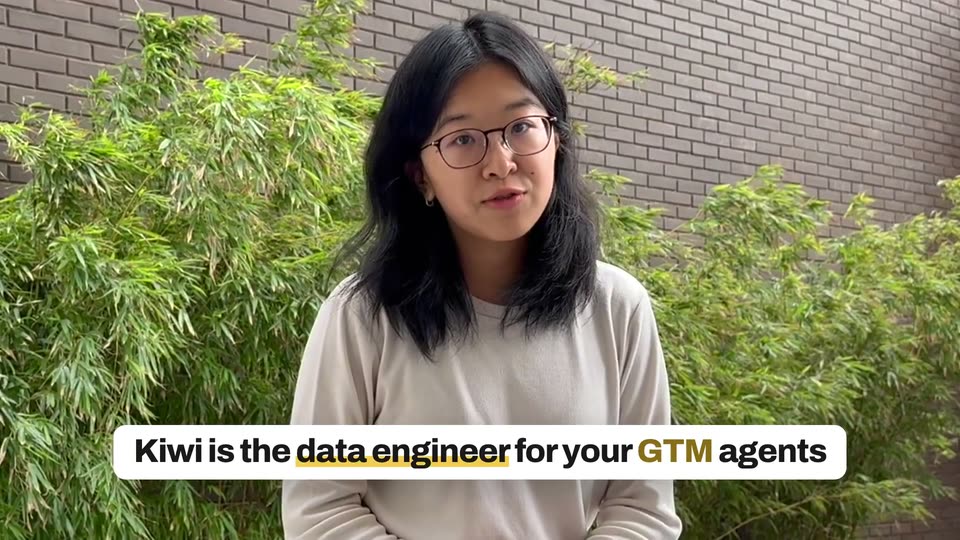
A woman with glasses and a beige sweater sits before a brick wall and bamboo, speaking to camera. A white caption bar at the bottom holds the line, a yellow highlight sliding in under the words data engineer.
On-screen text: “Kiwi is the data engineer for your GTM agents”
Camera: Static
08 · Feature reveal · 0:38–0:39
A woman with glasses and a beige sweatshirt stands before a brick wall and bamboo, speaking to camera. A white rounded caption bar is locked at the bottom. A small circular inset of the same woman pops into the lower right corner, then fades out.
On-screen text: “Kiwi is the data engineer for your GTM agents”
Camera: Static
09 · Feature reveal · 0:39–0:43
A cream background holds seven app cards stacked left, fading in in sequence, each linked by dotted lines with moving dots to a yellow 3D cylinder labeled Kiwi Data Lake. A circular inset of a talking woman bottom right then expands full screen as a checklist card fades in left.
On-screen text: “every record, every version”, “Complete”, “Consistent”
Techniques: 3D mockup, Particles, Masking
Camera: Pull out
10 · Feature reveal · 0:43–0:45
A woman with glasses speaks in front of a brick wall and green plants, while a clipboard graphic on the left lists three items. Green checkmarks fill the boxes one by one, matching the voiceover.
On-screen text: “Complete”, “Consistent”, “Correct”
Camera: Static
11 · Feature reveal · 0:45–0:46
A woman with glasses and a gray sweatshirt sits before a brick wall and bamboo, speaking. A clipboard graphic on the left lists three items, Complete, Consistent, Correct, each with a green checkmark.
On-screen text: “Complete”, “Consistent”, “Correct”
Camera: Static
12 · Feature reveal · 0:46–0:51
A screen recording of an agent-workflow page. The cursor rests on a highlighted checkpoint step as the view zooms in on the What it does card, then reframes right to the Run it button. A woman in a circular video bubble talks in the corner.
Techniques: UI zoom, Cursor demo
Camera: Push in
13 · Feature reveal · 0:51–0:53
A centered modal dialog sits over a blurred document page of SQL code that drifts upward. A cursor glides to the account field as Vantage Compute fills in, then rests above the yellow Start the run button. A circular video of a presenter plays in the lower right corner.
Techniques: Cursor demo
Camera: Pull out
14 · Feature reveal · 0:53–0:54
A product modal dissolves into a flat layout: a white checkpoint card with an Approve button on the left and a yellow 3D cylinder labeled Decision database on the right. A circular presenter video sits in the lower right corner.
On-screen text: “CHECKPOINT”, “Dana checks the renewal brief”, “Approve”, “Decision database”, “1,284 decisions”
Techniques: Morph, 3D mockup
Camera: Static
15 · Feature reveal · 0:54–0:57
A checkpoint card with a cursor on the Approve button sits beside a yellow database cylinder. The count ticks up as status pills slide in, then the card swaps to a change card with a struck-through line and empty input field. A circular video of a woman stays bottom right.
Techniques: Cursor demo
Camera: Static
16 · Feature reveal · 0:57–0:59
A white editor card floats on a cream background, its green field typing a new instruction word by word under a red strikethrough old one. A circular presenter video sits bottom right. The card slides left and shrinks as a faded eval card with before/after percentages fades in on the right.
Camera: Push in
17 · Feature reveal · 0:59–1:02
Two white cards sit on a cream background. The left card swaps a struck-through instruction for a green box. The right card's square grid fills green as a counter climbs to 248 and the after percentage rises to 97. A circular video of a woman speaking sits bottom-right.
On-screen text: “YOUR CHANGE”, “Renewal brief agent · step 2”, “EVAL · REPLAYED ON REAL HISTORY”, “248 of 248 past runs”, “Before 81% → After 97%”
Camera: Static
18 · Feature reveal · 1:02–1:05
On a cream background, three white cards are arranged: a change card, an eval card with a grid of green squares, and a suggestion card whose yellow Try it button slides in. A circular clip of a woman speaking and gesturing sits at the bottom right.
Camera: Static
19 · Feature reveal · 1:05–1:06
A white card holding a yellow bar chart titled RENEWAL BRIEF AGENT ACCURACY BY VERSION sits on a cream background. The eight bars grow upward left to right, each revealing its percentage, while a circular live-action inset of a woman with glasses talks in the lower right.
On-screen text: “RENEWAL BRIEF AGENT ACCURACY BY VERSION”
Camera: Push in
20 · Feature reveal · 1:06–1:07
A pixelated black word HALLUCINATION spans the cream background. A white bar-chart card fades out behind it, the word's left edge breaks into scattered pixels, then the letters settle solid. A circular portrait of a woman with glasses stays in the lower right corner.
On-screen text: “HALLUCINATION”
Techniques: Kinetic type, Particles
Camera: Static
21 · Feature reveal · 1:07–1:08
The word HALLUCINATION in black pixel type holds on a cream background while its left letters dissolve into a drifting cloud of small squares. A circular inset in the lower right shows a woman with glasses speaking against a brick wall and greenery.
On-screen text: “HALLUCINATION”
Techniques: Kinetic type, Particles
Camera: Pan
22 · Feature reveal · 1:08–1:09
A swarm of small dark gray squares drifts across the lower cream background, then thins out and vanishes. A circular headshot of a woman with glasses in the bottom right corner fades away with them.
Techniques: Particles
Camera: Pan
23 · Other · 1:09–1:15
Five flat-illustration people sit at a table with laptops; a top progress bar fills from 26% to 82% as green checkmarks pop above each person in sequence. A small back on track tag fades in. A circular live-action presenter inset sits bottom right, then the scene cuts to her full-frame.
On-screen text: “GTM roadmap · this quarter”, “↑ back on track”
Techniques: Particles
Camera: Static
24 · CTA · 1:15–1:24
A woman with glasses and a cream top stands centered before a brown brick wall with green bamboo below, speaking to camera. White tilted words ENABLEMENT and ACCURACY fade in on either side of her, then TRYKIWI.NOW fades in at the top.
On-screen text: “ENABLEMENT”, “ACCURACY”, “TRYKIWI.NOW”
Camera: Static
25 · Outro · 1:24–1:27
The Kiwi logo and tagline fade in on a cream background, with GTM in gold and data engineer underlined in yellow. A yellow pill button carrying the URL then fades in below the line.
On-screen text: “Your GTM agent's favorite data engineer”, “trykiwi.now”
Camera: Static