1:57
SaaS Launch Video with Cinematic Storytelling | Rodeo
Rodeo · Nov 2026
JOS · Jun 2023 · 1:38 · Full motion · AI-annotated
studio What a Story · director Kalpajit · director Shivam · director Yogendra · director & VO Artist · director Music Team · producer Emilyn Chua · director Vikas
JOS’s 1:38 launch film runs 44 scenes, about 2.2 s each. The product shows up at 0:19 and 3 features are revealed. The call to action lands at 1:33 (96% in), over a voiceover. The video is a linear explainer: a problem block, a solution title card, then a chain of benefit beats each opened by a short title and shown through flat vector characters, line-art diagrams and dotted connectors. Signature moves are pop-in card frames, a peach hand tapping UI, drifting teal dots, and the city skyline that bookends the story.
Is this your launch? to your site or press kit.
Films whose music sounds like this one, voice left out
Hilbert · Corporate / Tech Launch
Coworker · Electronic
Flat illustration cards pop in on a white background. The central card reveals a woman with a black bob and teal top, while a card with a bespectacled man and document shapes slides in from the left and small blue dots drift around the edges.
Techniques: Particles
Camera: Pull out
Flat vector avatars in white card frames pop in one by one across a pale grid, each beside a line-drawn building. The words HYBRID, WORK and CULTURE fill in letter by letter, then the camera zooms and pans so the labels slide out of frame.
On-screen text: “HYBRID”, “WORK”, “CULTURE”
Techniques: Kinetic type
Camera: Pull out
Flat vector portraits of remote workers sit inside white framed cards on a light background. The collage scrolls vertically, revealing new figures as small blue dots and dotted connector lines drift alongside.
Camera: Pan
Three flat-illustrated people in teal shirts stand on a gray platform labeled IT Department, cycling through shrugging and pointing poses. Around them, line-art icons of browsers, monitors, phones and clouds fade in and drift on a pale background as the camera pulls back.
On-screen text: “IT Department”
Camera: Pull out
Three flat-illustration figures in teal shirts stand on a gray platform labeled IT Department, surrounded by floating line-art tech icons. A translucent teal circle expands behind the group, growing to cover them as an exclamation mark pops above the center figure.
On-screen text: “IT Department”
Camera: Pull out
A line-drawn city skyline grows from a single tower into a full row of buildings on a base line, while the labels Resilient, Agile and Efficient with small icons slide outward and fade. The finished skyline blurs into a card layout at the end.
On-screen text: “Resilient”, “Agile”, “Efficient”
Techniques: Particles
Camera: Pull out
A 3D field of white cards with blue icons and text labels floats in space. The camera pans and zooms through the drifting cards. A shallow depth of field blurs the background layers while keeping the foreground sharp.
On-screen text: “Holistic Cybersecurity Defense & Compliance”, “Technology Discontinuities”, “Multiple Devices (incl. BYOD)”, “Consumerisation”, “App Modernization”, “Increased Employee Engagement”, “Competition & Regulatory”, “Improved Business Continuity”, “Work from Anywhere”, “New Workstyle and Skills Requirements”
Techniques: Parallax, 3D mockup, UI zoom
Camera: Pull out
A flat line-art laptop sits centered on white as the title “Virtual Desktop Infrastructure” types in letter by letter. Four line icons with short labels fade in at the corners, linked by dotted lines, while a faded diagram behind dissolves and small blue dots drift.
On-screen text: “Virtual Desktop Infrastructure”, “Highly Secure”, “Centralised Management”, “Seamless Collaboration”, “Cost Efficient”
Techniques: Kinetic type, Particles
Camera: Pull out
A flat illustration shows two peach hands tapping a wireframe laptop screen while line-art industry icons (heart, robot arm, medal, shop) with dotted connectors pop in around it on a soft blue-green gradient.
On-screen text: “Healthcare”, “Manufacturing”, “Education”, “Retail”, “Construction”
Camera: Pull out
A wireframe dashboard in 3D perspective sits at center, framed by line-drawn industry icons (healthcare, manufacturing, finance, retail, education, construction) joined by dotted lines. An orange hand points at the screen's base at the start, then exits.
On-screen text: “Healthcare”, “Education”, “Manufacturing”, “Retail”, “Finance”, “Construction”
Techniques: 3D mockup
Camera: Static
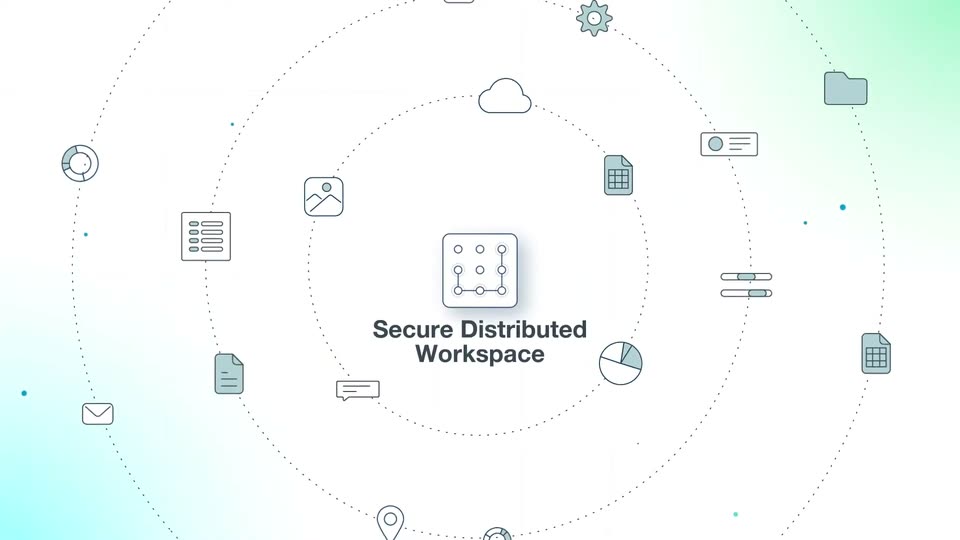
A rounded app icon with a node diagram sits above the caption “Secure Distributed Workspace” on a white field with a soft teal gradient. Line-art icons of clouds, documents, charts, folders and pins orbit on dotted circles as the view pulls back.
On-screen text: “Secure Distributed Workspace”
Camera: Pull out
A central network icon and the text 'Secure Distributed Workspace' sit on a light gradient background. Two concentric dotted rings surround them, holding various line-art icons such as clouds and folders that slowly orbit their paths.
On-screen text: “Secure Distributed”, “Workspace”
Camera: Pan
A white app-launcher window titled JOS Workspace floats at a 3D angle over a pale blue-green gradient. Its grid of colorful app tiles, from Google Mail to Salesforce, tilts and rises gently while small dots drift across the background.
Techniques: 3D mockup, Parallax
Camera: Push in
A web of flat vector avatars in blue and teal, linked by thin lines, floats over pale concentric circles. The camera pushes through the network as profiles drift past at different depths and grow larger.
Techniques: Parallax
Camera: Push in
A pale network of avatar icons floats over concentric radar rings as the camera pushes in. Blurred foreground avatars drift past while the view settles on a headset agent at a laptop, framed by a rounded triangle outline.
Techniques: Parallax, Morph
Camera: Static
A flat illustration of a woman types at a desk beside a dark 'IT Team Lead' pill as a padlock is drawn behind her and fades. 'Flexible Scaling Capabilities' appears above, four dashboard panels pop in around her, then 'Simplified Desktop Management' lands below as the panels drift away.
On-screen text: “IT Team Lead”, “Flexible Scaling Capabilities”, “Simplified Desktop Management”
Techniques: Particles
Camera: Push in
A flat vector illustration pans horizontally across a wide scene: a man in a teal shirt works on a laptop in a lounge chair beside a line-drawn palm tree, then a woman at an office desk with monitors appears, linked by a dashed teal line. Dark pill labels identify the characters.
On-screen text: “IT Team Lead”
Camera: Pan
Line-art illustration of a man with a laptop by a palm tree and a woman at a desktop, joined by an animated teal dotted line. A dashboard card with charts scales into the center in 3D perspective.
Techniques: 3D mockup
Camera: Static
On a white grid, a line-art laptop showing a dashboard settles from sketchy construction lines into a clean outline. A man in a blue cap then slides in from the right inside a video-call frame, linked by a dashed line.
Techniques: Morph
Camera: Static
A line-art laptop with a dashboard graphic anchors a white gradient field. Four video call tiles of illustrated coworkers pop in around it, linked by dotted lines; a bell, chat bubbles and a smiley icon appear as the tiles drift slowly outward.
Techniques: Particles
Camera: Pull out
A flat vector illustration of a woman in a blue blazer holding a tablet, inside a white card, scales up to the center as surrounding line-art icons and two side portraits fade away. A dark caption pill begins to slide in from the bottom.
Camera: Static
A flat vector woman in a blue blazer holds a tablet inside stacked card frames, tagged “IT Security Specialist.” A globe with a shield and lock icon enters on the right, dotted lines linking it to cloud and building icons labeled “Cloud Based” and “On-Premise.” Dots drift over a faint grid.
On-screen text: “IT Security Specialist”, “Cloud Based”, “On-Premise”
Techniques: Particles
Camera: Push in
Flat illustration on a pale grid background: a woman in a blue blazer holds a tablet in a card labeled IT Security Specialist. A globe with a shield-and-lock icon sits center, dotted lines linking it to cloud and rack server icons. Labels scale and slide in.
On-screen text: “IT Security Specialist”, “Cloud Based”, “On-Premise”
Techniques: Particles
Camera: Static
A flat illustration of a woman in a blue blazer holding a tablet sits left of a globe marked with two padlock shields, with cloud and server line icons on the right. The view pans right as the labels scale and slide in.
On-screen text: “IT Security Specialist”, “Cloud Based”, “On-Premise”
Camera: Pan
A flat network diagram on a soft cyan-to-green gradient. A globe with a shield and padlock sits at left, linked by solid and dotted lines to circular blue and teal icons. The view pans right across the lines as the label IT Security Specialist scales in.
On-screen text: “IT Security Specialist”
Camera: Pan
Two flat-illustration figures, a woman in teal and a man in blue, stand at a large white board of colorful app icons (Chrome, Office 365, Teams, Slides, Mail, Drive, Docs, Calendar). The board and teal circuit lines with round icons slide in from the sides and settle.
Camera: Pan
Two flat vector figures stand on either side of a white panel filled with a grid of app icons. The man in a blue sweater points at Slides, then Teams, then Calendar; the woman in teal gestures toward Chrome. Faint grid lines and small teal dots decorate the white background.
Camera: Static
A blurred app-icon grid sits behind a teal Data Protection card and six white circular line-icon badges that drift into a ring around it. The card rises while the grid slides down, creating a parallax depth.
On-screen text: “Data Protection”
Techniques: Parallax
Camera: Static
A shield card labeled Data Protection gives way to a flat illustration of a bespectacled man in a teal sweater holding a laptop, with line-art device icons and an IT Manager tag. The camera pans left as the figure scales up, icons fade, and the tag slides off frame.
On-screen text: “Data Protection”, “IT Manager”
Techniques: Parallax
Camera: Static
An illustrated man in glasses and a teal grid sweater stands at left, gesturing with his hand toward floating line-drawn chart panels: pie, bar, wave and zigzag graphs. The panels drift and resize while the charts redraw, over a pale teal gradient with a faint grid and scattered dots.
Camera: Pull out
A flat vector illustration of a bespectacled man in a teal sweater points at floating line-art chart cards on a soft gradient background, then a blue diamond with a green center expands from the middle to cover the frame.
Techniques: Masking
Camera: Static
A white diamond on a teal field opens like a mask, revealing a grid of illustrated avatar tiles linked by thin lines on a white background. A central man in a green plaid shirt is enlarged, with smaller figures in blue shirts scattered around.
Techniques: Masking
Camera: Pull out
A field of flat vector avatars in rounded square frames drifts slowly across a pale white-to-green gradient, linked by faint gray lines. The portraits, drawn in blue and teal, shift gently as the camera pans, suggesting a connected network of people.
Camera: Pull out
Flat vector avatars of people sit in rounded video-call tiles on a white grid. Large sharp tiles slide one way while smaller, blurred tiles behind shift at a different speed, creating a sense of depth.
Techniques: Parallax
Camera: Pull out
Two white cards with line icons, a cloud upload and a server rack, drift apart over a blurred field of blue and green person avatars. The cloud icon and its label shrink as the cards separate.
On-screen text: “Cloud Based”, “On-Premise”
Camera: Pull out
A blurred grid of blue and green avatar illustrations fills the background. Two white cards float in front, one with a cloud upload icon labeled Cloud Based, one with a server icon labeled On-Premise. The cards drift slowly while the background shifts at a different speed.
On-screen text: “Cloud Based”, “On-Premise”
Techniques: Parallax
Camera: Pull out
A vertical list of line-art user cards scrolls up over a faint grid as a peach-colored hand taps a dark checkmark on each row, marking a monitor, a laptop and a tablet in turn.
Techniques: Cursor demo
Camera: Pan
Flat line-art dashboard illustration on a white grid: checkboxes, a donut chart and bar charts. A hand taps the lower right, then the frame reframes onto a single centered card as the donut fills and a checkmark appears.
Techniques: UI zoom, Particles
Camera: Pan
A flat illustrated dashboard with checkboxes, a donut chart and a bar chart floats on a pale gradient grid. A peach hand slides in from the left and taps the second checkbox, which fills with a check while teal dots pop out, and the donut segments shift.
Techniques: Particles
Camera: Static
A flat vector dashboard panel with a donut chart, bar chart and text blocks rests on a pale mint gradient. A peach hand points at the left checklist, its index finger tapping the boxes while the panel drifts slightly right.
Camera: Static
A diagonal teal line sweeps across the frame, switching a wireframe dashboard and a ghosted figure into a colored illustration. A hand taps the third checkbox, filling it with a check, while a five-star rating bubble pops in above the woman at the desk.
Techniques: Masking
Camera: Pull out
A teal diagonal panel wipes across the frame, clearing to reveal a line-art city skyline that fills in with teal shading. The skyline rests on a light grid background dotted with small teal points.
Techniques: Masking
Camera: Static
A line-drawn city skyline rests on a white grid. Teal color fills the buildings from the base upward, like rising water with wavy tops, while a dark dollar coin slides along a dotted path below. The whole illustration fades to white.
Techniques: Masking
Camera: Push in
The green jos logo tile shrinks from an oversized square with a white border to a small centered mark. A dark Contact us today pill and the gray URL slide in below it, while soft blue and green gradient washes drift across the white grid background.
On-screen text: “Contact us today”, “A StarHub Company”, “www.jos.com.sg”
Techniques: Parallax
Camera: Push in