1:07

HealthTech SaaS Explainer Video | FlexDental x MotionCue
FlexDental · Jul 2026
Jitter · May 2026 · 0:48 · AI-annotated
Jitter’s 0:48 launch film runs 36 scenes, about 1.3 s each. The product is on screen from the first frame and 9 features are revealed. The call to action lands at 0:44 (92% in), over a voiceover. The video is built as a fast chain of black title cards, UI close-ups, and generated render demos, moving from a product promise to a chat-driven feature demo and then a capability montage. Its signature moves are blur-to-focus type reveals, centered frosted prompt cards, and 3D camera pushes into the editor.
Is this your launch? to your site or press kit.
FlexDental · Jul 2026
Kiwi · B2B · Oct 2026
TagadaRx · Oct 2026
A huge outlined wordmark in blue and purple wireframe type fills the dark frame, the right portion reading iter A with a glowing vertical bar at the edge. The letters start soft and blurred, then sharpen into a crisp neon outline over the second.
On-screen text: “Jitter AI”
Camera: Pan
The words “is here” sit centered on a black background, the blue “is” and white “here” resolving from a soft glowing blur into crisp focus on a locked-off frame.
On-screen text: “is here”
Camera: Static
On a black background, bold white sans-serif text builds word by word to read “Have an idea?”, a soft white glow blooming behind the letters as each word lands.
On-screen text: “Have an idea?”
Techniques: Kinetic type
Camera: Static
A two-panel layout sits side by side with a dark red control strip on the right. The left portrait de-pixelates from a blocky mosaic to a sharp photo of a red-haired person holding a baby, while the right landscape zooms out into a small framed card on black as its caption scales away.
On-screen text: “patagonia”, “FINDING”, “SPACE”
Techniques: Split screen, UI zoom
Camera: Pan
A three-panel layout holds the frame: a white panel pixelates into a colored mosaic on the left, a black panel turns a 3D cube of landscape photos under the patagonia wordmark in the center, and a dark-red panel drifts with red blob shapes on the right.
On-screen text: “patagonia”
Techniques: Split screen, 3D mockup
Camera: Push in
A three-panel split screen: left, a person in a green shirt holds a small white dog on white; center, a snowy Patagonia peak with the patagonia wordmark above and the headline BEYOND THE PEAK below, the image scaling up to fill the panel; right, a dark red field with a red dotted cross and AA, CC markers.
On-screen text: “patagonia”, “BEYOND THE PEAK”
Techniques: Split screen
Camera: Push in
A lock screen with a blue fluted-glass wallpaper sits centered on a pale blue background. The vertical glass panels shift their gradient pattern while the white clock and date stay fixed.
Camera: Pull out
A black-and-white Chanel campaign photo of a figure in profile sits centered on a light gray field. A wavy displacement ripples along the figure's edges, the distortion lines shifting and settling over the short clip.
Camera: Static
A black-and-white fashion poster sits centered on a light gray field, its image warped by a rippling fluted-glass distortion. The portrait of a face dissolves into a close-up of a hand gripping a denim cuff, while the CHANEL wordmark and collection caption hold still.
On-screen text: “CHANEL®”, “SPRING/SUMMER 2026 COLLECTION”
Techniques: Morph
Camera: Push in
A dark backdrop frames the tagline “Don't wait”, set in light blue and white. The word “wait” fades in beside “Don't”, then the line holds still.
On-screen text: “Don't wait”
Techniques: Kinetic type
Camera: Static
A near-black background holds two lines of bold white sans text. The first line, “Build the design”, resolves from a soft glow, then the second line, “tools you need”, fades and slides in beneath it, settling centered and still.
On-screen text: “Build the design”, “tools you need”
Techniques: Kinetic type
Camera: Static
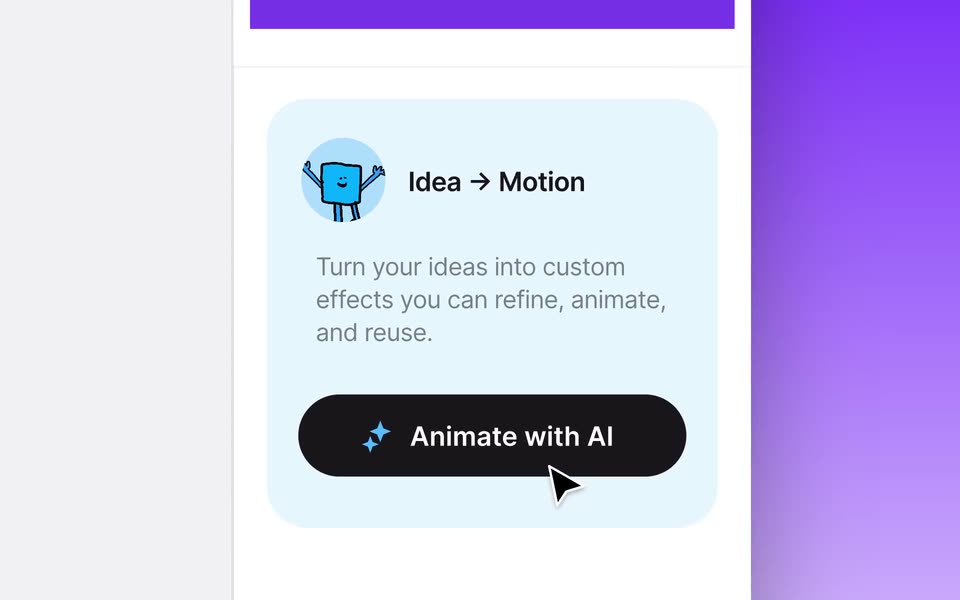
The motion editor zooms from the full window into the right-hand panel, isolating the Idea to Motion card with its black Animate with AI button. A cursor glides down and hovers the button as the view settles.
On-screen text: “Build the design”, “tools you need”
Techniques: UI zoom, Cursor demo
Camera: Push in
A dark chat panel with a blue AI message and a gray example bubble sits beside a white Custom Effect settings panel, above a time ruler. The blue message text fills in, then the two panels drift upward at slightly different speeds.
Techniques: Kinetic type, Parallax
Camera: Static
A dark, near-black background holds the phrase No coding required in light lavender sans-serif. The words reveal from left to right, starting with a bright glowing No while the rest fades in, then settle into a steady, softly lit line.
On-screen text: “No coding required”
Techniques: Kinetic type
Camera: Static
Close-up of a dark chat panel beside a cut-off settings column. A white cursor types “Add 3D transform with controls over rotation XYZ” in the input box, then clicks the send arrow; the line becomes a sent bubble and an empty reply field appears.
On-screen text: “No coding required”
Techniques: Cursor demo
Camera: Static
A white UI card on a blue gradient shows a header with a lightning icon and a three-dot menu. A row below holds a cartoon avatar with a blue progress ring spinning around it, the labels Generating... and Thinking..., and a dark stop button. The ring animates.
Camera: Static
A white settings panel lists Focal length 35 and Rotate X, Y, Z rows above an Animation section. A black cursor moves to the three-dot menu and clicks it, then a dark toast reading Added Focal Length with a checkmark slides up over the panel.
Techniques: Cursor demo
Camera: Push in
A light UI panel lists Focal length and Rotate values; a black cursor grabs the double-arrow handle beside Rotate Y and drags it right, the number climbs from 0 to 95 as a blue line extends beneath it.
Techniques: Cursor demo
Camera: Static
On a near-black field with a faint blue glow, bold white words flash in one by one at center, each replacing the previous: With Jitter AI, creative, possibilities, become, endless. The last two words tint their leading letters purple to white. The pace is even, one word per beat.
On-screen text: “With Jitter AI”, “creative”, “possibilities”, “become”, “endless.”
Techniques: Kinetic type
Camera: Static
A dark rounded prompt field with white text and an up-arrow icon holds center over a black-and-white halftone background whose dots shift and flicker. The field stays still while the dithered pattern churns behind it.
On-screen text: “endless.”
Camera: Static
A tilted teal drink can with a gold rim is shown in 3D over a magenta field of large dark-blue serif type. A frosted translucent card spans the center with the white caption and a small up arrow at its right edge.
On-screen text: “Remove color with keying”
Techniques: 3D mockup
Camera: Static
A purple rounded app icon bearing a globe mark and the word Pay spins in 3D, turning from front-facing to a thin edge-on sliver. A dark rounded caption bar reading Apply a 3D rotation with an up-arrow button stays fixed over it on a black background.
On-screen text: “Apply a 3D rotation”
Techniques: 3D mockup
Camera: Static
A grid of 3D renders, terracotta desert buildings and a dark device, scrolls behind a centered frosted-glass card. The card keeps the white headline “Generate an infinite grid” and a small up arrow on its right edge, all on a white background.
On-screen text: “Generate an infinite grid”
Camera: Static
A white field holds a grid of blue portrait tiles that drifts slowly upward. A frosted glass panel sits centered with the static label and a small up arrow at its right edge.
On-screen text: “Generate an infinite grid”
Camera: Static
A rounded CRT screen on black shows heavy static over a retro MTV-style graphic with white blocky letters. A frosted glass caption card, centered, reads 'Create a MTV video texture' with an up arrow at right. The shot is locked-off; only the noise and the background graphic shift.
On-screen text: “Create a MTV video texture”
Camera: Static
A frosted prompt bar reading “Create a MTV video texture” sits centered over a rounded TV screen filled with flickering analog static. Behind the bar, glitchy white letters spell “BEASTIE BOYS” above a pink underline, all shimmering with noise.
On-screen text: “Create a MTV video texture”
Camera: Static
A frosted glass card with a white prompt and an up-arrow sits centered over a media background. The background swaps from a grainy orange CRT clip to a scrolling orange LOVE type wall, while the card text changes from Create a MTV video texture to Animate kinetic type.
On-screen text: “Create a MTV video texture”, “Animate kinetic type”
Techniques: Kinetic type
Camera: Static
A wall of large orange letters spelling LOVE and WHAT scrolls horizontally across a black field. A dark rounded card holds the white headline Animate kinetic type and an up arrow, fixed at the center while the type moves behind it.
On-screen text: “Animate kinetic type”
Techniques: Kinetic type
Camera: Push in
A frosted glass card with white text and an up arrow sits centered over a grid of blue gradient squares that scroll vertically. The card and its text stay locked while the background pattern shifts.
On-screen text: “Create a geometric pattern”
Camera: Static
On black, the white two-line headline 'Share with your team' resolves out of a soft glow, the word 'team' appearing last, then holds with a subtle extruded shadow.
On-screen text: “Create a”, “geometric pattern”, “Share with”, “your team”
Techniques: Kinetic type
Camera: Static
On a black background, the wordmark Remix sits centered in a pale blue to white gradient with a soft white halo around the letters. The type stays locked and still for the full shot.
On-screen text: “Share with”, “your team”, “Remix”
Camera: Static
The headline reads Remix, then Build on, centered on a black field. A soft white halo around the bold letters brightens over the shot.
On-screen text: “Remix”, “Build on”
Camera: Static
A design tool window sits in 3D perspective on a purple gradient, its canvas holding six campaign thumbnails above a timeline. The camera pushes straight into the canvas, reframing until the blue “Love wins.” tile and the purple “Pay” tile fill the view.
Techniques: 3D mockup, UI zoom
Camera: Push in
On a black field, white text reads “Now”, then widens to “Now available” with a soft halo. The words blur and scale as a violet rounded pill fades in behind them, carrying “jitter.video” in white.
On-screen text: “Now available”, “jitter.video”
Techniques: Kinetic type
Camera: Static
A glowing blue pill button with the white text jitter.video sits centered on a black background. A white cursor arrow hovers at its lower right corner while the button fill shifts from violet to a darker blue, like a hover or press state.
On-screen text: “jitter.video”
Techniques: Cursor demo
Camera: Static
A white cursor rests at the lower corner of a dark pill button holding the jitter.video wordmark. The pill scales up from a small size, its blue outline glowing brighter against the black background, then locks off on the enlarged logo.
On-screen text: “jitter.video”
Techniques: Cursor demo
Camera: Static