1:27


Glen - Glen is now open to the public!
Glen · B2B · Oct 2026
Hopper Research · Oct 2026 · 0:56 · AI-annotated
Hopper Research’s 0:56 launch film runs 35 scenes, about 1.6 s each. The product shows up at 0:20 and 3 features are revealed. The call to action lands at 0:49 (86% in), over a voiceover. The video opens with a fast-cut sepia archival montage, then settles into rounded UI cards on light gray and teal fields, each sequence building one sentence in bold word-by-word captions. Signature moves are the camera push into cards, dashed selection frames, and the audio waveform that morphs from data bars into ripples.
Is this your launch? to your site or press kit.
Glen · B2B · Oct 2026
Waybill · B2B · Aug 2026
Screenpipe · Sep 2026
A sepia-toned, locked-off close-up of a vintage microphone centered on a black background. White bold text reads “For decades,” appearing word by word at the right edge.
On-screen text: “For decades,”
Techniques: Kinetic type
Camera: Static
A sepia archival clip inside a rounded-rectangle frame on black shows hands threading wires, then cuts to two spinning film reels. White text “For decades,” stays locked on the right throughout the short scene.
On-screen text: “For decades,”
Camera: Static
Two sepia archival photos in rounded cards on a black background. The first shows a vintage computer room with reel-to-reel drives and a seated figure, crossed by a wavy cream line. The second shows a hand turning a rotary dial. White bold text frames the cards.
On-screen text: “For decades,”, “we've been”, “teaching”
Camera: Pull out
A mosaic of small black-and-white clips of people working machines and computers fills the frame. The word machines sits centered, then to joins it and a large speak. drops in below.
On-screen text: “machines”, “to”, “speak.”
Techniques: Kinetic type
Camera: Pull out
A grid of black-and-white archival clips scrolls horizontally, the center panel shifting from a circular metal part to a woman in a dark dress at a vintage computer panel. The word speak. holds fixed in white at the center throughout.
On-screen text: “speak.”
Techniques: Split screen
Camera: Static
A sepia grid of vintage computer photos fills the frame, then a full-frame black-and-white shot of a mainframe room with tape drives takes over. White text reads “From electronic” scaling in at the left as the cut lands.
On-screen text: “speak.”, “From electronic”
Techniques: Kinetic type
Camera: Static
A grid of sepia archival photos, a 1960s stage presentation, reel-to-reel tape and a circuit diagram, zooms out to fill the frame. Bold white text reads From electronic on the left, then voices... appears on the right.
On-screen text: “From electronic”, “voices...”
Techniques: Kinetic type
Camera: Static
A black-and-white montage of archival computer photos and a connected-node diagram reorganizes into a scrolling grid. White text reads From electronic on the left and voices... on the right, then to conversations fades in over the central diagram.
On-screen text: “From electronic”, “voices...”, “to conversations”
Techniques: Kinetic type
Camera: Static
A mosaic of small archival clips fills the frame, the center panel cycling through people typing at vintage terminals and rows of CRT monitors. The white caption to conversations stays locked in the middle.
On-screen text: “to conversations”
Techniques: Split screen
Camera: Static
A dark grid of rounded cards frames a retro Dictation window at center, showing a letter to Margaret above a green progress bar. Surrounding cards hold archival clips of people at old computers and a black waveform. White caption text reads “to conversations,” then “that feel.”
On-screen text: “to conversations”, “that feel”
Techniques: Split screen, Kinetic type
Camera: Static
A mosaic of grainy vintage clips fills the frame, the center panel cutting from an old beige monitor with a blue text screen to a smiling woman in a headset. White captions read 'that feel' and 'human.' on either side.
On-screen text: “that feel”, “human.”
Techniques: Split screen
Camera: Static
Two rounded video panels slide left across a dark background, showing a woman, a man on the phone, then black-and-white clips of people at vintage terminals, then a logo tile and a purple audio waveform. White text 'that feel' and 'human.' overlays the panels at the start.
On-screen text: “that feel”, “human.”
Techniques: Split screen
Camera: Push in
A black audio waveform of vertical bars animates inside a white rounded card on a pale blue background. The card shrinks to a small pill, then expands back while the bars stretch taller and shorter.
Camera: Push in
A white chat card on a teal gradient shows a Listening state with an audio waveform. The view zooms in as the badge flips to Waiting, the user's question appears, and the agent row holds a three-dot typing indicator. Gray captions sit at the bottom.
On-screen text: “But building one?”, “You're still waiting.”
Techniques: UI zoom
Camera: Push in
A white chat card on a teal gradient shows a Waiting tag, a typed question, and an empty Agent line. The text fades, the card turns lavender, and a Customer care voice session with a white waveform and progress bar appears. A bottom caption reads “And as usage grows,”.
On-screen text: “And as usage grows,”
Techniques: Morph
Camera: Static
A purple customer care card with an animated voice waveform holds the center as the camera pulls back, revealing a grid of use-case cards (restaurant, airline, dental office, inference cost) sliding into place around it.
Techniques: UI zoom
Camera: Pull out
A wall of colored interface cards, each titled with a use case and filled with chat bubbles or audio waveforms, pans across the frame. A small caption sits at the bottom center.
On-screen text: “so does the bill.”
Camera: Pull out
A white card with a rising bar chart labeled INFERENCE COST sits centered over a blurred grid of pastel model cards. The bars grow taller one by one, the tallest crossing a dashed line, while the card scales down to reveal more of the background.
Camera: Pull out
A white chat card and a black CLOSED MODEL card sit side by side in a dashed selection box, captioned Your application. and Someone else's model. The left card and captions exit, the black card slides to center, and the box shrinks around it. A gray pill reads All on models you don't control.
On-screen text: “Your application.”, “Someone else's model.”, “All on models you don't control.”
Camera: Static
A dark rounded card labeled CLOSED MODEL with a lock icon and an audio waveform sits inside a thin selection box on a pale background. The card slides slightly right as a gray caption pill reading Hopper helps you move fades in at the bottom.
On-screen text: “Hopper helps you move”
Camera: Static
A white card inside a selection frame sits centered on a light gray field, showing an audio waveform and an open-source model label. The frame widens as the card duplicates and slides right with motion blur, while the bottom caption swaps to a second line.
On-screen text: “Hopper helps you move”, “to open-source voice models.”
Camera: Static
Two white cards sit side by side beneath the Hopper logo on a cream background. The left card animates an audio waveform under its title; on the right, kernel blocks fill from light gray to a dark teal bar while the throughput line flattens. A gray caption pill sits below.
On-screen text: “to open-source voice models.”
Camera: Static
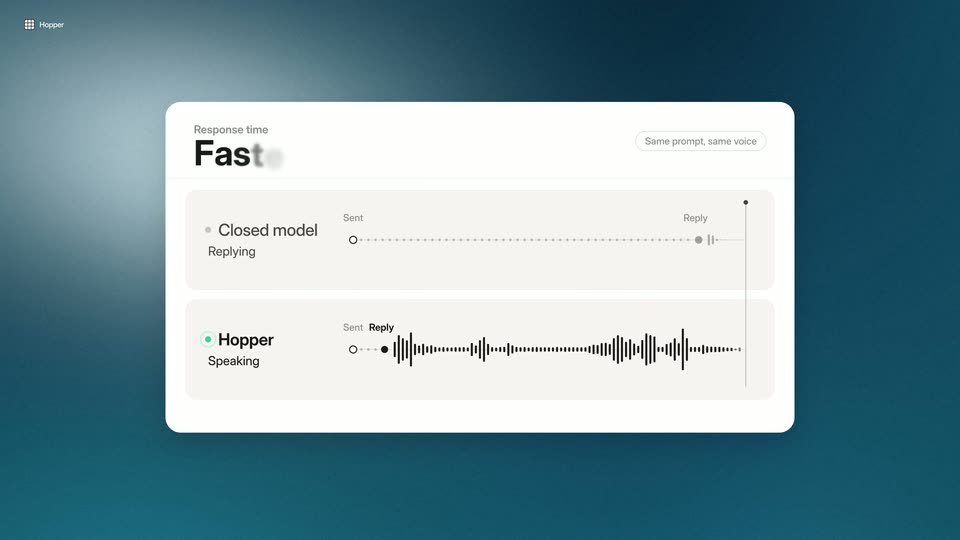
A white card on a dark teal background compares two response timelines: Hopper's black waveform fills in almost instantly while the closed model's dotted line stretches to a later reply point. The card heading changes to “Faster” and a caption below reads “Ten times faster.”
On-screen text: “Ten times faster.”
Camera: Static
A white rounded card on a teal gradient holds a comparison view. It cross-fades from a response-time layout, with a large Faster headline and two timeline rows, to a cost layout where a Low headline and a descending bar chart fade in. A gray caption pill sits below the card.
On-screen text: “At a fraction of the cost.”, “Response time”, “Faster”, “Same prompt, same voice”, “Cost per reply”, “Low”
Camera: Static
A white card on a teal contour background shows a cost-per-reply bar chart. The Hopper bars drop to short dark bars as the “Lower cost” headline completes and a “Saving” tag with a down arrow appears; a caption reads “At a fraction of the cost.”
On-screen text: “At a fraction of the cost.”
Camera: Static
A light gray slide holds a centered headline over a two-row grid of six feature tiles, each a rounded icon with a bold label and gray subline. Tiles fade in left to right; the top row's icons fill dark and gain a checkmark.
On-screen text: “Post-trained for your application.”, “Domain terms”, “Your jargon, said right.”, “Pronunciation”, “Names, the way you say them.”, “Character voice”, “One voice for every role.”, “Emotion”, “A tone for every moment.”, “Pacing', 'Timing that fits the scene.', 'Your scripts', 'Learns from your own lines.”
Techniques: Kinetic type
Camera: Static
A rounded video player card fades in at the center over the dimmed feature grid, playing anime footage: a man in profile, then a hooded figure in a dark scene. The headline and six labels behind it recede to pale gray.
On-screen text: “Post-trained for your application.”, “Domain terms”, “Your jargon, said right.”, “Pronunciation”, “Names, the way you say them.”, “Character voice”, “One voice for every role.”, “Emotion”, “A tone for every moment.”, “Pacing', 'Timing that fits the scene.', 'Your scripts', 'Learns from your own lines.”
Camera: Static
A rounded card showing an anime traveler with a large pack in a green forest scales up to fill the frame. A caption and an audio waveform with a moving playhead overlay the scene, and a two-option toggle flips from Base model to Post-trained.
On-screen text: “Careful, traveller. The forest has ears.”
Techniques: Masking
Camera: Static
An anime illustration of a hooded traveler with a large backpack stands in a dark green forest, overlaid with an audio player showing a waveform, a transcript caption and two model toggle pills. The view then zooms into a centered crop of the traveler, dropping the overlay.
Techniques: UI zoom
Camera: Pull out
A single card with an illustrated hiker in a forest sits centered, then expands into a row of five voice sample cards, each with a colored header, role label, style name and waveform. A caption below reads 'A voice shaped for your needs.' and fades out.
On-screen text: “A voice shaped for your needs.”
Techniques: Morph
Camera: Pull out
Under the headline “Faster responses”, a teal panel shows a white card where the Agent waveform fills in fast, while a second card on the right stays blurred then comes into focus. A red vertical bar flashes mid-frame.
On-screen text: “Faster responses”
Techniques: Split screen
Camera: Static
Three colored panels, teal, red and gray, sit side by side. A waveform card and a bar chart animate in the first two as white headlines scale in, and a slider card slides into the third.
On-screen text: “Faster responses”, “Lower costs”, “More control”
Techniques: Kinetic type, Split screen
Camera: Static
Three gradient panels (teal, red, gray) each pair a white heading with a rounded card: a waveform timeline, a descending bar chart, and four labeled sliders with a lock icon. A thin horizontal line wipes across the frame's middle.
On-screen text: “Faster responses”, “Lower costs”, “More control”
Techniques: Split screen, Masking
Camera: Static
A thin dark waveform line on a light gray background bends into a U, then morphs into concentric ripples. A small rounded grid icon fades in at the center while the headline appears word by word below.
On-screen text: “Build voice AI that sounds like you.”
Techniques: Morph, Kinetic type
Camera: Static
A light gray field holds the centered Hopper grid logo and wordmark. The wordmark reveals left to right, then the tagline builds word by word beneath it, and a small URL fades in at the bottom edge.
On-screen text: “Inference for realtime agents.”, “withhopper.com”
Techniques: Masking, Kinetic type
Camera: Static