1:03

Roma (YC F26): The AI To-Do List That Does Itself
Roma · Consumer · Oct 2026
Higgsfield · May 2026 · 0:36 · AI-annotated
Higgsfield’s 0:36 launch film runs 12 scenes, about 3.0 s each. The product is on screen from the first frame. The call to action lands at 0:31 (87% in), over a voiceover. The video is one continuous terminal session: an install command, a typed prompt, then a long split-screen demo where a build log on the left assembles a sunscreen landing page on the right, closed by a dot-built wordmark and URL. Its style is a black-and-lime terminal look with halftone dot textures, monospace type, line-by-line typing, and fast horizontal panel slides with motion blur.
Is this your launch? to your site or press kit.
On a black terminal, a white monospace install command types itself out, then gray status lines stack up line by line. A colored tree of skill names drops in, and the text block collapses into a row of yellow rectangles.
Techniques: Kinetic type, Morph
Camera: Pan
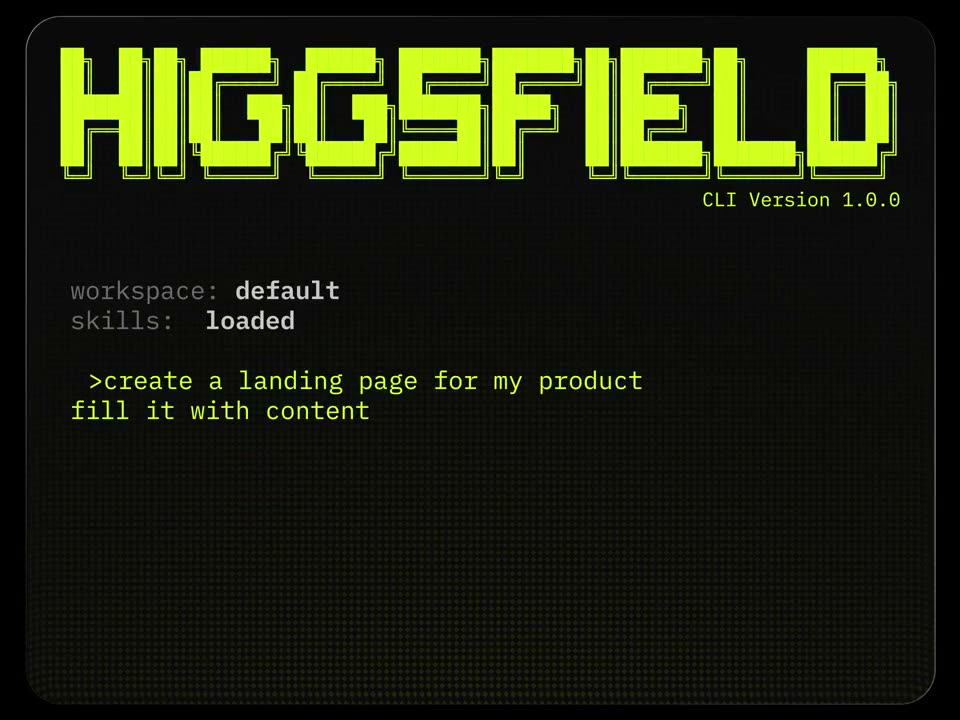
A dark halftone terminal panel locks the lime-green HIGGSFIELD wordmark at the top while monospace lines type in below: a status block, a green prompt command, then a blue task line.
Techniques: Kinetic type
Camera: Static
A dark dot-matrix screen with the green HIGGSFIELD logo at top and a status line at bottom slides left, revealing a second panel with a Generate button. The motion is a fast horizontal slide with motion blur on a locked-off frame.
On-screen text: “HIGGSFIELD”, “[1/4] generating hero scene”
Camera: Pan
A dark terminal panel on the left displays the green HIGGSFIELD wordmark and progress lines. The canvas on the right shifts from black to cream, revealing a teal beach-umbrella logo with script lettering, while a small Generating badge sits in the corner.
Camera: Static
Split screen: on the left, a dark terminal with a pixelated yellow HIGGSFIELD logo lists generation steps; on the right, a cream page card fades in the blue headline WEAR THE SUN. word by word below a Higgs SPF logo.
Techniques: Split screen, Kinetic type
Camera: Static
Left, a dark panel shows the yellow pixel HIGGSFIELD logo and terminal lines typing in; right, a generated website's sun hero image shrinks to a small circle while nav links fade in.
Techniques: Split screen
Camera: Static
Split screen: a dark terminal card on the left types out CLI log lines under a yellow pixel HIGGSFIELD logo, while a HIGGS SPF website on the right scrolls past a hand holding a yellow spray bottle, beach footage, then a product card and review photos populate.
Techniques: Split screen, Kinetic type, Masking
Camera: Pan
A split screen pairs a black terminal, headed by a neon green logo, typing colored build steps, with a generated landing page on the right that dims as the log runs from hero to commercial videos.
Techniques: Split screen, Kinetic type
Camera: Static
Split screen: left, a dark terminal under a yellow HIGGSFIELD logo types a build log line by line with checkmarks; right, a Higgs SPF product page scrolls down as its review carousel and footer video populate.
Techniques: Split screen, Kinetic type
Camera: Static
A split screen pairs a black terminal on the left, its yellow HIGGSFIELD logo above a scrolling build log, with a product page on the right showing a row of four review cards and a video of a model spraying sunscreen, which wipes to a new clip.
Techniques: Split screen, Kinetic type, Masking
Camera: Static
A gray wordmark reading Higgsfield CLI sits centered on a black background. The frame is locked-off and the text holds still for the full duration.
On-screen text: “Higgsfield CLI”
Camera: Static
On a black field, the centered title Higgsfield CLI holds with CLI first built from a cluster of glowing white dots that settle into solid text. A green tagline sits beneath, and the URL higgsfield.ai/cli fades in at the bottom before the frame holds still.
On-screen text: “Higgsfield CLI”, “+ integrated skills”, “higgsfield.ai/cli”
Techniques: Particles
Camera: Static