1:15
Screenpipe YC Launch Video
Screenpipe · Sep 2026
HeyBrain · Sep 2026 · 1:28 · AI-annotated
HeyBrain’s 1:28 launch film runs 40 scenes, about 2.2 s each. The product shows up at 0:04 and 8 features are revealed. The call to action lands at 1:25 (96% in), over a voiceover. The video alternates full-screen typed title cards with floating UI mockups, moving from promise to feature demos to a closing CTA. Its signature moves are letter-by-letter text reveals, pixel-brain iconography, and soft code-drift backgrounds.
Is this your launch? to your site or press kit.
Screenpipe · Sep 2026
Apple · Hardware · Sep 2026
On a cream background, the centered headline “People and agents” fades in, with “and” in light gray. A Salesforce app card and a Slack app card then pop in between the words, filling the gaps.
On-screen text: “People and agents”
Camera: Static
A dark gray sentence builds word by word at center, 'with one governed brain,' on a cream field. Faint pale blue and gray squares drift slowly in the corners.
On-screen text: “with one governed brain.”
Techniques: Kinetic type, Particles
Camera: Static
Centered on a pale cream field of faint blue dots, the line “with one governed brain.” sits in dark navy sans, locked-off. The word “brain” wipes in letter by letter with a brief blue flash, then holds.
On-screen text: “with one governed brain.”
Techniques: Kinetic type
Camera: Static
A soft blue gradient fills the frame with the white title centered. A cluster of small white squares fades in over the word, the title dissolves, and the squares coalesce into a pixelated brain silhouette.
On-screen text: “Meetl”, “with one governed brain.”
Techniques: Particles
Camera: Static
A dotted circle icon assembles from small squares at center on a cream field, while the lowercase wordmark 'brain' wipes in from left to right beside it, settling into a locked logo.
On-screen text: “Ask your brain.”
Techniques: Masking
Camera: Static
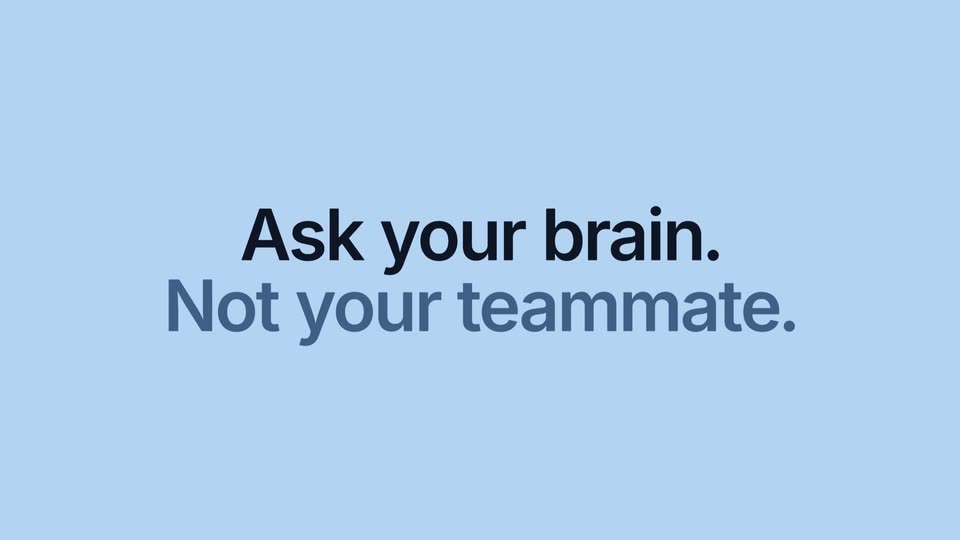
A light blue background holds a centered dark headline while a muted blue line types itself out beneath, letter by letter, with a blinking cursor. The copy then fades and a blurred search bar carrying app icons and a blue plus button drifts into the middle.
On-screen text: “Ask your brain.”, “Not your teammate.”
Techniques: Kinetic type
Camera: Static
A white command bar floats on a cream field while a cursor types the query and clicks the blue arrow. The app window scales in behind the bar, which then fades to reveal the Brain dashboard with a gradient hero panel and drifting code.
On-screen text: “Ask your brain.”, “Not your teammate.”
Techniques: Cursor demo
Camera: Static
A tilted 3D mockup of the Brain app floats over a blue-to-pink gradient filled with code characters. It rotates flat and zooms in as the dashboard scrolls through its cards, then settles on the home view where a cursor arrow appears mid-panel.
Techniques: 3D mockup, UI zoom, Cursor demo
Camera: Push in
Under a static headline, a close-up of a white input field types 'What did we decide on Q4 pricing?' and a cursor clicks the blue send button. The view then zooms out to the full Brain window, where the answer and source chips appear.
On-screen text: “Ask your brain anything and get instant answers grounded in your company's actual knowledge.”
Techniques: Cursor demo, UI zoom
Camera: Pull out
On a light blue field, the dark navy headline Multiplayer AI. holds center as the blue-gray line below types out Every session, one brain. with a cursor. Four dotted speech bubbles sit in the corners, a dotted frame briefly draws around the text, and small dots drift in and out.
On-screen text: “Multiplayer AI.”, “Every session, one brain.”
Techniques: Kinetic type, Particles
Camera: Static
A white “Live sessions” card eases up into the center of a cream field dotted with blue points and dashed outlines. Four rows stagger in with blue “syncing” dots; the counter climbs 0 to 4 as each row turns green and reads “synced”.
Camera: Pull out
The People & Agents admin screen floats on a blue-to-pink gradient framed by scattered code characters, then zooms to fill the frame. A cursor clicks the Ava Chen row and the view pans right, revealing her detail panel with membership, access and session stats.
Techniques: UI zoom, Cursor demo
Camera: Pan
A product dashboard floats on a blue field of drifting code characters. A cursor clicks the Agents tab, swapping the people list for an agents table, as the camera zooms in on the stat cards.
Techniques: Cursor demo, UI zoom
Camera: Push in
A faint product list fades out behind a centered headline on a light blue field. The first line sits static while the second line types out letter by letter with a blinking caret.
On-screen text: “Less token spend.”, “Context carries over.”
Techniques: Kinetic type
Camera: Static
Two white panels sit side by side under a centered headline. The left panel re-sends eight app icons to a black model tile while a token counter climbs and an orange bar fills; the right panel routes the icons through a glowing brain tile, keeping its counter and blue bar low. A green check caption appears beneath.
On-screen text: “One session, two ways.”, “The same question, the same eight documents, the same model.”, “Without brain”, “With brain”, “94% fewer tokens per session”
Techniques: Split screen, Light sweep
Camera: Static
A dark terminal window sits centered over a blue field of floating white code characters and pink blobs. The Claude Code plugin types lines recalling context, listing decisions, files and people. A white Session tokens card fades in at the right, comparing cold session and with-brain token counts.
Camera: Static
A white usage dashboard floats on a blue-pink gradient with scattered code letters. Stat numbers tick up, the page scrolls to a two-line chart, the cursor hovers a point and a tooltip pops up, then it clicks the People tab to reveal a table.
Techniques: Cursor demo
Camera: Static
A 3D-tilted usage dashboard floats on a blue field of drifting code. A cursor clicks the People tab, then Models; the top card swaps from a people table to a credits-by-model bar chart while the table below holds still.
Techniques: 3D mockup, Cursor demo
Camera: Static
Split screen. Left blue panel types out the headline Simple to start. with a blinking caret, then swaps to Governed to scale. Right cream panel shows a setup card where a cursor clicks Connect buttons that flip to green Connected checks, then the card fades into a node graph.
On-screen text: “Simple to start.”, “Governed to scale.”
Techniques: Split screen, Kinetic type, Cursor demo
Camera: Static
Split frame: a light blue panel on the left holds the static headline “Governed to scale.” with a thin cursor bar, while a network of blue nodes and thin lines on cream zooms out on the right, revealing more labeled clusters such as Marketing and Exec.
On-screen text: “Governed”, “to scale.”
Techniques: Split screen
Camera: Pull out
On a cream field, a large navy headline types out “Connect your files.” behind a blue caret while white app icons, folder cards, a yellow sticky note and a dark code window fade in around the edges.
On-screen text: “Connect your files.”
Techniques: Kinetic type
Camera: Static
A centered black serif headline reads Connect your tools. then rewrites to Connect your files. with a blue caret, while a field of floating app icons and file cards drifts in parallax depth on a cream background.
On-screen text: “Connect your tools.”, “Connect your files.”
Techniques: Kinetic type, Parallax
Camera: Static
A cream 3D field of floating terminal windows, app icons and agent name pills drift at varying depths around a centered headline. The text reads Connect your agents. with a blinking cursor at the end. Motion is slow and gentle.
On-screen text: “Connect your agents.”
Techniques: 3D mockup, Parallax
Camera: Static
On a cream background, the words “Silos become context” are built from small blue dots, with stray dots drifting off the edges. The bottom word then shuffles its dots to read “anything” while the top two lines hold still.
On-screen text: “Silos”, “become”, “context”, “anything”
Techniques: Particles, Morph, Kinetic type
Camera: Pull out
A rounded product window titled Brain sits centered on a blue-purple gradient scattered with drifting monospace code glyphs. The Library view fills in as four stat cards and a Departments row fade up from a blurred state, their figures counting up.
Techniques: Particles
Camera: Static
A light dashboard titled Library shows stat cards and a grid of department tiles. A cursor rises from the bottom and hovers the Engineering tile, which gains a soft border highlight.
Techniques: Cursor demo
Camera: Static
A light document-list view of a Marketing library loads extra rows, then a detail panel for the first document slides in from the right edge, showing tabs and metadata beside the table.
Techniques: Cursor demo, Split screen
Camera: Static
A document list sits left of a details panel titled Q4 pricing review, with a blurred field of floating letters on the right. A cursor travels down the rows, and the lower fields plus a blue note about restricted sections fade in.
Techniques: Cursor demo
Camera: Static
A white rounded card reveals over a blue field of blurred color blobs and drifting code, the panel sliding up to expose a row of app icons, a + 12 more pill and a small caption line.
On-screen text: “Ask anything.”
Techniques: Masking
Camera: Static
Light blue field with a centered dark navy headline Ask anything. A muted blue line Nothing leaks. types out letter by letter behind a caret, then a small + 12 more caption settles below.
On-screen text: “Ask anything.”, “Nothing leaks.”, “+ 12 more”
Techniques: Kinetic type
Camera: Static
A white rounded command bar sits centered on a cream background. A question is typed out letter by letter with a blue caret, between a plus button and a black sparkle icon.
On-screen text: “Ask anything.”, “Nothing leaks.”
Techniques: Kinetic type
Camera: Static
A dark blur lifts off the right edge, revealing the orange Claude starburst and serif “Welcome” title above a rounded prompt field. The question types out, the cursor clicks the blue send button, then the title fades and the field slides to the bottom.
On-screen text: “Welcome”
Techniques: Cursor demo
Camera: Static
A chat interface on white: a user question bubble sits top right while the answer text fades in below it. Source chips flash in and out, a small caption appears, then the reply box types a follow-up query as a mouse cursor hovers the send button.
Techniques: Cursor demo
Camera: Static
A chat interface displays a user request bubble on the right. A white card titled Lineage of an answer fades in below it; its five labeled rows fill from gray to black with blue checkmarks, then a small footnote line fades in at the card's bottom edge.
Camera: Static
Split frame: a cream left panel builds the tagline “Works where you work.” word by word with three inline app icons, while a blue right panel shows a central node tile linking two columns of black app icons through curved blue lines.
On-screen text: “Works where you work.”
Techniques: Kinetic type, Split screen
Camera: Static
On a light blue field, a white 'Your brain' card sits between the words 'You didn't just' and 'give your team AI.' The card shrinks to the center as app icons and initials link around it, and 'Works where you' appears top left with a 'People & Agents' panel top right.
On-screen text: “You didn't just”, “give your team AI.”, “Works where”, “you”
Techniques: UI zoom
Camera: Pull out
A flat light-blue network of small white app-icon tiles radiates from a central white card titled “Your brain”. Four corner callouts (Library, People & Agents, Monitor, Usage) sit at the edges as the whole constellation slowly zooms in.
On-screen text: “Your brain”, “Every release, source and agent, grounded in one place.”, “Library”, “People & Agents”, “Monitor”, “Usage”
Camera: Pull out
A blurred constellation of app icons and cards floats on a flat blue field. Centered white text assembles word by word into a single sentence, the background staying softly out of focus.
On-screen text: “You built one governed brain.”
Techniques: Kinetic type
Camera: Pull out
A soft blue orb on a cream background collapses into a dashed pixel ring around a small center dot, while the headline and URL hold still.
On-screen text: “You built one governed brain.”, “TRY BRAIN FOR FREE AT HEYBRAIN.IO”
Techniques: Morph
Camera: Pull out
A dark blue pixelated icon and the word “brain” are centered on a light beige background. Small light blue geometric shapes float in the background, and a light blue box below contains the text “TRY BRAIN FOR FREE AT HEYBRAIN.IO”.
On-screen text: “TRY BRAIN FOR FREE AT HEYBRAIN.IO”
Camera: Static