3:29
Explore
Alexander Belanger - despite coding agents, modern apps are fragile. without proper archit
Hatchet · Nov 2026 · 1:34 · AI-annotated
- Length
- 1:34
- Scenes
- 24 · 3.9 s avg
- Product on screen
- 0:00
- Features shown
- 4
- Call to action
- 1:22 · 87%
- Voiceover
- Yes
00:00:00 / 01:34:09
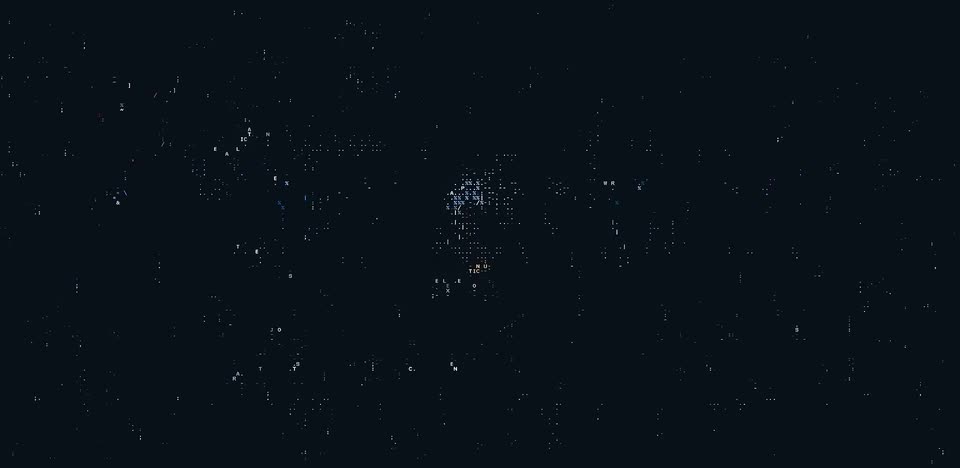
Hatchet’s 1:34 launch film runs 24 scenes, about 3.9 s each. The product is on screen from the first frame and 4 features are revealed. The call to action lands at 1:22 (87% in), over a voiceover. Tone: playful and witty, a retro 8-bit game parody that turns an infra pitch into a level-based run, with a deadpan terminal voiceover. Background: near-black navy (#08101b) with falling pixel rain, scanlines and dithered starfields. Fonts: a blocky pixel/monospace terminal typeface for all on-screen text, with a wide pixel display face for the HATCHET wordmark. Music mood: none detected; the cut rate is zero so the motion is carried by in-scene pixel animation at a steady ~96 bpm pulse. The cut
No filming indicatedEstimated needs: 3 capture groups — your screens or recordings · 1 official logo — reused across the film · 18 graphic passages — draw or supply
Is this your launch? to your site or press kit.
More like this
0:32


Caveman 4.0 + Caveman Cloud: why use many token when few do trick (YC F26)
Caveman · B2B · Oct 2026
0:55

Dhanush Rambhatla - Audora is live! We’re building audiobooks where every character gets
Audora · Consumer · Nov 2026
Alexander Belanger - despite coding agents, modern apps are fragile. without proper archit, scene by scene
· 24 scenes as text
01 · Product intro · 0:00–0:03
On a near-black background, scattered white pixel blocks, percent signs and orange dashes coalesce into the word HATCHET beneath a small pixel icon, hold briefly, then break apart and drift downward.
On-screen text: “HATCHET”
Techniques: Kinetic type, Particles
Camera: Static
02 · Problem · 0:03–0:04
A dark navy field holds drifting white and blue particles above a bottom strip of repeating blue plus signs. A thin outlined rectangle pops in on the right, then clears as faint glyphs surface on the left.
Techniques: Particles
Camera: Static
03 · Problem · 0:04–0:10
A retro pixel game screen on a dark field of falling code. An ASCII figure in a red jacket stands left inside yellow targeting brackets under a P1 tag, while a yellow-topped character select panel types out a developer persona, skill and weakness lists, and icon rows, ending with a selected status.
Camera: Push in
04 · Problem · 0:10–0:17
A pixel-art human figure built from ASCII characters stands on a dark starfield, ringed by orange invader sprites. The frame widens to reveal a second panel: a dotted-box diagram titled NEW APPLICATION with FRONTEND, API and DATABASE nodes.
On-screen text: “API”, “DATABASE”, “NEW APPLICATION”, “FRONTEND”
Camera: Pull out
05 · Problem · 0:17–0:17
A pixel-art human figure made of orange blocks and ASCII glyphs holds center as the frame pans left. A green USER COUNT: 12 label and an empty dotted box enter from the left, while a dotted architecture diagram tagged FRONTEND, API, DATABASE and NEW APPLICATION slides off the right.
On-screen text: “NEW APPLICATION”, “FRONTEND”, “API”, “DATABASE”, “USER COUNT: 12”
Camera: Push in
06 · Problem · 0:17–0:19
A dark retro pixel-art frame shows a yellow step line climbing from the bottom left corner, its tip a white pixel, while orange invader-shaped sprites drift on the right. The yellow label USER COUNT ticks up from 885 to 135,799 over the two seconds.
On-screen text: “USER COUNT: 885”, “USER COUNT: 23,303”, “USER COUNT: 29,585”, “USER COUNT: 92,390”, “USER COUNT: 135,799”
Camera: Static
07 · Problem · 0:19–0:20
A pixelated yellow growth line climbs the left of a dark dotted grid, then fades as orange invader sprites cluster in the center. On the right a dotted stack diagram assembles with FRONTEND, API and DATABASE boxes, while the user count label shifts toward the middle.
On-screen text: “USER COUNT: 2,000,000”
Camera: Pull out
08 · Problem · 0:20–0:30
The view pulls back to reveal a pixel-art system map: dashed lines link labeled nodes (FRONTEND, API, DATABASE, QUEUE, WORKER, KAFKA) as orange invader sprites drift in and multiply. The palette shifts from blue to red, red alerts pop up beside each node, then rows of invaders sweep the screen.
Camera: Pull out
09 · Problem · 0:30–0:31
Three orange dot-matrix quadruped silhouettes slide across dark navy lanes separated by dotted white lines, moving in opposite directions, while faint vertical dotted streaks drift in the background.
Camera: Pan
10 · Problem · 0:31–0:32
A dark pixel-rain screen holds a centered dotted-border menu. Red YOU DIED sits above white RESTART, SETTINGS, and QUIT, with a small red arrow pointing at RESTART. SETTINGS subtly scales while the locked frame stays static.
Techniques: Kinetic type
Camera: Static
11 · Product intro · 0:32–0:34
A pixel death menu (YOU DIED, RESTART, SETTINGS, QUIT) sits in a dotted rectangle on a dark scanlined background. A red triangle cursor slides down the list, then the rectangle swaps to a settings panel with HARD MODE and HATCHET MODE, each marked by a check.
Techniques: Cursor demo
Camera: Static
12 · Product intro · 0:34–0:37
A dotted panel on a dark starfield holds a pixel menu with SETTINGS and a selected HATCHET MODE. Two wireframe figures slide left across a dotted floor as the panel shifts and four small labeled nodes fade in along the middle line.
Camera: Static
13 · Product intro · 0:37–0:45
Dark dithered field: a pixel robot stands left as a white pixel headline types across the top. A dotted row links four dithered nodes, then a second dotted panel opens below, filling with yellow feature boxes that light up one by one as the robot flips.
On-screen text: “HATCHET MAKES RUNNING ASYNC AND DISTRIBUTED WORKLOADS EASY”
Techniques: Kinetic type
Camera: Static
14 · Feature reveal · 0:45–0:46
On a dark navy field, a wide grid of dotted lines and scattered small white text fragments fades out, with a red dot cluster at left and a blue cluster with a cursor at center.
Techniques: Particles
Camera: Static
15 · Feature reveal · 0:46–0:48
On a near-black field of drifting pixel particles, the headline UNIVERSAL ORCHESTRATION assembles in a white dotted terminal font, a small pixel icon of stacked layers with orange traces forms below it, and a dashed orange corner bracket draws in at the top left.
On-screen text: “UNIVERSAL ORCHESTRATION”
Techniques: Kinetic type, Particles
Camera: Static
16 · Feature reveal · 0:48–0:49
On a dark field of drifting pixel dots, the white pixel title UNIVERSAL ORCHESTRATION holds center, then a dashed amber box draws itself on the left and fills with a code snippet while YOUR CO types in at the top. A small pixel tower stands in the middle.
On-screen text: “UNIVERSAL ORCHESTRATION”, “YOUR CO”, “*”
Techniques: Particles, Kinetic type
Camera: Static
17 · Feature reveal · 0:49–0:57
A dark terminal-style diagram builds: three code blocks type in under YOUR CODE on the left, while CONTAINERS, SERVERLESS and SANDBOXES fill in on the right, linked by dotted lines around a center pixel figure. The layout dissolves into a scatter of dots at the end.
On-screen text: “YOUR CODE”, “YOUR COMPUTE”, “CONTAINERS”, “SERVERLESS”, “YOUR INFRASTRUCTURE”, “SANDBOXES”
Techniques: Kinetic type, Particles
Camera: Static
18 · Feature reveal · 0:57–1:03
A dotted rectangle on a near-black, pixel-rain background fills with orange dot clusters streaming in from a blue chevron band on the left. The headline types in above, then the frame widens as the clusters multiply to fill the expanded field.
On-screen text: “SCALE TO MORE USERS”, “(A LOT MORE USERS)”
Techniques: Kinetic type, Particles
Camera: Push in
19 · Feature reveal · 1:03–1:10
A dark static-textured background holds three labeled lanes, workload_a, workload_b and workload_c, each filled with rows of blue right-pointing chevrons. Orange pixel clusters travel left to right at varying speeds, some entering a dotted box on the right, while a pixel headline types out across the top.
On-screen text: “CONCURRENCY CONTROLS AND RATE LIMITS”
Camera: Static
20 · Feature reveal · 1:10–1:15
Six dotted boxes labeled workload_a to f appear in a 2x3 grid under a pixel headline that types in. Orange dot clusters drift inside each box while a band of blue chevrons scrolls right through the middle.
On-screen text: “YOUR SANDBOXES, ANY PROVIDER”
Techniques: Kinetic type, Particles
Camera: Static
21 · Other · 1:15–1:20
A pixel-art LEVEL UP! dialog opens on a dark navy field of falling pixel rain and dotted workload boxes. The card fills in typewriter style: player title, new skills, weakness, and pixel accessory icons, closing with a * LEVEL UP! * line.
On-screen text: “LEVEL UP!”, “PLAYER 1”, “LV 2”, “THE HUMBLE APPLICATION DEVELOPER”, “NEW SKILLS”, “+ MANAGED QUEUES”, “ACCESSORIES”, “COFFEE”, “LAPTOP”, “CLAUDE”
Techniques: Kinetic type, Particles
Camera: Static
22 · Other · 1:20–1:21
A dark grid of six dotted boxes labeled workload_a to workload_f, each holding a small orange pixel cluster, sits on a black field. A yellow LEVEL UP! panel listing new skills and accessories overlays the center, then vanishes, leaving the static grid.
Camera: Static
23 · Other · 1:21–1:22
On a near-black field, six dashed panels hold scattered white and orange dots, with scrambled letter fragments above and a band of blue chevrons across the middle. The grid dissolves as the dots condense into two vertical clusters at the left and right edges, then fade out.
On-screen text: “workload_b”
Techniques: Particles, Morph
Camera: Static
24 · CTA · 1:22–1:34
On a near-black background, white monospace text types out in the center line by line, ending with a blinking cursor. Two flickering pixelated wireframe shapes frame the sides. A pixelated Hatchet logo and wordmark assemble at the bottom as the sign-off.
On-screen text: “Any orchestration problem you can think of,”, “Hatchet has you covered.”, “Check us out: hatchet.run”, “HATCHET”
Techniques: Kinetic type
Camera: Pull out