1:28

Sutrix (YC F26)
Sutrix · Healthcare · Nov 2026
HappyRobot · Nov 2026 · 0:26 · Code only · AI-annotated
HappyRobot’s 0:26 launch film runs 14 scenes, about 1.9 s each. The product shows up at 0:04. The call to action lands at 0:23 (88% in), over a voiceover. A quiet, flat-lay explainer that alternates locked-off type cards with schematic interface panels, moving from a dark open through a pale middle to a dark close. The signature moves are word-by-word typing, scaling wordmarks, and the pixel squares drifting or condensing between scenes, with slow push-ins into the UI details.
Is this your launch? to your site or press kit.
Sutrix · Healthcare · Nov 2026
Input Systems · Oct 2026
Films whose music sounds like this one, voice left out
Talos · Modern electronic
ElevenLabs · Cinematic tech promotional soundtrack
Dyson · Modern electronic
A dark gray field holds a small white mark centered in frame: four squares in a 2x2 grid joined by a thin diagonal line. The line and two squares fade out, leaving two small squares side by side. The motion is slow and minimal.
Camera: Static
On a flat cream background, a single line of black sans-serif text types out word by word, building the sentence, while three small squares sit below as a typing cursor. The camera stays locked off and static throughout.
On-screen text: “Understand the work before you automate it.”
Techniques: Kinetic type
Camera: Static
A black sentence is centered on a pale gray background. A row of small gray squares sits beneath it and vanishes from left to right, leaving a single square at the end. The frame stays locked.
On-screen text: “Understand the work before you automate it.”
Camera: Static
On a pale gray field, the dark gray wordmark HappyRobot Surface types in and scales up, centered. A row of small squares in varying gray tones slides from the right of the line to a position beneath it.
On-screen text: “HappyRobot Surface”
Techniques: Kinetic type
Camera: Static
On a light gray field, the title HappyRobot Surface scales up from center, HappyRobot in black and Surface in gray, with a small dark square beneath it. A faint wireframe of a portal and inbox interface fades in behind the text.
On-screen text: “HappyRobot Surface”
Techniques: Kinetic type
Camera: Pan
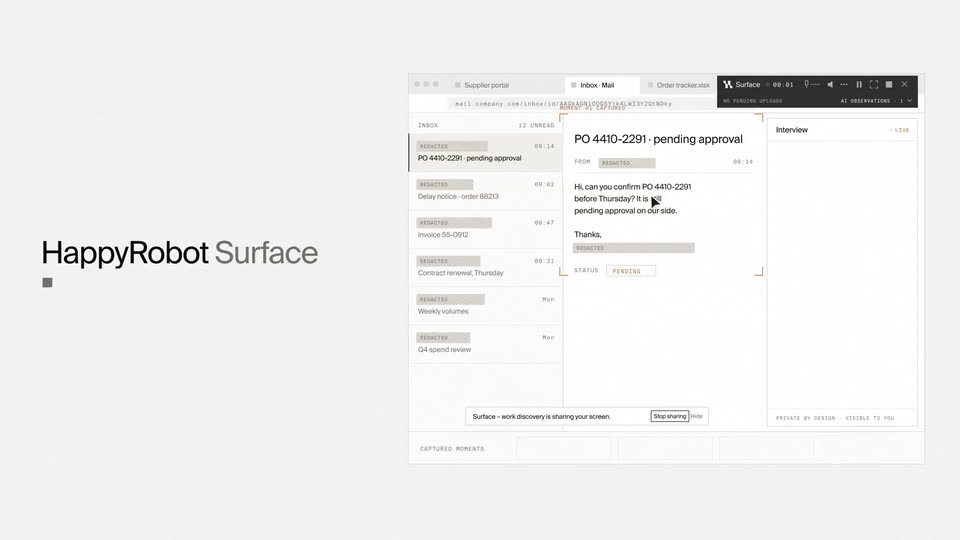
A headline on the left scales up over a row of small gray squares, while a product email interface on the right reframes toward the open message. The interface shows an inbox list, a pending-approval email, and an interview panel.
On-screen text: “HappyRobot Surface”
Techniques: Kinetic type, UI zoom
Camera: Push in
A flat product interface, an email with redacted fields beside a live interview chat, fills the right side as a black headline types on the left, switching from the brand name to 'Why it's done that way.' The camera then zooms into the interview panel.
On-screen text: “HappyRobot Surface”, “Why it's done that way”
Techniques: Kinetic type, UI zoom
Camera: Push in
A white workflow canvas shows a 5x4 grid of numbered cells on the left and a vertical stack of four task cards on the right, linked by lines. The layout cross-fades from a doubled, offset state into a clean arrangement as small orange and gray squares drift across the corners.
Techniques: Morph
Camera: Static
A small outlined tile with an orange pixel cluster sits centered on a pale gray field. The view pulls back to six team panels, each a 4x4 grid of white cells with gray dots, while the cluster condenses to one orange square.
Techniques: UI zoom
Camera: Pull out
Six schematic board panels labeled by team and region drift into a 2x3 grid on a light gray background. One cell in the FINANCE panel gains a dark outline and an orange dot, then a large gray square scales up in the center with the orange dot at its top edge.
Techniques: UI zoom
Camera: Pull out
A small light gray square holds centered on a flat medium-gray background. The shape stays static across the brief duration, with no motion, text, or other elements.
Camera: Static
A small pale square sits at the center of a dark gray field. It stretches sideways into a row of thin vertical bars, the first bar filled light and the rest outlined.
Techniques: Morph
Camera: Static
A dark gray field holds a grid of thin vertical bars and a row of small squares, which clear away as the white HappyRobot mark and wordmark with gray Surface settle in at the left.
On-screen text: “HappyRobot Surface”
Techniques: Kinetic type
Camera: Static
A pale gray card holds the black HappyRobot mark and gray wordmark at left, with a small orange square and the URL in a dashed box below. The dashed box expands to a wide frame around the logo and tagline, then its dashes resolve into a solid line as the square settles into the top-right corner.
On-screen text: “HAPPYROBOT.AI/SURFACE”, “PUTTING AGENTS TO WORK”, “1”
Techniques: Morph
Camera: Static