1:20
Explore
HappyOyster - HappyOyster 1.0 is now live! Happy Oyster 1.0 is an open-ended worl
HappyOyster · Jun 2026 · 2:14 · AI-annotated
- Length
- 2:14
- Scenes
- 78 · 1.7 s avg
- Product on screen
- 0:20
- Features shown
- 3
- Call to action
- 2:08 · 96%
- Voiceover
- Yes
- Views
- 7.6M on X
as of November 20, 2026
00:00:00 / 02:14:16
- Length
- 2:14
- Scenes
- 78 · 1.7 s avg
- Product on screen
- 0:20
- Features shown
- 3
- Call to action
- 2:08 · 96%
- Voiceover
- Yes
- Views
- 7.6M on X
as of November 20, 2026
HappyOyster’s 2:14 launch film runs 78 scenes, about 1.7 s each. The product shows up at 0:20 and 3 features are revealed. The call to action lands at 2:08 (96% in), over a voiceover. A fast-cut, music-video style launch film that frames the product as a game: a stylized pink cloud intro, then a long live-action school narrative where a girl voice-directs surreal transformations, punctuated by pixel-art and 3D cutaways and a first-person cat gameplay segment, then a return to the pink set and a black end card. The signature moves are the locked-off pink set with floating vinyl and pearls, the in-scene Directing Mode prompt bar that types out each command, and hard cuts that y
Footage neededEstimated needs: 3 capture groups — your screens or recordings · 52 filmed passages — shoot, supply or replace · 1 graphic passage — draw or supply · 11 3D passages — build or supply
Is this your launch? to your site or press kit.
More like this





Similar soundtrack
Films whose music sounds like this one, voice left out
0:37


Polymarket - AAAAAND NEW… Official Exclusive Prediction Market of the UFC & T
Polymarket · Electronic
1:48

Higgsfield AI 🧩 - Introducing Short Drama Studio. Drop a script → get a full season of
Higgsfield · Electronic, orchestral, and cinematic hybrid
1:30

Pump.fun - the moment you’ve all been waiting for $PUMP is launching through an
Pump.fun · Electronic, Cinematic
HappyOyster - HappyOyster 1.0 is now live! Happy Oyster 1.0 is an open-ended worl, scene by scene
· 78 scenes as text
01 · Hook · 0:00–0:01
A woman wearing headphones reclines on a white cloud prop against a pink wall, eyes closed, holding a pink laptop on her lap. Album covers, vinyl records and pearl necklaces float around her in a static, locked-off frame.
Camera: Static
02 · Hook · 0:01–0:04
Tight close-up of a young woman with short brown hair, black over-ear headphones and pink heart stickers on her cheeks, eyes lowered and a faint smile. She holds still against a soft pink set with a blurred white mic pop-filter at left, the locked-off frame drifting only with her subtle head turn.
On-screen text: “PENIT.”, “3SONCS”, “FEARL NECOROS”
Camera: Push in
03 · Hook · 0:04–0:06
A pink acrylic turntable rests on a soft pink cloud surface, its record printed with an oyster illustration and the slogan THE WORLD IS YOUR OYSTER / OPEN IT. A hand lowers the tonearm, the disc spins up, and the camera tilts to a top-down view into the blurred center.
Camera: Push in
04 · Problem · 0:06–0:08
A sunlit school courtyard centers on a cream fountain as students with backpacks walk past in both directions. The camera slowly pushes in toward the fountain and the yellow, blue-trimmed building behind it.
Camera: Push in
05 · Problem · 0:08–0:12
Three girls in pink and blue crop tops and low-rise jeans walk down a school hallway toward the camera, laughing and talking, as the camera tracks backward. Other students pass in the background. A caption sits at the bottom.
On-screen text: “It's so funny”
Camera: Push in
06 · Problem · 0:12–0:16
Three young women in pink crop tops walk and talk before green lockers. The lockers burst open, geese fly out, and the women clutch their heads in shock. A cut to a locker shows a goose and an orange cat leaping out.
On-screen text: “It's so funny”, “I dont care Mr jerry' hair”
Camera: Pan
07 · Problem · 0:16–0:18
Low angle in a school hallway: white and brown geese and a ginger cat burst out of teal lockers, wings flapping, as students sprint away down the corridor. Fast handheld motion with heavy motion blur on the flying birds.
Camera: Static
08 · Problem · 0:18–0:19
A curly-haired man sprints toward the camera screaming as a CGI crocodile lunges behind him. White geese flap and scatter, students flee down a school hallway of teal lockers, the camera tracking backward in a panic.
Camera: Push in
09 · Problem · 0:19–0:20
A low floor-level shot follows a pair of legs in olive cargo pants walking down a school hallway. A white goose runs past on the left while students in the background climb lockers and flee, white feathers drifting through the air.
Camera: Push in
10 · Feature reveal · 0:20–0:22
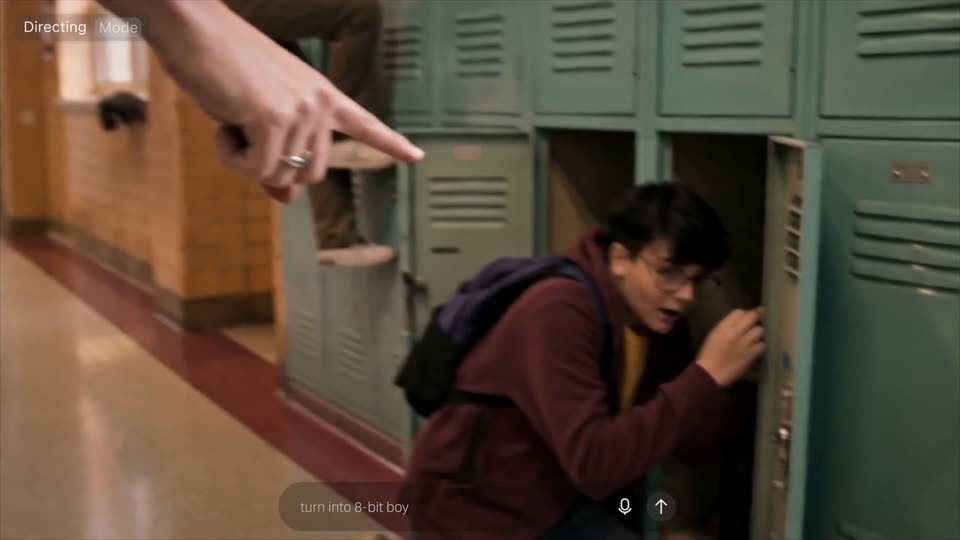
A student in tan cargo pants moves away from the camera down a warm-lit school hallway while classmates panic, drop bags and climb the lockers. A mode chip floats top-left and a command bar with a mic and send icon sits at the bottom edge.
Camera: Push in
11 · Feature reveal · 0:22–0:22
A live-action school hallway with green lockers. A real hand points from the top left at a pixelated 8-bit boy with glasses and a blue backpack, who crouches in an open locker. A person's legs rest on the locker above. The character holds a surprised pose.
Camera: Static
12 · Feature reveal · 0:22–0:25
A girl with headphones and a loose red tie walks toward the camera down a locker-lined school hallway, pointing up as geese fly overhead. A macaw and paper planes join the flock while other students pass by. Low-angle, static camera.
On-screen text: “turn into 8-bit boy”, “turn into parrot and paper plane”
Camera: Pull out
13 · Feature reveal · 0:25–0:26
An orange tabby cat walks along the top of teal school lockers in a hallway, the camera panning to follow it. In the final beat two students with headphones blur across the foreground while the cat stays sharp behind them.
On-screen text: “Directing”, “turn into parrot and paper plane”
Camera: Push in
14 · Feature reveal · 0:26–0:27
A girl with over-ear headphones around her neck and a red tie walks down a yellow school hallway toward the camera. Blurred students crowd the foreground, and another student with a backpack walks away in the background as the camera tracks backward.
Camera: Static
15 · Feature reveal · 0:27–0:28
A student in a white tank top and red tie stands still at the center of a school hallway while a crowd of peers rushes past on both sides, the frame widening from a tight blur to a symmetric wide shot.
Camera: Static
16 · Feature reveal · 0:28–0:30
A girl in headphones and a red tie walks a school hallway while a suited man points at her. The frame cuts to a close-up of her face as a Directing Mode badge and a bottom prompt bar fade in over the footage.
On-screen text: “Call 911”
Camera: Push in
17 · Feature reveal · 0:30–0:32
A man and woman sit on an orange couch in a green room while a caption reads Wtf. The camera pushes in on the man's face, then he morphs into a paper airplane that flies toward a suburban house where a woman waits on the porch.
On-screen text: “Wtf”, “Make the principal flash back to his home”
Techniques: Morph
Camera: Push in
18 · Feature reveal · 0:32–0:34
In a green striped living room, an older man seated on a leather sofa turns into a baby in a suit, cradled by the woman beside him, while a young woman in headphones and a red tie stands watching. The locked-off frame holds as the change completes.
On-screen text: “turn the principal into a baby”
Techniques: Morph
Camera: Static
19 · Feature reveal · 0:34–0:34
A medium shot of a woman in headphones and a red necktie stands in a green columned room and looks down, smiling. A Directing Mode badge sits top left while a prompt is typed into the input bar at the bottom.
On-screen text: “Directing Mode”, “turn the principal into a baby”, “let the baby sit on the floor”
Camera: Static
20 · Feature reveal · 0:34–0:36
A crying toddler in a dark suit sits on a patterned rug, framed inside the app interface with a Directing Mode tag top-left and a prompt line at the bottom. The locked-off shot holds while the baby writhes and a woman on the tan couch gestures.
Camera: Static
21 · Feature reveal · 0:36–0:40
A woman in black headphones, white tank top and red tie smiles in an arched hallway with a staircase, then turns her head to look back over her shoulder. At the end a Directing Mode bar slides in at the bottom with a typed prompt.
On-screen text: “Ok I'm going back to school”, “Hey”, “Directing Mode”, “transform the principal's wife into an oyster”
Camera: Push in
22 · Feature reveal · 0:40–0:41
A close-up of an older woman in a floral blouse sits in a green-walled room as her face distorts into horizontal scan-line glitch bands, then partially resolves. A Directing Mode badge and a caption bar with a mic icon stay fixed over the footage.
On-screen text: “transform the principal's wife into an oyster”
Camera: Push in
23 · Feature reveal · 0:41–0:42
A locked-off view of the app's Directing Mode screen shows a large iridescent oyster shell open on a brown leather sofa, its lower half heaped with white pearls spilling onto the cushions, a prompt bar with mic and send icons at the bottom.
Camera: Static
24 · Feature reveal · 0:42–0:45
A baby in a pinstripe suit and tie sits before a large prop oyster shell filled with pearls, reaches in, and lifts one pearl while smiling. A couch with a yellow pillow and a lamp sit in the soft-focus background. The camera holds a static close-up.
On-screen text: “Directing Mode”, “while the baby picks up a pearl from inside the oyster”
Camera: Push in
25 · Feature reveal · 0:45–0:47
A low floor-level shot tracks through a school hallway as students run past and white geese with orange feet waddle across the polished tiles. Legs and shoes pass in the blurred foreground while the geese and runners move away down the corridor.
On-screen text: “Directing Mode”, “while the baby picks up a pearl from inside the oyster”, “0”
Camera: Push in
26 · Feature reveal · 0:47–0:49
A young woman in a white tank top, red tie and over-ear headphones walks through a school hallway, smiling, as classmates run past behind her. The shot opens soft and out of focus, then racks into sharp focus on her as she moves.
Camera: Pan
27 · Feature reveal · 0:49–0:52
A girl in headphones and a red tie stands in a school hallway, arms raised, as the camera pulls back to a wide atrium where students, a goose and a dog move around the stairs. A Directing Mode badge and a prompt bar sit as a UI overlay.
Camera: Pull out
28 · Feature reveal · 0:52–0:53
A live-action school hallway shows a girl rendered in a low-pixel style with green particles, then glitching into a full rainbow voxel figure as she runs down the stairs while her classmates stay live-action.
On-screen text: “change everyone's art style”
Techniques: Particles, Morph
Camera: Push in
29 · Feature reveal · 0:53–0:55
A young man in a white collar and black sweater turns from profile to face the camera with a wide-eyed, open-mouthed look, his face broken up by a red-cyan glitch. The shot cuts to a white 3D model of a dog, also glitched, against a blurred warm background.
Camera: Pull out
30 · Feature reveal · 0:55–0:56
A white duck with an orange beak flaps its wings on a tiled floor, a seated person blurred behind it, then tumbles onto the ground. A small Directing Mode badge sits in the top-left corner.
Camera: Static
31 · Feature reveal · 0:56–0:59
A woman in black headphones smiles and waves beside a white duck in a medium shot, then the frame tightens to an extreme close-up of her freckled face with small heart stickers. A dark control pill labeled 'switch to stage scene' fades in along the bottom edge.
Camera: Push in
32 · Feature reveal · 0:59–1:03
A woman in headphones sits in the audience, pointing at a stage where a costumed child dances beside a giant oyster shell and a moon prop while two children stand by. The locked-off over-the-shoulder shot holds as captions of her directions swap in at the bottom.
On-screen text: “switch to stage scene”, “go left”, “jump into the oysters”
Camera: Push in
33 · Feature reveal · 1:03–1:06
A girl in big headphones smiles and talks to camera; behind her, two children stand on a school stage with hanging stars, a throne and a giant shell. A bottom caption bar types out her words beside a pause icon and check button.
On-screen text: “Let's do something more fun”, “first, transform a stage play into Romeo and Juliet”
Techniques: Kinetic type
Camera: Static
34 · Feature reveal · 1:06–1:07
A smiling young woman with face paint and headphones stands before a stage set with star props and two costumed actors, a prompt caption below her. The shot cuts to an extreme close-up of an eye whose iris reflects a starry night sky.
On-screen text: “first, transform a stage play into Romeo and Juliet”
Camera: Push in
35 · Feature reveal · 1:07–1:10
On a balcony set with columns and a starry night sky, a woman in a pink ball gown reaches toward a man in knight armor and headphones, who enters from the right holding a red rose. He offers it, she takes it surprised, and he bows. White doves fly past.
On-screen text: “My dear Romeo”
Camera: Pull out
36 · Feature reveal · 1:10–1:12
A hooded woman in silver armor and headphones stands centered in a 3D-rendered classical hall with arched windows and a starry sky. She tilts her head, then lifts a hand in a wave. A Directing Mode badge and a caption bar with pause and confirm controls frame the view.
Camera: Pull out
37 · Feature reveal · 1:12–1:14
A child in a knight costume and a girl in a pink ballgown perform on a faux-castle stage under a spotlight, arms outstretched. The camera pulls back to reveal a seated audience in the foreground as confetti, balloons and paper doves drift down.
On-screen text: “Directing”, “take everyone to the sky”, “Mode”
Camera: Pull out
38 · Feature reveal · 1:14–1:15
A close-up of a man in a dark suit and tie, mouth wide open in shock, eyes wide, one arm thrust upward. A blurred green plant sits against a beige wall behind him as the frame pushes in slightly.
Camera: Static
39 · Feature reveal · 1:15–1:15
A close-up of a crying woman in a pink collared top, her ponytail whipping sideways, mouth open in distress. The background is a soft-focus party set with warm string lights, a mirror and a tree, all blurred behind her.
Camera: Static
40 · Feature reveal · 1:15–1:16
A man in a white shirt and dark tie lifts a small wooden cabinet above his head, mouth open in surprise. He faces left against a dark blue set with a glowing star ornament and soft bokeh lights behind him.
Camera: Static
41 · Feature reveal · 1:16–1:19
A short-haired woman in a white top and green trousers stands in a ruined temple at night, lit by a shaft from the broken roof. She leans back in a slow bow as papers drift, then the camera tilts up to the torn ceiling and starburst shapes.
Techniques: Particles
Camera: Push in
42 · Feature reveal · 1:19–1:20
A vintage television with a cat face on its right grille displays an animated figure in headphones drifting against a blue sky crossed by horizontal scan lines. A small Directing Mode label sits in the top left corner while the frame stays locked off.
Techniques: 3D mockup
Camera: Static
43 · Feature reveal · 1:20–1:22
A retro wooden TV plays a flat illustration of a surfer on pixelated waves. The camera pulls back and rotates, tilting the set inside a room, then cuts to a close-up of an iridescent CD carrying the brand tagline.
On-screen text: “THE WORLD IS YOUR OYSTER.”, “OPEN IT.”
Techniques: 3D mockup
Camera: Pull out
44 · Feature reveal · 1:22–1:23
A 3D woman with headphones jogs across a large spinning vinyl record lying flat on a white void. The record's glossy surface prints the tagline in bold black type among small pastel stars, and the whole disc rotates, carrying the lettering around the running figure.
On-screen text: “THE WORLD IS YOUR OYSTER. OPEN IT.”
Techniques: 3D mockup
Camera: Push in
45 · Feature reveal · 1:23–1:23
A pixel-art first-person view shows a hand with rings and beaded bracelets reaching toward a pastel sky, a pink sun and a small fountain on a cloud. The legs in green cargo pants and black shoes dangle and shift as the hand lowers out of frame.
Camera: Static
46 · Feature reveal · 1:23–1:24
A pixel-art character in a white top and green pants walks away down a pink path through a sky of clouds. Pixel hearts and pearls bob on either side as clouds holding characters and animals drift past. A HUD box and a vertical color meter sit in the corners.
On-screen text: “Directing”
Techniques: Parallax
Camera: Push in
47 · Feature reveal · 1:24–1:25
A pixel-art woman with headphones and a red scarf points at the camera against a bright sky city. Pink pixel hearts drift upward, floating TVs and a striped hot air balloon bob in the background, and a small mode label sits in the top-left corner.
On-screen text: “Directing Mode”
Techniques: Particles
Camera: Static
48 · Feature reveal · 1:25–1:26
A hand holds a red vintage TV in a 3D sky. Its screen shows an animated girl with headphones against clouds, and she winks at the camera while the device stays locked in 3D perspective.
On-screen text: “Directing Mode”
Techniques: 3D mockup
Camera: Static
49 · Feature reveal · 1:26–1:27
A hand grips the left edge of a vintage red television, its screen showing a blue sky with white clouds. The camera pushes in until the screen fills the frame. A small 'Directing Mode' label sits top-left.
Techniques: 3D mockup
Camera: Push in
50 · Feature reveal · 1:27–1:29
A girl in a white tank top rides a glowing grid-patterned skateboard through a cloudy sky inside the app's Directing Mode. Cars, school chairs, and uniformed students float around her at different depths. A command bar with mic and send icons sits along the bottom edge.
Techniques: Particles, Parallax
Camera: Push in
51 · Feature reveal · 1:29–1:30
A freckled woman in headphones and a red tie turns from profile to face camera against a cloudy sky, while a pixelated orange fish, a school desk and square tiles float around her in 3D. A gray pill reading Directing Mode sits top left.
On-screen text: “Remove the character that is being selected”
Techniques: Parallax
Camera: Push in
52 · Feature reveal · 1:30–1:32
A man and woman in cardigans run hand in hand along a yellow beam high above a city. Floating office chairs, papers, a pixel dragon and other people drift through the blue sky as the camera tracks forward behind them.
Techniques: Parallax, Particles
Camera: Pull out
53 · Feature reveal · 1:32–1:33
Low-angle shot of a young woman in black over-ear headphones, white tank top and red neckerchief, framed against blue sky with set rigging above. The camera pushes in to a tight close-up as she scrunches her face into an intense squint.
Camera: Push in
54 · Feature reveal · 1:33–1:34
A translucent chapter list panel sits on the left over a 3D sky scene. A yellow school bus floats above a city skyline while a pixelated orange goldfish and loose chairs drift in the clouds, and a play button hovers at the center.
Camera: Static
55 · Feature reveal · 1:34–1:36
A directing-mode interface shows a chapter list panel on the left over a close-up of a girl with headphones on the right. A play button sits at center, and the caption Backward Chapter fades in at the bottom as the clip plays.
On-screen text: “Backward Chapter”
Camera: Static
56 · Feature reveal · 1:36–1:37
A fast montage of surreal shots: a school bus and people floating in a cloudy sky, a girl on a cracked road with a floating chair, then a close-up of a girl in headphones with a shouting man behind her. The caption builds word by word across the cuts.
On-screen text: “The world is restarting.”, “Directing”
Techniques: Kinetic type
Camera: Static
57 · Feature reveal · 1:37–1:38
A school hallway with teal lockers lining both walls and a red-striped floor. A student stands far down the corridor near an open door. A white caption sits centered in the lower third, static over the locked-off shot.
On-screen text: “The world is restarting ...”
Camera: Static
58 · Feature reveal · 1:38–1:39
A woman in a white tank top and loose red tie pushes a wooden door open and steps into a school office, framed by a bookshelf and corkboard. A small directing-mode UI panel with a clapperboard icon sits in the top-left corner.
On-screen text: “The world is restarting.”
Camera: Static
59 · Demo · 1:39–1:40
A live-action classroom shot of a male and female student talking at a desk, overlaid with the Directing Mode interface: a clapperboard prompt pill at top left and three choice pills along the bottom. The UI stays locked while the actors smile and gesture.
Camera: Static
60 · Demo · 1:40–1:42
Locked-off close-up of a young woman in black headphones talking in a school hallway. A directing interface overlays the frame: a task chip top left, three option pills and an input bar at the bottom that types out her chosen line.
Camera: Static
61 · Demo · 1:42–1:45
A teenage boy in a navy vest and striped tie sits at a classroom desk, grinning at the camera. His smile breaks into a stunned, wide-eyed look as he snaps his head upward. The frame stays locked off on him.
On-screen text: “Directing”, “Jessica”
Camera: Pull out
62 · Demo · 1:45–1:46
A startled student in a navy vest and tie stands in a sunlit classroom, eyes wide and mouth open, as a girl with a red backpack sprints past him, arms flung out and hair flying.
On-screen text: “Jessica”
Camera: Pan
63 · Demo · 1:46–1:50
A girl in a white tank top and red tie sprints down a long school hallway toward the camera, chased by a cluster of boys in uniforms. The shot cuts to a tight close-up of her face as she glances back, headphones on.
On-screen text: “Jessica”, “I forget how common that name is”
Camera: Pull out
64 · Demo · 1:50–1:51
A low-angle tracking shot follows a person's legs in green trousers and black shoes running down a school corridor. The glossy floor mirrors the blue and orange lockers lining both walls. A white subtitle sits at the bottom edge.
On-screen text: “I forget how common that name is”
Camera: Push in
65 · Demo · 1:51–1:52
A girl in a white tank top and olive cargo pants sprints down a locker-lined school hallway toward camera, a group of friends running behind her. The shot whips right to a blue-and-white cat dashing across the floor.
On-screen text: “I forget how common that name is”
Camera: Pull out
66 · Feature reveal · 1:52–1:54
A first-person view tracks a tuxedo cat sprinting through a school hallway, students leaning against teal lockers. The cat leaps onto the lockers. A fixed game HUD with WASD and arrow keys and action buttons overlays the footage.
Camera: Pan
67 · Feature reveal · 1:54–1:56
A low camera at floor level looks down a school hallway with teal lockers as a group of crouching students lunge toward it, hands outstretched, then rush past, leaving the empty corridor. A game HUD with WASD keys, an arrow pad and action prompts frames the bottom.
Camera: Push in
68 · Feature reveal · 1:56–1:57
The camera glides forward down a sunlit school hallway lined with teal lockers as a black-and-white cat with a pink collar sprints toward the right wall. A game HUD with a quest list and control keys overlays the corners.
Camera: Push in
69 · Feature reveal · 1:57–1:58
First-person view of a teal door with a smart lock; a white cat paw presses the lock and the door swings open to a bright interior. A dark HUD panel on the left lists Adventure Mode and Easter Eggs tasks.
Camera: Static
70 · Demo · 1:58–1:59
A tight close-up holds on a man's face as his cheeks bulge and his eyes widen, then settle, while blurred people behind him open their mouths and scream.
Camera: Pull out
71 · Demo · 1:59–2:00
A tablet at an angle shows a crowd with cartoonishly distorted faces, the central boy in a school sweater and tie. The camera pulls back from a tight crop of the screen to reveal the device against a pink wall, a headline cropped at the left edge.
On-screen text: “THE WORLD”
Techniques: UI zoom, 3D mockup
Camera: Pull out
72 · Demo · 2:00–2:02
A young woman in black over-ear headphones, a white tank top and a red neck scarf sits against a soft pink cloud set. She looks down at a pink laptop in the foreground, smiling, then breaks into a wide laugh as the shot holds.
On-screen text: “THE WORLD”
Camera: Static
73 · Demo · 2:02–2:02
Close-up of two hands typing on a silver laptop with a black keyboard. Fingers press the keys in a steady rhythm, a silver ring with a red stone on one finger. A soft pink background and a dark green sleeve sit out of focus at the frame edges.
Camera: Static
74 · Demo · 2:02–2:06
A laughing girl in headphones with a laptop on her lap throws her arms up, then pulls a green bag toward her. Album covers, vinyl records, pearl bracelets and soft clouds float around her on a pink backdrop as the camera pulls back.
On-screen text: “THE WORLD IS YOUR OYSTER,”, “OPEN IT.”
Techniques: Parallax
Camera: Pull out
75 · Demo · 2:06–2:08
A silver laptop sits open in 3D perspective, its dark screen showing a glowing circle counting from 86% to 87% with the line “Your world is coming to life.” Behind it, tilted album covers with oyster-shell line drawings carry the black headline “THE WORLD IS YOUR OYSTER, OPEN IT.” over a pink, pearl-flecked backdrop.
On-screen text: “THE WORLD”, “IS YOUR OYSTER,”, “OPEN IT.”
Techniques: 3D mockup
Camera: Push in
76 · CTA · 2:08–2:10
A laptop sits at an angle in front of a blurred poster, its dark screen showing a search bar where a URL is typed out letter by letter. The camera holds a locked-off close-up on the angled display as the address completes.
On-screen text: “www.happyoyster.com”
Techniques: 3D mockup
Camera: Static
77 · Outro · 2:10–2:13
On black, the tagline “The world is your oyster, Open it” fades in, then crossfades into a lockup: oyster icon, “Happy Oyster x”, the D1G'1T logo, and “Launches June 17”. A small horse icon with “Happy Horse Special Support” fades in at the bottom.
On-screen text: “The world is your oyster”, “Open it”, “Happy Oyster 1.0”, “Launches June 17”, “Happy Oyster x”, “D1G'1T”, “Happy Horse Special Support”, “www.happyoyster.com”
Techniques: Kinetic type
Camera: Static
78 · Outro · 2:13–2:14
A static black frame holds a co-branding lockup: the Happy Oyster mark and name sit left of a small x, with the D1G'1T arrow logo and italic name to the right, and a small Happy Horse Special Support line centered below.
On-screen text: “Happy Oyster x”, “D1G'1T”, “Happy Horse Special Support”
Camera: Static