0:16
Y Combinator - Video professionals don’t want to play prompt roulette. Filmmaking h
Martini · B2B · Jan 2026
Halo · Dec 2025 · 0:38 · AI-annotated
Halo’s 0:38 launch film runs 13 scenes, about 2.9 s each. The product is on screen from the first frame and 2 features are revealed. There is no explicit call to action. The video is one continuous product tour: a tilted 3D phone on off-white glides through the habit tracker's screens, cuts to a flat iMessage conversation with the coach, then returns to the 3D mockup for the Perfect Day confetti celebration before the gradient ring resolves into the Halo logo. Its signature moves are the camera drifting over tilted screens and the recurring glowing gradient ring that ties the app UI to the brand lockup.
Is this your launch? to your site or press kit.
Martini · B2B · Jan 2026
Perplexity · AI · Feb 2026
Aceternity UI · Oct 2026
A black smartphone tilts in 3D against a white background, its dark habit list scrolling upward as the camera glides from the Today header down past Hydrate, Walk and Deep squats to Alcohol-free day.
Techniques: 3D mockup
Camera: Push in
A black iPhone floats on a white background, its dark app showing an orange 30-day streak card above a calendar of orange checkmarks. The view pushes in on the card, then the phone swings into a 3D tilt revealing its side and a Strength score card.
Techniques: UI zoom, 3D mockup
Camera: Pan
A black phone mockup sits at an angle on white, its dark app screen scrolling down. A Strength card with a yellow bar and 27.2 score moves up, revealing a Projection card and a line graph that rises to a green point.
Techniques: 3D mockup
Camera: Pan
A black smartphone sits tilted in 3D perspective on a plain white background. Its dark habit-tracking screen lists habits with rows of green squares and percentages. The camera pans down the screen, revealing additional rows and a new habit at the bottom.
Techniques: 3D mockup
Camera: Pan
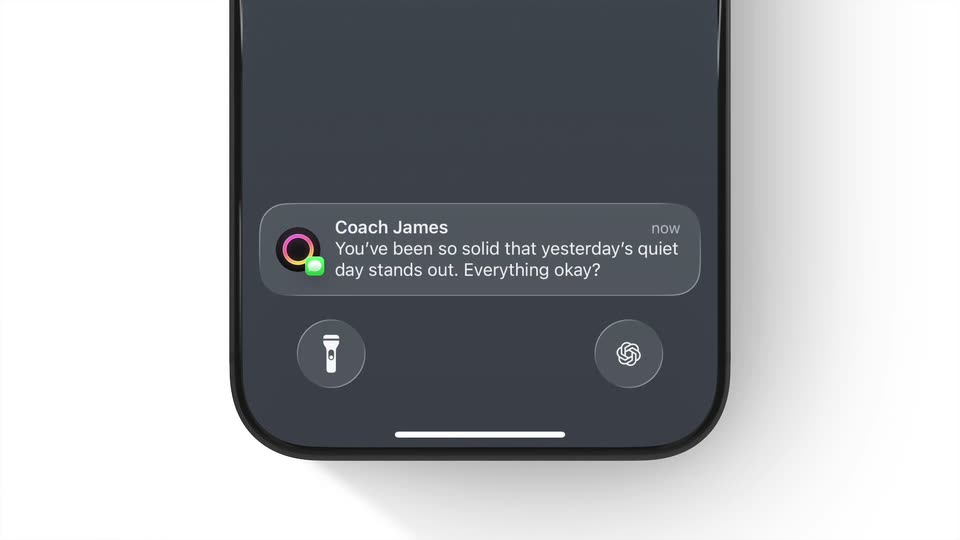
A front-facing iPhone mockup on a light background, frame locked, shows a notification card; the interface then slides up to a messaging view with an on-screen keyboard.
Camera: Static
A close-up of an iMessage thread on a phone. A gray received bubble extends to add the line 'Everything okay?', then the input field types 'Yeah just traveling' letter by letter and sends it as a blue bubble above the keyboard.
Camera: Push in
A close-up of a phone iMessage thread on a light background. A thumbs-up emoji and two bubbles sit above the keyboard; a three-dot typing indicator appears, then a long gray reply bubble slides in, and the field fills with “Love it” as a blue send button appears.
Camera: Static
Close-up of a phone messaging screen. The input field holds “Love it” as it is typed, then the message sends: a blue “Love it” bubble pops in on the right with a Delivered tag and the field clears to the Message placeholder. A keyboard fills the lower half.
Camera: Static
A close-up of an iMessage thread, with a gray bubble pitching a ten minute workout and a blue 'Love it' reply, pulls back. Two angled phone mockups slide in at the edges, both showing the 50 Pushups app, the row caught in motion blur.
Techniques: UI zoom, 3D mockup
Camera: Pan
A black iPhone in 3D on a white background shows a dark habit tracker. The list zooms into the 50 Pushups card, its strength counting 0.0 to 10.0 and streak to 1 day, then a rainbow ring and Perfect Day appear over the blurred list.
Techniques: 3D mockup, UI zoom
Camera: Pull out
A front-facing phone mockup sits on a light gray background. Its dark screen shows a glowing multicolor ring that rotates as small confetti shapes burst outward, then fall. The event title and date remain static below the ring.
Techniques: 3D mockup, Particles
Camera: Push in
On a black field, a glowing pink-to-yellow ring slides left into place, then the white word Halo holds to its right as the lockup. Small white captions for a title and a date sit on screen throughout.
On-screen text: “Perfect Day”, “November 26”, “Halo”
Techniques: Masking
Camera: Static
On black, a pink-to-yellow gradient ring slides in beside the white wordmark Halo. The shot cuts to the Apple logo with the white text Made for iPhone, held still on a locked-off frame.
On-screen text: “Halo”, “Made for iPhone”
Camera: Static