1:30

Tire Swing
Tire Swing · B2B · Jul 2026
Hailuo · Sep 2025 · 0:27 · AI-annotated
Hailuo’s 0:27 launch film runs 14 scenes, about 2.0 s each. The product is on screen from the first frame. The call to action lands at 0:26 (94% in). The video is built as a chain of dark UI vignettes, each pairing a typed prompt with a Creating spinner that resolves into a generated image under a sliding section headline. Its signature moves are left to right headline slides, image cards that fade and slide in one by one, spinner to image morphs, and a closing vertical grid scroll, all held at a measured pace of about four cuts per minute with soft crossfades.
Is this your launch? to your site or press kit.
Tire Swing · B2B · Jul 2026
Audora · Consumer · Oct 2026
A darkened product interface, a project panel and a grid of portrait thumbnails, sits behind the Hailuo AI Agent logo and a glowing gradient title. The title line then slides left across the frame, revealing the rest of the tagline as the interface fades to near black.
On-screen text: “Hailuo AI Agent”, “A New Creative Experience — From Idea to Visual”
Techniques: Kinetic type
Camera: Static
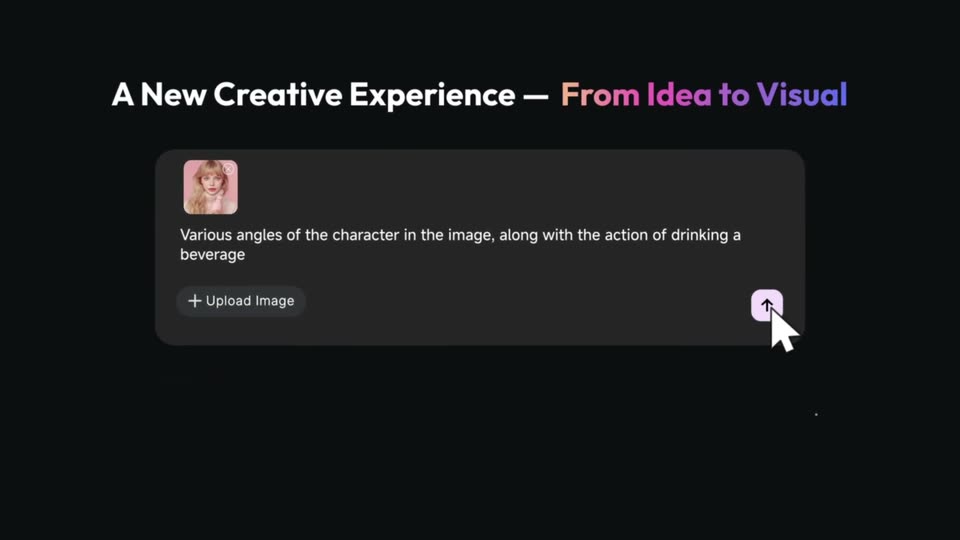
A large headline slides in above a dark chat input card. A cursor hovers over the upload button as a text prompt types out and a small portrait thumbnail appears. A larger portrait image slides in at the bottom right.
On-screen text: “A New Creative Experience - From Idea to Visual”
Techniques: Kinetic type, Cursor demo
Camera: Pull out
A dark chat interface shows a prompt card and an AI avatar replying. The view zooms into the plan text being typed, then reframes to the full workspace: two generated portraits on the left and a project panel with four thumbnails on the right, under a gradient headline.
On-screen text: “A New Creative Experience — From Idea to Visual”
Techniques: UI zoom
Camera: Pull out
On a dark canvas, four portrait cards of a blonde woman fade and slide in one by one from the left. A right-hand panel lists the generation steps and ends with a chat reply above an empty prompt box.
Camera: Pan
A dark chat interface fades in under a bold white headline and gray subtitle. A cat photo and an orange-sofa room image sit left of a Creating... pill with a spinner, above a typed prompt in the input bar.
On-screen text: “Focus on your ideas, Agent handles the rest”, “Plans, tools, and final creation - all taken care of”
Camera: Pan
A dark interface displays a cat photo, a sofa photo, and a prompt box on the left, while the right panel shows a Creating spinner that fades into the generated image of the cat on the sofa. The set then swaps to a new prompt beside a film still.
On-screen text: “Focus on your ideas, Agent handles the rest”, “Plans, tools, and final creation — all taken care of”
Camera: Pan
A dark product screen holds a bold headline and a static prompt box with a source photo on the right. On the left, a Creating status chip is replaced by a movie poster that fades and slides up into place.
On-screen text: “Focus on your ideas, Agent handles the rest”, “Plans, tools, and final creation — all taken care of”
Camera: Static
On a black screen, a bold headline and subtitle sit at the top. Two prompt cards with images exit as a new card with a small dog slides up from below; a Creating... label with a spinning loader fades in on the right.
On-screen text: “Focus on your ideas, Agent handles the rest”, “Plans, tools, and final creation — all taken care of”
Camera: Static
A dark two-column UI shows a dog photo and a typed prompt on the left; a Creating pill on the right swaps to a 3D render of the figurine on a desk. The bold headline and subtitle stay fixed at the top while the left photo fades out.
On-screen text: “Focus on your ideas, Agent handles the rest”, “Plans, tools, and final creation — all taken care of”
Camera: Static
A 3D monitor mockup on a dark desk shows a modeling app with a blue wireframe cat and a brown dog figurine, with a chat box below. The frame becomes a cactus diorama with a cursor and an Add to chat button, and a left caption fades in.
On-screen text: “Focus on your ideas, Agent handles the rest”, “Plans, tools, and final creation — all taken care of”, “Select, Send & Reimagine”
Techniques: 3D mockup, Cursor demo
Camera: Pan
A white caption sits left of a framed cactus diorama on black; a cursor hovers a button under the frame, then the frame slides left off screen as a chat panel slides in on the right with the image as a thumbnail.
On-screen text: “Select,Send & Reimagine”
Techniques: Cursor demo
Camera: Static
A dark app screen pairs a framed cactus photo on the left with a chat panel on the right. A cursor clicks Add to chat, the photo gains a Van Gogh oil-painting twin beside it, and a neon variant drops in below as the caption switches to Edit freely.
On-screen text: “Select,Send & Reimagine”, “Edit freely”, “let your ideas flow”
Techniques: Cursor demo
Camera: Static
A vertical grid of cactus images in many art styles scrolls upward on a black field. The two-line caption is anchored at the lower left and reads over the dark gaps between tiles.
On-screen text: “Edit freely”, “let your ideas flow”
Camera: Pull out
Three blurred cactus thumbnails at the top dissolve away as two centered lines of text sharpen into focus on a near-black background. The second line ends with the words limited time! in a warm orange-to-purple gradient.
On-screen text: “Create with HailuoAI Agent”, “Image generation free for a limited time!”
Camera: Pan