0:38
New Raycast. Coming 2026
Raycast · Productivity · Dec 2025
Granola · Nov 2026 · 1:43 · AI-annotated
Granola’s 1:43 launch film runs 40 scenes, about 2.6 s each. The product shows up at 0:02 and 3 features are revealed. The call to action lands at 1:31 (89% in), over a voiceover. The video is built as a chain of feature blocks, each opened by a large serif title that types or fades in over the hosts' cafe two-shot and then cut to flat-color UI animations of the product. Pacing stays brisk at about 123 BPM, mixing locked-off medium shots, close-ups, and fast UI card moves, with hand-drawn ink accents and pastel backdrops as the recurring visual signature.
Is this your launch? to your site or press kit.
Raycast · Productivity · Dec 2025
Shopify · Business software · Dec 2024
Tinycharts · Nov 2026
A man and a woman sit at a cafe table behind a laptop, the man holding a coffee cup, both facing the camera and smiling. Handwritten name labels with titles appear on the right and left as subtitles caption their introduction.
On-screen text: “NIKOLA”, “CTO”, “Hey, I'm Nikola”, “XIU TIN”, “AI Product Manager”, “and I'm Xiu Ting.”
Camera: Static
A collage of small Granola UI cards, color swatches and hand-drawn ink loops drifts into place on white, framing a large black serif headline that completes to Granola MCP Updates, while a white outlined caption sits below.
On-screen text: “Granola MCP Updates”, “It's been a busy week for Granola MCP updates.”
Techniques: Kinetic type, Parallax
Camera: Static
A collage of product UI cards, black ink scribbles and a green leaf photo fills the frame. A large serif headline reading Granola MCP Updates sits centered, with a white outlined caption at the bottom. The composition holds still.
On-screen text: “Granola MCP Updates”, “It's been a busy week for Granola MCP updates.”
Camera: Static
A white collage of Granola interface cards (people grid, priorities list, overview note) with a large serif title 'Granola MCP Updates' centered. The camera slowly pushes in and drifts up while a bold white caption appears along the bottom edge.
On-screen text: “Granola MCP Updates”, “It's been a busy week for Granola MCP updates.”, “And today we're introducing smart search,”, “making your entire meeting history”
Camera: Pan
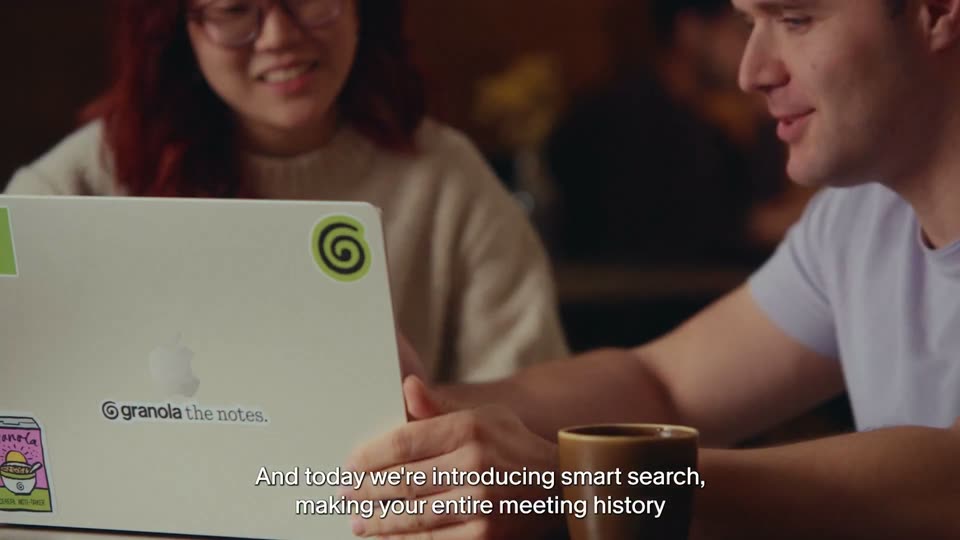
A red-haired woman and a man smile and talk at a café table, the white lid of a MacBook with the Granola logo and stickers filling the foreground, a brown mug on the table. Subtitles caption the voiceover at the bottom as the camera drifts slightly.
On-screen text: “And today we're introducing smart search,”, “making your entire meeting history”
Camera: Pull out
A man and a woman sit at a cafe table with a laptop; the man gestures to camera as the woman watches the screen. The title Smart Search reveals letter by letter across the center, white over the warm set, while subtitles track the voiceover along the bottom.
On-screen text: “Smart Search”, “And today we're introducing smart search, making your entire meeting history”, “truly native to agents such as Claude, ChatGPT, Grok, and Muse.”
Techniques: Kinetic type
Camera: Static
Man in a light gray shirt speaks in a warm room, framed right. At left, a green spiral icon and plus sign hold still while the second icon cycles through agent marks: red burst, gray knot, blue M, blue scribble. White subtitles sit at the bottom.
On-screen text: “Smart Search”, “truly native to agents such as Claude,”, “ChatGPT, Grok, and Muse.”
Camera: Static
Close-up of two people at a desk: one in a cream sweater rests a ringed hand near a laptop keyboard while the other clasps their hands in the foreground. A brown mug sits left, shallow focus, warm light, locked-off frame, white captions at the bottom.
On-screen text: “Our new smart search tools”, “allows your agents to find”
Camera: Static
A woman with red hair and a man in a white tee sit at a cafe table, leaning over a sticker-covered laptop. She points at the screen while he gestures, both smiling. A coffee cup sits in the foreground. White subtitles read across the bottom.
On-screen text: “Our new smart search tools”, “allows your agents to find”, “exactly what it needs”, “across your meeting”
Camera: Pull out
Two people sit at a wooden table, the man in a white shirt clasping his hands, a sticker-covered MacBook and a coffee cup in the foreground. The locked-off frame holds while white subtitles read at the bottom.
On-screen text: “exactly what it needs”, “across your meeting”
Camera: Static
Locked-off medium shot in a cafe: a red-haired woman with glasses talks and gestures while a man in a light T-shirt listens, both holding coffee cups behind a closed MacBook whose sticker-covered lid faces the camera. Other patrons blur into the brick-walled background. White subtitles run along the bottom.
On-screen text: “without having to read the transcript in full.”
Camera: Static
A woman with red hair and glasses speaks next to a man at a laptop, shelves of colored jars blurred behind them. A white and magenta headline, 44% faster, types in at the top left while small white subtitles sit at the bottom.
On-screen text: “It is 44% faster and 85% more token efficient,”, “44% faster”, “without having to”, “read the transcript in full.”
Techniques: Kinetic type
Camera: Static
Two people sit at a cafe table with a sticker-covered laptop, talking, in a locked-off medium shot. A white serif headline reveals letter by letter in the top left while a sans caption stays fixed at the bottom.
On-screen text: “It is 44% faster and 85% more token efficient,”, “85% more token efficient”
Techniques: Kinetic type
Camera: Static
A red-haired woman and a man sit at a laptop in a warm cafe. A white chat bar overlays the laptop as the query what did we agree with Northwind about pricing? types itself out, while a white subtitle runs along the bottom.
On-screen text: “It is 44% faster and 85% more token efficient,”, “while allowing your transcripts to remain the real source of truth.”
Camera: Pull out
Two people sit at a cafe table with a laptop between them. A white search bar overlay types a query, then cycles through Searching status lines. The shot cuts to a full-screen purple UI card repeating the status line. Subtitles run along the bottom.
On-screen text: “Your agent then can go off and search by company, person,”, “or topic and find the source of truth within the transcript.”
Camera: Static
A white UI card titled “Northwind sync” floats over a pink and red mountain background. The card displays a transcript list with messages highlighted in blue and orange. A white caption at the bottom reads “or topic and find the source of truth within the transcript.”
On-screen text: “or topic and find the source of truth within the transcript.”
Camera: Static
A white Northwind sync card with a transcript list sits over a pink sky and red mountain backdrop. A floating quote card shows Sam's line, then a green Northwind Sync 02:14 chip fades in beneath it while a white caption line appears at the bottom.
On-screen text: “It is always cited back so your agent can go off and dig deeper where it needs to.”
Camera: Static
A white “Northwind sync” transcript card floats over a pink sky and red mountain backdrop. A highlighted quote and a green timestamped citation row pan upward, revealing further transcript lines, while a white caption stays fixed along the bottom edge.
On-screen text: “It is always cited back so your agent can go off and dig deeper where it needs to.”
Camera: Pan
Two people sit at a cafe table with a sticker-covered laptop between them. The man on the right talks and gestures as the white title Agent Briefs fades and scales in over the center, while a two-line subtitle swaps at the bottom.
On-screen text: “Agent Briefs”, “Transcripts often include information your agent”, “doesn't have context to understand.”
Camera: Static
A man in a pale gray shirt sits in a softly lit office, framed in a locked-off medium close-up with a blurred background. He looks off-camera and talks, his expression shifting from a slight smile to a focused look. Subtitles track his speech at the bottom.
On-screen text: “Agent Briefs”, “doesn't have context to understand.”, “Say that your transcript reads something like”
Camera: Pull out
A man in a lavender shirt speaks in profile beside a woman at frame left, set against a blurred shelf of colored jars. The shot holds steady on his face as a white subtitle captions his line at the bottom.
On-screen text: “Say that your transcript reads something like”
Camera: Static
A man in a grey shirt speaks at a meeting table while a translucent transcript card slides in from the left, listing timestamped chat bubbles. A white caption sits centered at the bottom of the frame.
On-screen text: “Sam says Northwind wants to know what's happening with Project Atlas.”
Camera: Static
A man in a lavender tee talks at a table beside a woman with a laptop, in a blurred office. A frosted transcript panel overlays the left, its green line matching the spoken line. The man turns to the camera and smiles.
On-screen text: “Sam says Northwind wants to know what's happening with Project Atlas.”
Camera: Static
A man in a lavender tee sits at a cafe table holding a coffee cup, talking. A translucent chat panel titled Northwind sync floats over the left, listing timestamped message bubbles with two lines highlighted yellow. A white caption sits at the bottom.
On-screen text: “Granola context builds a picture of your work from your meetings,”
Camera: Static
A flat “My agent brief” UI card sits on a green striped background as new tags populate its sections. Three detail cards for a person, a project and a deal slide out from behind it while the main card drifts up, and white captions swap at the bottom.
On-screen text: “Granola context builds a picture of your work from your meetings,”, “and keeps it up to date so that your agent knows who Sam is,”, “what is Project Atlas and why the Northwind deal matters.”
Camera: Static
A cream screen holds a large serif Connect title above a pill toggle with Connectors selected in white and My context in gray. The pair slides slowly upward while a white outlined caption at the bottom fades out.
On-screen text: “You can see and edit that context yourself in the new Connect tab.”
Camera: Static
The Connect panel slides into the My context view, showing a notes counter, a bar chart and a work brief. A bottom caption notes you can edit that context in the new Connect tab.
On-screen text: “You can see and edit that context yourself in the new Connect tab.”
Camera: Pull out
The Connect tab fills the screen, showing My context and My agent brief cards with topic tags and a meetings chart. It cuts to a red-haired woman and a man at a laptop in a cafe, she points at the screen while he looks on.
On-screen text: “You can see and edit that context yourself in the new Connect tab.”
Camera: Pan
A woman with red hair and glasses and a man in a light t-shirt sit at a cafe table with a sticker-covered laptop and coffee cups. She speaks while he watches, against a brick wall and colored glass blocks. A caption holds at the bottom.
On-screen text: “Put your agents to work inside”, “Granola too.”
Camera: Static
A woman with curly red hair and glasses sits at a laptop before a blurred bookshelf; the white serif title Write Tools fades in over her face, then clears as she looks down at the screen. Subtitles run along the bottom.
On-screen text: “Write Tools”, “The new write capabilities”, “means that you can do things like write”, “Put your agents to work inside”, “Granola too.”
Techniques: Kinetic type
Camera: Static
A Granola note window titled Northwind Sync sits on a purple paper background beside a calendar. The window scales up while a red cursor taps the Summary and folder dropdowns, and white outlined captions cycle along the bottom.
On-screen text: “The new write capabilities”, “means that you can do things like write”, “prep notes directly into your Granola,”, “apply templates to a note, as well as file notes into folders.”, “Do this for one meeting or hundreds,”, “all with the Granola MCP.”
Techniques: Cursor demo, UI zoom
Camera: Push in
A woman with red hair and glasses sits across from a man in a white t-shirt at a cafe table, a laptop between them. She speaks and smiles as the man listens. White subtitles run along the bottom of the frame.
On-screen text: “Do this for one meeting or hundreds,”, “all with the Granola MCP.”, “So some big MCP updates today.”
Camera: Pull out
Two people sit at a wooden table in a brick-walled cafe, a sticker-covered laptop facing the camera between them. The man on the right gestures with his hands as he speaks, the woman on the left listens. A white subtitle sits at the bottom of the locked-off frame.
On-screen text: “So some big MCP updates today.”
Camera: Static
A red-haired woman with glasses and a man sit at a table beside a laptop, talking in a static shot. Large white serif titles swap in the center of the frame: Agent Briefs, then Smart Search, then Write Tools, while a small caption line runs along the bottom.
On-screen text: “Agent Briefs”, “So some big MCP updates today.”, “Smart Search”, “Agent briefs, smart search, and write tools are just the beginning.”, “Write Tools”
Techniques: Kinetic type
Camera: Push in
A close-up of a laptop lid features a green swirl sticker, with white subtitles reading across the bottom against a blurred background.
On-screen text: “Agent briefs, smart search,”, “and write tools are just the beginning.”, “Write Tools”
Camera: Static
A man in a white t-shirt and a red-haired woman sit at a cafe table behind a sticker-covered laptop, speaking to camera. He gestures as he talks; she listens with a faint smile. Brick walls and blurred patrons sit behind them; white captions run along the bottom.
On-screen text: “We're building Granola to be the most efficient”, “and most intelligent way for your agents to interact with your meeting history.”
Camera: Static
A man in a gray t-shirt speaks to camera, gesturing with one hand. A woman with glasses and a cream sweater sits beside him, holding a laptop with a green spiral sticker. Blurred shelves and a seated figure fill the background. Subtitles run along the bottom.
On-screen text: “and most intelligent way for your agents”, “to interact with your meeting history.”
Camera: Static
Two people sit at a cafe table with a laptop between them. A white serif headline types in on the left, four app icons pop in beside it, and a small caption stays at the bottom.
On-screen text: “Connect your agent to the Granola MCP in the new Connect tab today.”, “Connect your agents”, “today.”
Techniques: Kinetic type
Camera: Static
A man in a pale purple t-shirt closes a sticker-covered silver laptop at a cafe table, then rests his hand on it as he faces a red-haired woman in a cream sweater who smiles at him. Other patrons work on laptops in the soft-focus background. The camera holds a locked-off medium shot.
On-screen text: “Connect your agents”, “m today.”
Camera: Static
Centered on a flat green field, a black spiral mark grows from a small curl into the full icon, and the lowercase wordmark granola scales in beside it, then holds on a locked-off frame.
On-screen text: “granola”
Techniques: Kinetic type
Camera: Static