0:30

Introducing Linear Releases
Linear · Productivity · Apr 2026
Tinycharts · Nov 2026 · 0:25 · AI-annotated
Tinycharts’s 0:25 launch film runs 23 scenes, about 1.1 s each. The product shows up at 0:02 and 8 features are revealed. The call to action lands at 0:22 (89% in). The video opens on a slowly zooming grid of 28 illustrated charts, then walks through seven categories, each announced by a serif title card over a small card grid before one chart scales up and animates its data with a red accent line. It closes by typing a prompt that generates a custom flowchart, then a brand end card with a URL; the look is flat beige paper with hand-drawn isometric illustrations, driven by gentle crossfades and scale-ups.
Is this your launch? to your site or press kit.
Linear · Productivity · Apr 2026
Windsurf · Developer tools · May 2025
A grid of 28 small chart illustrations sits below a centered headline. The grid slowly zooms in and pans left, moving the outer columns off-screen.
On-screen text: “28 chart types”
Camera: Push in
A beige title card crossfades from the headline '28 chart types' to 'Space' while a grid of isometric chart illustrations fades from faint to sharp beneath it.
On-screen text: “28 chart types”, “Space”
Camera: Push in
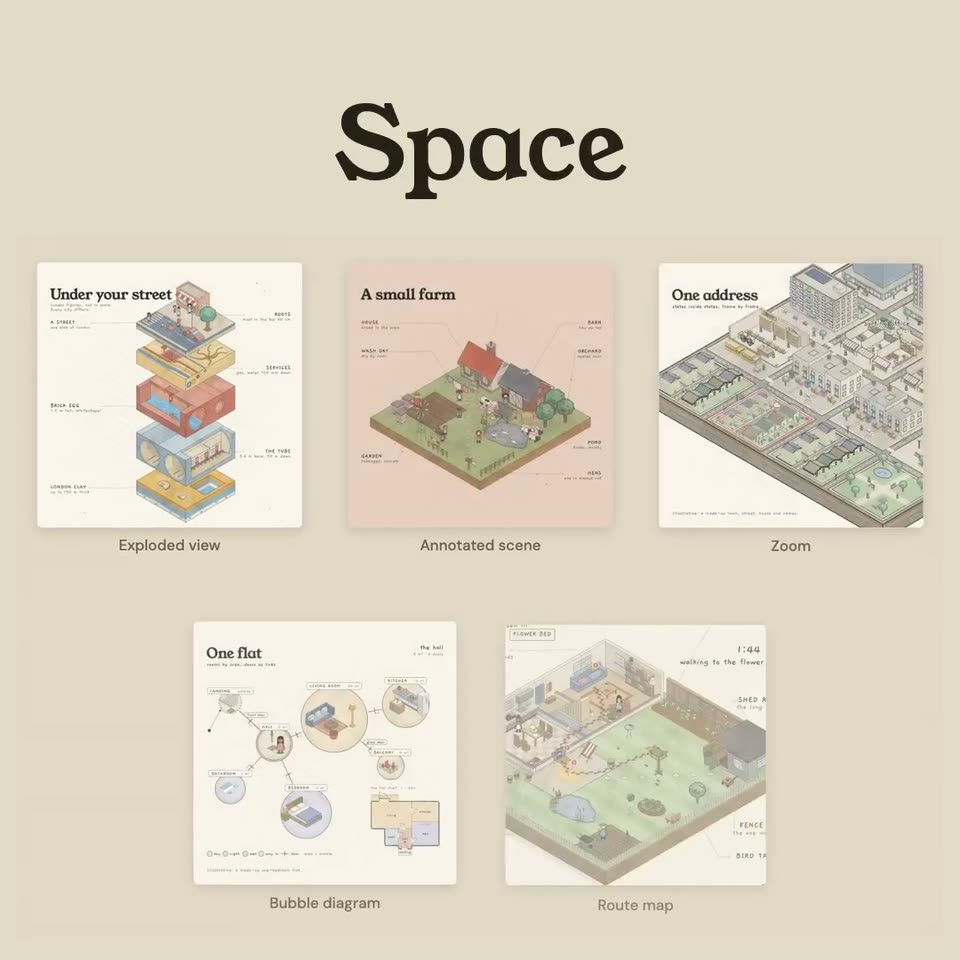
A beige layout holds the serif title Space above five illustration cards, each with a caption below it. The One flat card then scales up to fill the frame while the other cards fade out and drift aside.
On-screen text: “Space”, “Exploded view”, “Annotated scene”, “Zoom”, “Bubble diagram”, “Route map”
Techniques: UI zoom
Camera: Push in
A cream infographic maps a one-bedroom flat as circular room bubbles joined by door lines. A red ring highlights the kitchen, then the living room, while a small illustrated figure steps between them and the corner floor plan recolors to match.
On-screen text: “One flat”, “rooms by area, doors as links”, “the kitchen”, “the living room”
Camera: Static
A beige backdrop holds a large serif title above a grid of five white illustration cards, each depicting a time visualization. The cards ease and slide into their final positions while the title stays fixed.
On-screen text: “Time”, “Timeline”, “Clock”, “Parallel timeline”, “Timing diagram”, “Time-lapse”
Camera: Push in
A cream card holds an isometric illustration of a four-counter ramen shop, with thin leader lines to small labels around it. The bold serif title crossfades from a doubled ghost into a clean line at top left while the rest of the diagram stays still.
On-screen text: “Dinner at seven”, “four counters, one clock, to scale”
Camera: Push in
On a beige field, a dark serif title Order sits above a 2x2 grid of illustration cards: a comic strip, a circular process diagram, an isometric factory scene and a kanban board. Small captions beneath each card slide and scale into place while the bottom-left card's content pans.
On-screen text: “Order”, “Comic strip”, “Cycle”, “Flow machine”, “Kanban”
Camera: Static
Beige background with the serif headline Order above a 2x2 grid of illustrated cards (comic strip, cycle, flow machine, kanban), each under a gray caption. The cards and captions shift and scale as the layout reorganizes, the headline ghosting out.
On-screen text: “Order”, “Comic strip”, “Cycle”, “Flow machine”, “Kanban”
Camera: Push in
The illustrated Laundry day board scales up into frame on a beige background. An isometric row of laundry props runs across the top, while cards labeled darks, whites, sheets and towels slide between the Wash, Dry, Fold and Put away columns of the corkboard grid.
On-screen text: “Illustrative: four made-up loads.”
Camera: Push in
The previous laundry task screen scales down and fades, while a beige layout fades in. A large serif headline sits above a 2x2 grid of four illustrated diagram cards, each captioned with its diagram type.
On-screen text: “Who affects whom”
Camera: Static
A beige screen holds a serif headline above a 2 by 2 grid of diagram cards. The bottom two cards, Network and Escalation, scale up and rise to the front while the headline and the top two cards drift upward and fade.
On-screen text: “Who affects whom”, “Fishbone”, “Sequence diagram”, “Network”, “Escalation”
Techniques: Parallax
Camera: Push in
A flat illustrated village map links character nodes with thin lines. The round steps from four to five: a red line draws from the nurse to the farmer, the farmer's node turns from grey to yellow, and the counter ticks up to ten of twelve.
On-screen text: “News in a village”
Camera: Static
A flat beige background carries a large serif headline at the top. Three illustrated cards fade and scale into a row below it: a garden Sankey diagram, a seed-packet funnel, and a rain-barrel stock-and-flow chart, each with a small caption beneath.
On-screen text: “Flow & quantity”, “Sankey”, “Funnel”, “Stock and flow”
Camera: Static
Three illustration cards sit in a row beneath a large serif title, each captioned Sankey, Funnel, Stock and flow. The left card zooms forward to fill the frame as the title fades to a ghost and the other two cards recede to the right.
On-screen text: “Flow & quantity”, “Sankey”, “Funnel”, “Stock and flow”
Techniques: UI zoom
Camera: Push in
A cream card holds a static two-part infographic. The left is a vertical band diagram splitting 20 L of rain into runoff, soak-in, drain, roots and groundwater; the right is a garden cross-section with a raining cloud, an umbrella figure, a tree and labelled soil layers to the water table.
On-screen text: “Where the rain goes”, “one garden, bands to scale”, “in the groundwater”, “below the water table”
Camera: Static
A cream background holds a 2x2 grid of infographic cards, each with an isometric illustration and a small chart. The dark serif headline Comparison scales in at the top while the four cards settle into place, each with a category label beneath it.
On-screen text: “Comparison”, “Catalogue”, “Break-even”, “Quadrant”, “Bands”
Techniques: Kinetic type
Camera: Push in
A white infographic card titled Grading apples scales up into the center over a beige background, replacing faded Comparison and Catalogue labels. The card holds a quadrant chart with animated apples, a chute illustration and a small gauge box on the right.
Camera: Push in
A large serif title, Branches, resolves from a faded gray ghost into solid dark brown at the top of a beige frame. Three cream cards fade in beneath it, each pairing an illustrated coffee workflow, a flowchart, a decision tree and an isometric game board, with a small gray caption.
On-screen text: “Branches”, “Flowchart”, “Decision tree”, “Game board”
Camera: Push in
A hand-drawn coffee-ordering decision tree on a cream card zooms from a stacked offset into full frame. A red line traces the iced-latte path through the nodes while a glass drops onto a shelf, landing on a Served tag between two small figures.
On-screen text: “Order a coffee”, “three questions, eight drinks”, “Illustrative: a made-up menu of eight drinks.”
Camera: Push in
On a beige background, the serif headline “Or describe your own” sits above a white input box captioned YOU TYPE. The prompt “Draw our refund process” types itself out with a red caret, then the box crossfades into a hand-drawn isometric flowchart card titled “One refund” that fades in.
On-screen text: “Or describe your own”, “YOU TYPE”
Camera: Static
A static dark serif headline, Or describe your own, sits above a cream card holding an isometric illustrated refund flowchart with small figures and buildings. The diagram crossfades and slides, then settles into its full top-to-bottom layout.
On-screen text: “Or describe your own”
Camera: Pan
A cream rounded card holding the serif title Tinycharts, a gray tagline and a red URL sits centered over a blurred isometric flowchart. The card fades out, sharpening the background to reveal the full One refund return-process illustration.
On-screen text: “Or describe your own”, “Tinycharts”, “28 chart types · start with 9 free”, “april-zhu.com/tinycharts”
Camera: Static
A cream end card holds the wordmark Tinycharts over a blurred grid of chart thumbnails. A gray tagline and a red URL sit beneath it, all locked off and still.
On-screen text: “Tinycharts”, “28 chart types · start with 9 free”, “april-zhu.com/tinycharts”
Camera: Static