3:23


Meet the all new Codex Cloud
OpenAI · AI · Sep 2026
Google · Nov 2014 · 0:39 · AI-annotated
Google’s 0:39 launch film runs 24 scenes, about 1.6 s each. The product is on screen from the first frame and 2 features are revealed. There is no explicit call to action; a voiceover carries the film. The video is built as a rapid-fire series of centered phone shots alternating with miniature live action vignettes that physically stage each calendar event, all on seamless white sets. At about 29 cuts per minute near 103 bpm, the signature move is the device scaling, swaying or sliding in and out of macro props while a deadpan this, that, and the other thing voiceover runs the gags.
Is this your launch? to your site or press kit.
A black Android phone sits in 3D perspective on a light gray background, its home screen showing a Google search bar and app icons. A finger enters from the right and taps the Calendar icon, pressing it down.
Techniques: 3D mockup
Camera: Static
Top-down locked-off shot of a white table with a black phone centered, showing a colorful calendar app. Small illustrated objects, a red sock, a dog, a shoe and a gift box, pop in around the phone, then a hand taps the screen and the event list scrolls up.
Camera: Static
A hand holds a black phone showing a calendar app on a white set with miniature props: a coat rack, a small dog, and a crate. A finger taps the screen and the list scrolls up as the month header changes from July to August.
Camera: Static
A black smartphone stands centered in a miniature autumn park with lampposts and a bench. Its screen swaps from an October calendar grid to a Halloween Park Party event card with two glowing pumpkins, as a dog runs past and costumed figures gather by the bench.
Techniques: 3D mockup
Camera: Static
A black smartphone mockup stands centered on a white studio set, its screen showing a Halloween event card with a jack-o'-lantern photo, date and address. Behind it, costumed people gather at a grill and two sit on a bench between autumn trees and lit lamp posts, as the shot pushes in slightly.
Techniques: 3D mockup
Camera: Static
A studio set dressed as an autumn park, with lit street lamps, a bench and a grill. Two people in orange and white costumes reach toward a giant smartphone standing edge-on in the foreground, while others sit and stand behind it.
Camera: Static
A flat lay of folded shirts, shoes, belts and socks on white. A slim phone in the center scales up to fill the frame, revealing a red-headed notification list. A blue knit beanie with a red band then grows to dominate the frame.
Techniques: UI zoom
Camera: Static
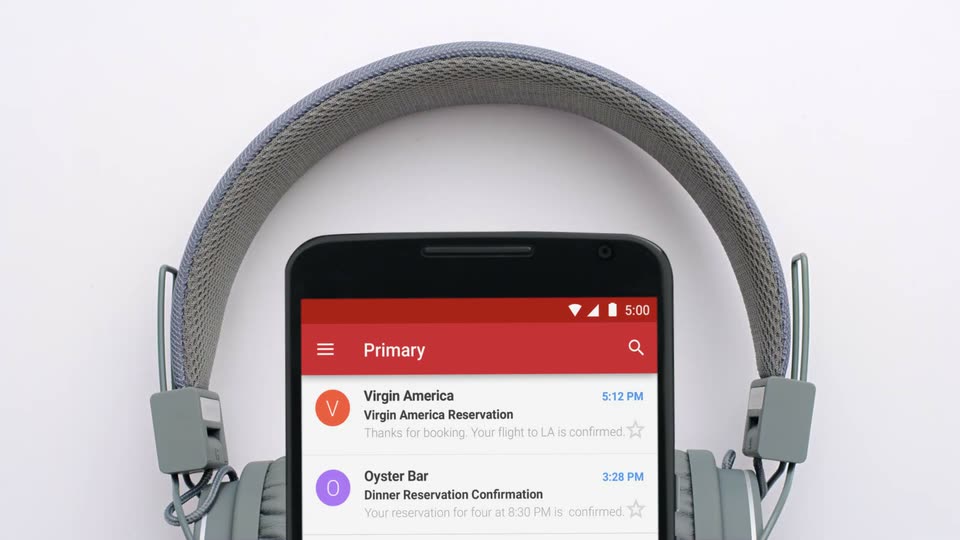
A black phone displaying a red Primary notification list stands centered before a gray over-ear headphone against a white background. The screen shows a Virgin America flight and an Oyster Bar dinner reservation. The shot holds static.
Camera: Static
A phone mockup with a red inbox header is held over a plate of oysters on ice, a hand reaching to grab one. It cuts to the same phone over a vinyl turntable and audio mixer while the notification list reorders.
Camera: Static
A smartphone mockup glides upward in front of a silver turntable, its screen showing a notification list under a red header. Two entries, a concert ticket reminder and a dinner text, sit in the white list as the phone settles into frame.
Techniques: 3D mockup
Camera: Static
A black Android phone mockup floats centered over a white flat-lay of men's clothing, shoes, belts, socks, sunglasses, a wallet, headphones and a turntable. The calendar screen updates in place: the January list fills with color-coded event cards for flight, dinner, concert and hiking, and a red plus button appears beside a Meet Rachel card.
Camera: Static
Close-up of the lower half of a black smartphone on a white surface, showing a schedule app with colored event cards. A real finger enters from the bottom right and presses the red circular plus button, which dips slightly on contact.
Camera: Static
A black smartphone mockup in 3D perspective sits centered on a pale gray background, its screen showing a search field reading “Party at natu” above a list of location results. White museum pedestals holding small sculptures fade in on the left and right, framing the device.
Techniques: 3D mockup
Camera: Static
A black phone mockup in a white studio types an event invite and adds guests on screen. Museum artifacts on pedestals give way to live people: a cyclist at left, a man with a tablet at right, a woman walking past the phone.
Techniques: 3D mockup
Camera: Static
A black smartphone stands upright against a pale gray backdrop, its screen showing a calendar event titled Party with a dinosaur skeleton photo and museum address. The device sways in 3D, tilting right then settling back to face the camera.
Techniques: 3D mockup
Camera: Static
A 3D T-rex skeleton stands on the top edge of a smartphone that displays an AR museum view. The phone slides down out of frame as the skeleton steps onto a small dark rock base, its shadow stretching left on a light gray background.
Techniques: 3D mockup
Camera: Static
Top-down shot of a black phone on a white table showing a calendar list, beside a blue frosted cake with sprinkles. A hand guides a knife through the cake, slicing a wedge while the phone screen stays static.
Camera: Static
A black phone rests on a white workbench dusted with wood shavings, a hand plane soft-focused in the foreground. Its screen shows a May calendar list; the date 17 slides down into place while the locked-off frame holds still.
Camera: Static
A hand grips a lock of dark hair and a pair of scissors snips it on the left, cut strands dropping onto the white surface. A black tablet on the right displays a static green calendar app with a May grid and a column of event cards.
Camera: Static
A phone mockup centered on a whiteboard marked with red and blue lines shows a calendar app cycling through months, June to August to May, as real hands slide red discs across the board at the edges.
Camera: Static
A black smartphone shows a calendar app with a red kickball event and a green catch-up event, centered on a white set. Miniature live-action people and props, a man, a woman, a red ball, a lamppost and an autumn tree, move around the device.
Techniques: 3D mockup
Camera: Static
A woman in a blue sweater stands beside a giant phone mockup displaying a November calendar. She tosses a red apple up, catches it, and bites into it. A white studio set holds autumn trees, a black lamppost, and a basket of apples.
Camera: Static
Three people work at a wooden table of pickling jars and vegetables on a white backdrop. A front-facing smartphone mockup in the foreground shows the app's Pickling Workshop screen, then slides down out of frame to reveal the full table.
Techniques: 3D mockup
Camera: Static
A small white rounded square centered on a pale background morphs into a blue calendar icon with a gray header. The white digit on the page flips through values and settles on 31, then the gray caption “A new day for Google Calendar” scales in below the icon.
On-screen text: “A new day for Google Calendar”
Techniques: Morph
Camera: Static