0:35

Granola - Introducing Agent Briefs. Every night, Granola crunches everything it
Granola · Productivity · Nov 2026
Google’s 1:34 launch film runs 36 scenes, about 2.6 s each. The product shows up at 0:24 and 2 features are revealed. The call to action lands at 1:23 (88% in), over a voiceover. tone:
Is this your launch? to your site or press kit.
Granola · Productivity · Nov 2026
OpenAI · AI · Oct 2026
Wispr Flow · Jun 2025
On a top-down textured paper surface, a vertical dashed line fades in at the center. Two hands slide up from the bottom edge and grip the paper on either side of the line, fingers poised to tear it.
Camera: Static
Overhead shot of two hands typing on a line-drawn keyboard over white paper. The caption builds word by word above the keys, then a large black Chinese character rises and morphs into a side-profile head with wavy lines drifting from the nose.
On-screen text: “There's this word”, “in Chinese...”, “香”
Techniques: Kinetic type, Morph
Camera: Pan
On a textured paper background, a black head silhouette faces left with wavy lines streaming from its mouth down to a sketched keyboard. Real hands type on the keys as the caption below the head scales up and slides out of frame while the wavy lines stretch.
On-screen text: “There's this word”, “in Chinese...”
Techniques: Kinetic type
Camera: Push in
A black abstract silhouette sits on a textured off-white paper background. Its lower edge opens and closes, three wavy lines drop briefly, then the shape morphs as a thin diagonal line extends across the left side.
Techniques: Morph
Camera: Static
On white paper, a pen draws a wavy line that becomes a stem; a doodled daisy with a yellow smiley face appears, then a cupcake with a cookie top is sketched around it, ringed by radiating tick marks.
Camera: Static
A sunglasses-wearing hamburger doodle sits at the center of a gray paper background as dozens of black-and-white sketches of food and objects pop in around it. The doodles then collapse inward and compress into a plus shape.
Techniques: Morph
Camera: Pull out
A locked-off close-up of a paper sheet with handwritten dictionary text. The ink sharpens from a blurred ghost into clear script. A typewriter bracketed label sits at the top. The word things types in bold serif with a caret, then clears. A pen tip enters from the bottom right.
On-screen text: “things”
Techniques: Kinetic type
Camera: Pull out
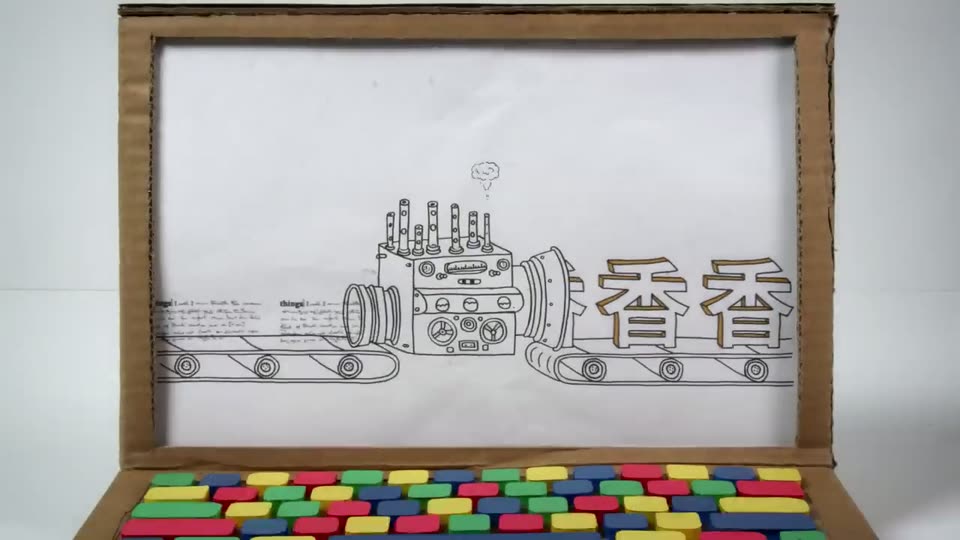
Hand-drawn sketch on a paper texture: a conveyor belt with rollers runs under a machine with a cylindrical hopper at right. The label 'things[]' slides in beside scribbled text lines as the frame drifts slightly wider.
On-screen text: “things[]~”
Camera: Pull out
A hand-drawn ink sketch of a tank-like machine with exhaust pipes sits on textured paper. The frame pulls back from the front roller to reveal the whole rig, then a yellow Chinese character on the conveyor belt scales up as it rolls toward the camera.
On-screen text: “香香”
Techniques: Kinetic type
Camera: Pull out
A hand-drawn line illustration of a mechanical machine with tubes and dials on a conveyor belt, beside 3D Chinese characters, sits inside a cardboard frame. The camera pulls back to reveal a row of multicolored chalks lined up along the bottom edge.
Camera: Pull out
A cardboard laptop mockup on a white set: a printed line drawing is torn from its screen, then red cardboard letters on strings rise to spell TALANOA, with a red Devanagari word below. The letters scatter as the camera pulls back, revealing white porcelain figurines around the laptop.
On-screen text: “香香”, “TALANOA”, “करो”
Techniques: Kinetic type
Camera: Pull out
A cardboard laptop with colorful paper keys sits on a white surface. A red propeller spins on its blank screen, then red paper flames rise around it as the machine sinks into a spreading pile of black keys.
Camera: Static
Top-down stop-motion on a white surface: black keyboard keys form a heart topped with a red paper flame and a matchstick, then rearrange into a lightbulb, and rows of keys fan out from the top like rays of light.
Techniques: Morph
Camera: Static
A light bulb built from black keyboard keys sits on a white surface, with short rows of keys radiating outward as rays. The frame holds steady on the arrangement, with only a faint drift.
Camera: Static
A sculpture made of black and colored keyboard keys sits on a white background. The camera pans down to reveal the full curved, rainbow-colored shape of the object.
Camera: Static
A 3D sculpture of small blocks forms a rainbow fan in blue, red, yellow and green, gripped by a dark blocky hand at the base. It sits on a plain white background and rotates slowly, the colored stripes fanning out above the fist.
Camera: Static
A cream keyboard with rainbow mosaic keys sits before a woven rainbow arch on a white wall. The shot racks from soft blur to sharp focus as hands enter and type across the keys.
Camera: Static
Overhead shot of two hands typing on a cream keyboard with red, blue, green and yellow keys, on a white surface with vertical blue stripes. The word MER pops in above the keys as 3D block letters with a white outline.
On-screen text: “MER”
Techniques: Kinetic type
Camera: Static
Top-down, hands type fast on a cream keyboard with rainbow keys over a blue-and-white striped backdrop. A chrome 3D logo with a lightning bolt assembles above the keys, then duplicates into three stacked copies while the hands keep typing with motion blur.
On-screen text: “HEPAKI”
Techniques: Kinetic type
Camera: Static
A hand strikes a retro keyboard with multicolored keys in front of a blue and white striped paper backdrop. A woman in a green bodysuit jumps and poses with arms spread, smiling, while the 3D metallic title MERAKI with a floor reflection holds at the top.
On-screen text: “MERAKI”
Camera: Push in
A woman in a green dress stands with arms wide against blue and white vertical stripes. An out-of-focus hand reaches toward her, then withdraws, and a thin circular line drawing overlays her figure before the frame blurs.
On-screen text: “NEVER NEVER NEVER”
Camera: Pull out
A thumb grips a tablet's left edge over a marble table; the screen plays footage of hands taping a poster of a woman in a green dress on blue and white stripes, MEMANI printed above. The soft-focus close-up pulls back to reveal the black bezel.
Camera: Pull out
A hand holds a black tablet over a white surface with line drawings, displaying a video of a person signing a blue and white striped shirt. The tablet tilts and moves slightly as the hand adjusts its grip.
Camera: Pull out
A hand grips a long-handled brush loaded with blue paint and dabs it onto the peak of a pencil-sketched mountain on a white canvas. The brush enters from the right, touches the line drawing, and lifts away, leaving a streak of blue over the sketched ridge.
Camera: Push in
A hand holds a wooden-handled climbing hammer in front of a pencil sketch of mountains and pine trees on white paper. The hammer head rests against a blue-painted peak, and the hand stays steady after a quick blurred entry.
Camera: Static
A hand swings a claw hammer in front of a whiteboard with a sketched mountain range and a blue watercolor patch. The shot cuts to two people holding heart-shaped whiteboards with the same sketch, the hammer still raised on the right one.
On-screen text: “X”
Camera: Pan
Two hands hold a white heart-shaped cutout over a canvas, framing a blue brushstroke and a paintbrush. The hands tilt the heart to the side, then pull it away in a fast blur against a dark background.
Camera: Static
A dark glass panel fills the frame with a glowing heart-shaped cutout at center. A hand enters from the lower right and sweeps slowly across the heart, fingers blurring in the dim light.
Camera: Static
A hand holds a small pale blue heart-shaped object against a dark reflective surface, the fingers turning it slightly while a faint reflection of the hand appears on the left.
Camera: Static
A hand holds a small print of a classical colonnade against a dark background, then the print grows to fill the frame, showing the columns in detail.
Camera: Static
A bright rectangle of a Greek temple widens to fill the frame over a crowd. A hand with a black marker crosses out the mixed-script caption, then the camera pulls back to reveal the glass panel inside a dark display case.
On-screen text: “¿φfqя βoeч wюгнъj? o 其rصΔ ḥцkжax”, “μ猫Σs 支vωصы ぽω∩ κфъ问α在 يvδ”, “λبp ċ6H|4дφ зyあ zطmй.”
Camera: Pull out
A wooden shelving unit with empty glass shelves stands against a white wall, lit by warm light from the right. The camera glides horizontally across the frames, revealing the bare structure and a small white card on the bottom shelf.
Camera: Pull out
A camera pan sweeps right across empty glass display shelves fitted with small spotlights, the motion blurring as it passes the lit frames and ends on a glimpse of the floor and a ladder.
Camera: Pull out
A fast, out-of-focus camera move sweeps across an empty room: a white wall fills the frame, then the view drops to a dark floor.
Camera: Static
Paper letters hung by threads on a white wall rotate from multilingual glyphs into the Google wordmark in brand colors. A black monospace caption fades in below, then swaps to the URL.
On-screen text: “Now you can type in over 80 different languages on the web.”, “google.com/inputtools”
Techniques: Morph, Kinetic type
Camera: Static
A white wall holds the Google wordmark built from strips of colored tape, each letter suspended by a thin thread and swaying gently. The URL google.com/inputtools sits centered below in small black type.
On-screen text: “google.com/inputtools”
Camera: Static