1:22


Introducing Lumi, the Product Adoption Agent | Userlens
Userlens · Nov 2026
Google · Dec 2016 · 1:10 · AI-annotated
Google’s 1:10 launch film runs 22 scenes, about 3.2 s each. The product shows up at 0:42 and 4 features are revealed. The call to action lands at 1:03 (91% in), over a voiceover. The video is built as a before-and-after: a blank phone builds a copy-paste pain point, then the same phone demos Gboard's in-keyboard search, followed by a rapid montage of secondary features and a store-badge end card. Its signature moves are the flat white phone mockup, hand-drawn blue arrows tracing the user's path, and real fingers tapping a live keyboard on a plain white field.
Is this your launch? to your site or press kit.
Userlens · Nov 2026
Pomerado · B2B · Oct 2026
Ecovadis · Nov 2020
A white phone mockup, flat front view, fades in centered on a light background. Its screen stays blank and white throughout the short clip, with no interface or text appearing.
Camera: Static
A flat white phone mockup zooms into its screen, where a chat thread builds up: a blue 'Grab dinner?' bubble, a white reply, then another blue bubble, before the view pulls back to the full phone.
Techniques: UI zoom
Camera: Pull out
Left: Google logo over a search box typing 'umami burger,' then an address card; right: a front-facing phone mockup with a chat. A dashed arrow flips as COPY pops over the highlighted address and PASTE appears over the input field, which fills with the address; the left half exits.
On-screen text: “$#@?!?!”, “COPY”, “PASTE”
Techniques: Split screen
Camera: Pull out
A flat white phone mockup rests on the right of a plain background, its screen showing a chat with blue and white bubbles above a keyboard. A gray dashed arrow draws in from the phone, curving left to imply a swipe gesture.
Camera: Static
On a white background, the Google logo sits above an empty search box, with a flat white phone mockup showing a chat and keyboard on the right. A dashed black arrow points from the phone to the search box, then redraws above the logo to point at the phone.
Camera: Static
A Google wordmark and search bar sit left of a flat phone mockup; the view zooms into the messaging keyboard where a hand-drawn blue arrow and circle point to the small G icon, then a finger taps it.
Techniques: UI zoom, Cursor demo
Camera: Push in
A close-up of a phone screen shows a search bar above a dropdown list of suggestions and a QWERTY keyboard. A real finger taps the search field, then slides down toward the keys. The framing stays tight on the lower half of the device.
Camera: Static
A close-up of a Google search bar on a phone. The query umami burger types in letter by letter as autocomplete suggestions populate the list above. The frame then zooms out, shrinking the interface to the right half as the search is submitted.
Techniques: UI zoom
Camera: Static
A phone chat screen scrolls as a Google result fills the search bar with the restaurant's address, then a finger taps send and the address pops up as a chat bubble with a link. Hand-drawn blue arrows mark the path.
Camera: Push in
A phone chat screen with a blue reply bubble and a white address card fades out to white. A grid of colorful app icons, including Google, Gmail, Twitter and Facebook, pops in with a brief scale-up, then dissolves back to white.
Camera: Pull out
A white phone frame holds a grid of colorful app icons. A real finger taps the WhatsApp icon, then the view cuts to a chat screen with two message bubbles, where the finger taps a letter on the on-screen keyboard.
Techniques: Cursor demo
Camera: Static
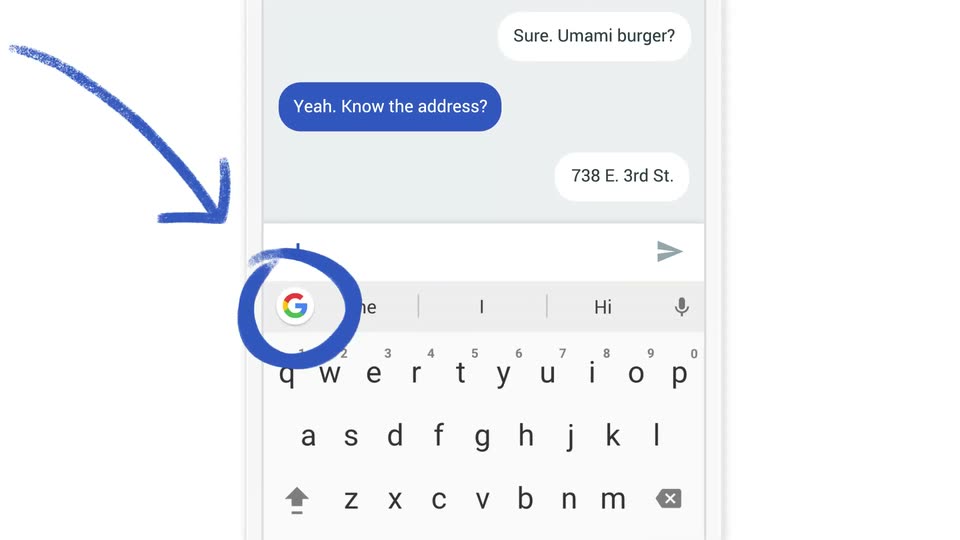
A close-up of a phone messaging screen shows a keyboard with a Google G icon in the suggestion bar. A hand-drawn blue arrow points down and a blue circle encircles the icon, then the interface fades to white, leaving the annotation.
Camera: Static
On a white background, a multicolor Google G icon fades in on the left while a gray keyboard icon with a teal A speech-bubble badge fades in and scales on the right, then both icons shift and tilt slightly.
Camera: Static
A blue keyboard icon sits centered on a white field. A white shield carrying the multicolor Google G starts tilted above the keys, rotates to an upright position, then holds still. A soft diagonal shadow falls from the shield onto the keyboard.
Camera: Static
A phone search results page displays the query “babies laughing” above a row of video thumbnails. One YouTube card zooms in from the side-by-side grid to a full-width result, showing the laughing twins video and its link.
Techniques: UI zoom
Camera: Pan
A phone screen on a plain white background shows a Google search results page with two flight status cards stacked in a vertical list. The list scrolls up a short distance to lock the cards into frame.
Camera: Static
A messaging app's GIF picker fills the frame, the search bar reading 'happy dance' beside a Google G. A horizontal strip of thumbnails scrolls leftward, passing a dancing SpongeBob, a man in plaid, and a pink cartoon character. The bottom bar keeps ABC, emoji, GIF and smiley icons fixed.
Camera: Static
A close-up of a phone search screen shows a finger gliding across the keyboard, leaving a blue swipe path. The query line and suggestion list update as the swipe completes.
Camera: Static
A close-up of a mobile search interface: the Google G logo sits left of a field where the word Dancer types out letter by letter. Above, a grid of emoji suggestions updates, narrowing to dancer figures, while a QWERTY keyboard fills the lower half.
Camera: Static
A close-up of a virtual QWERTY keyboard fills the frame, the black Android navigation bar sitting below. The gray language key at the bottom center updates its label from EN to ES, showing the keyboard switching languages on the fly.
Camera: Static
Close-up of a chat screen above a Gboard keyboard. A blue bubble reads “Fly safe! Te amo”; the reply “I will... ¡Ya te extraño!” is typed letter by letter into the input field, then sent and appears as a white bubble on the right.
Camera: Static
On a plain white background, a colorful G on a white tile sits above the gray headline, with two black store badges below. The tile morphs into the Gboard icon, a white shield over a blue keyboard base, while the text and badges remain locked off.
On-screen text: “Gboard: now available for Android®”, “GET IT ON Google Play”, “Download on the App Store”
Techniques: Morph
Camera: Static