0:39
Editwhiz | Motion Designer - Launch video for Slice
Slice · Aug 2026
Frame.io · Oct 2024 · 0:30 · AI-annotated
Frame.io’s 0:30 launch film runs 20 scenes, about 1.5 s each. The product shows up at 0:02 and 4 features are revealed. There is no explicit call to action. The video interleaves locked-off live-action portraits of creators with split-screen demos of a dark interface, each feature introduced by an oversized white headline that builds line by line. Cuts land near 20 per minute over a slow 81 BPM pulse, with smooth zooms and reframes inside the UI and a closing 3D montage of device screens that blurs into the tagline and the Frame.io logo.
Is this your launch? to your site or press kit.
Slice · Aug 2026
Figma · Design · May 2025
A dark grid of video project thumbnails fills the frame as the white headline scales down from oversized to a centered two-line lockup over the interface.
On-screen text: “Upgrade your creative workflow”
Techniques: Kinetic type, UI zoom
Camera: Pull out
A curly-haired woman in a beige sweater sits at a wooden desk in a dim home office, smiling as she works. The silver back of a desktop monitor fills the right foreground, and warm window light rims her hair. The frame is locked off.
Camera: Static
A dark media-asset interface stays locked off, showing a sidebar, a grid of video clips, and a preview panel on the right. A translucent strip of clip thumbnails slides across the center and preview area, then clears.
Camera: Static
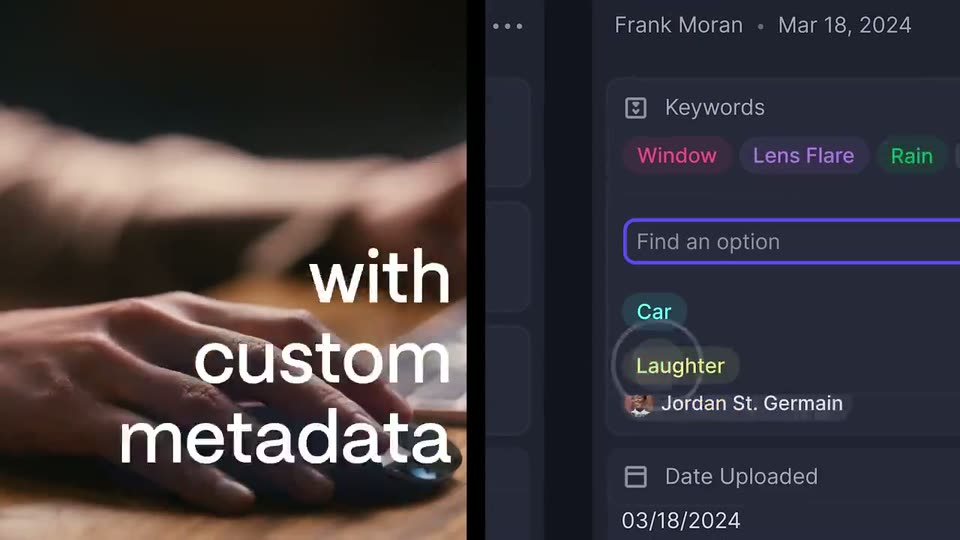
Split screen: a hand works a mouse on a wooden desk at left while a dark metadata panel scrolls and zooms into a keyword detail view at right. A white headline builds line by line over the footage.
On-screen text: “Organize assets with custom metadata”
Techniques: Split screen, Kinetic type, UI zoom
Camera: Static
A static split screen holds a shot of a curly-haired woman at a table on the left and a dark metadata panel on the right showing colored keyword tags, a search field, and an upload date. The white headline 'with custom metadata' overlays the footage.
On-screen text: “with custom metadata”
Techniques: Split screen
Camera: Static
Split screen: a curly-haired woman in a beige cardigan looks off camera on the left beneath a large white headline; on the right the app's dark thumbnail grid gains purple selection borders and checkmarks on six frames.
On-screen text: “with custom metadata”
Techniques: Split screen
Camera: Push in
A split screen pairs a curly-haired woman in a beige sweater, gazing at a screen, with a dark file-manager interface on the right. A grid of thumbnails sits above Download and Share buttons, a white cursor hovers on Share, the panel cuts to a monitor showing a green line graph.
Techniques: Split screen, Cursor demo
Camera: Static
Split screen: a curly-haired woman in a beige cardigan looks toward a screen on the left, while the right shows a monitor with a green line chart and a flat panel below holding gray and purple buttons. A round cursor taps the purple Share button.
Techniques: Split screen, Cursor demo
Camera: Static
A woman in a white turtleneck sits at a desk, facing an open laptop whose lid shows the Apple logo. She holds a faint smile while two blurred figures move behind her in a dim, warm room lined with bookshelves and framed art. The frame stays locked off.
Camera: Static
A video editor screen zooms into its preview, showing two astronauts from behind in a snowy tent with yellow comment circles on their backpacks. The view reframes into a split layout, the preview on the right and a large Compare versions headline on the left.
On-screen text: “Compare versions”
Techniques: UI zoom, Split screen
Camera: Push in
A dark interface displays a split view with a video of two astronauts on the left and a comment panel on the right. A yellow circle highlights a subject in the video, while the text 'Compare versions' sits at the top left.
On-screen text: “Compare versions”
Techniques: Split screen
Camera: Pan
Two people in white space suits stand in a tent facing snowy peaks, equipment cases at right. A yellow circle and location pin mark the suits. The headline 'Compare versions' swaps to 'Get feedback' as a dark comment card from Mia Ricci appears beside the pin.
On-screen text: “Compare versions”, “Get feedback”
Camera: Static
A white 'Get feedback' headline holds top left over live-action footage of two suited figures in a snowy tent, tagged with a map pin and yellow hand-drawn circles. A dark comment card on the right grows to reveal an attached file and a reply row.
On-screen text: “Get feedback”
Camera: Static
A dark image of two astronauts in white suits, seen from behind inside a tent, carries a yellow circle annotation and a floating comment card. The view reframes outward to reveal the full review interface, with a comments panel on the right and a toolbar framing the picture.
On-screen text: “Get feedback”
Techniques: UI zoom
Camera: Pull out
A dark user interface displays a kanban board with columns and tags. A modal window appears in the center, featuring a text input field and a list of status options with colored pills.
On-screen text: “Find a description”, “Not Addressed”, “Needs Review”, “Approved”
Techniques: UI zoom
Camera: Pan
A split screen pairs a film clip of a woman at a laptop on the left with a dark product panel on the right. A white headline slides in over the footage as a cursor sets a status option, the value flipping from Needs Review to Approved.
On-screen text: “Collaborate with your teams & clients”
Techniques: Split screen, Kinetic type, Cursor demo
Camera: Static
A dark cluster of phone, tablet and laptop screens floats in 3D perspective, tilted at an angle. The camera glides through the field with shallow focus, blurring the outer screens while media grids and list panels hold sharp.
Techniques: 3D mockup, Parallax
Camera: Push in
A 3D arrangement of phones and tablets with app screens blurs and fades to black around the frame edges, while the centered tagline sharpens and scales in place.
On-screen text: “Move creative projects”, “forward faster”
Techniques: 3D mockup, Kinetic type
Camera: Static
A two-line white headline sits centered on a black field and scales up slightly to settle into sharp focus. The frame stays locked off for the brief.
On-screen text: “Move creative projects forward faster”
Techniques: Kinetic type
Camera: Static
On black, a blurred white two-line headline sits above a small white mark of three arcs and a dot. The headline dissolves out, leaving the mark and the Frame.io wordmark at the bottom, then everything fades to black.
On-screen text: “Move creative projects”, “forward faster”, “Frame.io”
Techniques: Kinetic type
Camera: Static