2:13


Brad Menezes - Introducing Superblocks 2.0: AI-generated enterprise apps – finally u
Superblocks · Apr 2026
ForecourtIQ · Mar 2026 · 1:47 · AI-annotated
ForecourtIQ’s 1:47 launch film runs 46 scenes, about 2.3 s each. The product shows up at 0:21 and 3 features are revealed. The call to action lands at 1:35 (89% in), over a voiceover. The video is built as a text-card argument: a spending hook, the nobody-notices problem, the ForecourtIQ intro, three feature beats (AI detection, simple alerts, anti-spam), a revenue close, and a demo CTA. Its signature moves are word-by-word type builds on white with teal blur, dark navy motion graphics with pulsing radar dots and a recurring hexagon logo, and fast cuts at 115 bpm.
Is this your launch? to your site or press kit.
Superblocks · Apr 2026
Eccasion · Nov 2026
Google · AI · May 2026
Films whose music sounds like this one, voice left out
Owner · Upbeat electronic with cinematic elements
Google · Electronic
The frame fades up from black to a white field with soft teal blur at the edges. Centered blue text reads “You spend”, with “You” in a deeper blue and “spend” in a lighter blue, held static in a locked-off frame.
On-screen text: “You spend”, “THOUSANDS”
Camera: Static
A line of blue text sits centered on a white field, backed by a soft blurred teal ring. The phrase reads you spend THOUSANDS, with spend in lowercase and THOUSANDS in caps, the left edge of the line cropped by the frame.
On-screen text: “you spend THOUSANDS”
Camera: Static
A single line of blue lowercase text scrolls left across a white field with a soft teal blur in the top right corner. The line travels from “every” to a final stop on “buyers to your site”, which holds centered.
On-screen text: “spend THOUSANDS every month getting buyers to your site”
Techniques: Kinetic type
Camera: Static
A blue headline on a white background with a soft blurred teal arc at the left edge. The words appear in sequence, with 'what' fading in last, on a locked-off frame.
On-screen text: “But here is what”
Techniques: Kinetic type
Camera: Static
Centered bold blue sans-serif lines on a white background with a soft green glow in the corners. The line “But here is what” scales in, then cuts to “actually happens,” which holds still. Locked-off frame throughout.
On-screen text: “But here is what”, “actually happens”
Techniques: Kinetic type
Camera: Static
A top-down aerial shot of a car dealership forecourt, tinted dark blue, with pulsing blue and green circular markers popping over the building roof and parking bays while the camera slowly drifts and zooms.
Camera: Push in
A plain coral red background holds the white headline centered in frame. The text stays locked and still for the full duration, with no camera move or animation.
On-screen text: “Nobody Notices”
Camera: Static
The blue headline “Nobody Notices” sits centered on a plain white background, held static for the full shot.
On-screen text: “Nobody Notices”
Camera: Static
A white headline reading Nobody Notices sits centered on a solid coral background. The frame is locked off with no motion across the short clip.
On-screen text: “Nobody Notices”
Camera: Static
A blue headline reads 'Nobody Notices' centered on a plain white field, held static with a locked-off frame.
On-screen text: “Nobody Notices”
Camera: Static
The phrase Nobody Notices holds centered on a flat coral-red field. The frame is locked-off and the type stays still for the full shot.
On-screen text: “Nobody Notices”
Camera: Static
Top-down aerial of a forecourt building and street, graded dark blue, with green and blue radar pings pulsing over the desks and parking. The camera drifts slowly right as the still headline 'Nobody Notices' holds over the scene.
On-screen text: “Nobody Notices”
Camera: Pan
Top-down aerial of a blue-tinted office rooftop with pulsing blue and green radar dots. Frosted cards labeled Paperwork, Deliveries, Admin pop in over the desks, then fade as the camera pulls back to reveal the parking lot.
On-screen text: “Paperwork”, “Deliveries”, “Admin”
Techniques: Kinetic type, Particles
Camera: Pull out
On a white background with a soft teal blur top right, the word INTRODUCING in light blue scales in at center, then is replaced by the navy ForecourtIQ hexagon logo and wordmark, which scale up to fill the frame.
On-screen text: “INTRODUCING”, “ForecourtIQ”
Techniques: Kinetic type
Camera: Pull out
The ForecourtIQ logo, a navy hexagon mark beside the navy and blue wordmark, sits centered on a white background and scales up slowly. A soft white rounded square pulses behind the blue IQ letters, then fades as the logo settles.
On-screen text: “ForecourtIQ”
Techniques: Kinetic type
Camera: Static
On a white background, a dark hexagonal logo and the ForecourtIQ wordmark scale in on the left as a blurred gray pill with a cyan person icon and the caption FORMER CAR SALESPERSON slides in from the right; the brand lockup clears and the pill settles centered.
On-screen text: “ForecourtIQ”, “FORMER CAR”, “SALESPERSON”
Techniques: Kinetic type
Camera: Static
A dark navy field with a green curved line on the left, along which translucent cards reading Missed opportunities scroll downward and tilt. On the right, a single pill badge with a cyan person icon and the words FORMER CAR SALESPERSON holds steady.
On-screen text: “Missed opportunities”, “FORMER CAR SALESPERSON”
Techniques: Kinetic type
Camera: Pan
A dark navy field holds a central chip with a cyan person icon and the text FORMER CAR SALESPERSON. Word chips EVERY, SINGLE and DAY pop in around it with a glow as tilted Missed opportunities chips slide out lower left; a blurred green circle sits at the left edge.
On-screen text: “FORMER CAR SALESPERSON”, “EVERY”, “SINGLE”, “DAY”
Techniques: Kinetic type
Camera: Push in
The ForecourtIQ logo holds center on a white field as the camera slowly pushes in. Thin blue rings rotate around it at different speeds, four-pointed blue stars orbit the outer ring, and hexagonal badges with CCTV camera line icons land on the rings.
Camera: Push in
The ForecourtIQ logo with two hexagonal camera icons sits inside a thin blue circle on white, then cuts to the headline VALUABLE SALES TOOL in light blue scaling up on white with soft blurred blue shapes in the corners.
On-screen text: “VALUABLE SALES TOOL”
Techniques: Kinetic type
Camera: Push in
A light gradient background with soft blurred blue and green corner shapes. The blue all-caps headline VALUABLE SALES TOOL scales in at center, then the word YET appears below it. The frame stays locked off.
On-screen text: “VALUABLE SALES TOOL”, “YET”
Techniques: Kinetic type
Camera: Static
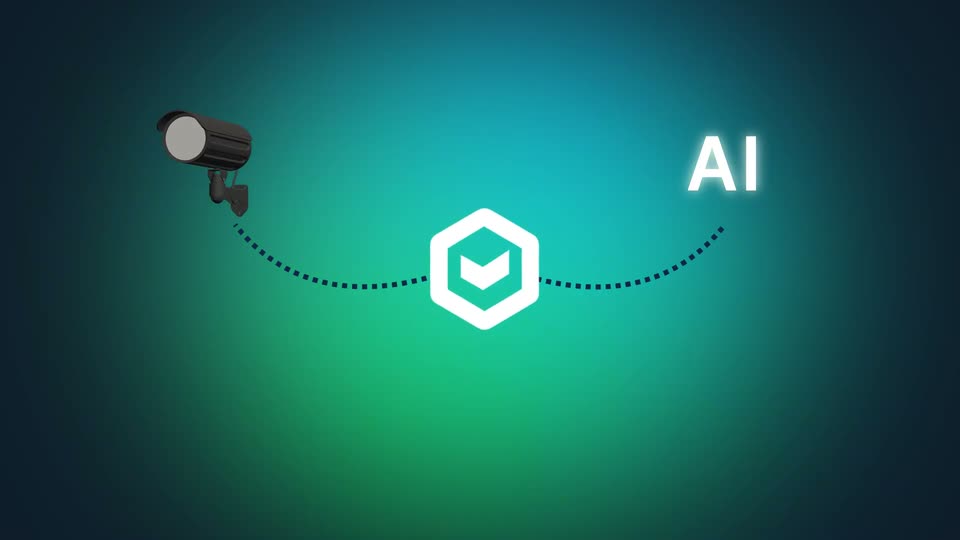
On a teal gradient, a white hexagon check logo holds the center. A gray security camera drifts in from the left, trailing a dotted line that arcs to the logo and on to a glowing “AI” label at right. The logo’s inner mark rotates between a check and a cube.
On-screen text: “AI”
Techniques: Morph
Camera: Static
Aerial night view of a car dealership lot; a suited man walks across the asphalt. Red scan lines sweep the frame, green brackets lock onto the man, and a Customer Detected! toast pops in. Red brackets then flag a car and a tree as rain falls, No Alert shown.
On-screen text: “AI”, “24/7”, “Customer Detected!”, “No Alert”
Techniques: Light sweep, Particles
Camera: Push in
High-angle locked-off view of a wet parking lot. A pedestrian crosses the frame as a green corner-bracket box locks onto them, and small green labels appear beside the box.
On-screen text: “Analyzing...”, “HUMAN DETECTED”, “No Alert”
Camera: Pan
High-angle, desaturated view of a wet parking lot. A green corner-bracket box locks onto a walking silhouette at center, with a small label to its right that reads Analyzing, then switches to HUMAN DETECTED.
On-screen text: “Analyzing...”, “HUMAN DETECTED”
Camera: Static
A blurred close-up of a person holding a smartphone fills the frame while a frosted notification card slides in at center. The card shows a purple Teams icon, the bold white text Customer Detected! and a small gray 10 sec ago timestamp in the top right.
On-screen text: “Customer Detected!”, “10 sec ago”
Camera: Static
A frosted notification card reading Customer Detected! floats over a blurred shot of a person holding a phone. A blue arrow drops onto the text as a second green-outlined panel slides up from the bottom.
Camera: Static
White three-line text reads “No new software to learn” on the left over a dark backdrop with a soft glowing arc. On the right, a green-bordered card holds a green person icon as a red diagonal line draws across it corner to corner, negating it.
On-screen text: “No new software to learn”
Camera: Static
A dark frame with a glowing teal arc holds a green-bordered card on the right, where green person icons sit under a red diagonal slash that sweeps across. The left headline swaps from 'No new software to learn' to 'No extra staff' as the icons go from one to three.
On-screen text: “No new software to learn”, “No extra staff”
Camera: Static
On a dark blue background with a soft glow, the headline “No extra staff needed” builds on the left as a green-bordered card on the right shows three green person icons crossed out by a red diagonal slash. The card then dissolves into a laptop mockup of a parking lot dashboard.
On-screen text: “No extra”, “staff needed”, “No”
Techniques: Kinetic type, 3D mockup
Camera: Static
A 3D monitor on a dark backdrop shows the ForecourtIQ dashboard while a red beam sweeps across it, next to the headline “No dashboards to watch”. The shot blurs and zooms into the interface as a blue cursor points at a “Notification” pill inside a glowing ring.
On-screen text: “No dashboards to watch”, “Notification”
Techniques: 3D mockup, Light sweep, UI zoom, Cursor demo
Camera: Static
A rounded pill button with a purple border and white text bounces left and right on a dark field ringed by a blurred green-white glow. Two blue cursor arrows hover at its right edge, one drifting up from below.
On-screen text: “Notification”
Techniques: Kinetic type
Camera: Static
Centered cyan text reads 'Already walking out' against a dark background featuring a blurry, glowing ring of white and green light.
On-screen text: “Already walking out”
Camera: Static
On a dark teal gradient, the white line “With our Advanced” and the blue-green line “Anti-Spam Technology” fade in centered, hold, then give way to the gradient line “you will get only”. Locked-off frame, slow pace.
On-screen text: “Already walking out”, “With our Advanced”, “Anti-Spam Technology”, “you will get only”
Camera: Static
On a plain off-white background, the caption you will get only holds still while the blue ONE Alert wordmark slides in and settles at the center of the frame.
On-screen text: “you will get only”, “ONE Alert”
Techniques: Kinetic type
Camera: Static
On a dark teal gradient, the teal words slide left and overlap the still green line 'per Customer' as they cross-fade. Near the end a solid blue circle with a white letter enters from the right edge.
On-screen text: “ONE Alert”, “per Customer”
Techniques: Kinetic type
Camera: Static
Two large blue radial-glow orbs on a black field each hold a white two-line label. The right label holds still while the left label slides in from the left as its orb grows into frame.
On-screen text: “No Duplicates”, “No False Alarms”
Techniques: Kinetic type
Camera: Static
Two blue glowing ovals drift across a black background while white two-line labels, No False Alarms on the left and No Duplicates on the right, slide out of frame.
On-screen text: “No False Alarms”, “No Duplicates”
Techniques: Kinetic type, Parallax
Camera: Static
Black screen with soft blue arcs at top and bottom. 'Faster Engagement = Higher Conversions' builds word by word, then 'convert into a sale' scales in at center, and 'More Engagements mean more Revenue' fades in as the arcs shift into blue waves.
On-screen text: “Faster Engagement = Higher Conversions”, “convert into a sale”, “More Engagements”, “mean more Revenue”
Techniques: Kinetic type
Camera: Pan
A dark frame holds a blue sphere above glowing blue waves. White text 'mean more Revenue' scales in at the center, then a larger dark-teal 'WALK-INS' appears above it, both locked off.
On-screen text: “mean more Revenue”, “WALK-INS”
Techniques: Kinetic type
Camera: Static
A teal WALK-INS sits inside a glowing cyan ring on a dark blue field. White lines build the sentence beneath it, line by line, then the scene cuts to a gray 3D funnel beside a small pound sign on a teal-green gradient.
On-screen text: “WALK-INS”, “are the HIGHEST”, “converting lead type”, “your dealership”, “will EVER get”
Techniques: Kinetic type
Camera: Static
A white 3D funnel rotates into view on a dark teal background, dropping small source icons (Facebook, AutoTrader, eBay Motors) from its spout. A rounded badge on the right ticks up from £15,017 to £24,737. At the end, the words WALK-INS and will EVER get appear.
On-screen text: “AutoTrader”, “WALK-INS”, “will EVER get”
Techniques: 3D mockup, Kinetic type
Camera: Push in
A white background holds the blue headline “Just to” as a soft teal blur drifts in the top right corner. The line “let them Walk Away” scales in below it, word by word, over the next second.
On-screen text: “Just to”, “let them Walk Away”, “AutoTrader”
Techniques: Kinetic type
Camera: Static
On a dark navy field with a soft teal glow at the right edge, the white headline scrolls left across a locked-off frame while slowly scaling up, so each word passes through center in turn. The line reads as one continuous sentence.
On-screen text: “Are You ready to boost your revenue?”
Techniques: Kinetic type
Camera: Static
A white rounded badge carrying the ForecourtIQ wordmark slides up from the bottom and tilts into the center of a dark navy field dotted with green sparkles, as a glowing blue dome rises beneath it. A blue Book a Demo button pops in below the badge, then the whole frame fades to black.
On-screen text: “Book a Demo”
Camera: Pull out
On a black background, the ForecourtIQ wordmark slides into the center of the frame while the smaller Book a Demo line sits still beneath it. The frame stays locked off for the short sign-off.
On-screen text: “ForecourtIQ”, “Book a Demo”
Techniques: Kinetic type
Camera: Static