
1:33
Bruno Arizio - officially launching the rebrand of @jobyaviation with @TinyWinsHQ
Joby Aviation · Feb 2026
Flick’s 0:40 launch film runs 21 scenes, about 1.9 s each. The product shows up at 0:05 and 2 features are revealed. There is no explicit call to action. The video is built as a chain of flat paper-grain title cards interleaved with framed 3D-viewport and live-action inserts, each beat a single uppercase sentence that scales, wipes or types into place. Its signature moves are the center-scaled type reveals with one red accent word, the vertical wipe that trades the gray 3D void for the orange fairground, and the typed prompt bars that hand control to the agent.
Is this your launch? to your site or press kit.
Joby Aviation · Feb 2026
Mastercard Global Money Platform · Oct 2026
Google · AI · Jan 2026
On a textured off-white field, the gray headline AI FILMMAKING fades to black and holds, then a larger line NOW HAS A CAMERA. with the final word in red scales up from center and eases back down.
On-screen text: “AI FILMMAKING”, “NOW HAS A CAMERA.”
Techniques: Kinetic type
Camera: Static
A yellow 3D mannequin with purple joints sits at a white table in a gray void. The frame pushes in, then a vertical wipe opens on the right to reveal a live-action outdoor shot.
On-screen text: “NOW HAS A CAMERA.”
Techniques: Masking
Camera: Push in
A man in a dark blazer and glasses sits in a weathered metal ride car at a fairground under an orange hazy sky. The car swings, a metal strut sweeps across the frame, and the fairground backdrop pans.
Techniques: Parallax
Camera: Pull out
On a light gray paper-textured background, the centered words “Introducing” and “3D STAGE” sharpen from a soft blur into focus. A red tint spreads across the word “STAGE” from right to left as the type settles.
On-screen text: “Introducing”, “3D STAGE”
Camera: Static
On a pale gray paper-grain background, 'THE FIRST OF IT'S KIND,' assembles with sliding letters, then 'COMPLETELY FREE.' appears in red. The line is swapped for 'START WITH AN IMAGE.' as a faint pink-and-teal image fades in below it.
On-screen text: “Introducing”, “3D STAGE”, “THE FIRST OF IT'S KIND, COMPLETELY FREE.”, “START WITH AN IMAGE.”
Techniques: Kinetic type
Camera: Static
A small rectangular image of a surreal orange amusement park with a Ferris wheel and a lone figure sits centered on a plain off-white background. The words START WITH and AN IMAGE. slide in from the left and right edges to flank it.
On-screen text: “START WITH”, “AN IMAGE.”
Techniques: Kinetic type
Camera: Static
A small rectangular 3D render of a fairground, Ferris wheel and carousel in orange haze, plays on the left of a light gray grainy background. Black caption lines slide in on the right, ending on the held line BUILT IT IN 3D STAGE, while the render loops.
On-screen text: “START WITH”, “AN IMAGE.”, “BUILT IT IN 3D STAGE,”
Techniques: Kinetic type
Camera: Static
A dark 3D viewport sits on the left of a grainy off-white field, showing gray primitives, wireframe lines and a small orange figure on a platform. The red word INSTANTLY. holds still on the right while the figure shifts pose inside the viewport.
On-screen text: “BUILT IT IN 3D STAGE,”, “INSTANTLY.”, “Canvas”
Camera: Static
A white rounded toggle sits centered on a light gray textured background. A small red dot slides from the left, beside the dark label Canvas, to the right, beside the gray label 3D Stage, while the container border resolves into a single clean rectangle.
Camera: Static
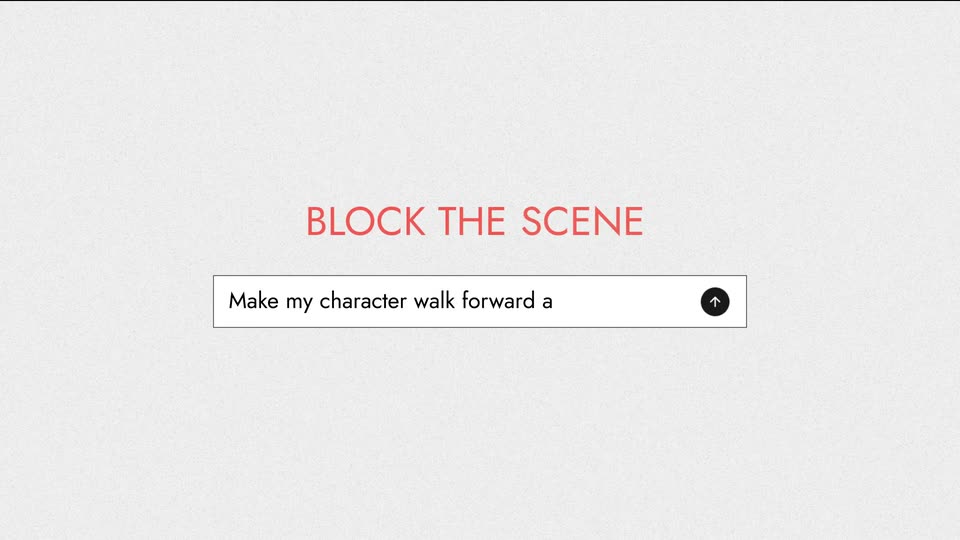
On a light gray grainy background, a red headline sits above a white prompt bar. The prompt types out character by character, and the round up-arrow button on the right darkens from gray to black as the line completes.
On-screen text: “BLOCK THE SCENE”
Camera: Static
A white command bar with a thin dark border sits on a red textured background. Black text reads inside the bar and a red circle with a white up arrow sits at the right edge. The bar fades to a flat red frame over the half second.
Camera: Static
A dark grey 3D editor viewport shows two tan figures walking a purple waypoint path; the camera orbits left to right, revealing grey cubes and a large sphere, while the Properties and Components panels remain fixed in the corners.
Camera: Static
A coral heading sits above a text input field on a textured off-white background. The field types out a sentence character by character and widens as it fills, its arrow button turning coral. The heading fades out, leaving the filled field centered.
On-screen text: “DIRECT THE CAMERA”
Techniques: Kinetic type
Camera: Static
A dark 3D viewport shows a gray scene of white cubes, a sphere and wireframe lines around a small yellow character. The camera orbits slowly in front of the character. A white icon panel sits at left, a Components panel at top right.
On-screen text: “Make the camera orbit in front of him”
Techniques: 3D mockup
Camera: Static
A low-poly yellow humanoid figure runs across a gray grid floor in a dark 3D void, framed by a white paper border. A flat gray disc hangs overhead and a sphere sits to the right among gray box structures while the camera tracks the figure.
Camera: Static
A man in a dark coat walks through a snow-covered, deserted fairground under an orange-tinted sky, passing a Ferris wheel and game booths. The camera tracks him laterally while a white caption stays locked in the center of the frame.
On-screen text: “THEN REFERENCE INTO YOUR FILM.”
Camera: Pan
A dark 3D animation interface with a gray viewport and a left panel of motion poses sits on a textured off-white background. A human figure is selected in the viewport as the camera slowly orbits the gray set, while the right-side headline fades from gray to black.
On-screen text: “BLENDER-QUALITY”, “RESULTS, FULLY”, “AGENT POWERED”
Camera: Static
A textured red background holds centered white uppercase type. An earlier phrase fades out in a quick crossfade as the final line resolves, ending on a clean locked-off frame.
On-screen text: “BLENDER-QUALITY RESULTS, FULLY AGENT POWERED”, “LEARN IN MINUTES, NOT MONTHS.”
Techniques: Kinetic type
Camera: Static
A low-poly orange figure walks away across a dark gray 3D stage of boxes and spheres, a white all-caps headline held centered over the scene, a REC timer top left and a key-binding control bar along the bottom edge.
On-screen text: “LEARN IN MINUTES, NOT MONTHS.”
Camera: Static
On a red grainy background, white text reads ONE centered, then PLATFORM. joins it. The line scales up and drifts left, pushing ONE off the frame so PLATFORM. fills the screen.
On-screen text: “ONE”, “PLATFORM.”
Techniques: Kinetic type
Camera: Static
On a grainy off-white background, a striped line-art FLICK wordmark with a red dot sits centered, then it turns into a solid red flick.art wordmark, which holds still.
On-screen text: “FLICK”, “flick.art”
Camera: Static