1:10
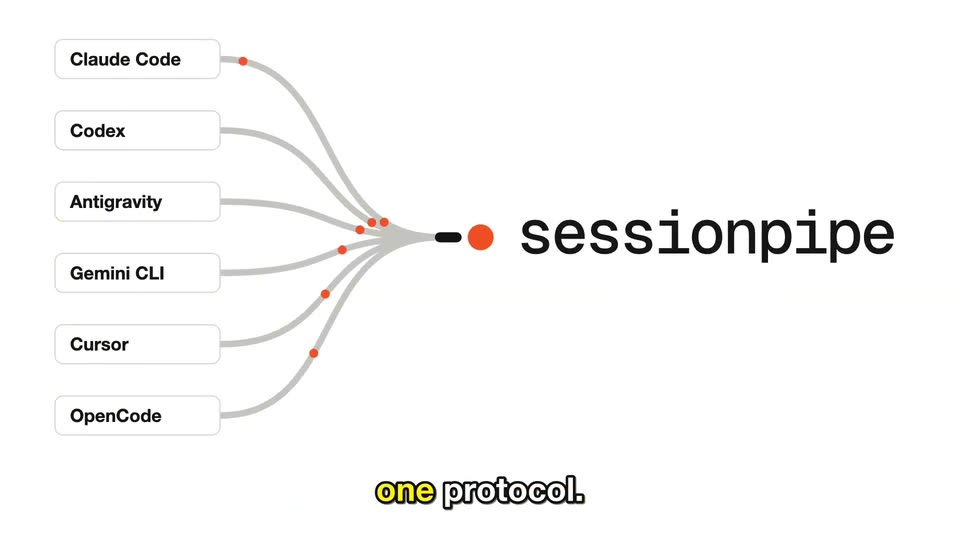

sessionpipe: all your coding-agent sessions, connected (open source)
Spacesheep · B2B · Nov 2026
FlexDental · Mar 2026 · 0:57 · Full motion · AI-annotated
FlexDental’s 0:57 launch film runs 21 scenes, about 2.7 s each. The product shows up at 0:16 and 3 features are revealed. The call to action lands at 0:48 (85% in), over a voiceover. A 57-second product launch for Flex, a dental scheduling integration, built as a problem-to-feature ladder: a typed search bar opens, a string of UI mockups and flat vector characters dramatize the pain of phone-based booking, then the Flex logo and three feature beats (24/7 multi-channel booking, Open Dental sync, SmartFill) land on clean title cards. The style is a soft pastel-blue gradient world with rounded white cards, a navy-and-cyan palette, flat two-tone character illustration, and 3D-fo
Is this your launch? to your site or press kit.
Spacesheep · B2B · Nov 2026
Logical · B2B · Nov 2026
Films whose music sounds like this one, voice left out
Reducto · Upbeat electronic
Google · Upbeat electronic, house
A white rounded search bar sits centered on a soft pastel blue gradient. A magnifying glass icon marks the left edge, and the query is typed in character by character next to it. The frame stays locked off.
Techniques: Kinetic type
Camera: Static
A 3D phone mockup rotates from a tilted angle to face the camera, showing a chat list of doctor names. The list scrolls, then a flat blue hand taps Dr. Nicole Anderson, which highlights in a blue box.
Techniques: 3D mockup
Camera: Static
A flat blue illustrated hand reaches in and taps the highlighted Dr. Nicole Anderson card in a vertical doctor list, the other names dimmed. The panel then swaps to a time-picker showing Monday with Morning, Afternoon and Evening buttons.
Techniques: Cursor demo
Camera: Pull out
A phone mockup tilts in 3D on a soft blue gradient, then rotates to a flat front view. Its screen scrolls through a day-and-time picker, the Tuesday Morning chip glowing blue, then settles on a Thanks screen listing three open slots.
Techniques: 3D mockup
Camera: Static
Flat vector illustration of a woman in a blue sweater holding a phone to her ear beside a dark laptop, on a pale lavender gradient. A white call-screen card with a red end-call button slides in from the right and settles at the top right as the figure's pose shifts slightly.
On-screen text: “CALLING..”, “Thanks!”, “Here's what we have available”, “July 10th | 12 p.m.”
Camera: Pull out
A purple 3D laptop on a soft gradient shows a dental booking screen with a search bar and six doctor cards. Illustrated hands rise to type, then a cursor moves to the center card and clicks its button, which pops up in 3D.
On-screen text: “CALLING..”
Techniques: 3D mockup, Cursor demo
Camera: Static
A flat blue vector illustration of a bearded man with a laptop raises a finger as a two-column calendar fades in beside him with two booking cards. A navy pill badge reading New Bookings Added pops in above, and a teal checkmark bursts with confetti in the top right.
On-screen text: “New Bookings Added”
Techniques: Particles
Camera: Static
The Flex wordmark reveals on a soft white-to-lavender gradient. It fades in from a faint pale-blue state to solid dark blue, with a cyan node-and-line motif woven into the x. The frame stays locked and centered as the logo settles.
Camera: Static
A large blue X logo holds center on a pale gradient field while thin orbital rings and small dots drift around it. White circular badges carrying the Google G and a shopping bag icon slide along the orbits.
Camera: Pull out
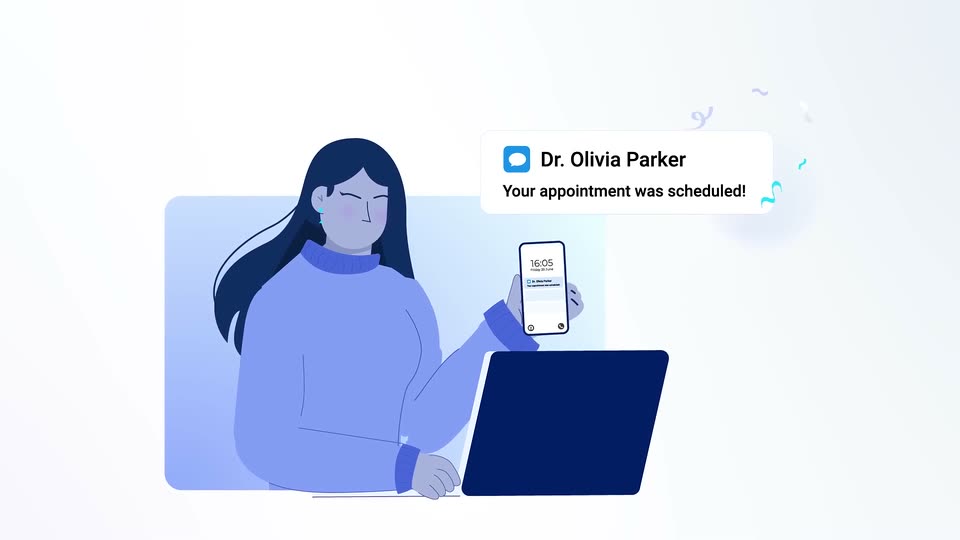
A flat blue illustration of a woman at a laptop holds up a phone showing a booking confirmation. A white notification card with a chat icon settles into the top right as the confirmation line slides in, and small blue squiggles pop out around it.
On-screen text: “Dr. Olivia Parker”, “Your appointment was scheduled!”
Techniques: Kinetic type, Particles
Camera: Pan
A cyan icon and three stacked labels sit on a light background. Each label scales or slides to dark navy as the one above fades to light gray, the icon swapping from globe to person to speech bubble. The list fades and an Open Dental panel slides up.
On-screen text: “Your website”, “Google profile”, “Text message”
Techniques: Kinetic type
Camera: Static
The Opendental interface fills the frame, the top menu bar with the Select Patient button in focus. The view then zooms down into the daily schedule, revealing doctor columns and a blue appointment block under the 9am row.
Techniques: UI zoom
Camera: Pull out
A week-view scheduling interface for Opdental, with columns of blue appointment blocks and a side calendar panel, is shown tilted in 3D on a pale blue gradient. The panel eases from a side angle to a flat front-on view.
Techniques: 3D mockup
Camera: Static
On a white background with a faint grid, dark navy 'SmartFill' appears centered; 'Technology' joins it and the phrase scales up, then settles into the full centered title as pale blue squares fade in at the grid corners.
On-screen text: “SmartFill”, “SmartFill Technology”
Techniques: Kinetic type
Camera: Static
A dark blue cursor hovers over a blue plus circle that morphs into a wide pill with a white line, on a white field of pale blue grid shapes. The navy caption Filling Gaps sits right of the icon, then SmartFill Technology scales in.
On-screen text: “Filling Gaps”, “SmartFill Technology”
Techniques: Morph, Kinetic type
Camera: Static
A pale grid background with soft blue shapes holds a bold two-line headline, Stacked Appointments, on the left that fades from gray to navy. On the right, two white notification cards with person icons stack into place, each reading Appointment Booked with a time chip.
On-screen text: “Stacked Appointments”
Camera: Static
Two appointment cards sit right of a bold dark blue headline. Emily's card switches to canceled with a red X badge, then a dark blue cursor arrow slides in. The cards fade as a flat illustration of a bearded man in blue checking his phone slides in from the right.
On-screen text: “Quickly fill Openings”
Techniques: Cursor demo, Parallax
Camera: Static
A bearded man in a blue sweater holds a phone on the right. On the left, a December 2025 calendar and a schedule list fade in; dates fill in until 31 turns cyan, and time slots appear one by one.
Camera: Pull out
On a dark blue field, the large light-blue words “With Flex” fill the frame, “With” scaling down while “Flex” holds, then the line gives way to a small centered “it's”.
On-screen text: “With Flex”, “it's”
Techniques: Kinetic type
Camera: Pull out
On a flat dark blue field, large white words scale in one after another, then the line settles into the smaller phrase it's always open, held still. The text sits left of center, lowercase, and the frame stays locked off throughout.
On-screen text: “With”, “Flex”, “it's always open”
Techniques: Kinetic type
Camera: Static
The navy Flex wordmark with a small cyan node cluster on the X sits centered on a pale blue gradient. Around 2.5s, the caption AUTHORIZED INTEGRATION VENDOR and the Opendental software logo fade in beneath it, then the lockup holds still.
On-screen text: “Flex”, “AUTHORIZED INTEGRATION VENDOR”, “Opendental”, “software”, “it's always open”
Camera: Static