1:10
Explore
A Whole New Way to Fathom 🚀 April 2026 Product Update
Fathom · Apr 2026 · 1:10 · Full motion · AI-annotated
- Length
- 1:10
- Scenes
- 19 · 3.7 s avg
- Product on screen
- 0:00
- Features shown
- 5
- Call to action
- 1:08 · 97%
- Voiceover
- Yes
- Views
- 1.6M on YouTube
as of November 22, 2026
00:00:00 / 01:10:16
- Length
- 1:10
- Scenes
- 19 · 3.7 s avg
- Product on screen
- 0:00
- Features shown
- 5
- Call to action
- 1:08 · 97%
- Voiceover
- Yes
- Views
- 1.6M on YouTube
as of November 22, 2026
Fathom’s 1:10 launch film runs 19 scenes, about 3.7 s each. The product shows up at 0:00 and 5 features are revealed. The call to action lands at 1:08 (97% in), over a voiceover. A space-themed launch film that opens on a starfield, names the product, then walks through five features (in-meeting notes, cross-meeting search, topic trackers, the mobile app, integrations) as dark UI cards that slide and zoom over orange and purple gradient fields, closing on a feature-pill recap and a logo card with the URL. The style is defined by neon gradient outlines, glowing light sweeps that trace every card, and a recurring motif of concentric orbiting rings that carry the logo and a
No filming indicatedEstimated needs: 5 capture groups — your screens or recordings · 1 official logo — reused across the film · 5 graphic passages — draw or supply · 1 3D passage — build or supply
Is this your launch? to your site or press kit.
More like this
1:53

Mistral AI - Introducing powerful new features in Le Chat, making it more capable
Mistral AI · AI · Jul 2025
0:39
Similar soundtrack
Films whose music sounds like this one, voice left out
1:06

Paul Klein IV - Your agents suck when using the web because 85% of it doesn't have an
Browserbase · Electronic
2:02
Coworker.ai - Today we're launching OM2. Your AI re-reads your entire company from
Coworker · Electronic
2:04

Tanuj Thapliyal - China is winning the AI race. So we raised $12M from @8vc to build t
Kos AI · Modern electronic
A Whole New Way to Fathom 🚀 April 2026 Product Update, scene by scene
· 19 scenes as text
01 · Hook · 0:00–0:00
A thin cyan light arc sweeps across a black starfield, then expands into a glowing radiating sunburst with a dark core. The streaks fan out into fine spikes as the emblem brightens and holds.
Techniques: Light sweep, Morph
Camera: Static
02 · Product intro · 0:00–0:11
A comic-style blue planet drifts in a starfield as a neon-outlined card draws in the upper right, filling into a meeting notification with a live countdown. The planet slides away while a cursor opens the Change menu, picks Audio, then hovers the Start meeting button.
Techniques: Cursor demo
Camera: Push in
03 · Product intro · 0:11–0:12
A cursor hovers over a meeting notification card on a starry black field; the card's text fades and the card vanishes as concentric rings ripple outward from the left, revealing a large orange disc with a small ringed dot at its center.
Techniques: Cursor demo
Camera: Static
04 · Product intro · 0:12–0:13
A dark rounded rectangle sits in the upper right of an orange gradient field. Faint concentric rings and a few small dots at the frame edges fade out over the clip, leaving the plain background.
Techniques: Masking
Camera: Static
05 · Feature reveal · 0:13–0:26
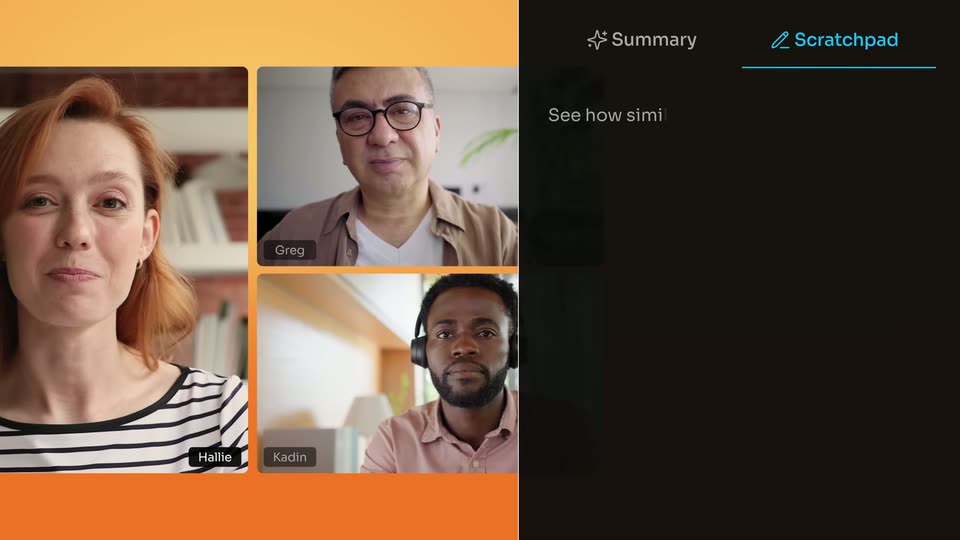
Three video-call tiles scale in on an orange field while a dark notes panel slides from the top right. Summary bullets appear line by line, a cursor clicks the Scratchpad tab, the view reframes onto the panel, a note is typed, then a white curved wipe exits.
Techniques: UI zoom, Cursor demo, Masking
Camera: Push in
06 · Feature reveal · 0:26–0:29
A dark meeting summary panel slides in across a four-person video call grid, settling to the left of the call. The shot then zooms into the Ask Fathom field as a question is typed out word by word.
Techniques: UI zoom, Kinetic type
Camera: Push in
07 · Feature reveal · 0:29–0:37
A dark search panel types the question about SOC 2 compliance approvals. A cursor opens the My meetings dropdown, selects All meetings, then clicks the send arrow. The panel reflows left as a list of meeting cards slides in from the right.
Techniques: Cursor demo
Camera: Pull out
08 · Feature reveal · 0:37–0:42
A dark two-panel product screen: the right chat panel types out an answer to a SOC 2 question, then the view reframes onto the left document as a glowing gradient outline highlights the matching sentence.
Techniques: Kinetic type, UI zoom
Camera: Push in
09 · Feature reveal · 0:42–0:43
A dark rounded card sits on a flat orange background. A glowing streak sweeps along its top edge and a thin light curve arcs across the frame. A meeting summary with a video thumbnail and text fades in, then dims as the light line brightens.
Techniques: Light sweep
Camera: Static
10 · Feature reveal · 0:43–0:46
A dark rounded UI panel on an orange gradient fades in, showing a Trackers screen with two tracker cards, each with a video thumbnail, tags, and a bar chart. A glowing outline traces the top card, then the whole panel brightens to full opacity.
Techniques: Light sweep
Camera: Static
11 · Feature reveal · 0:46–0:48
A dark Fathom meeting-summary screen, with a text column left and a video-call grid plus chat right, brightens on an orange gradient. A cursor rests on the Summary tab, then the whole card fades to black.
Techniques: Cursor demo
Camera: Static
12 · Feature reveal · 0:48–0:51
A dark meeting-list panel titled All meetings sits centered on an orange gradient. Its dimmed video thumbnails and a purple document card light up, hold, then fade back to dark as purple arcs sweep in from the frame corners.
Camera: Pull out
13 · Feature reveal · 0:51–0:53
A dark phone mockup rotates from an edge-on 3D angle to a flat front view as white rings and an orange circle fade into a soft purple-pink gradient. A round cursor moves down and taps the blue Capture button beneath the meeting list.
Techniques: 3D mockup, Cursor demo
Camera: Pull out
14 · Feature reveal · 0:53–0:56
A flat phone mockup sits centered on a shifting purple-to-pink gradient. Its dark screen shows a recording view titled Lunar Mission Planning: a running timestamp pill, a white waveform that grows, a thin playhead line, and Pause and End buttons below.
Camera: Static
15 · Feature reveal · 0:56–0:56
A flat phone mockup showing a voice player with title, timestamp chip, waveform and Pause/End buttons sits centered on a pink-purple gradient. The view pulls back fast as the background breaks into concentric rings and a starfield, shrinking the phone to a dot.
Techniques: Parallax, Particles
Camera: Static
16 · Feature reveal · 0:56–1:02
Concentric pink, orange and blue arcs rotate at different speeds around a dark disc with a blue F logo on a black starry field. White circular app badges (OpenAI, Zapier, Slack, GitHub, Notion) pop onto the rings while the camera pushes in.
On-screen text: “zapier”
Techniques: Parallax
Camera: Pull out
17 · Feature reveal · 1:02–1:03
A Spotify logo floats at the center of concentric purple, orange and pink rings on a black star field, ringed by small white badges of Salesforce, Zapier, Slack, Google Drive, HubSpot and ChatGPT. The whole assembly drifts right and exits the frame, leaving empty space.
Techniques: Parallax
Camera: Push in
18 · Other · 1:03–1:08
A starry black space holds an orange planet arc that slides out of frame. Seven gradient-outlined pills fly in and settle into a loose grid, each revealing a white feature label. The pills then shrink into small floating toggle shapes and a glowing comet trail with a flag.
On-screen text: “Bot-free capture”, “AI insights across calls”, “iOS app”, “Live notes in-meeting”, “API + MCP + CLI”, “+ more”, “Works with ChatGPT + Claude”
Techniques: Kinetic type, Morph
Camera: Pull out
19 · CTA · 1:08–1:10
On a black starfield, the FATHOM wordmark and blue logo mark sit centered. A glowing arc sweeps beneath the text, the wordmark shifts from rainbow gradient to white, and the blue URL fades in below.
On-screen text: “FATHOM”, “fathom.ai/new”
Techniques: Light sweep
Camera: Static