0:11
Explore
Family - We're excited to share a major feature addition to Family: Previews.
Family · Aug 2023 · 0:30 · AI-annotated
- Length
- 0:30
- Scenes
- 16 · 1.9 s avg
- Product on screen
- 0:00
- Voiceover
- Yes
00:00:00 / 00:30:43
Family’s 0:30 launch film runs 16 scenes, about 1.9 s each. The product is on screen from the first frame. There is no explicit call to action; a voiceover carries the film. The video is a single uninterrupted product demo: a title card names Previews, then 3D phone mockups rotate, slide and multiply across the frame while bold taglines build word by word on the left. The signature moves are the slow 3D tilts of the phones, the sliding wallet sheets and the word-by-word headline reveals, all held on a flat cream field.
No filming indicatedEstimated needs: 1 capture group — your screens or recordings · 1 official logo — reused across the film · 1 graphic passage — draw or supply · 11 3D passages — build or supply
Is this your launch? to your site or press kit.
More like this

Family - We're excited to share a major feature addition to Family: Previews., scene by scene
· 16 scenes as text
01 · Product intro · 0:00–0:00
On a plain off-white background, the word Introducing sits center-left in light gray, then darkens to charcoal as a yellow lightning bolt pops in beside it and Previews fades in to the right in light gray.
On-screen text: “Introducing”, “Previews”
Techniques: Kinetic type
Camera: Static
02 · Product intro · 0:00–0:02
A cream background holds a centered dark gray headline reading Introducing Previews, with a yellow lightning bolt icon between the two words. The frame stays locked and the text remains still for the whole short clip.
On-screen text: “Introducing Previews”
Camera: Static
03 · Demo · 0:02–0:04
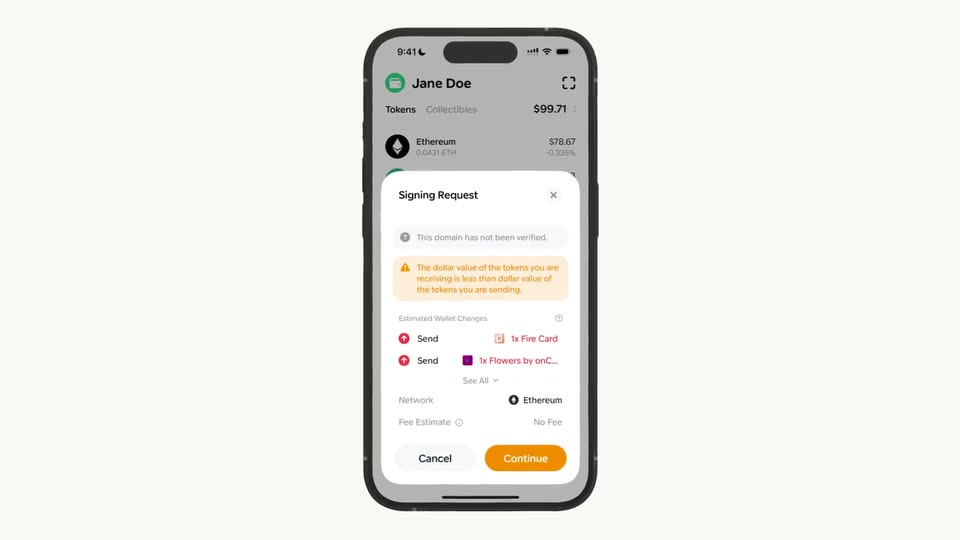
A tilted phone mockup on a light background shows a wallet app with a signing-request sheet. The sheet fills with a domain warning and token-change details, then the phone rotates flat to face the camera.
Techniques: 3D mockup
Camera: Static
04 · Demo · 0:04–0:09
A 3D phone mockup on the right shows a wallet signing request with a list of token changes, tilting and blurring at the start and end. On the left, a large dark gray headline builds line by line to read the full tagline.
On-screen text: “Unprecedented level of control & transparency.”
Techniques: 3D mockup, Kinetic type
Camera: Static
05 · Demo · 0:09–0:09
A black smartphone mockup starts at a three-quarter angle and rotates to face the camera, revealing a white wallet screen with a user name, a token list and a balance of $99.29. The phone floats on a plain light gray background.
Techniques: 3D mockup
Camera: Static
06 · Demo · 0:09–0:13
A front-facing iPhone mockup on a plain light background shows a wallet app: a dark transaction sheet slides up over the token list under a green Jane Doe card, the request badge and button turn red, then a Transaction Preview sheet slides up with an approval warning.
Camera: Static
07 · Demo · 0:13–0:14
A phone mockup in 3D perspective shows a transaction preview with a red warning box and a Continue button. It slides left as a second phone enters from the right, showing a balance screen, while a blue paper-plane logo and a signature sit below.
Techniques: 3D mockup
Camera: Static
08 · Demo · 0:14–0:14
Two phone mockups sit in 3D perspective on a plain off-white background, the left dark with a red transaction warning, the right light with a wallet and sign-in dialog. Both tilt slightly as the scene holds. A blue arrow and a blue squiggle rest beneath them.
Techniques: 3D mockup
Camera: Static
09 · Demo · 0:14–0:18
Three smartphone mockups in 3D perspective sit on a pale background, each showing a wallet app. Their popups cycle through states: warnings and transaction preview on the left, a signing request in the middle, a connection or verified-domain card on the right. Blue logos sit below each phone.
Techniques: 3D mockup
Camera: Pull out
10 · Demo · 0:18–0:19
A dark phone mockup rotates in 3D on a pale background, its screen showing a wallet signature request with a blue Confirm button; faint ghosted rounded cards float on either side.
Techniques: 3D mockup
Camera: Static
11 · Demo · 0:19–0:23
A phone mockup in 3D perspective holds the right side, its wallet screen opening a signing-request modal whose content updates through the clip. On the left, the headline fades in word by word on a plain white background.
On-screen text: “Understand your actions.”
Techniques: Kinetic type, 3D mockup
Camera: Static
12 · Demo · 0:23–0:24
Two phone mockups in 3D perspective sit on a light gray field, the front device showing an open All Warnings sheet over a token list, the rear device offset behind it. The shot holds still with no added motion.
Techniques: 3D mockup
Camera: Static
13 · Demo · 0:24–0:25
A flat iPhone mockup sits centered on a light gray field, showing a crypto wallet with a token list. A warnings sheet is open, then a Signing Request modal slides up over it, listing unlimited permissions and ending on Cancel and Continue buttons as the text sharpens from blur.
Camera: Static
14 · Demo · 0:25–0:26
A 3D iPhone mockup floats on a pale gray field, its screen showing a wallet app with a Signing Request sheet over a token list. The device tilts a few degrees to the right through the clip.
Techniques: 3D mockup
Camera: Static
15 · Outro · 0:26–0:28
A locked-off frame on a plain off-white field shows dark gray sans-serif text building word by word. The first line reads Experience Ethereum, then a second line completes with safely, with Family.
On-screen text: “Experience Ethereum”, “safely, with Family.”
Techniques: Kinetic type
Camera: Static
16 · Outro · 0:28–0:30
A dark padlock icon sits centered on a plain cream background. Its shackle lifts up to open the lock, then the icon holds still. The static headline “Experience Ethereum safely, with Family.” is set on the frame.
On-screen text: “Experience Ethereum”, “safely, with Family.”
Camera: Static