1:36
Explore
00:00:00 / 01:32:06
- Length
- 1:32
- Scenes
- 28 · 3.3 s avg
- Product on screen
- 0:01
- Features shown
- 2
- Call to action
- 1:17 · 83%
- Voiceover
- Yes
- Views
- 590K on X
as of November 10, 2026
Extend’s 1:32 launch film runs 28 scenes, about 3.3 s each. The product shows up at 0:01 and 2 features are revealed, with social proof. The call to action lands at 1:17 (83% in), over a voiceover. Founder talking-head shots alternate with grid-paper motion graphics and 3D document renders at a steady ~3 cuts per minute. Signature moves are word-by-word pill captions, selection-frame highlights, and bar charts that recolor per industry.
Footage neededEstimated needs: 1 official logo — reused across the film · 6 filmed passages — shoot, supply or replace · 16 graphic passages — draw or supply · 3 3D passages — build or supply
Is this your launch? to your site or press kit.
More like this
0:58

Best SaaS Promo Video for AI Product | EyeQ Imaging Inc.
EyeQ Imaging · Sep 2026
1:30

Telamont launch film
Telamont · Real Estate and Construction · Nov 2026
Kushal Byatnal - Over 1 billion PDFs are created every day, but your agents still can’, scene by scene
· 28 scenes as text
01 · Hook · 0:00–0:01
A man in a black hoodie talks to camera in a bright open office, gesturing with one hand. A thin white bar in front of him expands into a wide white box that types out the statistic while a small pill label below updates from “Over 1” to “billion”.
On-screen text: “Over 1”, “1 BILLION”, “billion”, “PDFs”
Techniques: Kinetic type
Camera: Pan
02 · Product intro · 0:01–0:15
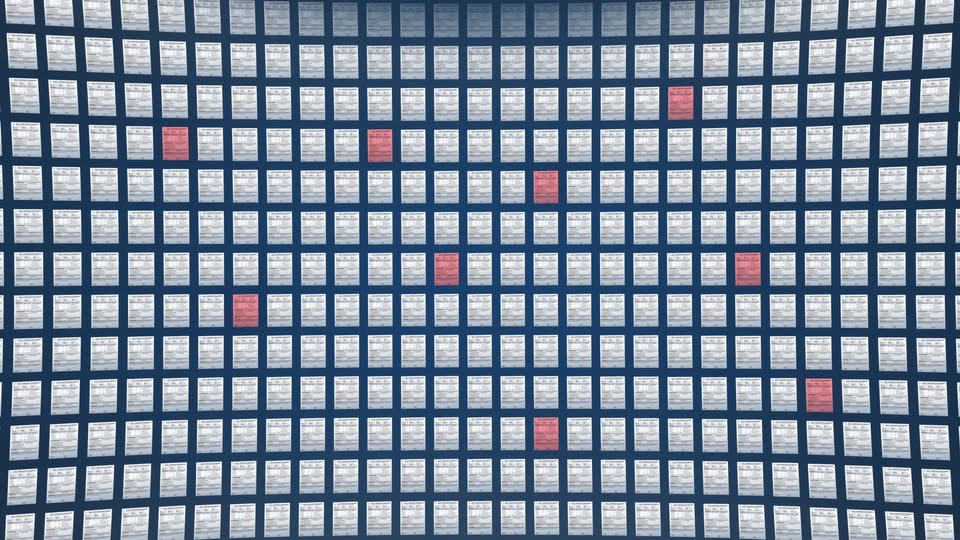
Split screen: a man speaks in an office on the left while white PDF icons spin in a 3D sphere on black on the right. The icons flatten to a grid with red error labels, then a black-block wipe reveals outlined PARSE 2.0 above him.
On-screen text: “1 BILLION PDFs ARE CREATED EVERY DAY”, “called”, “single”, “Merged table cells”, “Missed checkbox”, “still”, “Incorrect reading order”, “reliably”, “Context length exceeded”, “Today,, Parse 2.0, evolution, state, parsing, trained, hardest, documents,, Kushal Byatnal, Founder & CEO, Extend, PARSE 2.0, Trained on over 1 million pages”
Techniques: Kinetic type, Particles, Masking, Split screen, Light sweep
Camera: Pan
03 · Feature reveal · 0:15–0:19
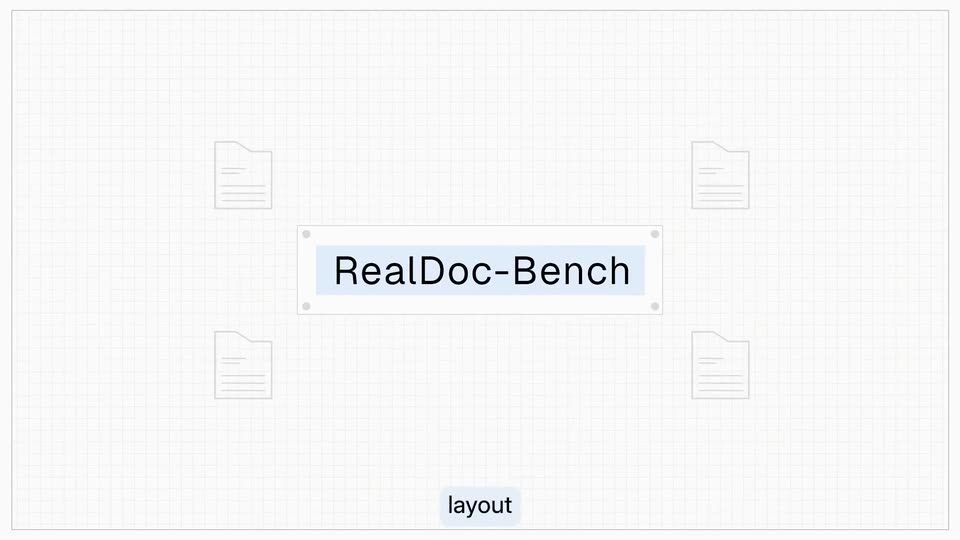
On a white grid background, a large black “Real” scales down into a centered “RealDoc-Bench” label framed by a white selection box with corner dots and a blue highlight. Four line-drawn document icons fade in at the corners as a bottom caption cycles through the spoken words.
On-screen text: “RealDoc-Bench”, “along”, “RealDoc-Bench”, “Our new benchmark”, “layout”, “understanding.”
Techniques: Kinetic type
Camera: Static
04 · Feature reveal · 0:19–0:20
On a pale grid, the headline RealDoc-Bench sits in a blue highlight box above understanding. The words swap to Actual Document and Most as a flat BAMBOO lunch menu card slides up from the bottom right.
On-screen text: “RealDoc-Bench”, “understanding.”, “Actual”, “Document”, “Most”, “arks”
Techniques: Kinetic type
Camera: Static
05 · Feature reveal · 0:20–0:21
A white canvas holds a translucent label box on the left reading “Actual Documents from other Benchmarks” with ghosted duplicate words fading, while flat sample documents on the right swap from a restaurant menu to a religious text and a price list. A rounded pill at the bottom cycles the words “benchmarks” then “irrelevant”.
On-screen text: “Actual Documents from other Benchmarks”, “benchmarks”, “irrelevant”
Techniques: Kinetic type
Camera: Static
06 · Feature reveal · 0:21–0:22
A graph-paper background holds a white caption card on the left reading “Actual Documents from other Benchmarks,” the last two words boxed in light blue. On the right, a stacked vintage ledger page cycles its line items, English rows crossfading into Korean text.
On-screen text: “Actual Documents from other Benchmarks”
Techniques: Morph
Camera: Static
07 · Feature reveal · 0:22–0:23
A white title card on the left holds the line “Actual Documents from other Benchmarks”, the last two words on a light blue highlight. On the right, a stack of scanned ledgers and a Korean table slides downward, swapping which pages are visible.
On-screen text: “Actual Documents from other Benchmarks”
Techniques: Split screen
Camera: Static
08 · Feature reveal · 0:23–0:25
On a grid-paper background, a left title box reads “Actual Documents from other Benchmarks” while a fanned stack of pages on the right cycles through sample papers, from a Korean form to dense scientific text to a clean two-column layout. The title fades and “Real” appears at the bottom.
On-screen text: “Actual Documents from other Benchmarks”, “Real”
Camera: Static
09 · Feature reveal · 0:25–0:27
Large light-gray text reading Actual Documents from other Benchmarks fades over a 0 to 100 line chart. A gray document page slides out to the right as two bars rise to 37.4% and 28.9%, and a bottom caption changes from is to different.
On-screen text: “Actual Documents from other Benchmarks”, “is”, “different.”
Techniques: Kinetic type
Camera: Static
10 · Feature reveal · 0:27–0:28
A light gray bar chart animates on a plain background. The bars resize and the percentage and axis labels update as the dataset shifts, with a small 'health care' tag fading in at the top and a 'documents' tag at the bottom. The blue Extend Parse bar stays tallest, leading the gray competitors.
Techniques: Morph
Camera: Static
11 · Feature reveal · 0:28–0:30
A benchmark bar chart sits static on the left while the right side swaps from a handwritten medical form to a printed financial form. The top category label changes from HEALTHCARE to FINANCIAL SERVICES, and a small logo at the bottom updates to match.
On-screen text: “HEALTHCARE”, “FINANCIAL SERVICES”
Camera: Static
12 · Feature reveal · 0:30–0:30
A static bar chart sits on the left while a stack of scanned documents on the right flips in 3D, cycling through a medical form, a green financial statement, a legal report, and a logistics manifest. A caption at the bottom types out the matching words in sequence.
On-screen text: “financial”, “services,”, “real estate,”, “logistics.”
Techniques: Kinetic type
Camera: Static
13 · Feature reveal · 0:30–0:32
A split layout pairs a bar chart on the left with a tilted document on the right. The chart title and bar values update from financial services to real estate as the document rotates into a property map, while a bottom caption cycles through services and estate.
On-screen text: “FINANCIAL SERVICES”, “services,”, “REAL ESTATE”, “estate”
Techniques: Kinetic type, Split screen, Morph
Camera: Static
14 · Feature reveal · 0:32–0:33
Split screen: a bar chart left, a document right. The chart title flips from REAL ESTATE to LOGISTICS, the green Extend Parse bar leading. The document swaps from a real estate map to a rotated customs form. A bottom label changes from estate to logistics.
On-screen text: “REAL ESTATE”, “estate”, “LOGISTICS”, “logistics”
Techniques: Split screen
Camera: Static
15 · Feature reveal · 0:33–0:34
A split screen displays a bar chart on the left and a scanned document on the right. The chart has a green bar and four grey bars, each topped with a percentage and an icon. A small badge reads 'logistics.' at the bottom center.
On-screen text: “LOGISTICS”, “logistics.”
Techniques: Split screen
Camera: Static
16 · Feature reveal · 0:34–0:35
A white bar chart fades in, five vertical bars rising to their heights with percentage labels counting up above each, tool names along the baseline, and a HEALTH CARE tag at lower right. A small tAce logo sits centered below the chart.
On-screen text: “HEALTH CARE”, “tAce”
Camera: Static
17 · Feature reveal · 0:35–0:35
A benchmark bar chart with one blue and four gray bars slides right and down across a white grid. A 'documents' pill stays fixed at the bottom while the category title shifts from HEALTH CARE to REAL ESTATE.
On-screen text: “documents”, “HEALTH CARE”, “REAL ESTATE”
Camera: Pull out
18 · Feature reveal · 0:35–0:39
A 2x2 grid of bar charts compares a colored Xtend bar against gray competitor bars in four industry quadrants. At the bottom center, a highlighted word cycles in place through providers, foundation and other.
On-screen text: “providers,”, “foundation”, “other”
Techniques: Kinetic type
Camera: Static
19 · Feature reveal · 0:39–0:39
A four-quadrant grid of bar charts fills the frame, each panel titled with an industry name and its first bar tinted a different color. The word providers sits in a white chip at the bottom center, matching the voiceover.
On-screen text: “providers”
Camera: Static
20 · Social proof · 0:39–0:45
A man in a black hoodie stands in a kitchen set and speaks to camera. White logo cards for flatiron, Opendoor, Brex, AMGEN and others scroll vertically on both sides, while a white pill caption at the bottom swaps words to the voiceover.
On-screen text: “processes.”, “digital”, “single day.”, “customers.”, “industries.”
Techniques: Kinetic type
Camera: Push in
21 · Problem · 0:45–0:59
A man in a black hoodie sits at a desk in a bright office, speaking to the camera while the shot slowly pushes in. One-word captions in white rounded pills pop in at the bottom center, synced to his speech.
On-screen text: “Documents”, “critical”, “mission”, “industries,”, “powering”, “everything”, “how”, “people”, “to get”, “doctor's appointments, Accuracy is non-negotiable, and one-shot VLM approaches lead to performance issues downstream. Parse 2.0 works by deploying our state-of-”
Techniques: Kinetic type
Camera: Push in
22 · Feature reveal · 0:59–1:00
A bearded man sits in an office behind a light blue panel holding two stamped Russian receipts in 3D perspective. The panel wipes up to cover the live-action shot, leaving the tilted documents on blue while a caption word at the bottom swaps from works to deploying.
On-screen text: “Parse 2.0”, “works”, “deploying”, “extend”
Techniques: Kinetic type, 3D mockup, Masking
Camera: Pan
23 · Feature reveal · 1:00–1:01
A scanned form with red and blue stamps lies in 3D perspective on a light blue field, rotating slowly while a small caption at the bottom switches from 'state' to 'layout'.
On-screen text: “state”, “layout”
Techniques: 3D mockup
Camera: Pull out
24 · Feature reveal · 1:01–1:09
A stamped form floats in 3D on a blue grid as a scan bar counts to 99 percent and colored boxes mark its regions. The camera pushes in to reveal four 3D model cards linked by white lines, then the frame clears to a plain background.
On-screen text: “which”, “element”, “region”, “intelligently”, “them”, “tuned”, “models”, “customers”
Techniques: 3D mockup, Kinetic type
Camera: Push in
25 · Social proof · 1:09–1:16
Six testimonial cards with quotes and attributions scale in and settle into a 3x2 grid on a cream background. A light blue highlight pill at the bottom cycles through caption words in time with the voiceover.
On-screen text: “customers”, “for 2.0”, “significant”, “improvements”, “with”, “latency”, “the same time”
Techniques: Kinetic type
Camera: Static
26 · Social proof · 1:16–1:17
A grid of light testimonial cards flashes with bold black quote text pulled to the top of each card, a caption reading the same time sits at the bottom. It hard cuts to a man in a gray hoodie standing in a bright office, a wooden sign behind him.
On-screen text: “Great to see that the new parser gets this more reliably”, “Changing the model worked perfectly, thanks guys, that'd be all.”, “Quick FYI, the parsing problems we'd been seeing seem to be fixed by the new Parsing engine. Early signs look very promising!”, “The new engine is working much better than before!”, “The parser is looking quite good in terms of quality!”, “Engine 2.0.0 worked great!”, “the same time”, “Make something people want.”, “yolfre”
Techniques: Kinetic type
Camera: Static
27 · CTA · 1:17–1:29
A man in a black hoodie speaks to the camera in a bright office; colleagues work at desks behind him and a framed orange poster stands to the left. Word-by-word captions appear at the bottom, and the shot shrinks to a rounded card on white at the end.
On-screen text: “challenging”, “promises,”, “before.”, “Parse 2.0”, “is the”, “of hours”, “invested”, “in”, “processing”, “market,, excited, today.”
Techniques: Morph
Camera: Pull out
28 · Outro · 1:29–1:32
On a light gray graph-paper grid, a wireframe stacked-rhombus mark and outlined wordmark sit inside a blue selection frame with corner handles. The frame tightens, the outlines fill to solid black, and the tagline and URL fade in beneath.
On-screen text: “extend”, “GET STARTED TODAY”, “EXTEND.AI”
Techniques: Morph, Kinetic type
Camera: Static