1:14


SaaS Explainer Video for Recruitment Platforms 2026 | JobWriter
JobWriter · May 2026
Expand · Oct 2026 · 1:25 · AI-annotated
Expand’s 1:25 launch film runs 26 scenes, about 3.3 s each. The product shows up at 0:31 and 3 features are revealed, with social proof. The call to action lands at 1:17 (91% in), over a voiceover. The video cuts back and forth between a sunlit rooftop presenter and a near-black interface space, moving from the token explosion problem, through three model reveals staged on a glowing planet horizon, to a benchmark, a verified demo and a URL close. Signature moves include word-by-word captions, counters and tables that draw in or dissolve, cycling pixel icons that merge into the wordmark, and a lens flare transition into the final tagline.
Is this your launch? to your site or press kit.
JobWriter · May 2026
Arvist · Sep 2026
A man in a dark denim jacket over a white tee stands on a rooftop with a blurred city skyline and greenery behind him, gesturing with both hands as he talks to camera; white subtitle captions appear phrase by phrase at the bottom center.
On-screen text: “Today we're”, “rethinking”, “how agents”, “read the web.”, “When it comes”, “to web data,”, “agents”, “currently”, “a dilemma.”, “For full accuracy,”
Camera: Static
A man in a denim jacket stands center frame, gesturing, with a column of white HTML code behind his left shoulder. On the right, a large white counter climbs from 105,432 to 195,331 tokens of raw HTML. A caption at the bottom reads explosion, then with HTML.
On-screen text: “105,432”, “tokens of raw HTML”, “Michael Jackson · Wikipedia”, “explosion”, “195,331”, “with HTML”
Camera: Static
A man in a denim jacket gestures while speaking in front of a bright window. A translucent block of raw HTML code fills the left, a white counter reads 931,804 tokens of raw HTML top right and ticks down, and the word screenshot. fades in at the bottom.
On-screen text: “931,804”, “tokens of raw HTML”, “Michael Jackson · Wikipedia”, “screenshot.”
Camera: Static
A man in a dark denim jacket stands on a rooftop against a blurred city skyline, gesturing as he talks to camera. White captions swap word by word at the bottom while a monospace feature table and pink icon labels appear on the right.
On-screen text: “Markdown,”, “Feature | Essential | Plus”, “Download chart data | x | ✓”, “Saved layouts | 5 | 10”, “however,”, “misses”, “important”, “ICONS”, “TABLES”, “LAYOUTS”
Techniques: Kinetic type
Camera: Static
A man in a dark denim jacket and white tee stands on a rooftop with blurred city buildings behind him, speaking to camera and gesturing with both hands. White subtitles at the bottom read his words in two lines.
On-screen text: “Let's look at”, “an example.”
Camera: Static
Dark chat interface with a top breadcrumb label. A prompt types itself into the input field, word by word, then the field collapses into a sent message bubble. A two-tone caption reveals word by word along the bottom.
On-screen text: “02 / Web ingestion Markdown only → Research”, “an example.”, “We're asking”, “this agent”, “which trading”, “view priced”, “to download”
Techniques: Kinetic type
Camera: Static
A dark chat interface shows a user question on TradingView pricing and the agent's answer being typed, then the view switches to the fetched pricing table comparing plans with checkmarks. Italic white captions appear word by word at the bottom.
On-screen text: “and it”, “incorrectly”, “answers”
Techniques: Kinetic type
Camera: Static
On a black background, a rendered pricing table with green checks and gray crosses dissolves into plain numbered markdown lines, the grid and icons dropping out. A monospace “Markdown only” caption with an M icon holds above as the source code takes over.
On-screen text: “Markdown only”
Techniques: Morph, Kinetic type
Camera: Static
A dark rounded card holds centered on black, showing the question 'Cheapest plan to download chart data?' above a source line 'tradingview.com/pricing'. The card eases in with a subtle scale-up, then stays locked off for the rest of the shot.
On-screen text: “Now imagine”
Camera: Static
A dark chat card sits centered on black, showing a query bubble, a URL, and a red underlined price. A second result line with a divider fades in below, while the gray caption at the bottom crossfades from “Now imagine” to “at scale,”.
On-screen text: “Now imagine”, “at scale,”
Techniques: Kinetic type
Camera: Static
A dark screen shows a grid of rounded Q&A cards, each pairing a question with a fetched source and an answer that underlines one keyword in red. A large white caption, procurement,, sits centered at the bottom.
On-screen text: “procurement,”
Camera: Pull out
A field of dimmed chat-answer cards drifts in 3D on black while a large red dollar figure counts up at left under a white ILLUSTRATIVE ANNUAL COST label. The line If ~13,400 teams each incur ~$553/year sits below, and a white product. fades in at the bottom center.
On-screen text: “ILLUSTRATIVE ANNUAL COST”, “$566,719”, “If ~13,400 teams each incur ~$553/year”, “product.”
Techniques: Kinetic type, Parallax
Camera: Pull out
A man in a dark denim jacket stands on a rooftop terrace, a blurred city skyline and glass building behind him, talking to the camera and gesturing with both hands. White subtitle captions appear phrase by phrase along the bottom of the locked-off medium shot.
On-screen text: “I'm Tim,”, “founder”, “of Expand,”, “and we hit”, “this dilemma”, “when”, “agents”, “ourselves.”, “But we”, “believe', 'have to choose.', 'That's why', 'three', 'products.”
Camera: Static
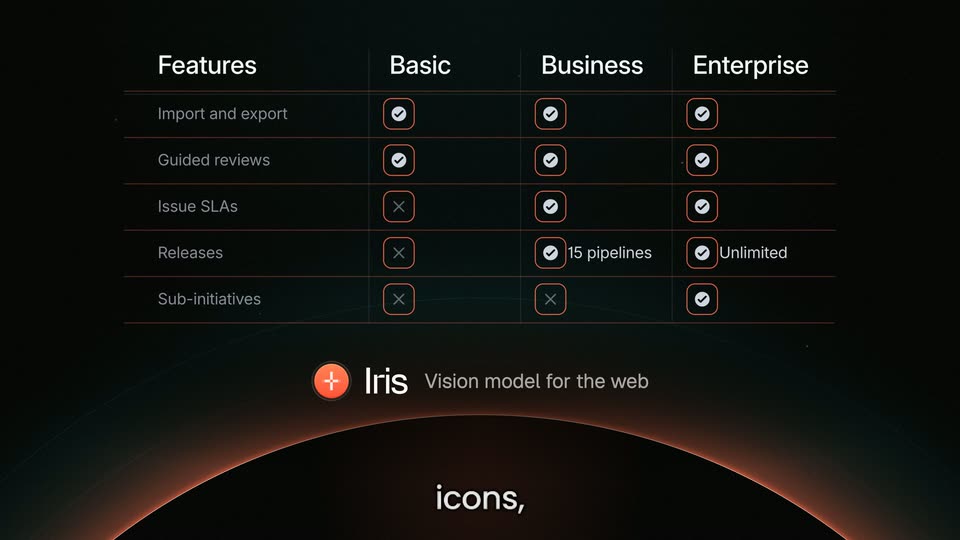
On a dark starfield above a glowing orange horizon arc, the Iris plus badge shrinks into a logo lockup as a blurred feature table pulls into focus. Orange boxes and grid lines draw over the table's icons and cells while captions swap at the bottom.
On-screen text: “products.”, “Number one is”, “vision model”, “for the web”, “and like you”, “preserving”, “icons,”, “tables, and”, “layouts.”
Camera: Static
A dim pricing table with Basic, Business and Enterprise columns fades out over a black field, leaving a glowing red arc curving along the bottom like a horizon, traced by a faint perspective grid and scattered star dots.
Camera: Static
A dark space with a glowing planet horizon hosts two pixel icons. A yellow X-Ray icon introduces a JSON code block, then a pink Wayback Machine icon introduces a pricing table, while a light-gray caption scales in phrase by phrase at the bottom.
On-screen text: “X-ray, a model”, “X-Ray”, “that finds”, “the right”, “Finds the useful hidden JSON in the page”, “JSON information”, “in the page”, “And a Wayback”, “Wayback Machine”, “Browsing history for your agent”
Techniques: Kinetic type
Camera: Static
A dark pricing comparison table fills the top as a red box highlights the Plus checkmark on the Download chart data row. Below, the Wayback Machine logo and tagline sit above a large white caption that swaps from what your to agent saw.
On-screen text: “what your”, “agent saw.”
Techniques: Kinetic type
Camera: Static
On a near-black field with a glowing orange horizon arc, a pixelated coin icon cycles through teal, yellow, pink and orange states while its label swaps between Iris, X-Ray and Wayback Machine. Word-by-word captions run along the bottom, then the icon slides left to sit beside the white EXPAND FETCH wordmark.
On-screen text: “Plus”, “Iris”, “A vision model,”, “X-Ray”, “a JSON”, “model, a”, “Wayback Machine”, “vision model,”, “model, a”, “Are you it? It's all and we're Expand Fetch.”
Techniques: Kinetic type, Morph
Camera: Static
On a black starfield above a glowing orange horizon, an orange circular logo with a white pixel mark sits beside a large white pixel wordmark that finishes revealing its last letter, while a small gray caption below scales and fades out.
On-screen text: “EXPAND FETCH”, “Expand Fetch.”
Techniques: Kinetic type
Camera: Static
A dark rounded card holds a bar chart titled MDBench Hard; the red Expand bar rises to 74% as the numbers count up, while gray bars for Exa and Firecrawl fill in. Below, a gray caption builds phrase by phrase: Now your agent can answer more with less tokens.
On-screen text: “Now your agent”, “can answer”, “more”, “with less tokens.”
Techniques: Kinetic type
Camera: Static
A dark agent interface types a question into its input field, then the view reframes upward to reveal the agent's answer: a markdown pricing table and a typed conclusion. Large white captions swap phrase by phrase along the bottom.
On-screen text: “02 / Web ingestion Expand → Research”, “Back to our”, “question.”, “the agent”, “correctly,”
Techniques: UI zoom, Kinetic type
Camera: Static
A dark agent chat shows a reply with a fetched TradingView pricing table, then the frame zooms into the captured expand.land page, scaling up the plan comparison grid. A white caption “and you can” holds at the bottom.
On-screen text: “and you can”
Techniques: UI zoom
Camera: Static
A dark pricing-comparison table sits on black with the caption “verify it.” below it; the last row and one checkmark are highlighted in red. The panel then dims as a man in a denim jacket steps in front of it, gesturing with both hands outdoors.
On-screen text: “verify it.”
Camera: Static
A man in a dark denim jacket stands on a rooftop terrace, gesturing with both hands against a blurred city skyline. Orange pixelated sunglasses snap onto his face, then a horizontal lens flare sweeps across his eyes. White captions swap at the bottom.
On-screen text: “It's time”, “to expand”, “your agent's”, “vision.”
Techniques: Light sweep
Camera: Static
A bright white flare floods the frame, hiding a faint figure behind it, then fades to a soft oval glow. Below, a dark dome with a glowing orange rim and thin concentric arcs holds the lower frame. The word vision. stays centered at the bottom.
On-screen text: “vision.”
Camera: Static
A dark frame with a glowing orange arc across the bottom. The white EXPAND wordmark glows then settles at top center. A gray caption 'Prompt your agent' fades in, and a dark input box types a URL character by character behind a red block cursor.
On-screen text: “Prompt your agent”, “set up https://expand.ai/start.md”
Techniques: Kinetic type
Camera: Static