1:28
Explore
00:00:00 / 01:12:15
- Length
- 1:12
- Scenes
- 36 · 2.0 s avg
- Product on screen
- 0:27
- Features shown
- 2
- Call to action
- 1:07 · 93%
- Voiceover
- Yes
- Views
- 1.9M on X
as of November 9, 2026
Energy’s 1:12 launch film runs 36 scenes, about 2.0 s each. The product shows up at 0:27 and 2 features are revealed. The call to action lands at 1:07 (93% in), over a voiceover. A founder-led pitch built as hook, two-part problem, two escalating use-case demos, capability callouts, then a logo card. Signature moves are hard cuts between the balcony talking-head, meme and line-drawing inserts, and tilted floating app windows over blurred blue backdrops, with word-by-word serif captions and a steady 117 bpm pace.
Footage neededEstimated needs: 2 capture groups — your screens or recordings · 1 official logo — reused across the film · 18 filmed passages — shoot, supply or replace · 2 graphic passages — draw or supply · 2 3D passages — build or supply
Is this your launch? to your site or press kit.
More like this

gabriel - 3 months ago i resigned from @OpenAI. today we are launching Energy, scene by scene
· 36 scenes as text
01 · Hook · 0:00–0:01
A young man with curly hair and glasses sits on a balcony, speaking to camera against a green hillside. A white knot logo on the left disintegrates into drifting smoke particles. A white caption sits at the bottom.
On-screen text: “Three months ago, I quit OpenAI”
Techniques: Particles
Camera: Static
02 · Hook · 0:01–0:03
On a plain white background, a centered headline builds from a black dot into the words 5.6 Sol Extra High, the second half in gray. Serif captions with a dark outline cycle along the bottom edge. The frame stays locked off.
On-screen text: “Three months ago, I quit OpenAI”, “because the models have become capable”, “5.6 Sol Extra High”, “enough to do most of the work on your computers.”
Techniques: Kinetic type
Camera: Static
03 · Hook · 0:03–0:05
On a cream grid-paper background, a centered vertical list of model names in dark serif type sits still. The words toggle between gray and black, and a yellow highlight rectangle appears behind the top word, Fable. A white caption line stays fixed at the bottom.
On-screen text: “enough to do most of the work on your computers.”, “Opus”, “Sonnet”, “Haiku”, “Fable”
Techniques: Kinetic type
Camera: Static
04 · Hook · 0:05–0:08
A young man with curly blond hair and clear glasses speaks in a tight medium close-up, a green hedge wall blurred behind him. White serif captions enter word by word around his head, building the line about using AI to do work.
On-screen text: “Yet virtually”, “no one”, “is using”, “AI”, “to do”, “their work”
Techniques: Kinetic type
Camera: Push in
05 · Problem · 0:08–0:10
A man in a beige tee sits cross-legged on a sunlit patio, gesturing as he talks. A yellow emoji with brown sunglasses bounces in on the left, and a white line drawing of a strongman carrying a boulder animates on the right. A subtitle reads his line at the bottom.
On-screen text: “I think there are two things that are hard.”
Techniques: Masking
Camera: Static
06 · Problem · 0:10–0:13
A young man in a blue gaming chair and headphones gestures animatedly in a home room, the handheld shot blurry and locked off. White serif subtitles run along the bottom as he speaks.
On-screen text: “The first one is that these tools are”, “built by engineers who give you their”, “full toolkits with MCPs, skills, automations”
Camera: Push in
07 · Problem · 0:13–0:16
A pale 3D cartoon face fades into view on a gray background as white line icons, a paperclip, a checklist, and two gears, pop in around it. White serif captions with a dark drop shadow at the bottom swap from one line to the next.
On-screen text: “full toolkits with MCPs, skills, automations”, “and all these other things that you have”
Camera: Static
08 · Problem · 0:16–0:18
A tight locked-off close-up of a woman's face fills the frame as she speaks, her gaze drifting slightly. White subtitle captions sit at the bottom, swapping once during the clip.
On-screen text: “and all these other things that you have”, “to understand to become productive with them.”
Camera: Push in
09 · Problem · 0:18–0:20
A young man with curly hair and glasses sits in a chair, gesturing with both hands while talking. Large white serif captions read on the left and right over a bright window with a rocky hillside behind him.
On-screen text: “to understand to become productive with them.”, “We've made that”, “super simple”
Camera: Static
10 · Problem · 0:20–0:21
A white line-art illustration of a muscular man straining to push a boulder covered in small sketched creatures, overlaid on a blurred live-action shot of a person at a desk with monitors. A scanline texture covers the frame, and white subtitles appear at the bottom as the speaker talks.
On-screen text: “Secondly,”, “I think it's very hard to imagine the”
Camera: Static
11 · Problem · 0:21–0:22
A man in a black shirt stands at a desk between two glowing blue monitors, head down, with metal armor suits lined up behind him. The frame stays locked off while a subtitle line sits at the bottom.
On-screen text: “I think it's very hard to imagine the”
Camera: Static
12 · Problem · 0:22–0:25
A man seen from behind sits at a curved desk, spreading his arms then raising them to his head, while blue holographic wireframes of a motorcycle and a car float around him above rows of data screens.
On-screen text: “I think it's very hard to imagine the”, “things you can use this tool for”, “because they're”
Camera: Static
13 · Problem · 0:25–0:27
A young man with curly blond hair and clear glasses sits before a window overlooking green trees, speaking in a locked-off medium shot. White serif captions pop in on either side of him, first “so incredibly,” then “powerful.”
On-screen text: “so incredibly”, “powerful”
Techniques: Kinetic type
Camera: Static
14 · Demo · 0:27–0:27
A young man with glasses in a beige sweater sits on a balcony with a wire railing and green hillside behind him, talking to the camera and gesturing with his hands. A white subtitle line sits at the bottom of the locked-off frame.
On-screen text: “Let me show you what I use this for.”
Camera: Static
15 · Demo · 0:27–0:28
A man in a beige shirt sits cross-legged on a sunlit balcony, gesturing with both hands as he speaks. A wire railing and a hillside of trees and rock fill the background. The camera holds a locked-off medium shot.
On-screen text: “Let me show you what I use this for.”
Camera: Static
16 · Demo · 0:28–0:31
A young man in silver headphones furrows his brow and looks down against a yellow wall, then a hard cut jumps to a blonde man in glasses seated outdoors. Both face the camera in locked-off close-ups while white subtitles track the bottom edge.
On-screen text: “For example, my accountants”, “ping me all the time for missing receipts.”, “Let me show you what I use this for.”, “I used to procrastinate this for weeks,”
Camera: Static
17 · Demo · 0:31–0:33
A young man with curly blond hair and glasses sits on a sunlit patio, speaking and gesturing with his hand. A cable railing and green trees fill the background. The camera is locked off. A white subtitle line sits at the bottom of the frame.
On-screen text: “I used to procrastinate this for weeks,”
Camera: Static
18 · Demo · 0:33–0:33
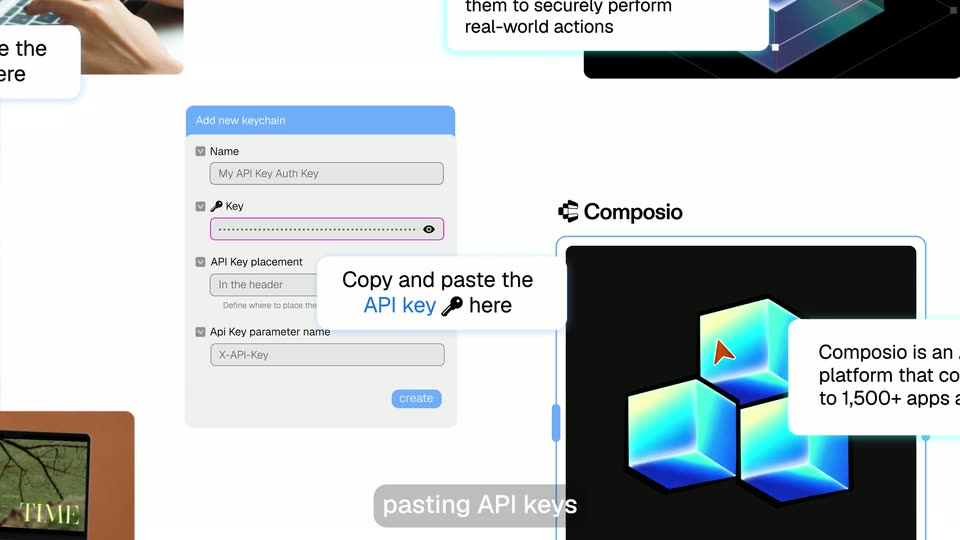
A tilted app window floats over a blurred blue backdrop, showing a chat titled Upload missing receipts daily with a Thinking status and a cursor. A browser panel slides in beside it, and a caption sits along the bottom.
On-screen text: “and now I can just give it to Energy to handle.”
Techniques: Cursor demo, Split screen, 3D mockup
Camera: Static
19 · Demo · 0:33–0:35
A three-panel desktop app fills the frame: assistant chat left, message thread center, browser tasks list right. A curved arrow points to the browser as 'Switching tab' and 'Clicking' labels pop in. A cursor rests in the center panel; subtitles run along the bottom.
On-screen text: “Energy is using browser on it's own”, “and now I can just give it to Energy to handle.”, “So it will open up Mercury here,”
Camera: Static
20 · Demo · 0:35–0:38
Two-panel product UI on a blurred blue background: a chat left with a black cursor, a Mercury banking window right that switches from a tasks list to a transactions table. A teal arrow points from chat to browser; white outlined captions run along the bottom.
On-screen text: “Energy is using browser on it's own”, “So it will open up Mercury here,”, “it will track down the receipts on my”, “computer and in my inbox,”
Camera: Static
21 · Demo · 0:38–0:42
Split screen shows a chat app on the left and a browser on the right. The cursor clicks through browser tabs, switching from a blank page to Gmail and then to Mercury. A hand-drawn arrow points at the browser while the caption reads 'Energy is using browser on it's own'.
On-screen text: “Energy is using browser on it's own”, “computer and in my inbox,”, “and then it will go back to Mercury to”, “upload any of my receipts.”
Techniques: Split screen, Cursor demo
Camera: Static
22 · Demo · 0:42–0:43
Split view: the Energy chat panel on the left and a Mercury browser window on the right, with a curved arrow linking the two and a cursor resting in the chat. A 'Switching tab' pill sits over the browser tab while two comic captions sit at the bottom.
On-screen text: “Energy is using browser on it's own”, “upload any of my receipts.”
Techniques: Split screen, Cursor demo
Camera: Static
23 · Demo · 0:43–0:44
A locked-off extreme close-up of a man's face, framed by a green HUD with circular gauges and scale ticks. A bold white line sits across his mouth and a smaller serif line rests below, both held static for the duration.
On-screen text: “Okay Energy let's step it up a notch”, “Let me show you an example”
Camera: Static
24 · Demo · 0:44–0:45
A product app window floats over a faded close-up of a face and teal ring graphics. A large white headline spans the middle and a smaller outlined caption sits below. The chat panel on the right adds a new assistant line.
On-screen text: “Okay Energy let's step it up a notch”, “Let me show you an example”
Camera: Static
25 · Demo · 0:45–0:48
A tilted 3D screen shows a chat assistant on the left and a PostHog browser on the right. The browser switches from a dashboards list to a new dashboard page while a cursor moves, and a white caption rolls along the bottom.
On-screen text: “Okay Energy let's step it up a notch”, “Here I'm asking Energy to find power”, “users in our product in PostHog”
Techniques: 3D mockup, Cursor demo, Kinetic type
Camera: Static
26 · Demo · 0:48–0:51
A tilted 3D view of the app shows a chat panel beside a browser panel. A cursor hovers over the assistant's reply, triggering tooltips, while the camera slowly pushes in on the interface.
On-screen text: “users in our product in PostHog”, “and schedule meetings with them through email.”
Techniques: 3D mockup, Cursor demo, UI zoom
Camera: Static
27 · Demo · 0:51–0:52
Two product windows sit side by side on a desktop: a chat assistant on the left, a PostHog browser on the right. A cursor rests on a task message, a Waiting for page tag floats over the browser, and a caption lines the bottom.
On-screen text: “After the meeting notes come in,”
Techniques: Cursor demo
Camera: Static
28 · Demo · 0:52–0:53
Two interface windows sit side by side: a chat assistant panel on the left and a browser with a data table on the right. A white caption reads across the bottom. The layout is static, holding the two panes in a split view.
On-screen text: “After the meeting notes come in,”
Techniques: Split screen
Camera: Static
29 · Demo · 0:53–0:55
A flat macOS desktop shows two app windows side by side: an AI assistant chat on the left streams a reply while a browser on the right switches from a code page to a Gmail inbox where a cursor opens a draft. A caption runs along the bottom.
On-screen text: “I've asked it to run in the background”, “and create pull requests for common”
Techniques: Split screen, Cursor demo
Camera: Static
30 · Demo · 0:55–0:58
A split screen shows an AI assistant chat on the left and a Gmail inbox in a browser on the right. A cursor clicks browser tabs and hovers over an email while small dark tooltips label the actions. White outlined captions run along the bottom.
On-screen text: “and create pull requests for common”, “and then send those requests to my co-founder David.”
Techniques: Split screen, Cursor demo
Camera: Static
31 · Demo · 0:58–0:59
A split view pairs an AI chat on the left with a Gmail browser window on the right. A cursor clicks in the chat as a new assistant message appears, and the right window opens a compose form. A caption runs along the bottom.
On-screen text: “and then send those requests to my co-founder David.”
Techniques: Split screen, Cursor demo
Camera: Static
32 · Feature reveal · 0:59–1:03
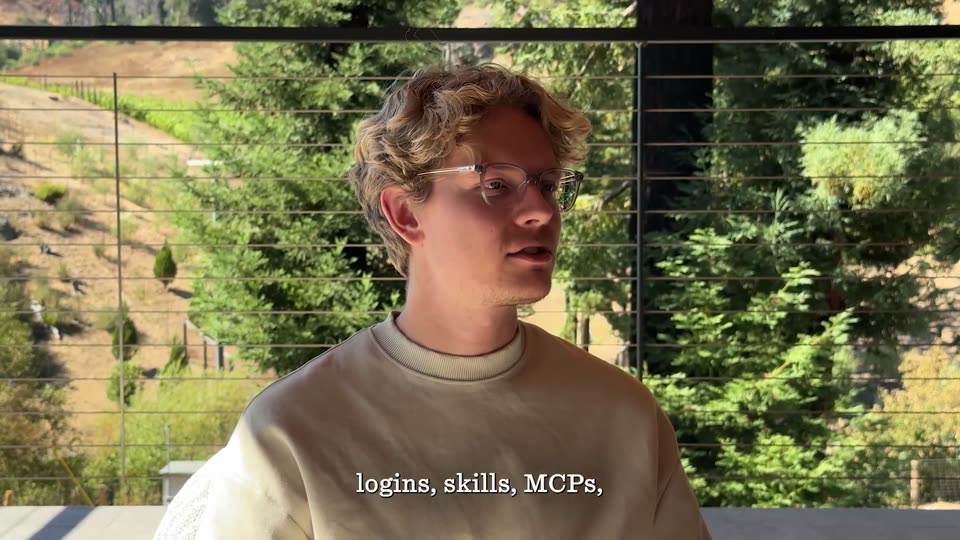
A young man with curly hair and glasses in a cream sweater sits outdoors, speaking off-camera. Behind him, evergreen trees and a sunlit hillside show through a cable railing. White serif captions appear centered at the bottom, matching his speech, while the camera stays fixed.
On-screen text: “Energy will import all of your browser”, “logins, skills, MCPs,”, “or anything else you want to bring with you,”
Camera: Push in
33 · Feature reveal · 1:03–1:05
A blond man in glasses and a cream sweatshirt sits on a balcony, gesturing as four brand icons pop in around him: an orange starburst, a blue dolphin, a black K tile, and a rainbow star. A white serif subtitle sits at the bottom.
On-screen text: “or anything else you want to bring with you,”, “and Energy can be used with all models”
Camera: Static
34 · Feature reveal · 1:05–1:07
A young man with curly blond hair and clear glasses talks in front of a green hedge and wire fence. The white outlined ChatGPT logo fades in at the right beside his head while a caption runs along the bottom.
On-screen text: “and Energy can be used with all models”, “or for free with an existing ChatGPT plan.”
Camera: Static
35 · CTA · 1:07–1:10
A young man with curly blond hair and glasses sits cross-legged on a sunlit deck, talking to camera against a mountain backdrop. White subtitles caption his words, then a cut reveals a white card with a brown cartoon logo and the URL getenergy.com.
On-screen text: “or for free with an existing ChatGPT plan.”, “Now, let me know what you think,”, “and happy vibe working.”, “getenergy.com”
Camera: Push in
36 · Outro · 1:10–1:12
A black spiky creature logo with two white oval eyes sits centered above the URL against a misty mountain lake backdrop. The frame is locked off and remains still throughout the shot.
On-screen text: “getenergy.com”
Camera: Static