
0:26
Explore
Introducing SFX v2 — Higher Quality, Seamless Looping, and Expanded Library
ElevenLabs · Sep 2025 · 0:51 · Full motion · AI-annotated
- Length
- 0:51
- Scenes
- 25 · 2.0 s avg
- Product on screen
- 0:00
- Call to action
- 0:42 · 83%
- Voiceover
- Yes
- Views
- 12K on YouTube
as of November 27, 2026
00:00:00 / 00:51:00
- Length
- 0:51
- Scenes
- 25 · 2.0 s avg
- Product on screen
- 0:00
- Call to action
- 0:42 · 83%
- Voiceover
- Yes
- Views
- 12K on YouTube
as of November 27, 2026
ElevenLabs’s 0:51 launch film runs 25 scenes, about 2.0 s each. The product shows up at 0:00. The call to action lands at 0:42 (83% in), over a voiceover. A dark product launch built as a fast montage on pure black: an abstract light wave, a rapid cut-through of the SFX interface and spec counters, then a steady demo of prompt-to-sound generation across several scenes. Its signature moves are the soft-blur slide-ins, the 3D rack-focus tilts, and the centered counter and badge animations that lock in on black.
No filming indicatedEstimated needs: 2 capture groups — your screens or recordings · 1 official logo — reused across the film · 3 graphic passages — draw or supply · 1 3D passage — build or supply
Is this your launch? to your site or press kit.
More like this


0:35


Viral SaaS Product Launch Video Idea | Commas Webinar
Commas · Sep 2026
1:14

Introducing Superhuman
Superhuman · Productivity · Feb 2021
Similar soundtrack
Films whose music sounds like this one, voice left out
2:56
Ace Pro 2 16-9
Insta360 · Electronic Dance Music, Electronic Pop
2:20

Meet DJI Neo 2 - Follow Me Camera Drone
DJI · Electronic dance music
1:34
Dr. Alex Wissner-Gross - I'm delighted to share that Physical Superintelligence PBC (PSI), whi
Physical Super intelligence · Electronic, cinematic
Introducing SFX v2 — Higher Quality, Seamless Looping, and Expanded Library, scene by scene
· 25 scenes as text
01 · Hook · 0:00–0:00
On a black field, a glowing wave of blue, purple and green light grows from the right edge, its bands rippling outward. Thin white light trails curve across it with bright nodes. A faint letter and a partial word begin to fade in near the center and bottom right.
Camera: Static
02 · Product intro · 0:00–0:01
A dark rounded panel with the placeholder “Describe a sound...” and two pills, “30.0s” and “Looping,” slides into view, sharpening from a soft blur. A glowing teal waveform line and blurred blue light streaks drift on the left.
Camera: Static
03 · Product intro · 0:01–0:02
A dark rounded panel with a glowing blue edge slides in from the right on a black background. It holds the placeholder “Describe a sound...” above three pill buttons reading 30.0s, Looping, and a compass icon. Motion blur softens the panel as it settles.
Camera: Static
04 · Product intro · 0:02–0:05
A dark sound-effects library interface tilts in 3D perspective against a teal-lit background. The frame racks focus from blur to sharp on the category cards and waveform list, then softens back to black.
Techniques: 3D mockup
Camera: Pan
05 · Product intro · 0:05–0:06
On a black field, a centered Hz readout counts up quickly. Each new value drops in below the last while the previous one fades and drifts upward, the type shifting from white to warm gold.
On-screen text: “44100 Hz”, “45339 Hz”, “46578 Hz”, “47817 Hz”
Techniques: Kinetic type
Camera: Static
06 · Product intro · 0:06–0:07
On a black background, the amber digits of 48000 Hz spin through intermediate values like a counter, then lock into place with a faint reflection beneath. The frame stays centered and locked off throughout.
On-screen text: “48000 Hz”
Techniques: Kinetic type
Camera: Static
07 · Product intro · 0:07–0:08
A dark rounded prompt bar sits centered on black. A blurred orange sample-rate readout flashes inside it, then the bar resolves into the input view as a prompt types out word by word and a white Generate pill scales in on the right.
On-screen text: “48000 Hz”
Techniques: Kinetic type
Camera: Static
08 · Product intro · 0:08–0:09
A dark rounded prompt bar sits centered on black, the text field typing out the snowboard whoosh prompt while a white Generate button and option chips (Loop, 22s, 30%, HQ) sit beside it. The view then zooms into the bar, pushing the option row to fill the frame.
Techniques: UI zoom
Camera: Static
09 · Product intro · 0:09–0:11
A dark rounded badge glows at center on black. A stopwatch icon and the text 30s sit inside it, then the badge widens and the content swaps to an infinity symbol and the word Loop, before blurring out.
On-screen text: “30s”, “Loop”
Techniques: Morph
Camera: Static
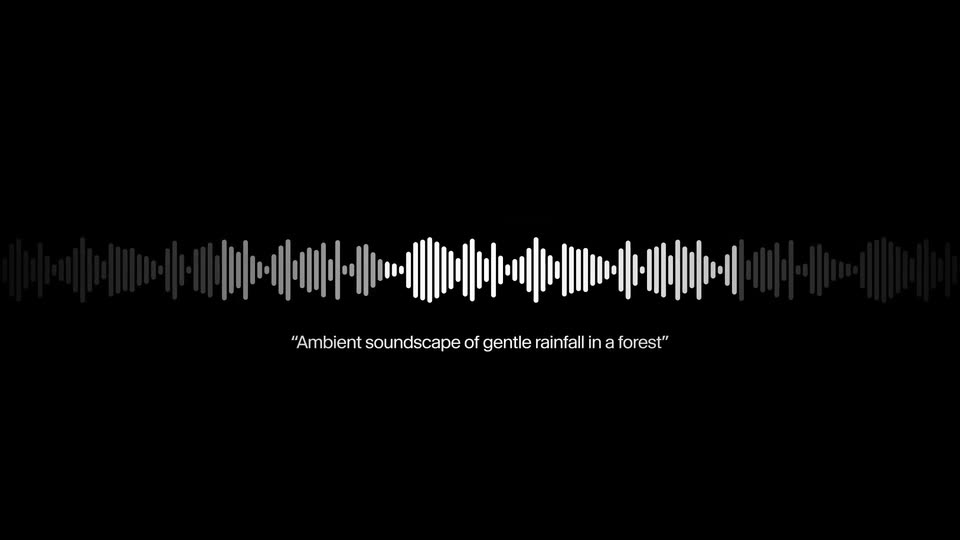
10 · Demo · 0:11–0:16
A black frame holds a horizontal white audio waveform that pulses in the center, with a static white caption below stating the sound prompt. The bars shift height while the text stays locked.
On-screen text: ““Ambient soundscape of gentle rainfall in a forest””
Camera: Static
11 · Demo · 0:16–0:18
A dark interface lists generated sound tracks, each row showing a play button, a text prompt, a waveform, a duration and a download count. New rows fade in at the bottom as the list grows.
Camera: Static
12 · Demo · 0:18–0:21
On black, a rounded video player fades in at center, playing a foggy teal beach with a lone figure and a massive ship. Beneath it, three audio rows show play buttons, text labels, waveforms, durations and action icons.
Camera: Static
13 · Demo · 0:21–0:22
A dark sound library interface: a foggy beach video preview at the top fades out while a list of audio clips with play buttons, waveforms, durations, and download and star icons shifts down into view.
Camera: Static
14 · Demo · 0:22–0:23
On a black screen, a list of generated sound effects with play buttons, italic captions, waveforms and download icons sits at the bottom. A race-car video preview pops up in the center, scales to a large rounded frame, then shrinks into a thumbnail beside the top row.
Camera: Static
15 · Demo · 0:23–0:24
A dark interface view shows a rounded video player at the top switching between two 3D renders of a glowing race car, above a static list of three sound rows, each with a play button, waveform, duration and size.
Camera: Static
16 · Demo · 0:24–0:25
A dark interface card shows a 3D race car video playing at the top, its lighting shifting from red to teal. Below, three rows list generated audio clips, each with a play button, a prompt line, a waveform, and duration figures.
Camera: Static
17 · Demo · 0:25–0:26
A dark product interface holds a rounded video preview of a 3D race car on a track, lit in red, above three rows of sound clips. Each row shows a play button, caption, waveform, duration and download count. The preview plays while the list stays still.
Camera: Static
18 · Demo · 0:26–0:27
A dark product interface fades to black: a rounded video player shows a blue race car, and below it three rows of generated audio with waveforms, durations and download icons. The frame is locked off and dims out over the clip.
Camera: Static
19 · Demo · 0:27–0:28
A dark interface lists generated sound clips. Each row shows a circular play button, a text label, a waveform, a duration and a download count, plus link, download and star icons. The rows and labels fade and slide into place.
Camera: Static
20 · Demo · 0:28–0:32
A small glowing placeholder gives way to a beach sunset video card above a three-row list of generated audio, each row with a play button, waveform, duration and download icons. The rows fade out and the card shrinks to a small frame at the top.
Camera: Static
21 · Demo · 0:32–0:36
A dark prompt bar sits centered on black while the text Icy cinematic snowboard whoosh types into the field. A cursor moves to the download icon, popping a waveform card labeled Audio Sample 01, then the bar fades and a small vertical snowboard clip fades in.
Techniques: Cursor demo
Camera: Static
22 · Demo · 0:36–0:42
A vertical phone mockup on the left plays a clip of a skier kicking up snow beside a four-track audio waveform editor. A thin playhead line sweeps left to right across the tracks as the clip runs, and the layout drifts slowly left.
Camera: Static
23 · CTA · 0:42–0:43
On a black background, a small white audio-waveform icon sits left of the headline. The words 'AI Sound Design' fade in from left to right, settling into a centered lockup.
On-screen text: “AI Sound Design”
Techniques: Kinetic type
Camera: Static
24 · CTA · 0:43–0:45
A white label “AI Sound Design” with a small waveform icon sits centered on a black field, glowing softly, then fades to black.
On-screen text: “AI Sound Design”
Camera: Static
25 · Outro · 0:45–0:51
On a black field, two thin white vertical bars sit centered, then widen and blur horizontally as the bold white wordmark “IIElevenLabs” resolves beside them. The lockup then holds perfectly still for the rest of the clip.
On-screen text: “IIElevenLabs”
Techniques: Morph
Camera: Static