1:04

AnyAlpha: The Agentic Trading Platform
AnyAlpha · Fintech · Oct 2026
Eleven Labs · Sep 2026 · 1:05 · AI-annotated
Eleven Labs’s 1:05 launch film runs 39 scenes, about 1.7 s each. The product shows up at 0:03 and 8 features are revealed. The call to action lands at 1:00 (91% in), over a voiceover. The video alternates cinematic alpine footage with light UI mockups, using circular masks, 3D card stacks, and typed prompts to introduce each tool. It keeps a brisk tempo with short cuts, soft gradients, and recurring card or waveform shapes to move from footage to interface demos.
Is this your launch? to your site or press kit.
AnyAlpha · Fintech · Oct 2026
Apple · Hardware · Oct 2026
A wide aerial view of jagged grey peaks rising above forested green slopes and a hazy valley. The frame pushes in slowly, and a dark blurred edge enters the top-left corner.
Camera: Pull out
The shot opens on a goggle lens mirroring jagged alpine peaks, then pulls back to a bearded man in a white helmet and white-framed goggles, the mountain reflection held in the dark lenses as he looks off camera.
Camera: Pull out
A first-person shot of a helmeted climber on a sunlit rock face is held in a circular mask that shrinks toward the center against a black background. As the circle contracts, the title lockup fades in on either side, a three-bar mark with “Elev” on the left and “4.0” on the right.
On-screen text: “Elev”, “4.0”
Techniques: Masking
Camera: Pull out
On a flat dark background, the ElevenLabs wordmark sits left and the title Studio 4.0 right, flanking a circular video of a rock climber that steadily scales down toward the center. Both text lines hold still while the circle shrinks over the clip.
On-screen text: “IIElevenLabs”, “Studio 4.0”
Camera: Pull out
A circular clip of a climber sits between the white titles ElevenLabs and Studio 4.0 on a dark field, then the frame breaks into a scattered 3D stack of video cards: a man with a yellow pack, a carabiner on rope, a particle burst and a water drop, each tagged Nano Banana Video generation.
On-screen text: “ElevenLabs”, “Studio 4.0”
Techniques: 3D mockup
Camera: Static
On a near-black background, rounded video cards showing climbers, a rope, and a bird murmuration drift slowly around the frame. In the center, the white headline types out word by word, and small Nano Banana chips ride on some cards.
On-screen text: “Every tool you need in one place”
Techniques: Kinetic type, Parallax
Camera: Pull out
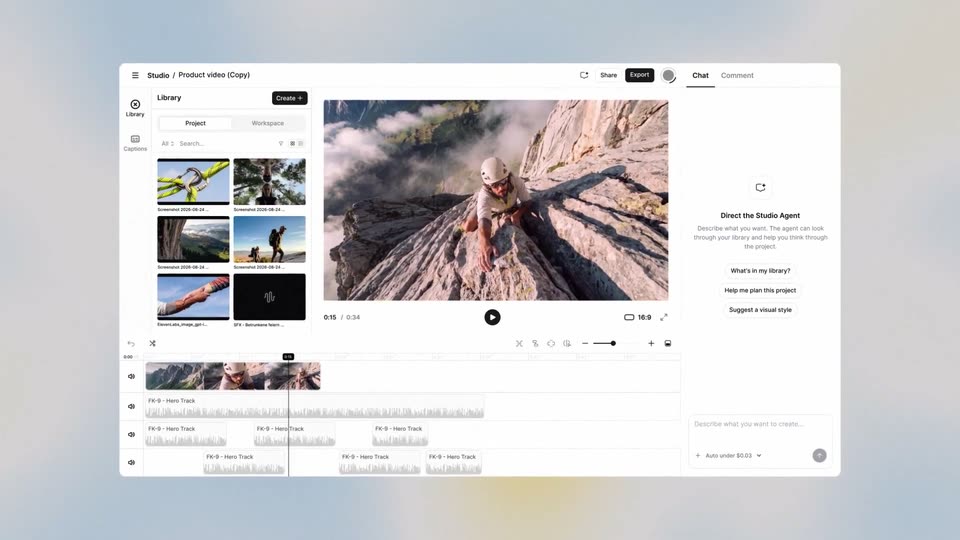
A video-editor interface floats on a light gradient, the center preview playing a clip of hands gripping a log while the left thumbnail library and right chat panel stay fixed. The whole mockup gently zooms in over the shot.
On-screen text: “Every tool you need in one place”
Camera: Pull out
A frosted glass panel with rounded corners fades in over a soft blue and white gradient. The gray label Prompt sits above a text field where a blinking caret follows the first typed letter.
Camera: Static
Close-up of a light prompt card on a blurred pastel background. The label Prompt sits above an input line where the words Make our character type themselves out letter by letter behind a blinking caret, the frame locked off.
Techniques: Kinetic type
Camera: Static
A white settings panel on a blurred pastel background types a prompt, then scrolls down to a black Generate button that a cursor clicks. The panel dissolves in a soft fog to reveal a 3D scene with a white helmet and a character's face.
Techniques: Cursor demo
Camera: Pan
A bearded climber in white sunglasses fills the frame, a bright light flare sweeping across his face. The image then scales down into a rounded card on a dark background, widening to show him on a rock face above the clouds.
Techniques: Light sweep
Camera: Pull out
A video player on a dark background shows a rock climber on a cliff, with a white voice-list panel docked on the right. A cursor moves in and hovers the Hope row, highlighting it, as the clip cuts to a closer shot of the climber. The scene fades to black.
Techniques: Cursor demo
Camera: Pan
A white reference panel on the left lists product cards that scroll up. A dropdown menu pops in beside the helmet card, showing Start frame, End frame, Reference and Lip sync, with Reference highlighted. The right half is a soft blurred canvas.
Camera: Pan
A bearded climber in sunglasses against a blue sky sits on the left, his helmet and jacket swapping between beige, dark blue and red. On the right a white prompt card lists three item thumbnails above the typed instruction and an Auto toggle.
Camera: Push in
A locked-off frame: a bearded climber in a white helmet and red jacket fills the left half; a white prompt card on the right shows three gear thumbnails, the typed line with a blinking caret, and an Auto dropdown.
On-screen text: “Change the outfit of the climber”
Camera: Static
A white rounded card listing two music models, Eleven Music v2.5 and Eleven Music v2, each with a version badge and short description, scales down at the center of a soft blue field with blurred yellow and white blobs and a faint rounded grid.
Camera: Static
A white rounded card listing two music model rows, Eleven Music v2.5 and v2, each with a small badge icon and a line of body copy, sits centered on a soft blue field of rounded-square outlines and blurred yellow shapes. A blurred diagonal band slides across the left edge.
Camera: Static
A helmeted climber scales a sheer rock face above a misty green valley. On the right, a small “Prompt” label sits over a line of text that types out word by word with a blinking caret, reading “Let's add some ambient sounds to the footage.”
On-screen text: “Prompt”, “Let's add some ambient sounds to the footage”
Camera: Pull out
A climber scales a cliff above a misty green valley. White prompt text on the right shows a small 'Prompt' label and a typed line ending in a blinking cursor. The text is then replaced by a white rounded card labeled 'Mountain Atmosphere SFX' with an animated audio waveform.
On-screen text: “Prompt”, “Let's add some ambient sounds to”, “the the footage”, “Mountain Atmosphere SFX”
Camera: Pull out
A close-up of a bronze carabiner threaded with a bright green climbing rope against a blue sky resolves out of a washed-out white frame, while a white rounded card holding a sound waveform and the label Carabiner SFX sits centered.
Camera: Static
A flock of starlings flies diagonally across a pale sky behind a static white audio card labeled Birds SFX, its dark waveform bars fading to gray. The flock then streaks into radial motion blur as it passes the camera.
On-screen text: “Birds SFX”
Camera: Static
A climber works an overhanging cliff face while a yellow rope loops through the foreground with motion blur. A white rounded audio card with a black waveform and the label Rope SFX stays locked in the center over the shot.
Camera: Pull out
A video editor UI on a white field. The top preview plays a rock-climbing clip with a yellow rope coiled in front of the climber. A timeline below holds five thumbnails and a waveform. The timecode ticks from 00:31 to 00:32 and the 16:9 badge scales.
Camera: Pull out
A close-up of a blue Headline box with a hand cursor pulls back to reveal a light canvas holding the box, two mountain-image panels with audio waveform icons, and a dashed center line.
Techniques: UI zoom
Camera: Static
A mountain video frame fills the screen with a selected text block: small lime TROOXOUTDOOR above a huge lime SUMMIT, framed by a blue selection box with corner handles and a hand cursor. A player bar with timecode and play button runs along the bottom.
On-screen text: “TROOXOUTDOOR”, “SUMMIT”
Techniques: Kinetic type, Cursor demo
Camera: Static
A close-up of the properties panel shows opacity easing from 66% to 70% beside a mountain clip with lime SUMMIT text. The view zooms out to the full editor, where a sneaker floats over the alpine scene under REACH THE SUMMIT.
On-screen text: “SUMMIT”, “REACH THE”
Techniques: UI zoom
Camera: Pan
A light interface panel slides in from the right beside a video frame of a pale rocky cliff. A gray chat bubble with a caption prompt sits above 'Thought briefly' and 'Activated workflow' rows, while the Share and Export buttons and the underlined Chat tab stay fixed at the top.
Camera: Static
On a white background, two pastel blocks shrink into small pills reading 'Transcribing video' and 'Generating captions...', then a horizontal row of alternating green and purple caption pills slides and scales in, carrying short hiker phrases.
Techniques: Kinetic type
Camera: Static
A white product screen displays a row of gray transcription pills and a Transcribing video label at top right. Three rounded hiking-clip cards scale in across the center, each carrying a colored caption, as the outer pills slide.
Camera: Static
Four vertical clips of hikers sit side by side on a light gray background, each carrying a caption line that slides or scales in. The left panels show a ridge walk and a sunrise silhouette; the right panels show a hooded hiker and a helmeted selfie.
On-screen text: “Second time doing this hike”, “Up before sunrise.”, “Oh wow, it's so quite”, “This”, “why”, “but way more fun this time”, “just to catch this light”
Techniques: Split screen, Kinetic type
Camera: Static
A climber in a tan helmet and sunglasses grips the edge of a rocky outcrop above a foggy green valley, then lifts his head to grin at the camera. A white border frames the locked-off shot as caption text slides and scales in.
On-screen text: “Oh wow, it's so quite”, “why”, “but way more fun this time”, “just to catch this light”
Techniques: Kinetic type
Camera: Static
A low-angle shot frames a bearded climber in a white helmet and gray shirt, arms raised as he hangs from a rock edge against a blue sky. The camera tilts and rotates around him, swinging his body from a steep diagonal to a near-horizontal pose.
Camera: Pan
A video editor shows a preview of a man in a helmet falling against a blue sky above a filmstrip timeline. A white comment card from Jeniffer overlays the preview as its text types out, then the card scales up while a cursor hovers at its corner.
Techniques: Kinetic type, Cursor demo
Camera: Static
A man's hairy arm extends from the right, palm up, against a blue sky with thin clouds. A second hand in a white sleeve reaches in from the top left to meet it. The card frame expands to fill the screen.
Camera: Push in
Two arms reach in from opposite corners and clasp forearms in a firm grip, one in an orange sleeve, one in white, a black watch on the wrist. The hands hold against a bright blue sky streaked with thin clouds, the camera holding a tight close-up.
Camera: Static
A rounded vertical card at center on a dark background plays a selfie video of two helmeted climbers on a rocky peak. Left of it, a translation icon and “Dub to” hold still; right of it, the language label crossfades English, then Spanish, then French.
On-screen text: “Dub to”, “English”, “Spanish”, “French”
Camera: Static
A vertical clip of two helmeted climbers on a rocky ridge sits centered on a black field. The label Dub to with a translation icon holds on the left while language names, Mongolian, Zulu, French, cycle in on the right. The clip tightens its framing slightly.
On-screen text: “Dub to”, “Mongolian”, “Zulu”, “French”
Techniques: Kinetic type
Camera: Pull out
A dark grid of rounded video clips showing hikers, climbers and outdoor gear fills the frame, each captioned 1920x1080 16:9. The clips fade and scale into place over the first second, completing the collage.
Techniques: Split screen
Camera: Pull out
A light gray field of rounded-square outlines scales outward while the two-bar II mark sits centered. The mark holds its place as the bold wordmark ElevenLabs appears beside it, followed by the gray tagline Studio 4.0, and the lockup holds still.
On-screen text: “Studio 4.0”
Techniques: Kinetic type
Camera: Static