1:43

Viraj Aero YC Launch Video
Viraj Aero · Nov 2026
DJI’s 2:45 launch film runs 75 scenes, about 2.2 s each. The product is on screen from the first frame and 7 features are revealed. The call to action lands at 2:31 (91% in), over a voiceover. The film bookends on the DJI Enterprise lockup, runs an industry montage into the pilot-shortage problem, then introduces Flight Simulator and walks through its modules one at a time. It alternates live-action control-room shots with 3D renders, names each feature with a lower-right caption tag, and closes on a store end card.
Is this your launch? to your site or press kit.
Viraj Aero · Nov 2026
Google · AI · Oct 2026
Films whose music sounds like this one, voice left out
Hobbes · Modern corporate tech promotional video
CData · Corporate Electronic
Spara · Modern electronic
A black screen holds a small gray DJI logo mark in the center. The mark fades in from darkness to a steady mid-gray, staying small and static in the middle of the frame.
Camera: Static
The white DJI logo holds centered on black, then the word ENTERPRISE appears in caps to its right. The lockup stays put as the background cuts to a dim aerial view of a wind turbine over rolling hills.
On-screen text: “ENTERPRISE”
Camera: Static
A wind turbine blade fills the right foreground over a dry hilly wind farm, with a small drone crossing the mid-distance. The camera holds still and the word ENTERPRISE remains fixed on screen.
On-screen text: “ENTERPRISE”
Camera: Static
A black multi-rotor drone hovers low over a steaming, cracked volcanic field streaked with yellow mineral. A row of helmeted workers stands on the rocky slope behind. The drone drifts slightly as steam rises and the aerial camera tracks it.
Camera: Pan
A small drone with a bright white light hovers in front of a dark rocky cliff. A worker in an orange hard hat stands out of focus at right, holding a rope. The dim blue light suggests dusk.
Camera: Static
A small drone with a bright white light hovers near a dark rock face at night. A blurred rescuer in an orange helmet and climbing gear stands on the right, holding ropes.
Camera: Static
Two uniformed officers hold a large black multi-rotor drone with a gimbal camera, its arms spread wide, in front of an open white pickup truck bed. The camera slowly pushes in on the drone under a hazy outdoor sky.
Camera: Static
Two uniformed officers stand in a dry field, one holding a laptop, watching a large multi-rotor drone with a gimbal camera hover at shoulder height. The drone holds a steady position against a bright blue sky with light clouds while the props spin.
Camera: Static
A black multirotor drone with a camera gimbal hovers in a clear blue sky above a low cream-colored commercial building. The wide locked-off shot holds on the drone as it bobs gently, with trees and a parking lot in the background.
Camera: Static
A white agricultural drone with black arms and red lights flies low over a green crop field, centered in a locked-off aerial shot. A large numeral 181 scales up on screen.
On-screen text: “181”
Techniques: Kinetic type
Camera: Pull out
A person in a dark blue jacket stands on a dry grassy hill, holding a large grey multi-rotor drone with white dome sensors. The low close-up frame fills with the drone's arms and rotors as the person's hands adjust its body.
Camera: Static
A multi-rotor inspection drone hovers in mid-air beside a steel transmission pylon, its insulator strings hanging in the foreground. The wide shot frames the pylon on the right against terraced hills and a clear blue sky.
Camera: Static
Aerial view of a green field with long crop rows. Several agricultural drones fly low, each trailing a fine mist; the camera follows the nearest drone as it crosses the rows while the others trail behind.
On-screen text: “00000000”
Camera: Pan
In a dim workshop lit by blue shelf lights, three technicians work around a long table of controllers and a radio. A standing man adjusts a small white unit on a tall rig while two others handle equipment at the table.
Camera: Push in
A man in a dark polo shirt with a MEASURE chest logo looks down at a tablet held in his hands, seated behind a black quadcopter drone on a table. A blurred person in a dark shirt walks past against the teal wall in the background.
Camera: Static
A black multi-rotor drone hovers and drifts right through thick smoke above a burning building, framed over the shoulder of a firefighter in the foreground. A red fire truck and a crouching crew member sit behind in the haze.
Camera: Pan
Low angle on a uniformed firefighter and a man in a hi-vis vest, both leaning over a tablet mounted on a drone controller. Cut to a dark control room where a monitor shows the DJI logo over a keyboard and controller.
Camera: Pan
A dark desk holds a monitor, backlit keyboard and white drone controller before a wall of blurred data screens; the DJI logo brightens on the monitor with a light sweep. Cut to a man from behind, hands on the controller, flying a desert scene in the simulator.
On-screen text: “MENLO PARE”, “FLIGHT SIMULATOR”
Techniques: Light sweep
Camera: Push in
A man sits in a dark room holding a two-antenna drone controller, watching a monitor that shows a drone flight simulator over a sunlit desert. A static FLIGHT SIMULATOR title holds in the frame while the on-screen drone drifts across the terrain.
On-screen text: “FLIGHT SIMULATOR”
Camera: Static
A black quadcopter drone hovers over a sunlit beach lined with palm trees, drifting up and down against a blue sky with drifting clouds and a low sun flare. A speed dial HUD sits in the lower-left corner while the camera holds the wide coastal view.
Techniques: 3D mockup
Camera: Pan
A black quadcopter drone with a gimbal camera hovers over a rendered shoreline of palm trees, rocks and a tall tower, drifting forward under a blue sky with a sun flare. The camera tracks it from behind and below.
Techniques: 3D mockup
Camera: Push in
A first-person aerial view flies forward over rocky coastal terrain toward a sunlit bay and distant bridge, a low sun flaring in the sky, framed by a simulator UI with a top status bar, compass, telemetry and a corner minimap.
Camera: Static
A monitor in a dark room, angled in 3D perspective, shows the training software: a white and black quadcopter rendered over a grassy field, with a vertical menu on the left that slides slowly downward while the highlighted item stays on top.
Techniques: 3D mockup
Camera: Static
A man in a dark room operates a white drone controller in front of a monitor showing a 3D drone and a vertical menu list. It cuts to a close-up of his hands on the joysticks.
Camera: Static
Two hands hold a white drone controller with twin antennas, thumbs resting on the joysticks while a white cable plugs into the side port. The hands shift and the thumbs nudge the sticks. The dark room glows blue, with a backlit keyboard below.
Camera: Push in
A man in a dark control room holds a white two-antenna remote controller, facing a monitor that displays a DJI flight simulator over a mountain landscape. The camera slowly pans right, bringing his profile into frame while blurred glowing panels fill the background.
Camera: Pull out
A black FPV drone sits on a white round pedestal in a blurred 3D outdoor setting, with a second drone out of focus behind it. On the left, a vertical menu lists options, and a selection box slides down through the three training items.
Techniques: 3D mockup
Camera: Static
A man sits in a dark room, seen from behind, gripping a two-stick controller lit blue. His monitor shows a white hangar simulation where a dotted flight path and colored floor markers shift as the on-screen view glides forward.
Camera: Static
A man in a dark control room grips a two-stick controller, facing a monitor that displays a white hangar simulation dotted with blue and yellow tracking markers. Blurred data panels glow behind him. He makes small hand movements as the simulated view shifts slightly.
Camera: Static
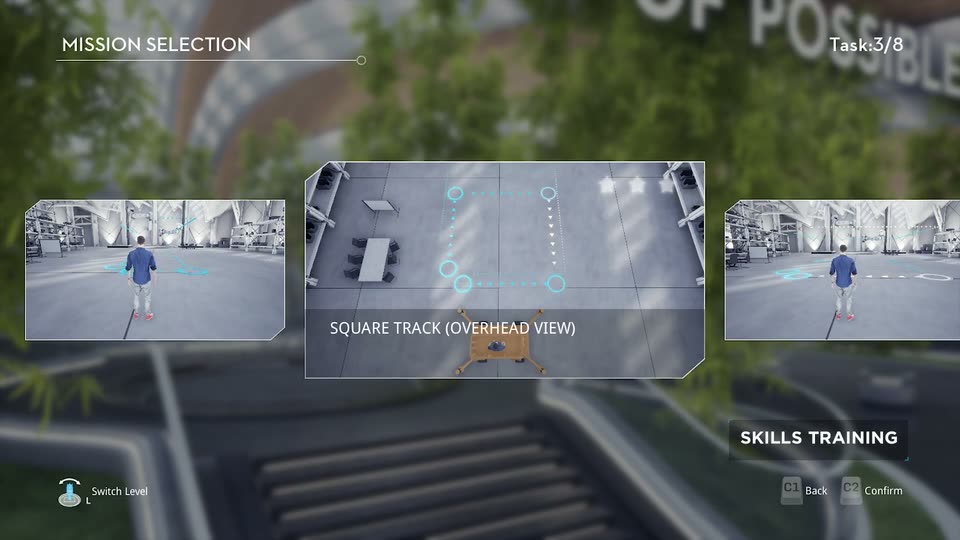
A mission selection menu floats over a blurred 3D park. A carousel of angled preview cards scrolls left, the center card enlarging to show a warehouse with a man and an orange quadcopter on a blue path. The task counter steps up and a SKILLS TRAINING tag highlights.
Techniques: 3D mockup, UI zoom
Camera: Pan
A black multirotor drone lifts off and climbs through a white hangar inside a flight simulator, passing a glowing target ring. The view stays fixed as the drone rises toward the ceiling trusses, with a gray SKILLS TRAINING label held in the lower right.
On-screen text: “SKILLS TRAINING”
Camera: Pull out
A small black drone hovers in the center of a bright 3D hangar floor marked with a yellow dotted square route and blue and yellow arrow trails leading to two ring gates. Shelves of drones line the left wall. The camera slowly pushes in as the drone drifts forward.
On-screen text: “SKILLS TRAINING”
Techniques: 3D mockup
Camera: Pan
Close-up of hands holding a white drone controller as thumbs work the sticks, a monitor with a flight readout glowing behind. Cut to the pilot's face, lit by blue bokeh, watching the screen.
On-screen text: “FREE FLIGHT”
Camera: Static
A man in a dark shirt looks down at a monitor, his face lit from below, while blurred blue and red text glows on the dark wall behind him. The caption sits small in the lower right corner.
On-screen text: “FREE FLIGHT”
Camera: Static
A man is filmed from behind in a dark room, watching a computer monitor that displays a top-down drone flight simulation interface over a city map.
On-screen text: “FREE FLIGHT”
Camera: Pan
A black quadcopter with spinning propellers flies through a dense 3D city of glass skyscrapers, the camera tracking it from the side. The label FREE FLIGHT sits in the lower right corner.
On-screen text: “FREE FLIGHT”
Techniques: 3D mockup
Camera: Push in
A black quadcopter drone hovers over a forested mountain valley in a 3D render, its rotors blurred. The camera holds wide as the drone drifts slightly left. White text FREE FLIGHT sits in the bottom right corner.
On-screen text: “FREE FLIGHT”
Techniques: 3D mockup
Camera: Static
A dark quadcopter drone flies left over a 3D coastal scene of open water, rocky cliffs and pine trees, with distant mountains under a blue sky. The white label FREE FLIGHT holds in the lower right corner as the camera tracks the drone.
On-screen text: “FREE FLIGHT”
Techniques: 3D mockup
Camera: Pan
A man in a dark control room watches a monitor showing the drone's live feed, which flies closer to a steel transmission tower above a forested hillside. The caption APPLICATION TRAINING fades in at the lower right.
On-screen text: “APPLICATION TRAINING”
Camera: Push in
A 3D simulator view shows a quadcopter drone flying toward a white lattice power tower in a forested hillside, with a speed gauge and altitude readout overlaid. The camera tracks the drone as it closes on the tower while the APPLICATION TRAINING caption sits in the lower right.
On-screen text: “APPLICATION TRAINING”
Techniques: 3D mockup, Parallax
Camera: Push in
A 3D aerial view of a steel power line tower over a forested valley fills the screen, framed by the DJI drone app HUD with green flight bar and telemetry readouts. The camera drifts forward past the tower while the white caption APPLICATION TRAINING holds in the lower right.
On-screen text: “APPLICATION TRAINING”
Techniques: Parallax
Camera: Static
A flight simulator view centers a white lattice power-line tower in a forested valley, the camera drifting around it. The DJI HUD frames the edges with a compass and telemetry readouts; a caption reads APPLICATION TRAINING. The shot cuts to a black drone hovering over a coastal island.
On-screen text: “APPLICATION TRAINING”
Camera: Push in
A black quadcopter with a gimbal camera lifts off a sandy islet and accelerates over a palm-fringed bay, the camera tracking from behind while the in-game speedometer climbs from 29 to 89 km/h.
Techniques: 3D mockup, Parallax
Camera: Static
A man in a dark room, seen over the shoulder and rim-lit in blue, holds a drone controller with an attached phone and watches a monitor showing a drone flying over a coastline with a speed gauge. The camera is locked off.
Camera: Static
A man seen from behind holds a white drone controller at a dark desk, watching a monitor that displays a drone flying over a coastline. Blurred control panels glow in the background. The camera slowly pushes in on the screen as the drone's speed gauge ticks.
Camera: Pan
Close-up of two hands holding a white drone controller with twin antennas. A thumb flips a small switch on the body while a blurred screen of yellow foliage fills the background. A caption block appears at the lower right corner.
On-screen text: “3 FLIGHT MODES”, “Position, Sport, Attitude”
Camera: Static
A black quadcopter hovers and drifts forward over a sunlit 3D coastal landscape of water, rocks and hills. On the right, white text reads 3 FLIGHT MODES, with the mode names scaling in beneath. A circular speed gauge sits in the lower left corner.
On-screen text: “3 FLIGHT MODES”, “Position, Sport, Attitude”
Techniques: 3D mockup
Camera: Push in
A first-person drone view glides over a sunlit coastal canyon toward a large rock arch, the HUD updating altitude and speed. In the lower right, a caption reads 3 FLIGHT MODES while the sub-line Position, Sport, Attitude scales in.
On-screen text: “3 FLIGHT MODES”, “Position, Sport, Attitude”
Techniques: Kinetic type
Camera: Static
A black quadcopter drone flies over a sunlit coastal landscape of rocky shores, trees and a wooden pier, the camera tracking it from behind as it climbs. A dark caption box on the right states the flight modes while a circular speed gauge in the corner counts up.
On-screen text: “3 FLIGHT MODES”, “Position, Sport, Attitude”
Techniques: 3D mockup, Parallax
Camera: Pan
Over-the-shoulder view of a man in a dark control room watching a monitor that plays a drone racing game over a city skyline. A caption block listing five point-of-views sits in the lower right corner.
On-screen text: “5 POINT-OF-VIEWS”, “Pilot FPV, Remote Control View, Drone FPV, Drone Follow View, 3rd Person”
Camera: Static
A black quadcopter with green arm lights flies forward through a futuristic night city, camera tracking it past glass towers. A circular speed dial sits in the lower left and a caption block holds in the lower right.
On-screen text: “5 POINT-OF-VIEWS”, “Pilot FPV, Remote Control View, Drone FPV, Drone Follow View, 3rd Person”
Techniques: 3D mockup, Parallax
Camera: Static
A first-person view holds on a pilot's hands gripping a white drone remote with a tablet on top, its screen showing the live city feed from above. The feed drifts as the drone moves over the skyline. A caption at lower right lists the five points of view.
On-screen text: “5 POINT-OF-VIEWS”, “Pilot FPV, Remote Control View, Drone FPV, Drone Follow View, 3rd Person”
Techniques: 3D mockup
Camera: Static
A high-angle 3D cityscape of glass skyscrapers fills the frame under a drone simulator HUD, the camera slowly pulling back to reveal more towers. A translucent caption box in the lower right lists five point-of-views.
On-screen text: “5 POINT-OF-VIEWS”, “Pilot FPV, Remote Control View, Drone FPV, Drone Follow View, 3rd Person”
Camera: Static
A black quadcopter drone flies forward over a cliff and water landscape, camera tracking beside it. Spinning propellers and a gimbal camera are visible as the drone banks slightly past forested hills and distant wind turbines.
Techniques: 3D mockup, Parallax
Camera: Push in
A black quadcopter with green indicator lights hovers and banks over a rendered coastal cliff, a winding road, and a sea dotted with wind turbines. The sky shifts from bright midday sun to a warm orange sunset as the camera tracks the drone.
Techniques: 3D mockup
Camera: Push in
A black multi-rotor drone with green LED lights hovers over hilly, sparsely wooded terrain at dusk, drifting across the frame under a cloudy orange sky. A thin tower stands on the horizon at right.
Techniques: 3D mockup
Camera: Static
A white quadcopter drone rests on a glossy circular pad with concentric blue and teal rings. The drone lifts off and rises out of frame as the blurred street and cars pan behind.
Techniques: 3D mockup
Camera: Static
A black quadcopter drone rests on a circular pad of glowing blue concentric rings, low angle, centered. The background is a blurred outdoor set with soft bokeh lights. A faint ghost of the drone overlays the second frame, hinting at a dissolve.
Techniques: 3D mockup
Camera: Static
A black quadcopter drone hovers over a glowing blue circular pad set against a blurred green backdrop. A second drone model fades in above as the first dissolves, crossfading between two supported aircraft.
Techniques: 3D mockup, Morph
Camera: Static
A black DJI drone hovers above a circular platform with glowing blue rings and tick marks. The camera orbits the drone slowly while its rotors spin and orange arm lights glow, set against a blurred green outdoor background.
Techniques: 3D mockup
Camera: Static
A low-angle 3D shot of a black drone with two white sensor domes fills the foreground; the camera pulls back to reveal a row of matching drones on circular landing pads before a bamboo wall.
Techniques: 3D mockup
Camera: Static
On a dark paved terrace, a curved row of cylindrical charging pads each holds a drone, with bamboo trees behind. A white-propeller drone fills the foreground as the camera slowly pushes in, the depth layers sliding at different speeds.
Techniques: 3D mockup, Parallax
Camera: Static
A worker in a yellow hi-vis vest and blue hard hat crouches on a concrete rooftop, adjusting a black quadcopter drone. He stands up and steps back as the propellers spin. Orange construction netting and a city skyline with a clock tower sit in the background.
Camera: Pull out
Two men in yellow safety vests and blue hard hats stand on a rooftop, city skyline and orange fencing behind them. One passes a small controller to the other, and they clasp hands. A black quadcopter drone sits on the concrete at their feet.
Camera: Pull out
A man in a blue hard hat and clear safety glasses tilts his head upward, tracking something off frame, against a blurred sunlit building. The helmet carries a circular SAFE badge. Locked-off medium close-up.
Camera: Static
A worker in a blue hard hat and hi-vis vest stands in profile at a glass facade, hands on a drone controller. The locked-off frame holds as caption text slides in across the shot while reversed bond lettering stays on the glass panels.
On-screen text: “SAFE”, “TF ACCOUNTABILITY FOR ID”, “obond”
Techniques: Kinetic type
Camera: Static
A black multi-rotor drone with a gimbal camera hovers before an orange construction safety net, the city skyline soft behind it. The locked-off frame holds as the drone drifts and tilts. The word obond slides in as a caption.
On-screen text: “obond”
Camera: Pan
A black multirotor drone with a gimbal camera hovers and drifts left in front of a glass skyscraper, its props a blur. An orange safety net sits soft in the lower frame while city towers and a clock tower fill the background.
Techniques: Parallax
Camera: Pan
A black quadcopter drone with a gimbal camera hovers in a rendered city of white curved skyscrapers, rotors spinning. It drifts slowly forward and tilts as the camera holds a low angle on the device.
Techniques: 3D mockup
Camera: Pull out
A monitor in a dark control room plays a 3D simulation of a black multi-rotor drone hovering low among futuristic glass skyscrapers. The camera pulls back to reveal the screen's bezel and an operator's head at the right edge.
Camera: Pull out
Low locked-off shot of three silhouetted pairs of legs and shoes walking across a bright, polished floor. The dark figures move at a steady pace against a white background, casting soft reflections on the glossy surface.
On-screen text: “1”
Camera: Static
Three silhouetted figures walk toward the camera against a bright, overexposed sky. The central man carries a multi-rotor drone over his shoulder, its propellers and antennas catching the light. The pace is slow and steady.
Camera: Static
On a black background, the gray DJI logo fades in at the center, brightening from a faint dark mark to a solid light gray mark.
Camera: Static
The white DJI logo sits centered on black, then the word ENTERPRISE assembles beside it to form the dji ENTERPRISE lockup. A thin horizontal line draws across the frame as the lockup dims, and end-card text appears at the right edge.
On-screen text: “ENTERPRISE”, “SUBSCRIBE HERE!”, “BUY NOW”, “STORE.DJI.COM”
Camera: Static
A static end card on black. Two blue sans headlines, Mavic 2 Enterprise and Phantom 4 RTK, sit above white body paragraphs, split by a white rule with a SUBSCRIBE HERE link. A STORE.DJI.COM callout holds at right. The text settles from a compressed start, then holds.
On-screen text: “DJI - Introducing the Mavic 2 Enterprise”, “SUBSCRIBE HERE!”, “DJI PHANTOM 4 RTK”, “A Game Changer for Construction”, “BUY NOW”, “STORE.DJI.COM”
Camera: Static