1:28

Sutrix (YC F26)
Sutrix · Healthcare · Nov 2026
Devin · Apr 2026 · 0:55 · AI-annotated
Devin’s 0:55 launch film runs 17 scenes, about 3.2 s each. The product shows up at 0:18. The call to action lands at 0:51 (93% in), over a voiceover. The video is built in three acts: a dark cinematic stage where a 1970s terminal disassembles into the hexagon logo, a fast white montage of the interface in use, and a clean white close with the wordmark and a typed URL. Signature moves are slow push-ins under a single spotlight, 3D disassembly and reassembly of the logo, and layered parallax of interface cards drifting on white.
Is this your launch? to your site or press kit.
Sutrix · Healthcare · Nov 2026
Vorelios · Industrials · Nov 2026
A beige 1970s terminal with a dark text screen rests on a dark pedestal in a black void. A small pendant lamp hangs above, casting a narrow beam onto the machine. The camera pushes in slowly, tightening the frame on the terminal.
Techniques: 3D mockup
Camera: Static
A beige vintage terminal on a stone pedestal under a spotlight, its CRT showing scrolling text as the camera pushes in. It pulls back to reveal the caption, then the machine disassembles into floating circuit boards, keyboard and CRT tube rotating in the dark.
On-screen text: “But today's work is bigger”, “than local constraints”
Techniques: UI zoom, 3D mockup, Parallax
Camera: Push in
A cluster of seven glass cubes hovers over a stone plinth under a single spotlight in a dark stage. Two translucent panels with terminal windows flank the object while white headlines scale in on the right card, swapping three times, and the scene ends in a bright white flash.
On-screen text: “First CLI with its own computer.”, “Works with all your favorite models”, “And it's super performant.”
Techniques: 3D mockup, Kinetic type, Light sweep
Camera: Push in
A dark terminal window sharpens from a soft blur and settles front-on on a white ground. Inside, a command types out line by line with a blinking block cursor, and a model line sits below it while the title bar holds the session name.
Camera: Push in
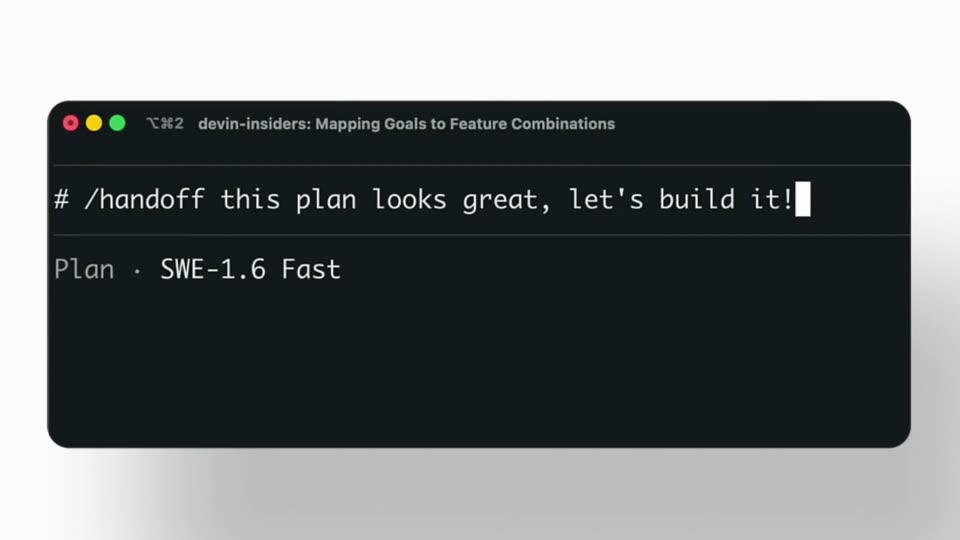
A dark terminal mockup with a plan and implementation steps floats on white and scales up. A flat white chat card with a handoff command slides up from the bottom left, overlapping the window.
Techniques: 3D mockup
Camera: Pull out
A dark code window with monospace goal text drifts down and right across a field of blurred white interface screens that slide sideways, creating layered depth.
Techniques: Parallax
Camera: Pull out
Several blurred browser windows and code panels float in 3D perspective, drifting slowly across a light gray field. The panels are out of focus, one showing a Japanese heading and another a dark terminal block.
Techniques: 3D mockup
Camera: Pull out
A flat product window, split into an agent chat log on the left and a browser preview on the right, pushes in toward the login form. Blurred interface cards float in the background. The steady zoom ends close on the form fields.
Techniques: UI zoom
Camera: Pan
A browser window sits in 3D perspective over a dark Lysium login screen. A white permissions panel slides up from below, covering the form and showing an Allow users list. Static code text runs down the left edge.
Techniques: 3D mockup
Camera: Static
A white prompt card holds the typed instruction about toggling the activity panel, sharpening into focus as the app window behind it blurs out; a New tab dropdown with Worklog highlighted fades in on the right.
Techniques: Kinetic type
Camera: Push in
A light gray backdrop holds a centered Devin app window. It opens on a New session view with a prompt bubble and a right-hand list of tabs, then refreshes into a live session showing activity items on the left and a markdown document on the right.
Camera: Pan
A left chat thread panel scrolls to reveal a blue bar chart of daily Google signups inside a Devin message, over a blurred desktop background. The camera pulls back and the whole interface softens into a blur.
Camera: Pull out
A dark terminal window mockup rises from the lower right and scales up to center over a blurred code-review interface. Large white monospace headline types in, then the line slides left to hand off to the next phrase.
On-screen text: “Start from your terminal”, “Continue from anywhere”
Techniques: Kinetic type
Camera: Push in
A close-up of a laptop screen shows a dark terminal card reading Continue our terminal; the camera pulls back to reveal the laptop on a white pedestal in a room lined with monitors, and the card's lower line swaps to From Anywhere.
On-screen text: “Continue”, “our terminal”, “From Anywhere”
Techniques: Kinetic type
Camera: Pull out
A laptop on a white pedestal shows the headline “Continue From Anywhere...” as the camera pulls back to reveal a curved wall of monitors with code and docs. The headline scales out and the black hexagon logo appears on the laptop screen.
On-screen text: “Continue From Anywhere...”
Techniques: Kinetic type, 3D mockup
Camera: Pull out
A black hexagon cluster scales up at center on white, the hexagons sliding from a cross into a ring around a C. The wordmark Devin fades in to its right, then For Terminal fades in below, and the lockup holds.
On-screen text: “Devin”, “For Terminal”
Techniques: Morph
Camera: Static
On a plain white background, the URL devin.ai/terminal types itself out letter by letter with a solid block caret, then holds static in the center of the frame.
On-screen text: “devin.ai/terminal”
Techniques: Kinetic type
Camera: Static