1:24

Click - Managed Agents API
Click · B2B · Oct 2026
Click’s 1:24 launch film runs 12 scenes, about 7.0 s each. The product is on screen from the first frame and 1 feature is revealed. The call to action lands at 1:14 (89% in), over a voiceover. A talking-head host on a pink living-room set is intercut with cream diagram builds and a split-screen terminal demo, cut slowly at about three cuts per minute. Signature moves: white rounded chips that stack to list features, a cascading grid of agent tiles, and a locked bottom URL banner that outlasts the host walking off.
Is this your launch? to your site or press kit.
Click · B2B · Oct 2026
Craft · Productivity · Nov 2020
Films whose music sounds like this one, voice left out
SynScience · Modern, upbeat electronic music with a mid-tempo beat, synthesized bass, and atmospheric pads.
Vybe · Upbeat electronic
Graphon Labs · Electronic
A man in a navy shirt sits centered on a light sofa flanked by rust cushions, a laptop on his lap. He waves and settles in as the Click Managed Agents lockup appears top left and Backed by with an orange Y mark top right, both held static.
On-screen text: “Click”, “Managed Agents”, “Backed by”
Camera: Static
A cream diagram assembles: an App card connects to an Agent card, and a column of model provider icons scrolls under a BYOK label, highlighting the middle slot. Copper arrows labeled Tools Inputs and Outputs fade in, then Sandbox, Browser and Sessions pills drop in below the Agent.
On-screen text: “App”, “Agent”, “BYOK”, “Tools Inputs”, “Outputs”, “Sandbox”, “Browser”, “Sessions”
Camera: Static
A grid of rounded cards, each holding a peach paper-plane icon and the gray word Agent, zooms out from a close-up to reveal the full seven-by-five layout. The center card is highlighted with a white fill, peach border and black text.
On-screen text: “BYOK”, “App”
Techniques: Parallax
Camera: Pull out
A grid of thirty-five rounded cream tiles, each with a tan paper-plane icon and the word Agent, fades in in a staggered cascade from the top left corner on a pale background.
Camera: Static
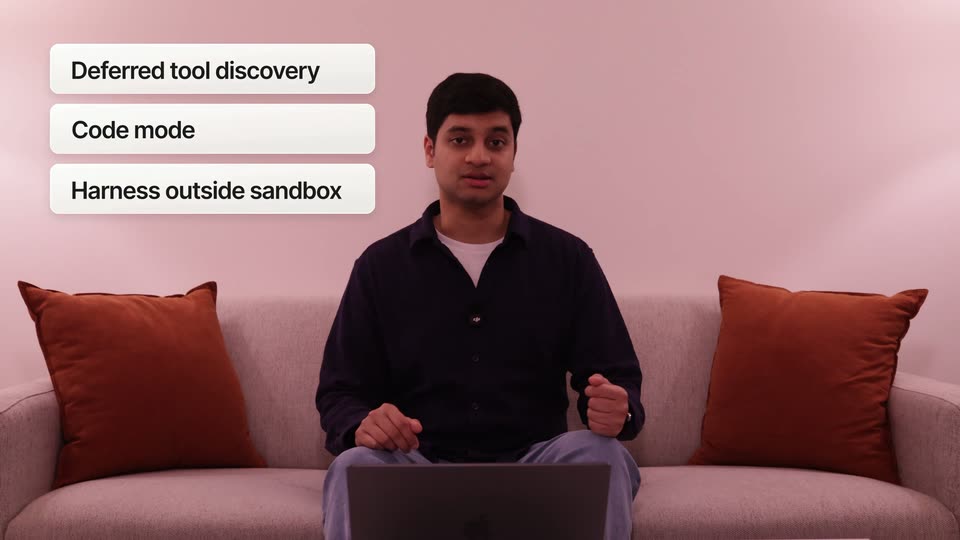
A man in a dark shirt sits centered on a gray sofa with a laptop on his lap, gesturing as he speaks to camera. White rounded label chips stack in the top left as he lists features, then fade out.
On-screen text: “Deferred tool discovery”, “Code mode”, “Harness outside sandbox”
Camera: Static
A man in a dark shirt sits on a beige couch flanked by orange pillows, holding a laptop on his lap. He leans forward to set it on the table as the frame shrinks into a smaller window shifted to the right.
Camera: Static
Split screen: a black code editor on the left streams Python code and JSON tool events, lines highlighted in turn, while a man in a dark shirt sits on a couch at right, pink-lit, setting a laptop on his lap and watching it.
Techniques: Split screen
Camera: Static
A PDF viewer displays Form 1040 with the name and address fields filled in red, while a man on a couch works on a laptop in a live-action panel on the right. The two areas sit side by side and remain static.
Techniques: Split screen
Camera: Static
A completed Form 1040 tax return fills the left side of the frame, its name and address fields in red, while a man sits on a couch with a laptop on the right, lifting his head to face the camera.
Techniques: Split screen
Camera: Push in
A man in a navy shirt sits on a couch with rust pillows, holding a closed laptop toward the camera. He lowers it out of frame and a white rounded banner with a URL slides in at the bottom center.
On-screen text: “useclick.ai”
Camera: Static
A man in a dark shirt sits on a beige couch with rust pillows against a pink wall, speaking and gesturing, then stands and walks off to the right. A white rounded banner with a tan logo mark and the URL stays pinned across the lower third.
On-screen text: “useclick.ai”
Camera: Static
A person in a black top and light jeans walks across a pink-walled living room set with a beige sofa and rust pillows, exiting right, while a white rounded bar with the useclick.ai logo and wordmark stays locked at the bottom.
On-screen text: “useclick.ai”
Camera: Static